AI-Driven Testing in Practice: A Complete Guide to Building Your Claude Code Testing Workbench

A complete guide to building an AI-driven testing workbench using Claude Code, DeepSeek, and a five-layer architecture.
This article explains the paradigm shift from AI-assisted to AI-driven testing and provides a hands-on guide to building a testing workbench. The five-layer architecture combines an IDE (Trae/VS Code), Claude Code as the agent, DeepSeek as the model layer, CC Switch for configuration, and an asset accumulation layer. Full setup instructions cover Node.js installation, API key management, and IDE integration.
From AI-Assisted to AI-Driven: A Paradigm Shift in Testing
The application of AI in software testing is undergoing a fundamental transformation. Beima, a well-known testing-focused content creator on Bilibili, proposed a core insight in his AI automated testing bootcamp: AI-driven testing and AI-assisted testing are two completely different concepts, and many testing professionals have misconceptions about this distinction.
He used a very apt analogy to illustrate this shift: In the era of assisted driving, your hands can't leave the steering wheel—humans remain the primary driver. But today's autonomous driving has achieved true driverless operation—robotaxis and autonomous delivery vehicles in cities like Changsha and Wuhan are already a reality. The testing industry is following the same trajectory.
AI-assisted testing essentially embeds AI as an enhancement tool within existing workflows—for example, using ChatGPT to generate test case templates or Copilot to auto-complete test code snippets—but test strategy formulation, execution orchestration, and result evaluation remain entirely human-driven. AI-driven testing, on the other hand, means AI takes ownership of the entire chain: task planning, decomposition, and execution, while humans transition into the roles of architects and reviewers. The technical foundation for this shift is the maturation of Agentic AI: agents possess capabilities for autonomous reasoning, tool invocation, and multi-step task orchestration, enabling them to complete complex workflows without human intervention. Gartner listed AI-driven testing as one of the top ten software engineering trends in 2024, predicting that by 2027, over 70% of enterprise testing activities will be orchestrated by AI.
Clarifying Two Common Misconceptions
The first misconception is: Simply using AI in your work means you're doing AI testing. Beima points out that this is an outdated notion. If you're still the primary driver with AI providing only minor assistance, or if humans and AI alternate tasks, you're still in the "AI-assisted testing" stage.
The second misconception goes to the other extreme: handing over all work entirely to AI, including production monitoring, CI/CD continuous integration, and automated regression—all executed by AI. This approach ignores the significant time costs and token costs that accompany every action AI takes.
Tokens are the basic unit of measurement for how large language models process text, and each API call is billed based on the number of input and output tokens. Taking DeepSeekAd V3 as an example, input tokens cost approximately 1 RMB per million tokens, and output tokens cost approximately 2 RMB per million. When AI executes testing tasks, every operational step requires model inference—including understanding context, generating code, and analyzing results—all of which consume substantial tokens. If high-frequency repetitive tasks like production monitoring are entirely handled by AI through real-time inference, daily token consumption could reach hundreds of thousands or even millions, with costs far exceeding traditional script execution. Therefore, the best practice for AI-driven testing is to let AI handle the parts that require intelligent judgment (such as test case design and defect analysis), while delegating highly deterministic repetitive execution to traditional automation scripts.
So what constitutes true AI-driven testing? The core principles are summarized as follows:
- AI takes the lead, humans assist
- AI can independently complete the entire task workflow, delivering results for human review or decision-making
- Humans need systems-level orchestration capabilities, managing process control and outcome review
It's worth noting that previously learned automated testing skills are not entirely obsolete, but their value will be primarily limited to the "regression testing" phase.
Building the AI Testing Workbench: Five-Layer Architecture Explained
To have AI truly take on testing work, conversational AI tools like DeepSeek or Doubao alone are insufficient—they may be "smart," but they can't execute API tests or control test workflows for you. What you need is an AI testing workbench, essentially equipping AI's brain with a pair of "arms" capable of performing actions.
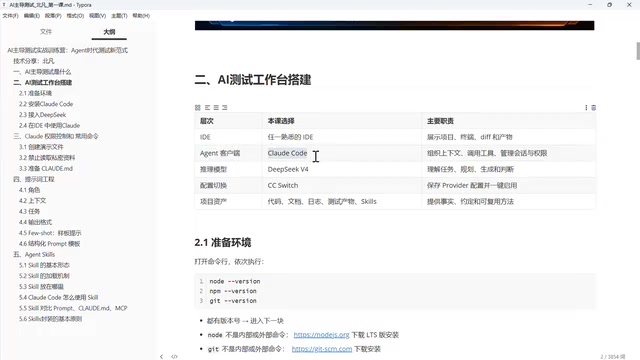
This workbench consists of five layers:
Layer 1: IDE as the Unified Interface
The IDE serves as the display window for the entire workbench. It not only shows projects and provides a terminal for executing commands, but also compares the differences in the agent's output each time—for instance, when you ask AI to redesign a test case, you can clearly see whether it genuinely improved or just recycled the old one. Trae Code is recommended (note the distinction from Trae Work, which is for office tasks), though VS Code is also an option.
Layer 2: Agent Client
For the agent selection, Claude Code is recommended. Claude Code is a command-line AI programming agent released by Anthropic, falling under the Agentic Coding tool category. Unlike traditional code completion tools (such as GitHub Copilot's Tab completion mode), Claude Code employs an Agent architecture: it can autonomously browse the file system, read project structures, execute Shell commands, run tests, and commit Git changes, forming a complete "perceive-plan-execute-verify" loop. It's built on Anthropic's Constitutional AI alignment technology and Extended Thinking capabilities, excelling at complex multi-step reasoning tasks. On SWE-bench (Software Engineering Benchmark), Claude-series models have consistently ranked first, which is the core reason it's recommended for enterprise-level testing scenarios.
In comparison, Tencent's Trae, CodeX, and other Agentic Server tools still have notable gaps in enterprise-level agent testing scenarios.
Layer 3: Model Layer with Domestic DeepSeek
Regarding rumors about Claude Code's "backdoor," a clarification is needed: the so-called backdoor is actually Anthropic's mechanism for identifying Chinese users and banning accounts, because the company doesn't provide services to China. The solution is straightforward—use only Claude Code's client tool while connecting the model layer to domestic DeepSeek. This way, data flows only within China, eliminating both political/legal risks and account ban concerns.
The technical foundation that makes this substitution possible is the OpenAI-compatible API protocol. This is a de facto industry standard: the vast majority of domestic large models (DeepSeek, Qwen, Zhipu GLM, MiniMax, etc.) implement the same request/response format as OpenAI's API, including the /chat/completions endpoint, messages array structure, and stream output. This means any client tool built on this protocol can seamlessly switch the underlying model by modifying just two configuration items—base_url (API address) and api_key (secret key)—without changing any upper-layer logic.
DeepSeek, developed by DeepSeek AI, uses a Mixture of Experts (MoE) architecture in its V3/V4 series models, with total parameters reaching 671B but activating only 37B parameters per inference, achieving an optimal balance between performance and cost. DeepSeek V3 reaches GPT-4o levels on multiple programming benchmarks while pricing at only 1/10 to 1/30 of the cost, enabling domestic developers to access top-tier AI capabilities at extremely low cost. Additionally, DeepSeek has open-sourced its base model weights, allowing enterprises to opt for private deployment to meet data compliance requirements. DeepSeek has currently been updated to V4 official release, delivering good results, fast speed, and low prices—an extremely cost-effective choice. Domestic models like Qwen, Xiaomi, Zhipu, and MiniMax can also be integrated.
Layer 4: CC Switch Configuration Tool
Since Claude Code, as a foreign command-line tool, can be relatively inconvenient to configure, a configuration switching tool called CC Switch is needed to connect DeepSeek to Claude Code and simplify the entire configuration process. CC Switch essentially automates the injection of base_url and api_key configurations, allowing users to complete model switching without manually editing configuration files.
Layer 5: Asset Accumulation Layer
Once the workbench is running, it automatically accumulates various assets: automation code, requirements analysis documents, test execution logs, and Skills. These are valuable assets for the entire testing project—no manual creation needed, as they accumulate progressively as the workbench operates.
Hands-On: Setting Up the Claude Code Testing Workbench Environment
Preparing the Base Environment
First, you need to install three foundational tools and verify their version numbers via the command line:
- Node.js: Must select the LTS (Long Term Support) version (e.g., v24.19); do not choose the latest short-term maintenance version. Node.js uses even version numbers for its LTS release strategy, with LTS versions receiving a 30-month maintenance cycle, including 18 months of Active support and 12 months of Maintenance support, ensuring continuous delivery of security patches and critical bug fixes. Claude Code is distributed as an NPM package, and the underlying modules in its dependency tree have strict compatibility requirements with the Node.js runtime version—versions that are too old (such as v14, which reached EOL in April 2023) lack necessary V8 engine features and API support, while overly new Current versions may introduce Breaking Changes. Choosing the LTS version is the standard best practice for production environments.
- NPM: Installed alongside Node, no version requirement
- Git: Must be installed, no version requirement (many testers from purely functional testing backgrounds tend to overlook this step)
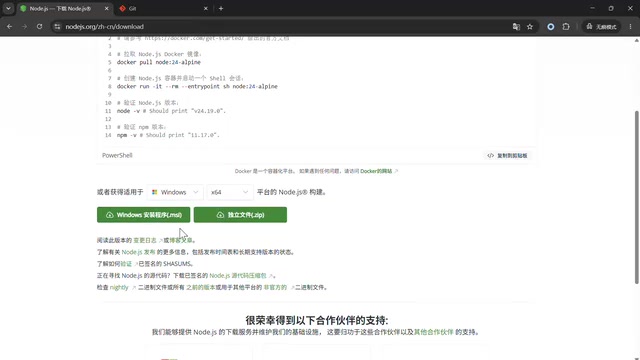
Windows users are advised to download the installer directly and click "Next" all the way through. For Apple M-series chips, select the ARM type; for older laptops, select X64. Users familiar with NVM (Node Version Manager) can also use NVM for management.
After installation, be sure to execute the NPM mirror configuration command to switch the download source to a domestic CDN accelerator; otherwise, downloads from foreign sources will be extremely slow.
Installing Claude Code and Connecting DeepSeek
Claude Code can be installed with a single NPM command. Warnings during installation can be ignored—only errors are actual problems. After installation, verify success by checking the version number.
Next are the critical steps for connecting DeepSeek:
- Register and top up on the DeepSeek website (recommend starting with 5-10 RMB to test the waters and observe consumption rate before committing more)
- Generate an API key (starting with sk-); store it securely—anyone who obtains the key can consume your balance
- Download the CC Switch tool, search for DeepSeek, enter only the API key (all other configurations are handled automatically), then click add and enable
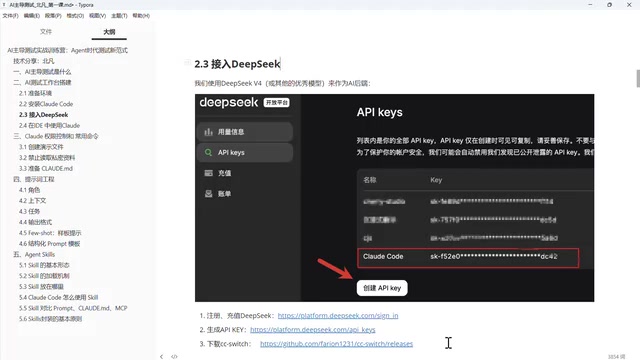
Security practices for API keys deserve special emphasis: an API key is essentially equivalent to a password with spending privileges. Once leaked, any holder can make calls using your account balance, and most platforms don't provide call tracing for individual keys. Security best practices include: never hardcode keys into code repositories—use environment variables or secret management services instead; generate independent keys for different projects to enable isolation and rotation; set usage alerts and daily spending caps to prevent abnormal consumption; and rotate keys regularly. Tools like CC Switch typically store keys in local configuration files—ensure that file's read permissions are limited to the current user, and add it to .gitignore to prevent accidental commits.
It's important to understand that virtually all AI large models charge fees when connected to your own agent—the free quotas on official websites are only for trial purposes. This is a globally standard practice.
Launching Claude Code and Verification
There's an important consideration when launching Claude Code: you must launch it in a clean, trustworthy empty directory—never run it in a system directory like C drive. During the first launch, if a yellow warning prompt appears, it actually confirms that the directory is safe and clean. After confirming, select yes to enter the interface.
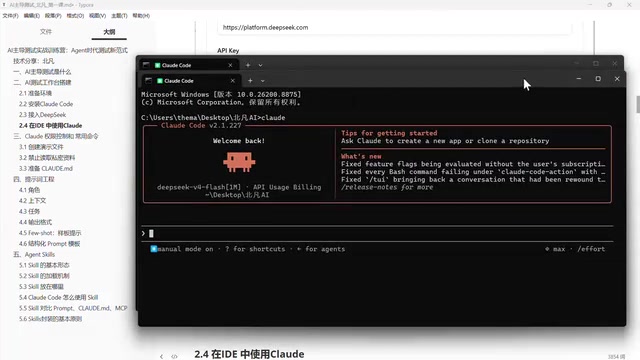
Verification is simple: ask it any question (such as "Who are you? What model are you?"). As long as you get a response that clearly shows it's using the DeepSeek V4 model, the configuration is successful. If a red error appears, it's typically due to an unconfigured key, incorrect key, or insufficient balance.
Integrating Claude Code in the IDE
Command-line usage has limitations—content overlaps and copying with line breaks is inconvenient. Therefore, the final step is integrating Claude Code within the IDE:
- Open the previously created project directory in Trae/VS Code
- Search for and install the Claude extension in the extension marketplace
- Access Claude Code within the IDE through the sidebar icon
The final result: the left side manages files that the agent reads or creates, while the right side handles AI conversations. The IDE and Agent are now connected, and the entire AI testing workbench environment setup is complete.
Conclusion: The Future Competitiveness of Test Engineers
AI testing is evolving from "assisted" to "driven"—this isn't merely a tool upgrade, but a restructuring of how testing professionals work. Building a workbench composed of Trae/VS Code (IDE) + Claude Code (Agent) + DeepSeek (Model) + CC Switch (Configuration Tool) is the first step toward embracing this transformation.
For test engineers, future core competitiveness will no longer be the ability to manually write test cases, but rather the comprehensive capability of systems-level orchestration, process control, and outcome review. Setting up your own AI testing workbench early and accumulating hands-on experience with AI-driven testing is how you'll secure an advantage amid industry transformation.
Related articles

Chain of Thought Isn't Just for AI: How Humans Can Use CoT to Improve Thinking Quality
Chain of Thought isn't just a prompt trick for large models. Starting from a Hacker News discussion, this article analyzes why CoT works for human thinking too, breaks down actionable ways to transfer it, and highlights the key differences between human CoT and machine CoT.
Cloudflare Teams Up with OpenAI: Closi…
Cloudflare Teams Up with OpenAI: Closing the Loop from Vulnerability Discovery to Defense with AI
Cloudflare uses OpenAI Daybreak to investigate security vulnerabilities and generate reviewable remediation plans, while developers use Codex to boost coding efficiency and quality.

Orca Multi-Agent Orchestration in Practice: A Guide to Parallel Collaboration with Claude and Codex
Orca is Stable AI's free open-source agent workbench supporting 34 agents like Claude Code and Codex in parallel. Learn its Git worktree isolation, multi-model orchestration, and mobile management.