AI Manga Drama Production: Full Workflow from Image Generation to Monetization

Step-by-step AI manga drama workflow from image generation to monetization using tools like ComfyUI, MiniMax, and Topaz.
This article walks through the full production pipeline for AI animated short dramas, covering AI video generation with Jimeng, Hailuo, and ComfyUI, voiceover synthesis with MiniMax and Index TTS, high-definition upscaling with Topaz Video AI, and final editing in CapCut. It offers a realistic look at both the workflow's maturity and the actual effort required to monetize on platforms like Bilibili.
AI Manga Dramas: A Low-Barrier Monetization Opportunity for Everyday Creators
Recently, a Bilibili UP host shared a complete AI manga drama production workflow, claiming that by combining AI tools, creators can produce uploadable animated short drama episodes within a week and monetize through two platform mechanisms: "Cover Unlock" and "Ad Revenue Sharing." The "Cover Unlock" feature lets creators set interactive unlock conditions on videos, while "Ad Revenue Sharing" pays creators based on views and engagement rates — together forming the basic income stream for Bilibili's mid-to-long video creators. That said, actual earnings are heavily influenced by follower count, content niche depth, and platform algorithm distribution, and often fall well short of the ideal figures touted in marketing content. These AI animated short dramas are essentially industrialized content products that chain together AI image generation, AI video generation, AI voice synthesis, music, and traditional editing.
The creator summed up the monetization logic quite plainly: AI manga dramas have only two revenue buttons — Cover Unlock and Ad Revenue Sharing. For creators, the key isn't to "invent the machine" but to "learn how to press the buttons" — mastering a reproducible production pipeline. This pipeline has three core steps: identify viral model styles, lock in production parameters, and set up a publishing cycle.
It's worth keeping a rational perspective here. Claims like "earn ten thousand in a week" carry obvious marketing hype. What's genuinely worth noting is that the AI content production toolchain demonstrated in this workflow is mature enough for ordinary people without any professional animation background to independently complete a full piece of work.
Step 1: AI Video Generation — Online Platforms vs. Local Deployment
The heart of AI manga drama production is the video generation stage. Current mainstream AI video generation technology is built on Diffusion Model and Video Transformer architectures, learning inter-frame motion patterns and visual consistency through training on massive video datasets. Lip Sync relies on joint modeling of audio features and facial keypoints — a capability that has only been commercially available for about two years. First/Last Frame Control is a conditional generation technique that anchors the start and end frames to constrain the generation path of intermediate frames, significantly reducing the chance of visual degradation in longer shots. The creator divides approaches into two categories: online platforms and local deployment.
Choosing an Online Platform
Here's a comparison of the main tools:
- Jimeng (即梦): Best value for money; supports lip sync during motion generation; described as "quite obedient"; suited for simple action scenes.
- Hailuo (海螺): Better performance for complex scenes like fight sequences and multi-shot transitions; supports First/Last Frame Control.
- Runway: Good results but relatively expensive.
- Tongyi Wanxiang (通义万象): The only domestic model supporting synchronized audio-visual generation; its audio-visual sync capability is built on joint audio-video training, making it one of the few commercially available models with this feature in China.
In practice, the creator mainly uses Jimeng for basic shots: upload the first frame image, paste the preset prompt from the script, and select the second quality tier — the top tier produces the best results but consumes the most credits, making it poor value.
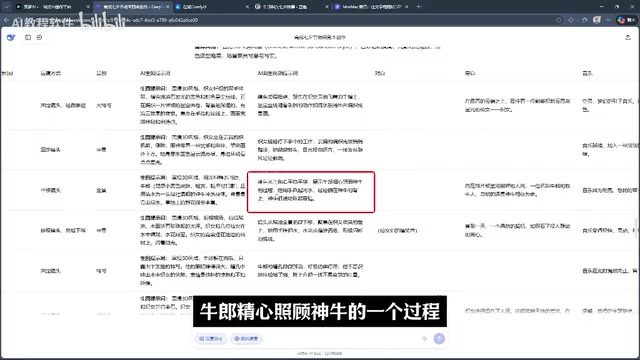
Using First/Last Frame Control for Complex Shots
Shots like zooming in from a wide angle to a close-up on a character's face require the First/Last Frame feature. The reason: faces are naturally blurry in wide shots, and without a target end frame to guide the AI, the image tends to degrade as it zooms in. For 360-degree rotations and special effects shots, Hailuo is a better fit.

Interestingly, many complex shots don't come out right on the first try. Grand scenes like "magpies gathering to form a bridge" were achieved by repeatedly generating images, breaking the scene into multiple segments, and then splicing them together. This is a reminder: AI video generation still requires a lot of trial and error, and the final cut is typically a composite of many clips.
Step 2: Local ComfyUI Workflow — Tongyi Wanxiang Pipeline
Beyond online platforms, the creator also demonstrated a locally deployed solution using ComfyUI with the Tongyi Wanxiang model's silent video workflow. ComfyUI is an open-source AI image/video generation interface based on a node-based workflow system, released in 2023 by developer comfyanonymous. Unlike linear interfaces such as WebUI, ComfyUI breaks each AI processing step down into visual nodes that users can freely connect and combine, enabling highly customized generation pipelines — which is precisely why its prompt-following precision outperforms online platforms.
Advantages and Hardware Requirements of Local Deployment
The ComfyUI workflow is more accurate at "scene rendering" from prompts than Jimeng. For example, given the same input — "focus on the Weaving Maid's flying fingers" — ComfyUI accurately renders the hand detail, while Jimeng failed to do so.
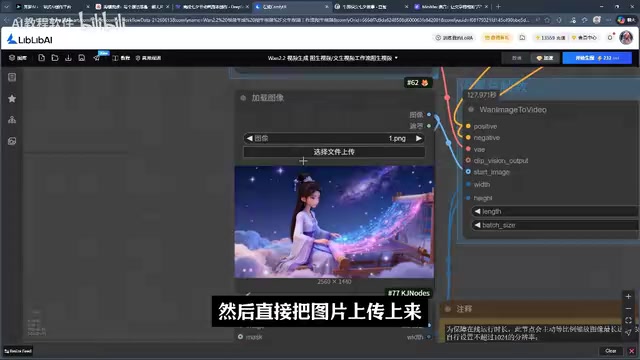
However, local deployment has non-trivial hardware requirements: at minimum, 32GB of RAM and 300GB+ of storage space are recommended. Users without sufficient hardware can use the same model directly on the Tongyi Wanxiang website, bypassing the hardware barrier entirely. This dual-track approach — local deployment for control, online platforms for convenience — is a typical decision logic in current AI content creation.
Step 3: Voiceover and Music — Emotional Delivery Is the Key
AI manga dramas rely primarily on narration rather than character dialogue, making the voiceover stage relatively straightforward.
MiniMax and Local TTS Solutions
Text-to-Speech (TTS) technology has evolved through three generations: concatenative synthesis, parametric synthesis, and end-to-end neural network synthesis. The creator primarily uses MiniMax for narration, citing its voice tones as "more emotionally expressive than those in CapCut (Jianying)," with support for text-based custom voice descriptions (e.g., "commentator, fast pace, high volume"). MiniMax's emotional control capability is powered by its proprietary speech large model, which learns to adjust pitch, speed, and volume combinations in specific contexts through emotion-labeled training data. Free users get 10,000 characters per month; a VIP subscription unlocks emotion modes such as happy, sad, and surprised.
For local deployment, Index TTS is recommended — an open-source local TTS solution released by Bilibili, with audio quality approaching commercial standards. It represents one of the higher benchmarks in the current open-source TTS space, though its model files are quite large (over 10GB), making it better suited for users with ample storage.
A practical tip: generate emotionally expressive audio with MiniMax first, then import it into CapCut and replace the voice with your target timbre — this lets you get both the emotional performance and the desired voice style.
Step 4: Editing and Upscaling — Delivering the Final Cut
Editing Workflow
Editing follows a standard process: import assets → rough cut (speed adjustments, remove unusable footage) → fine cut (add transitions, sound effects) → export. The creator specifically notes that in many scenes, a hard cut looks more natural than adding a transition effect — there's no need to force transitions everywhere.
For music, you can directly reference the music descriptions in the AI-generated script (e.g., "ethereal, dreamlike cinematic music") and search for those keywords in CapCut's music library to find matching tracks.
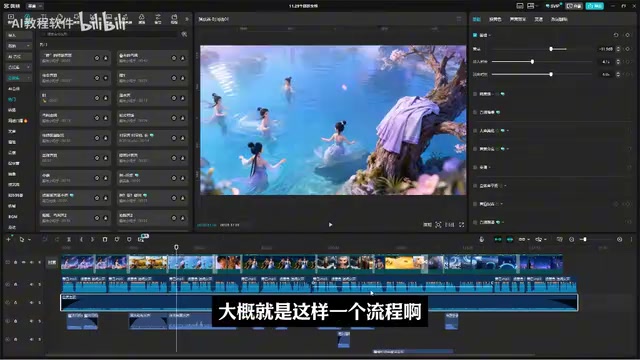
Enhancing Quality with Topaz Video AI Upscaling
The final step is using Topaz Video AI to upscale the finished video, with support up to 4K. The Video Super-Resolution technology used by Topaz Video AI relies on deep convolutional neural networks to perform pixel-level reconstruction of low-resolution frames, while leveraging inter-frame temporal information to restore motion detail — compared to single-frame image upscaling, this significantly reduces flickering and artifacts. Its underlying algorithm integrates multiple sub-tasks including denoising, deblurring, and detail enhancement; adjusting the sharpening and restoration parameters is essentially a matter of balancing the trade-off between recovering high-frequency texture and suppressing noise. Because frame-by-frame inference is computationally intensive, it places far heavier demands on GPU VRAM and CPU than standard editing software — which is the technical reason behind the creator's recommendation to process long videos in segments: for finished videos of 4–7 minutes, upscale in segments to avoid freezing; for shorts of 1–2 minutes, the whole video can be processed at once.
If the upscaling effect isn't noticeable, manually increase the sharpness value, lower the restoration value, and adjust the detail improvement parameter — the before-and-after difference is quite striking. Once upscaling is complete, go back to CapCut, use the subtitle recognition feature to add captions, and the short film is done.
Closing Thoughts: The Tools Are Ready, But the Bar Isn't Gone
This workflow presents a complete industrial path for AI manga dramas — from images and video to voiceover and final cut — proving that the AI content toolchain is capable of supporting ordinary creators in independently completing a full work. But it's important to stay clear-eyed: claims like "easily earn over ten thousand a month" are largely marketing talk. The actual production process is full of repeated generation attempts, trial-and-error assembly, and hardware costs.
AI has lowered the technical barrier to content creation, but it hasn't eliminated the demands on aesthetics, patience, and topic selection. For creators looking to enter this space, mastering the tools is only the starting point — the real dividing line between making money and not is whether you can consistently produce content that genuinely resonates with audiences.
Key Takeaways
Related articles

DeepCell: One-Click AI Generation of Documents, Spreadsheets, and Slides
DeepCell tops Product Hunt with one-click generation of documents, spreadsheets, and slides, using the .deepcell format for linked updates, designed for System 2 tasks like modeling and sales reviews.

Doneas: 15-Minute Daily Accountability Calls That Keep Indie Developers From Procrastinating
Doneas is a daily accountability tool for indie developers: plan tasks on Monday, join a 15-minute call with five builders each day, and log deliveries on a public progress page. This article analyzes its core mechanics, effectiveness, and potential issues around retention and matching.

Fastlane 2.0: Fully Automated AI Ad Campaigns, From Creative to Optimization
Fastlane 2.0 is an AI ad automation tool: enter your website and it learns your brand, generates video and image ads, and runs and optimizes them on Meta, TikTok, Instagram, and YouTube.