AI Not Answering Your Question? Hands-On with Open-Source Prompt Optimizer

Open-source Prompt Optimizer turns vague ideas into structured prompts with templating, multi-model comparison, and local privacy-first deployment.
Prompt Optimizer is an open-source tool that rewrites short, vague user input into structured prompts AI can execute accurately. Through scenarios like red team reviewer, haggling, and text-to-image, it fills in role responsibilities, task steps, and visual details. Variable mode turns prompts into reusable templates, making them accumulable assets. It supports OpenAI, Gemini, DeepSeek, and Grok, offers multi-model comparison and version history, and can be deployed via web, desktop, browser extension, or Docker. All processing happens locally in the browser, with requests going directly to the user-configured model provider.
Title
AI Not Answering Your Question? Hands-On with Open-Source Prompt Optimizer
Meta Description
Prompt Optimizer is an open-source prompt engineering tool that rewrites a casual one-liner into a high-quality prompt AI can actually execute. It supports variable templates, text-to-image optimization, multi-model comparison, and local in-browser processing. This article breaks down its core features and real usage.
Article Content
Same AI model, same question — one person gets a usable answer in a single sentence, while another keeps going in circles after asking for ages. The difference usually isn't the model itself, but the sentence you type in. Most people write prompts the same way they send a WeChat message — one casual line and let the AI figure out the rest. When it guesses wrong, you just start over again and again.
According to a Bilibili creator, this open-source tool called Prompt Optimizer is built specifically to solve that pain point: throw in your raw idea, and it rewrites it into a prompt the AI can actually understand and execute.
How does it actually "optimize" prompts?
Let's look at an example. Suppose you only write:
You are a red team reviewer
That's all the information there is, and the model will most likely just politely reply with a few platitudes. But throw that sentence into the optimizer, and it will break the role down into a full identity setup and skills checklist: explicitly require it to spot logical holes, verify facts, find sources, and then have it review a specific draft.
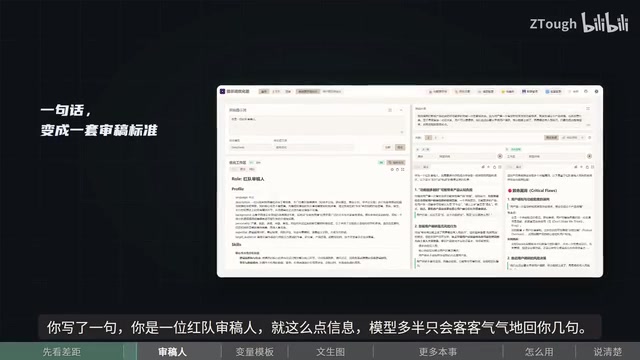
The output is a numbered list of fatal flaws, clearly spelling out where things don't hold up. The key to persona-style prompts isn't "who you are" — it's "what you need to do, how to do it, and by what standard to deliver the result." That's exactly the part the optimizer fills in.
What is a "persona prompt"
A persona prompt is one of the earliest summarized patterns in prompt engineering: by assigning the model a specific identity (such as "senior editor," "red team reviewer," or "pediatrician"), you get it to automatically invoke the knowledge, tone, and judgment criteria associated with that identity. But many people's understanding stops at the line "you are so-and-so," which has limited effect.
The reason is that a role's value isn't in the label itself, but in the task chain implied behind the label: a real reviewer would first check whether the conclusion holds up, then verify sources, then rank issues by severity, and finally give actionable revision suggestions. The model won't fill in these actions automatically — they have to be written out explicitly. So a more effective way to write it is "identity + responsibilities + work steps + delivery format," for example explicitly requiring numbered items, distinguishing fatal issues from suggestions, and giving a rationale for each issue. The essence of a persona prompt is translating a vague character into an executable work specification.
Variable mode: turn prompts into reusable templates
This is the feature the original author says he uses most. Taking a haggling scenario as an example, variable mode can break the prompt into a template, extracting what the product is, what flaws it has, your bid, your bottom line, and the tone you want to strike — all as separate variables.
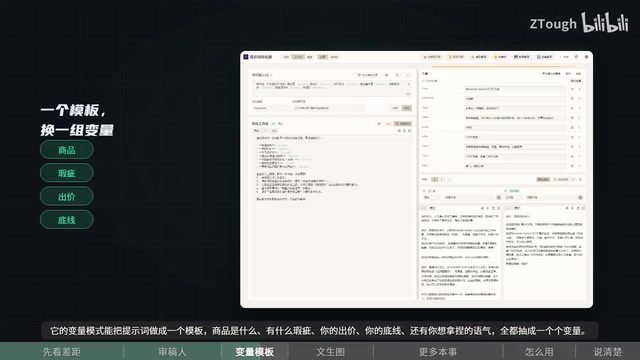
The next time you encounter a similar scenario, just fill in a few values — no need to rewrite from scratch. The value of this approach is that prompts are no longer "one-time consumables" but become accumulable, iterable assets. For people who frequently handle repetitive tasks, the time saved is considerable.
Prompt templates and variable placeholders
Variable mode borrows the idea of "functions" from programming: extract the parts of a prompt that change into placeholders, and fix the parts that don't change into a template. For example, in a haggling scenario, "product," "flaw," "bid," "bottom line," and "tone" are variables, while structures like "please take the buyer's stance, first point out the shortcomings of the other party's product, then give reasons for a counteroffer below the bottom line" are constants.
The benefits of doing this are threefold: first, it reduces repetitive work — next time you only need to fill in values; second, it lowers error rates, because a validated prompt structure won't get carelessly broken; third, it makes comparison and iteration easier — after changing the template, you can immediately test the effect on a new batch of tasks. Note that more variables isn't always better — too many variables make the template hard to fill in and hard to reuse. Usually keeping three to six key variables is enough. For people who regularly handle similar tasks, templating is the most direct way to turn personal experience into reusable assets.
Text-to-image can be optimized too: from vague imagery to visual description
The same logic applies to image generation. You input the line "a library floating in the night sky," which sounds beautiful, but the model will most likely give you a perfunctory image.
The optimizer will help you fill in the subject, spatial relationships, and emotional focal point, turning that one sentence into a vivid description, which you then use to generate the image — the result is completely different. The focus here isn't piling on adjectives, but completing the visual information the model needs that you didn't say out loud.
What visual information does a text-to-image prompt need to fill in
Text-to-image models understand text differently from dialogue models — they rely more on concrete visual elements than abstract feelings. A line like "a library floating in the night sky" gives humans imaginative space, but to the model it lacks key visual coordinates.
Dimensions that usually need to be filled in include: subject (architectural style, materials, scale), spatial relationships (is the library hovering above the clouds or floating in interstellar space, is the viewpoint looking up or down), light and color tone (cool blue night, warm yellow window light), atmosphere and emotion (quiet, lonely, mysterious), and visual style (realistic photography, concept illustration, thick impasto oil painting). In addition, you can specify composition details, such as whether there are birds in the foreground, or whether it's centered or rule-of-thirds composition. This information isn't piling on adjectives — it's giving the model concrete visual constraints, so it paints within a clear space rather than randomly diverging.
Multi-model support and engineering capabilities
Prompt Optimizer's abilities go beyond rewriting a single prompt. According to the Bilibili creator, it supports connecting to mainstream models like OpenAI, Gemini, DeepSeekAd, and Grok, and the same prompt can be compared side by side across different models to see which one works better.
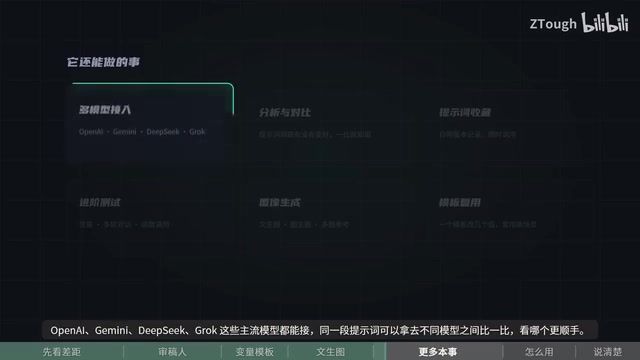
Well-written prompts can be saved, come with version history, and can be called directly next time. For deeper use, there are advanced features like testing, multi-turn conversation, and function calling; on the graphics side, text-to-image, image-to-image, and multi-image reference are all covered.
Deployment and privacy: data doesn't pass through third-party servers
It's not picky about environment. The web version works right away, or if you find that cumbersome you can install the desktop app or browser extension, and there's also Docker if you want to self-host.
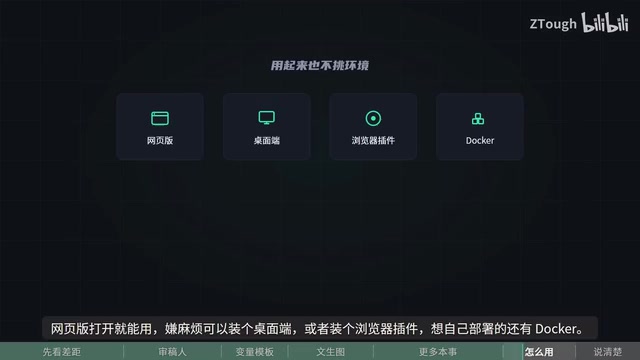
What's more noteworthy is the privacy design: all processing is done in your own browser, requests go directly to the model provider you configured, and nothing passes through someone else's server in between. For people who care about data, this architectural choice is more persuasive than a feature list.
What "local in-browser processing" actually means
Many online AI tools work like this: you type content into a webpage, the content is first uploaded to the tool's own server, and the server then forwards it to the model vendor. This means the tool provider can see all your input, including potentially sensitive information.
Prompt Optimizer takes a different path: the page itself is an application running in your browser, your input and the model's response are assembled locally, and requests are sent directly through the browser to the model provider API you configured yourself (for example, the OpenAI API Key you enter yourself). The tool provider only supplies code and doesn't touch the data. This architecture is often called "frontend direct connection" or "local-first."
It brings two practical benefits: first, there's one less intermediary link in the data chain; second, you have full control over your own API quota and call records. One caveat: the privacy improvement assumes the model provider you configure is itself trustworthy, because the request will ultimately reach it.
Prompt engineering is becoming "toolified"
The significance of this project isn't just saving a few rewrites. It reflects a trend: prompt engineering is shifting from "personal skill" to "tool capability." In the past you needed to memorize various frameworks, templates, and persona-setting tricks; now these experiences are baked into tools, lowering the barrier for ordinary users.
At the same time, we should recognize the boundaries — the optimizer's output quality depends on the underlying model's comprehension ability, and it can't conjure up requirements you haven't thought through yourself. Features like variable mode and multi-model comparison are essentially still forcing you to clarify your vague intentions.
In the end, whether AI is useful often comes down to whether you can clearly articulate what you want. The link to this free, open-source project is in the video description — try it yourself if you're interested.
One-line Summary
Open-source tool Prompt Optimizer rewrites vague ideas into structured prompts, with templating, multi-model comparison, and local privacy-first deployment.
Paragraph Summary
Prompt Optimizer is an open-source prompt optimization tool whose core capability is rewriting short, vague user input into structured prompts AI can execute accurately. Through scenarios like red team reviewer, haggling, and text-to-image, the article shows how it fills in role responsibilities, task steps, and visual details. Variable mode is the most practical, turning prompts into templates that extract variables like product, bid, and bottom line for reuse next time, making prompts accumulable assets instead of one-time consumables. The tool supports mainstream models including OpenAI, Gemini, DeepSeek, and Grok, allows side-by-side comparison of the same prompt across models, and includes version history, multi-turn dialogue, function calling, and text-to-image. Deployment covers web, desktop, browser extension, and Docker self-hosting. On privacy, all processing happens locally in the browser, with requests going directly to the user-configured model provider without passing through third-party servers. The author also notes its boundary: optimization quality is limited by the underlying model's comprehension and can't replace the user's own clarity about requirements.
Related articles

Chain of Thought Isn't Just for AI: How Humans Can Use CoT to Improve Thinking Quality
Chain of Thought isn't just a prompt trick for large models. Starting from a Hacker News discussion, this article analyzes why CoT works for human thinking too, breaks down actionable ways to transfer it, and highlights the key differences between human CoT and machine CoT.
Cloudflare Teams Up with OpenAI: Closi…
Cloudflare Teams Up with OpenAI: Closing the Loop from Vulnerability Discovery to Defense with AI
Cloudflare uses OpenAI Daybreak to investigate security vulnerabilities and generate reviewable remediation plans, while developers use Codex to boost coding efficiency and quality.

Orca Multi-Agent Orchestration in Practice: A Guide to Parallel Collaboration with Claude and Codex
Orca is Stable AI's free open-source agent workbench supporting 34 agents like Claude Code and Codex in parallel. Learn its Git worktree isolation, multi-model orchestration, and mobile management.