AI-Powered Automated Testing: Using Pytest + MCP to Tackle Non-Determinism

How to use Pytest + Playwright + MCP with AI Skills to build stable, cost-effective automated testing.
This article explores why automation matters more in the AI era, not less — and how to build it correctly using Pytest, Playwright, Allure, Skills, and MCP. It covers using Skills to enforce project structure, using Google's browser debugging MCP to give AI real-time page visibility, and honest debugging war stories showing why automation experience still makes a critical difference.
Why Automation Matters More Than Ever in the AI Era
In the testing industry, efficiency has always been the number one priority. As development velocity keeps increasing, testers are under mounting pressure to keep up. And in the age of AI, the importance of automation hasn't diminished — it's actually grown stronger.
Many testers wonder: if AI can already control browsers and mobile devices, do we still need traditional automation? The answer is yes — more than ever. The fundamental reason comes down to AI's biggest weakness: non-determinism.
If you rely entirely on pure AI to execute test cases, you'll encounter a peculiar phenomenon: the same test case sometimes passes, sometimes doesn't. This unpredictability makes it nearly impossible to deploy high-precision testing at scale. For consumer-facing features or low-precision scenarios, using "AI + Skills" to operate web pages might be acceptable. But once you're dealing with large-scale automated test suites, pure AI approaches expose two fatal flaws: unstable results and prohibitive token costs.
The Business Logic Behind Token Costs
Tokens are the basic unit that large language models use to process text — think of them as words or fragments of words. In mainstream models like GPT and Claude, roughly every 750 English words or 500 Chinese characters equals 1,000 tokens. Every API call consumes tokens for both the input prompt and the generated output, and enterprises pay per token used. When your automated test suite scales to hundreds or thousands of cases, invoking AI in real-time on every run leads to linearly — or even exponentially — growing costs, plus the added risks of network latency and unstable responses.
There's an unavoidable reality here: enterprises don't want to call AI every time automation runs. The actual demand at most companies is to use AI to generate automation scripts upfront, not to pay for AI inference on every execution.
Furthermore, many projects operate in environments with strict network restrictions that block external internet access entirely. AI can assist with code generation during development, but the execution environment after scripts are finalized typically doesn't allow real-time AI involvement. This means the "AI directly controls the browser" approach is largely impractical in real enterprise environments.
The correct approach, therefore, is: use AI to generate reusable automation code that can run independently without AI involvement at runtime.
Core Solution: Skill Initialization + MCP for Real-Time Page Reading
The tech stack for this project is Pytest + Playwright + Allure, combined with Skills and MCP to complete the entire workflow. Not a single line of code was written by hand — everything was done through conversation with AI.
Playwright is Microsoft's modern browser automation framework, open-sourced in 2020, supporting Chromium, Firefox, and WebKit. Compared to the veteran Selenium, Playwright has built-in auto-wait mechanisms that intelligently determine whether elements are interactable, dramatically reducing test failures caused by page load timing issues. Combined with Pytest's parameterization and fixture management, and Allure's visual reporting, these three tools form one of the most widely used Python-based web automation testing stacks today.
Step 1: Use Skills to Scaffold the Project Structure
The first question in any automation project: what should the code structure look like? Without constraints, AI generates a different structure every time — completely unmanageable.
This is where Skills come in. In AI agent frameworks, a Skill is essentially a structured prompt engineering artifact — an engineering-level encapsulation of a "system prompt." It constrains AI output behavior for specific tasks through pre-defined rules, format requirements, and operational steps, turning accumulated professional expertise into reusable automated capabilities. This is conceptually similar to the "Template Method Pattern" in software engineering. For example, an automation project scaffolding Skill might explicitly define: create a report directory for test reports, a utils directory for utilities, a data directory for test data, and so on.
The most universal trick for installing a Skill is: just hand the Skill's file path or downloaded file directly to the AI and let it install itself. This way, regardless of whether you're using Codex, OpenCode, or any other tool, you don't need to worry about each platform's different installation methods.
There's a classic "chicken-and-egg" problem worth acknowledging here: many people say you don't need to learn to code in the AI era, but how does AI generate code that meets your specific requirements? The answer lies in Skills — they're not magic, they're the distillation of experience. You can use existing templates, but you'll almost always need to adapt them to your organization's specific standards.
Step 2: Use MCP to Give AI Real-Time Page Visibility
Once the project structure is set up, the next core challenge: how does AI know what elements exist on a page?
The most time-consuming pain point in traditional automation is manually opening DevTools (F12) to locate elements one by one — and when page IDs change, everything needs to be re-maintained. This has stumped countless testers and deterred many companies from investing in web automation.
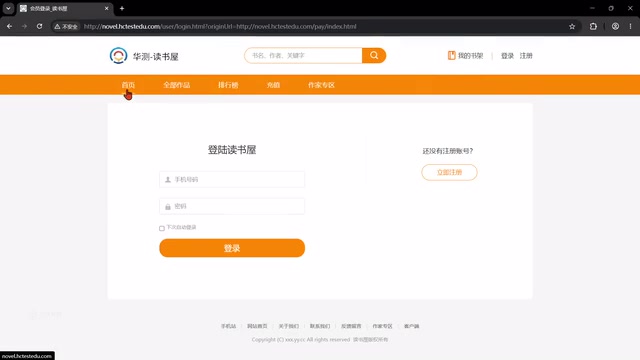
The solution is to integrate Google's official browser debugging MCP. MCP (Model Context Protocol) is a standardized protocol proposed and open-sourced by Anthropic in late 2024, designed to solve the integration problem between AI models and external tools and data sources. Through a unified protocol specification, AI clients can standardize calls to various tool servers (MCP Servers), including file systems, databases, browsers, and more. Google's official browser debugging MCP is built on the Chrome DevTools Protocol (CDP), enabling AI to retrieve DOM structures in real-time, execute JavaScript, and capture page snapshots — allowing it to "see" and understand the current state of the browser. This is the key technological leap that upgrades AI-assisted automated testing from "writing code blind" to "real-time page awareness." The MCP is provided by Google officially (free) and can be installed using Claude, Trae, or any compatible tool.
With this capability in place, creating Page Object (PO) classes becomes straightforward. The Page Object Model (POM) is one of the most important design patterns in automated testing. Its core idea is to create a corresponding "page object class" for each page under test, encapsulating all element locators and operation methods within that class. Test cases only call methods on PO objects — they never interact with browser elements directly. When the UI changes, you only need to update the corresponding PO class rather than modifying every test case, dramatically reducing maintenance overhead. You can instruct AI to open the browser via MCP, read the current page's elements, and automatically generate the corresponding PO objects — you can even give instructions via voice conversation, treating AI as a genuine collaborative team member.
Real Failures and Debugging in AI Collaboration
This section is the most valuable part of this entire project, because it shows the reality of AI-assisted programming — it's far from "one click and everything just works."
AI Will "Zone Out" and "Act on Its Own Initiative"
When asking AI to generate the login page PO object, it instead captured the homepage content (top-up buttons, weekly recommendations, etc.) and automatically navigated back to the homepage. This exposes a classic AI problem: it always has its own agenda and won't follow your intent exactly.
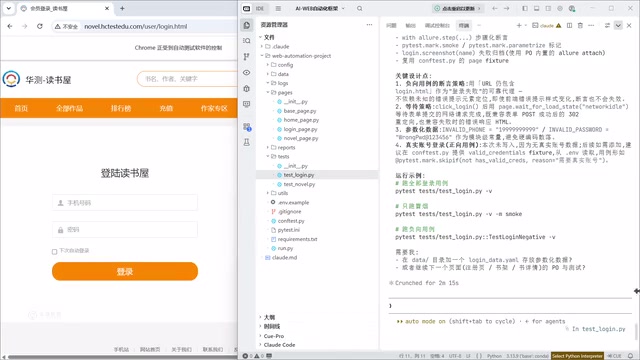
The fix is to give more precise instructions: "The browser currently has the login page open. Please implement the PO object for the login page. Do not autonomously perform any actions on the web page. We are collaborating on this together."
But if you have to repeat this kind of clarification in every conversation, efficiency tanks. The more elegant solution is to create a CLAUDE.md file — a rules file that the AI must follow while working, similar to a "Coding Convention" document in software projects, except the audience isn't human engineers — it's the AI agent itself. For example, you can specify: "When collaborating using Google Chrome to write PO objects, do not proactively interact with the web page," "Save PO objects to the Pages directory," "Save test scripts to the Tests directory."
Skills vs. Project Rules: When to Use Which
Here's an important distinction:
- Skills: Best for reusable, generalizable scenarios — like project scaffolding initialization or manual test case generation (where you need format template constraints). Skills are a cross-project general capability library, invoked as needed like a "skill."
- Project Rules (CLAUDE.md / AGENT.md): Best for project-specific conventions. These are "instincts" that the agent must follow on every run, not "skills" that are invoked on demand. Their scope is limited to a single project and they act as mandatory constraints.
One notable point: you generally don't need to write a Skill for the automation test scripts themselves — because "code is already a set of conventions," and AI will naturally follow naming conventions to generate compliant code. Different tools also use different rule file names: Claude uses CLAUDE.md, while OpenCode and similar tools use AGENT.md.
The Chain of Problems: Missing Data and Report Generation
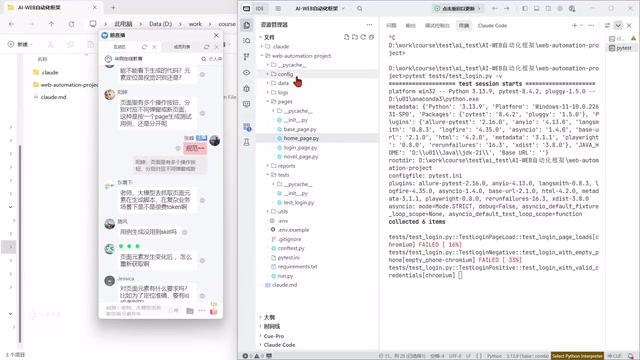
When AI generates test cases, it has no idea what your test data is. You need to explicitly provide context like "the correct login password is 123456." More frustratingly, even though AI specifically mentioned having a dedicated data directory for test data, it still didn't put data there — requiring another round of rule corrections.
Runtime issues were even more numerous: 33 test cases showed massive failures, and Allure reports initially refused to generate. The pragmatic approach here was to hand the error logs directly to AI and let it debug itself.
The Dividing Line: Whether You Have Automation Experience Makes All the Difference
This is the most important point in the entire article. After AI spent several minutes investigating, it finally identified the root cause: the login button's element locator was wrong — the page used a button type, but AI had written submit.
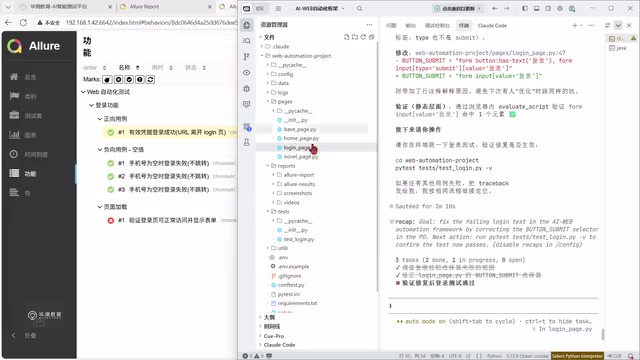
The takeaway is blunt: if you have automation experience, you'd spot this error at a glance from the logs and tell AI "the login locator is wrong — the page type is button but you wrote submit," resolving it in one sentence. Someone with no experience can only let AI iterate through self-debugging, taking 3–5 times longer — and potentially never finding the issue at all.
This answers the popular question: do you still need to learn to code in the AI era? The answer is unambiguous — yes, but the learning objectives have changed. You no longer need to memorize every line of code. Instead, you need to:
- Understand code logic and conventions
- Read error logs and quickly pinpoint problems
- Master the three core principles of automation: fixed data (use deterministic inputs to ensure reproducible results), repeatability (use Setup/Teardown to ensure each run starts from the same initial state), and mandatory assertions (a script without assertions is just a recording playback — it can't verify whether system behavior meets expectations)
On the topic of token costs, there's a rational comparison worth making: manually writing this codebase would take a skilled tester (monthly salary ~¥15,000, daily rate ~¥800) a full day. AI accomplishes the same thing in a few minutes for a dollar or two. From an enterprise perspective, this math is compelling — which is exactly why companies are willing to keep investing in AI tooling.
Advanced Usage: Converting Recorded Scripts to Framework-Compliant Code
A more advanced application: using customized Skills to automatically convert Playwright-recorded scripts into PO object code that conforms to your framework's standards.
Playwright comes with a built-in Codegen script recording feature that converts manual interactions into test scripts — but recorded scripts have obvious flaws: hardcoded data, no POM encapsulation, no data-driven handling, making future maintenance a nightmare. With a customized Skill, you can automatically transform this "rigid" recorded code into data-driven, POM-compliant automated test cases.
This kind of customized tooling can't be found online — it needs to be developed by automation engineers themselves. The value lies in dramatically accelerating AI's practical deployment efficiency in real enterprise environments.
The Real Competitive Edge for Testers in the AI Era
What testers need to learn in the AI era isn't just "how to use AI tools" — it's an entire collaborative skill set:
- Selecting the right AI tool for different scenarios (Trae, Cursor, Claude Code, OpenCode, etc.)
- Installing and managing MCP servers
- Building your own Skills (for test case generation, document generation, and more)
- Maintaining solid automation programming fundamentals for reviewing and debugging AI output
At a more advanced level, the direction is building custom tool development for AI agents and even constructing platform-level AI agent systems — which is exactly what today's high-paying roles demand. An AI testing platform is, at its core, a collection of Skills that each solve a different business problem.
The real bottom line comes down to one sentence: AI is powerful, but if you're not capable yourself, AI has nothing to offer you. A capable person using AI will see astonishing productivity gains. But someone who treats AI like a search engine and fires off casual queries — even with the most powerful models available — won't be able to build a working automation project in a month.
Related articles

Vibe Coding Full-Stack in Practice: AI Programming from Beginner to Enterprise Deployment
From Cursor to Claude Code, this Bilibili AI programming course uses four progressive projects to cover full-stack development, open-source secondary development, and team collaboration. The article analyzes the shock to frontend roles, the efficiency shift from 50 people to 5, and the methodology required for enterprise-grade projects.

David Blaine's Global Quest for Real Magic: From South Africa to Japan and India
David Blaine travels to South Africa, Japan, and India in his Do Not Attempt special, documenting Spinning drivers, black mamba rescuers, iaijutsu masters, and ascetics—exploring the boundary between magic and real human极限 challenges.

Is a Touchscreen MacBook Coming? Vergecast Reveals Apple Executive's Response
Vergecast podcast reveals a conversation between a reporter and Apple executive John Ternus about a touchscreen MacBook and Apple Pencil support. Ternus says iPad is the best device for a stylus, while the reporter bets MacBook will eventually support Apple Pencil.