AI-Powered Lead Generation with n8n: Say Goodbye to Manual Data Entry

Automate lead management in 3 steps using n8n, AI, and Google Sheets — no manual work needed.
This article introduces a sales lead management solution built on the open-source automation tool n8n. The core workflow has three steps: form submissions flow automatically into n8n, AI analyzes and structures the lead data, and results are written to Google Sheets automatically. Compared to closed-source SaaS tools like Zapier, n8n's self-hostable nature offers better data privacy and cost control — making it ideal for small teams, ops staff, and entrepreneurs looking to eliminate repetitive data entry.
Why You Need Automated Lead Management
Manually collecting and organizing sales leads every day is time-consuming and error-prone. After a form is submitted, you have to copy the data by hand, then paste it line by line into Google Sheets for sorting and categorization — this repetitive work not only drains your energy but also slows down your entire lead management process.
This Bangla tutorial from YouTube demonstrates a compelling approach: using the open-source automation tool n8n to fully automate the entire lead generation and management workflow, with AI handling data analysis in the middle, and structured data automatically written to Google Sheets at the end.

How the Workflow Operates
The entire automation flow can be broken down into three key stages:
1. Capture Leads via Form
Once a user submits a form, the lead data flows automatically into the n8n Workflow. This step replaces the tedious process of manually monitoring forms and exporting data, ensuring every new lead is captured in real time.
2. AI Analyzes the Data
Once inside the workflow, AI processes and analyzes the lead information. This is the core value of the entire solution — AI doesn't just move data around; it makes judgments and organizes information along the way, turning raw, unstructured data into something coherent and actionable.
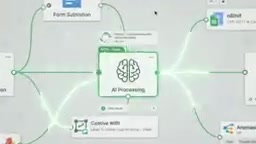
Integrating AI analysis into an n8n workflow is typically done through an "AI Agent" node or by calling the API of a large language model such as OpenAI or Anthropic. In a lead management context, AI can: extract key fields from unstructured form text (e.g., company size, requirement type); score or tier leads based on predefined rules (Lead Scoring); identify duplicate leads; or categorize free-text user input into standardized business categories. Implementing these judgments with a rules engine would require maintaining a large number of conditional branches — but with a large language model, you simply describe your business logic in plain language. Note that AI node calls incur API costs and outputs carry some degree of uncertainty, so it's recommended to add a validation step in production environments.
3. Automatically Write to Google Sheets
The analyzed data is automatically organized and written into Google Sheets. The entire process requires zero manual copy-pasting — data classification and formatting are handled entirely by the automated workflow.

The Real Value n8n Delivers
The significance of this solution lies in chaining together three tasks that would otherwise require manual effort — data capture, analysis, and organization — into a fully unattended pipeline. As the tutorial puts it, lead management becomes "faster, more organized, and simpler."
For sales teams or solo entrepreneurs, n8n's advantage as an open-source automation platform is its flexibility and control: you can freely connect form tools, AI services, and Google Sheets to build a custom lead-processing workflow tailored to your business needs, without relying on expensive closed-source SaaS tools.
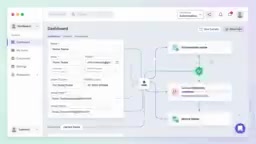
n8n (pronounced "n-eight-n") is a node-based open-source workflow automation platform licensed under a "fair-code" model, allowing users to self-host it on private servers. Compared to closed-source SaaS automation tools like Zapier and Make (formerly Integromat), n8n's key advantages are that your data never passes through third-party servers and there are no per-execution charges — making it well-suited for scenarios with strict data privacy requirements or high execution volumes. n8n connects various service nodes through a visual drag-and-drop interface, with over 400 official integrations including Google Workspace, OpenAI, various databases, and Webhooks. Users can either use the n8n Cloud hosted version or self-deploy via Docker or npm on a local or cloud server. The latter requires some technical know-how but gives you full control over your runtime environment and costs.
Who Should Try This
If you're still manually organizing sales leads every day, this kind of n8n automation solution is worth exploring. It's especially well-suited for:
- Small and medium-sized teams that handle large volumes of form-based leads
- Operations staff looking to reduce repetitive data entry work
- Entrepreneurs who want to quickly build automated workflows with low-code tools
It's worth noting that this article is based on a short tutorial video. The specific node configurations, AI model selection, and field mapping details will require referencing the full tutorial or the official n8n documentation. The core idea is clear: let AI and automation tools take over repetitive tasks, and free your time for work that actually matters.
Related articles

Felix Rieseberg Personal Homepage
Felix Rieseberg's personal homepage sparks attention on Hacker News. This article covers the Slack engineer's technical background, the rise and fall of nativefier, and the value of a developer homepage as a tech calling card.

@ai-sdk/vue 3.0.306 Patch Release Syncs with [email protected] Update
@ai-sdk/vue 3.0.306 released, synced with [email protected]. A routine patch release for the Vercel AI SDK ecosystem with no public API changes; the Vue adapter layer stays version-aligned with the core package.

Gemini 4 Argon API Launches: The Era of Million-Token Output Begins
Google launches Gemini 4 Argon with sparse MoE architecture, up to 1M output tokens, and a 68.90% Vals Index score, available across API, AI Studio, and the Gemini app.