AI SDK RSC 2.0.330 Released: Dependencies Synced to ai@6.0.330

AI SDK's @ai-sdk/rsc releases 2.0.330 patch, only syncing the core dependency ai.
Vercel's AI SDK ecosystem has released @ai-sdk/rsc@2.0.330, a standard patch update whose only change is bumping the dependency to ai@6.0.330 (commit 1b19ee5). It was auto-published by the github-actions bot on November 11 with a GPG signature. @ai-sdk/rsc and the core ai package share the same version number (330), reflecting a conjoined release strategy in the monorepo to ensure compatible versions. The patch has no breaking changes or new features—low upgrade risk but limited capability gains; the main value is version alignment and avoiding dependency tree forking. The article recommends using ^2.0.0-style ranges, watching the upstream ai changelog, and running integration regression tests on streaming rendering after upgrading.
A Typical Patch Iteration
Vercel's AI SDK ecosystem has released @ai-sdk/rsc@2.0.330 on GitHub. According to the release note, this is a standard patch version update, with only one core action: updating the dependency ai@6.0.330, corresponding to commit 1b19ee5.
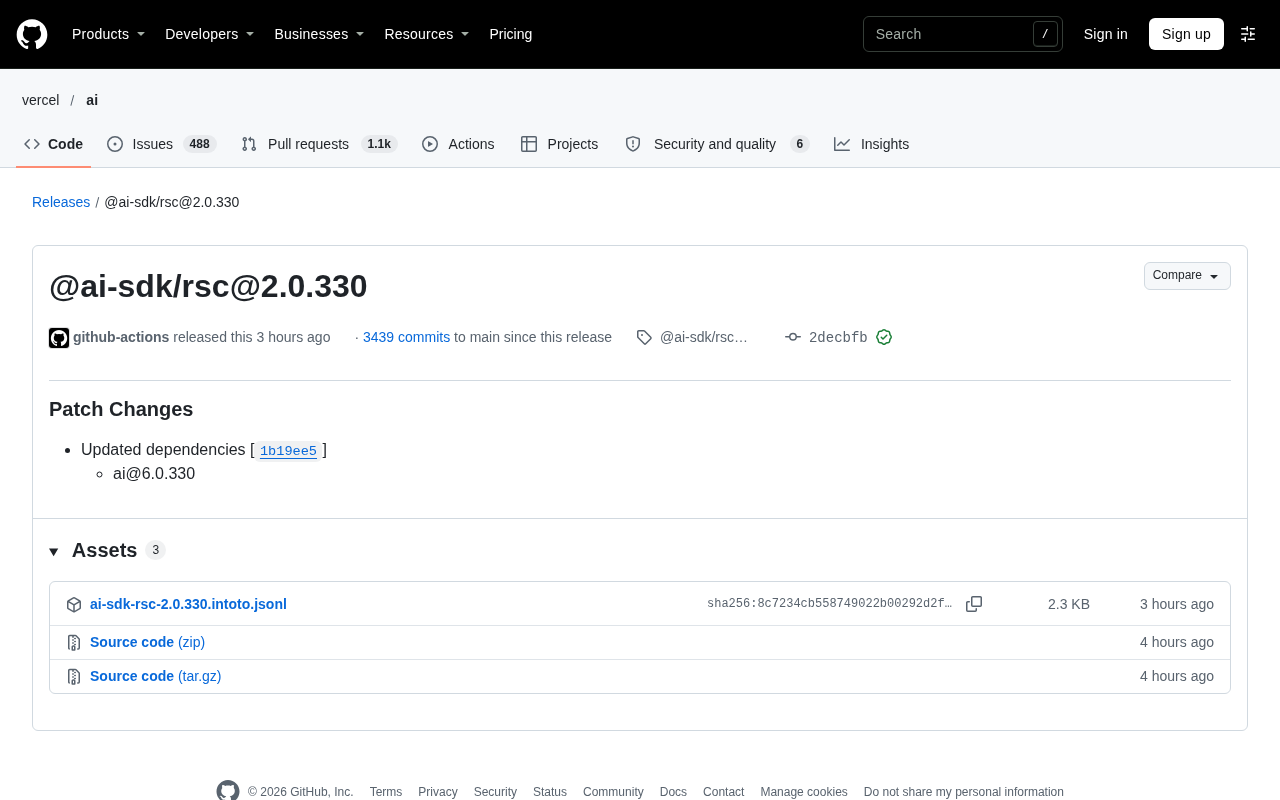
This version was published by the github-actions bot on November 11, accumulating 3439 commits since the last code commit. The release record carries a GitHub verification signature (GPG key ID ending in B5690EEEBB952194), indicating that the release process goes through an automated pipeline rather than manual packaging.
What the Version Number Tells Us
Why the Two Packages Are Always Released Together
@ai-sdk/rsc and ai both belong to the AI SDK system. The former is responsible for streaming UI and model call wrappers in React Server Components scenarios, while the latter is the core SDK. The two packages maintain identical version numbers (both 330), meaning their release cadences are bound together.
This conjoined release strategy is common in monorepos: whenever the core package ai has any change, the surrounding integration packages get a patch bump alongside it, ensuring users install a mutually compatible set of versions. For users, seeing @ai-sdk/rsc bumped essentially means "the core SDK has shipped another patch."
Monorepo and Conjoined Releases
A monorepo (single code repository) refers to maintaining multiple interrelated npm packages in the same Git repository. AI SDK's ai, @ai-sdk/rsc, and the various model provider packages all fall into this category. The repository typically uses tools like pnpm workspace, Turborepo, or Changesets to unify builds, tagging, and publishing in CI.
Because they share the same dependency graph and the same release pipeline, every time changes are merged to the main branch, the toolchain calculates version numbers uniformly for all affected packages. If a "fixed/locked" mode is used, all packages are forced to use the same version number—which is exactly why both ai and @ai-sdk/rsc are at 330. The benefit is that users don't have to figure out the compatibility matrix between packages themselves; the cost is that a package will bump even without substantive changes, which is why you see many patch releases that "only update dependencies"—this is by design, not an anomaly.
React Server Components and Streaming UI
React Server Components (RSC) is a rendering model in React: components execute on the server and are directly serialized into a special data stream format. The client no longer downloads their JS, only receiving the rendered result and references to client components. Next.js App Router is its primary implementation scenario.
LLM output is naturally streamed token by token, which aligns well with RSC's streaming serialization capabilities: the wrappers provided by @ai-sdk/rsc allow server components to push model call results to the client UI as a stream, while handling data serialization constraints at RSC boundaries—for example, functions, class instances, and complex objects other than Promises cannot be passed across boundaries arbitrarily. This serialization behavior is highly sensitive to data structure changes in the upstream core SDK, so whenever the core package changes, integration packages need synchronized version bumps and regression verification.
What a Patch Version Means
2.0.330 belongs to the 2.0.x series. In semantic versioning, the patch position only covers backward-compatible bug fixes. The release note lists no breaking changes, new APIs, or feature additions/removals—the only content is a dependency bump.
This has two practical implications: upgrade risk is extremely low, and existing code requires no adjustments; but at the same time, you shouldn't expect this version to bring capability changes. If your project hasn't encountered the associated bugs, the benefit of upgrading to 2.0.330 is limited—it's more about keeping versions aligned and avoiding dependency tree forking.
Semantic Versioning (SemVer) Constraints
SemVer specifies that version numbers take the form MAJOR.MINOR.PATCH: a MAJOR change indicates incompatible API modifications, MINOR indicates backward-compatible feature additions, and PATCH only indicates backward-compatible bug fixes. Therefore, the number 330 in 2.0.330 only promises "doesn't break existing usage"—it doesn't promise which category of problems was fixed.
This also explains why the patch position can reach three digits: in high-frequency release projects, the patch number is essentially a "build number" that increments with every automated release. npm's ^2.0.0 range accepts all 2.x.y, so as long as the major version is pinned, the package manager will automatically follow these patches; while ~2.0.0 only accepts 2.0.x. Note that if upstream accidentally introduces breaking changes in a patch (SemVer violations are not uncommon in practice), the range declaration will bring that risk along too—which is why regression testing is still needed after upgrading.
Practical Advice for Developers
For frontend teams building AI applications with RSC architecture, the practical strategy for these high-frequency patch versions is:
- Use range declarations like
^2.0.0inpackage.jsonto let the package manager automatically follow patches, avoiding manual version chasing each time - If you've pinned exact versions, keep an eye on the
aicore package's changelog, since@ai-sdk/rsc's substantive changes all come from upstream - After upgrading, run integration tests related to streaming rendering to confirm no regressions in RSC boundaries and serialization behavior
Judging from release frequency, AI SDK follows a high-frequency, small-step iteration approach. Individual versions aren't particularly newsworthy, but the release cadence itself reflects the project's maintenance activity. For product teams depending on this SDK, establishing automated dependency update and regression processes is more worthwhile than watching release notes version by version.
One-line Summary
AI SDK's @ai-sdk/rsc releases 2.0.330 patch version, only syncing the core dependency ai.
Paragraph Summary
Vercel's AI SDK ecosystem has released @ai-sdk/rsc@2.0.330, a standard patch update whose only change is bumping the dependency to ai@6.0.330, corresponding to commit 1b19ee5. The version was automatically published by the github-actions bot on November 11, with a GPG verification signature, indicating an automated pipeline. @ai-sdk/rsc and the core package ai maintain identical version numbers (both 330), reflecting the conjoined release strategy in the monorepo, aimed at ensuring users install a mutually compatible set of versions. The patch position contains no breaking changes or new features; upgrade risk is low but capability gains are limited—the main value is keeping versions aligned and avoiding dependency tree forking. The article recommends developers use range declarations like ^2.0.0, watch the upstream ai package's changelog, and run integration regression tests on streaming rendering logic after upgrading.
Related articles

RePlan-VLA: Progress-Aware Replanning Breakthrough for Long-Horizon Robotic Manipulation
The RePlan-VLA framework converts VLA models' short-horizon capabilities into reliable long-horizon execution through progress-aware adaptive replanning, improving success rates by 21.9% and 10.4% on RoboCasa365 and CALVIN, and validating real-world deployment on a Franka Research 3 robot.

Geometric Bridge Flow Matching: A New Breakthrough in Blind Rigid Motion Correction
Geometric bridge flow matching enables blind rigid motion correction in head CBCT, achieving 37.1 dB PSNR and 0.27 mm RPE on simulated data in ~9.1 minutes, outperforming existing methods.

Google Releases Gemini 4 Hydrogen: 2.5x Faster Without Sacrificing Intelligence
Google releases the lightweight Gemini 4 Hydrogen: 2.5x faster task completion, AA Intelligence Index of 54 beating its flagship sibling, 7.3s single-step on Agent Arena faster than Claude and GPT rivals, four thinking levels with pay-as-you-need pricing, now available across AI Studio and more.