AI SDK Workflow 2.0.70 Released: Fixes Streaming Reconnection and Terminal Response Loss

AI SDK workflow 2.0.70 patch focuses on fixing stability issues in streaming reconnection, conversation preservation, and error reporting.
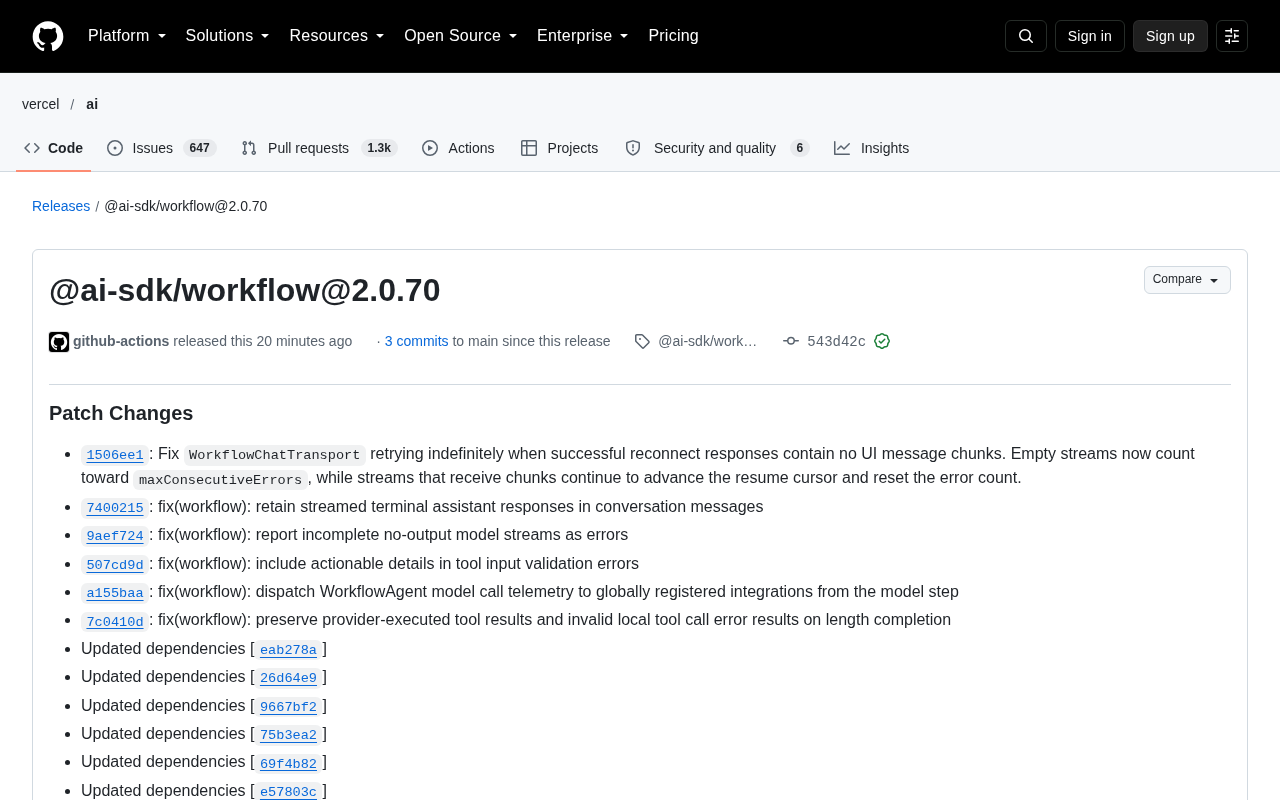
@ai-sdk/workflow released 2.0.70, a stability-focused patch version with 3 commits and dependency updates. Core fixes include: WorkflowChatTransport no longer retries infinitely when reconnection succeeds but no UI message chunk arrives, with empty streams counting toward maxConsecutiveErrors; streaming terminal assistant responses are no longer lost from conversation messages; incomplete model streams with no output are now explicitly reported as errors, and tool input validation errors carry actionable details. Agent telemetry is now dispatched from the model step to global integrations, and provider tool results plus local tool call error results interrupted by length are preserved. Dependencies are synced to ai@7.0.138 and others.
Vercel's AI SDK ecosystem has rolled out another minor version iteration. @ai-sdk/workflow has released version 2.0.70, a patch-focused update, but several fixes targeting streaming transport and Agent workflows deserve attention from developers building production-grade AI applications.
Overview of Core Fixes
This release includes 3 commits and a series of dependency updates. According to the Changelog, the fixes focus on WorkflowChatTransport, preservation of streaming terminal responses, error reporting for streams with no output, and the readability of error messages for tool call validation. These are all "hidden issues" that AI applications easily run into during actual operation but are hard to pinpoint.
WorkflowChatTransport Reconnection No Longer Retries Infinitely
The most detailed fix is in the retry logic of WorkflowChatTransport. The previous issue was: when a reconnection request successfully returned but the response contained no UI message chunk, the transport layer would fall into an infinite retry loop.
The fix makes empty streams also count toward maxConsecutiveErrors—that is, even if the HTTP layer reports "success," as long as no actual content is delivered, it accumulates as an error. Streams that receive real chunks continue to advance the resume cursor and reset the error count.
This change seems minor but actually solves a typical "false success" trap: connections keep being established but data is never received, causing the client to spin continuously in the background. For conversational applications that rely on long-connection recovery, this fix directly avoids wasted resources and the "stuck" experience for users.
What are UI message chunks and the resume cursor? UI message chunks are the smallest data units that the AI SDK pushes to the frontend chunk by chunk during streaming conversations. Each chunk typically corresponds to a segment of incremental text, a tool call event, or a metadata fragment. The client consumes these chunks to render the conversation in real time. The resume cursor is a position marker in the reconnection mechanism that records the last successfully received data point. On reconnection, the server uses it to continue pushing from the breakpoint, avoiding duplication or omission.
The key relationship is: only when the client actually receives a valid UI message chunk does the resume cursor advance. If a connection is established but no chunk arrives, the cursor stays in place, and retry requests repeatedly land on the same breakpoint position, forming a loop that appears to be recovering but makes no progress. Understanding this explains why this fix treats "empty streams" the same as real errors—it essentially prevents wasting retry budget when the cursor cannot advance.
Terminal Assistant Responses No Longer Disappear from the Conversation
Another fix targets the preservation of streaming terminal assistant responses in conversation messages (commit 7400215). After streaming output ends, the terminal assistant reply could previously be lost from conversation messages, resulting in incomplete conversation history.
For products that need to replay conversations, perform audits, or continue multi-turn dialogues, the completeness of historical messages is a basic requirement. This fix ensures that messages are correctly preserved after streaming termination.
Error Readability for Output-less Model Streams and Tool Validation
This release also fixes the erroneous handling of "incomplete streams with no output" from models. Such cases are now explicitly reported as errors (commit 9aef724). Empty responses are no longer silently swallowed, helping developers promptly detect upstream model or network anomalies.
Input validation errors for tool calls have also been improved (commit 507cd9d). Error messages now include actionable details rather than generic failure prompts. This significantly helps debugging efficiency when troubleshooting Agent toolchains.
"Incomplete streams" and "output-less streams" in streaming responses are two different abnormal forms. An incomplete stream means the streaming transmission was truncated midway—some chunks may have been delivered, but the normal end signal is missing. An output-less stream is more thorough—the entire stream produces no valid data from start to finish. Both could previously be handled silently, causing upstream systems to receive no content without an error. After explicit error reporting, developers can directly identify from logs and monitoring whether the upstream model returned an anomaly or the network disconnected during transmission, without having to guess.
Tool input validation errors also deserve elaboration: when an Agent calls a tool, the model's output must first pass schema validation, and only outputs matching the tool parameter definitions are executed. When validation failed, the past behavior often returned only a generic "invalid input," making it impossible to know which field or which constraint was unsatisfied during troubleshooting. After the change, error messages carry actionable details such as specific field paths and expected types, which is especially important for complex Agent chains with multiple tools and parameters.
Boundary Fixes for Agent Telemetry and Tool Results
There are two more fixes related to Agent runtime: first, dispatching model call telemetry from WorkflowAgent to globally registered integrations, triggered from the model step (commit a155baa); second, preserving provider-executed tool results as well as local tool call error results interrupted due to length termination (commit 7c0410d).
The former makes the telemetry collection path more accurate, while the latter avoids losing tool execution results under special termination conditions. For teams using built-in or third-party observability integrations, these fixes make trace data closer to the actual execution path.
Agent telemetry refers to runtime-collected model call trace data, including latency, token usage, tool call sequences, error distributions, etc., typically exported to observability platforms through frameworks like OpenTelemetry. This release adjusts the telemetry dispatch point of WorkflowAgent from its previous location to "triggered from the model step," meaning that every time a model actually initiates a call, it reports to globally registered integrations, rather than only aggregating at a higher-level workflow stage. This allows trace data to reflect each step's actual execution at a finer granularity, avoiding loss of intermediate step details due to aggregation at the scheduling layer.
Provider-executed tool results refer to tool call returns completed directly by the model provider side (rather than locally), such as certain providers' built-in web search or code execution. These results, along with the error results of local tool calls, were easily discarded under special termination conditions—for example, when interrupted because the output length reached its limit. After the fix, these results are preserved, ensuring that both tracking records and conversation state do not lose key fragments due to abnormal termination.
Synchronized Dependency Updates
The version also updates several dependencies, including ai@7.0.138, @ai-sdk/provider-utils@5.0.59, @ai-sdk/provider@4.0.27, etc. Such dependency upgrades are usually aligned with the underlying capabilities supporting the above fixes, and it is recommended to verify version compatibility together when upgrading.
Summary
@ai-sdk/workflow@2.0.70 is not a feature release but a concentrated round of stability patches. Error counting for empty streams on reconnection, conversation preservation of terminal responses, explicit error reporting for output-less streams—these fixes all point in the same direction: making streaming AI workflows more predictable and observable under abnormal boundaries. For teams building production applications with the AI SDK, this patch is worth following up on soon.
One-line Summary
AI SDK workflow 2.0.70 patch focuses on fixing stability issues such as streaming reconnection, conversation preservation, and error reporting.
Paragraph Summary
@ai-sdk/workflow released 2.0.70, a stability-focused patch version containing 3 commits and dependency updates. Core fixes include: WorkflowChatTransport no longer retries infinitely when reconnection succeeds but no UI message chunk arrives, and empty streams count toward maxConsecutiveErrors; streaming terminal assistant responses are no longer lost from conversation messages, ensuring historical completeness; incomplete model streams with no output are now explicitly reported as errors, and tool input validation errors carry actionable details. Additionally, Agent model call telemetry is now dispatched from the model step to global integrations, and provider tool results as well as local tool call error results interrupted by length are preserved. Dependencies are synchronously updated to versions such as ai@7.0.138. This version makes streaming AI workflows more predictable and observable under abnormal boundaries, and production teams are advised to follow up soon.
Related articles

JobRunner MCP Server: AI Agents Can Now Fix Failed Java Jobs
JobRunner launches an open-source MCP server enabling AI agents to view cluster status, diagnose failures, and recover Java jobs—incident response from any cloud coding environment or existing agent.

MLAI Digital Launches 9 Security Agents: MCP Server Safeguards the Full Lifecycle of Agentic AI
MLAI Digital launches Security MCP Server with nine built-in specialized security agents covering vulnerability discovery, attack simulation, prompt injection detection, API and infrastructure assessment, and accelerated remediation—embedding security validation across the full Agentic AI lifecycle from development to production.

Running Isaac Lab on H100 GPUs: Exploring Better Approaches
Exploring optimization methods for running Isaac Lab on NVIDIA H100 GPUs, including MIG configuration, mixed precision, TensorRT acceleration, and community experience to improve robotics simulation and reinforcement learning efficiency.