AI + Skill Reshaping Testing: Hands-On Interface Automation Without Writing Code

A practical guide to zero-code API automation testing using AI + Skill methodology.
This article presents a hands-on framework for achieving API automation testing without writing code, leveraging AI tools like Claude Code. It covers environment setup, browser packet capture for interface analysis, the critical distinction between manual and automated test cases, building a Skill system for team-wide consistency, and understanding AI's capability boundaries. The core insight: testers' value lies not in coding, but in business knowledge, workflow design, and AI orchestration.
From Zero to One: The Feasibility of AI Across the Entire Testing Workflow
In traditional testing, testers often spend enormous amounts of time on interface analysis, test case writing, and automation execution. But as AI capabilities mature, this entire workflow is being fundamentally restructured. According to a hands-on demonstration by a Bilibili content creator known as Teacher Sanfang, the entire chain from API test case generation to interface automation can be completed entirely without writing a single line of code—all powered by AI.
This article distills the core content of that practical course into an "AI + Skill" pure-AI automated testing framework. The essence of this methodology isn't about how powerful AI is, but rather how testers can understand AI's capability boundaries and build a system that enables AI to produce stable, reliable output.
It's worth emphasizing: AI is a new productivity tool, much like how machine-ground soy milk replaced hand-ground soy milk—the efficiency gains are an irreversible trend. When developers are all using AI to write code, testers who cling to the mindset of "AI isn't useful for me" will inevitably fall behind in output efficiency.
Environment Setup: Lower Barrier Than You'd Think
To replicate this AI-driven interface automation testing workflow, the required environment is actually quite simple.
Two Installations
First, install Node.js—download it from the official website and double-click to install. It works across Windows, Mac, and Linux. Node.js is a JavaScript runtime built on Chrome's V8 engine that allows JavaScript to run on the server side outside of browsers. It comes bundled with npm (Node Package Manager), making it easy to install various command-line tools. Second, install the Claude Code client with a simple npm install command.
Claude Code is a command-line AI programming tool from Anthropic, falling under the category of AI Agents. Unlike traditional conversational AI, an Agent-mode AI doesn't just generate text responses—it can proactively execute system commands, read and write files, call APIs, and make autonomous decisions across multiple rounds based on execution results. Claude Code runs in a terminal environment and inherently has the ability to access the file system and execute Shell commands, which is why it can call interfaces via CURL without any additional configuration. This "think and act" capability makes it particularly well-suited for automated testing scenarios that require an analyze-decide-execute closed loop.
Misconceptions About Token Costs
Many beginners' biggest concern is that "learning AI burns through a lot of tokens." But real-world data dispels this anxiety—the demonstration used an economical model like MiniMax M3, with a monthly subscription of only about 49 RMB (roughly $7), more than enough for a full month of usage.
It's important to understand token economics and model selection strategy here. A token is the basic billing unit for large language models; Chinese text typically converts at 1.5–2 tokens per character. Token pricing varies dramatically across models: GPT-4o costs about $2.5 per million input tokens, while domestic Chinese models like MiniMax can go as low as a few RMB per million tokens. In test automation scenarios, model selection requires balancing cost and capability: structured tasks like API document parsing and test case formatting can be handled by mid-tier models, while complex business logic analysis may require stronger reasoning models. The monthly subscription plan mentioned in the course (49 RMB) is an API subscription model that's more economical for high-frequency users compared to pay-per-token billing.
The course author did some quick math: a complete interface testing demonstration (including two packet captures, two API document generations, one test case generation, and two interface executions) consumed only a few cents worth of tokens. If a tester earning 15,000 RMB per month were to complete the same work manually, at an enterprise cost of roughly 100 RMB per hour, half an hour of work would cost 50 RMB. "The free option is always the most expensive—if you're not willing to spend money, you'd better be willing to spend time."
Interface Analysis: Doable Even Without Documentation
Many testers say, "Our company doesn't have API documentation," but this is precisely the scenario where AI delivers the most value. There are three sources of interface information: API documentation (most authoritative), source code analysis, and system packet capture.
The Packet Capture + AI Combo
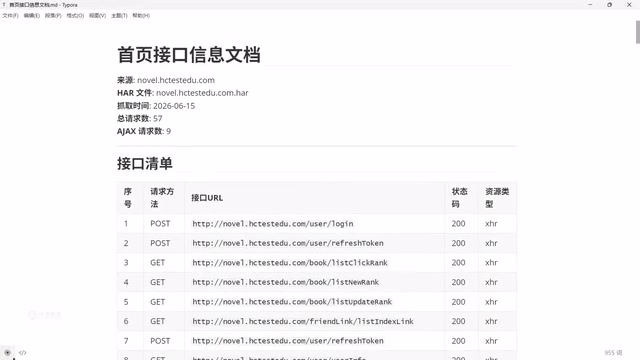
A key practical technique demonstrated in the course: perform the complete workflow once in the browser (login, registration, query, search), then right-click to save the browser's network request information (HAR file) to a local folder.
HAR (HTTP Archive) is a JSON-format standard file used to record all HTTP interactions between the browser and server. Defined by the W3C Web Performance Working Group, it contains complete information including request headers, response headers, request bodies, response bodies, timestamps, cookies, and more. Nearly all mainstream browsers' Developer Tools (DevTools) support exporting HAR files—in Chrome, after opening the Network panel, right-click on the request list and select "Save all as HAR with content." This feature was originally designed for front-end performance analysis, but in the AI era it's been given a new purpose: serving as the raw data source for API information, ready for AI to parse and structure.
This action seems simple, but it reveals a common problem—many people don't lack the ability to use AI for analysis; they simply don't know that browsers can directly export access information. Once you have this raw data, just run Claude Code in the directory and tell it "extract the accessed interfaces and organize them into documentation," and AI can accurately identify 4 core interfaces from 33 requests.
AI Inherently Has the Ability to Call Interfaces
An important discovery: after installing Claude Code, without configuring any additional skills, AI can naturally call interfaces. This is because the operating system itself has networking commands like CURL, and even if it doesn't, AI can write its own code to make calls. CURL (Client URL) is a cross-platform command-line tool that comes pre-installed on virtually all Unix/Linux/macOS systems, and is also integrated by default in Windows 10 and above. It supports HTTP, HTTPS, FTP, and many other protocols, and can send GET, POST, and various other request types—it's the most fundamental interface debugging tool in development and testing. As an Agent, Claude Code can directly execute CURL commands in the terminal, meaning testers no longer need to have AI write extensive calling code as they would with Python/Java automation.
Test Case Generation: The Critical Difference Between Manual and Automated Test Cases
This is the most easily overlooked yet most critical cognitive distinction in the entire methodology.
Two Essential Elements for Generating Test Cases
Generating test cases requires two pieces of content: interface parameter inputs (to ensure the interface can be called) and interface parameter response outputs (for assertion validation). If the API documentation lacks response content, you need to have AI call the interface first to obtain the response, then supplement the documentation.
The concept of "assertion" here is central to automated testing—it's the validation rule for interface return results. For example, a login interface should return status code 200, the response body should contain a token field, and failed login attempts should return specific error codes and messages. Without clear expected responses, effective assertions cannot be constructed, and automated testing loses its ability to "automatically determine pass or fail."
The author specifically warns: the widely circulated claim that "you can just throw API documentation at AI to generate test cases" is overly idealistic. If it were truly that simple, testers wouldn't be needed at all. AI-generated test cases still require human oversight.
Manual Test Cases ≠ Automated Test Cases
This is the core distinction repeatedly emphasized throughout the course. In manual test cases, the tester can decide what username and password to enter. But automated test cases need to be executed repeatedly without human intervention, so the data source problem must be solved.
Automated test case descriptions cover the complete workflow that AI processes: where to obtain loginable user data, which login interface to call, which interface to call next, and whether test data needs to be cleaned up after execution. AI cannot know these workflows and data sources out of thin air—testers must explicitly communicate them.
This touches on a classic design pattern in test automation—the Data Factory. Data factories solve the problems of test data creation, management, and cleanup. In manual testing, testers can register accounts on the fly or prepare data by hand; but automated testing requires correctly-stated test data available for every execution, without polluting the environment afterward. A data factory typically includes: data generation strategy (how to create test data that conforms to business rules), data isolation mechanisms (ensuring parallel tests don't interfere with each other), and data cleanup strategy (restoring the environment after testing). In an AI-driven automation framework, these strategies need to be communicated to AI in the form of Skills or knowledge bases.
The Skill System: The Core Vehicle for Capability Accumulation
As interactions with AI grow increasingly complex, a question naturally arises: How do you ensure everyone on the team can consistently use AI to deliver work of the same quality?
What Is a Skill, Really?
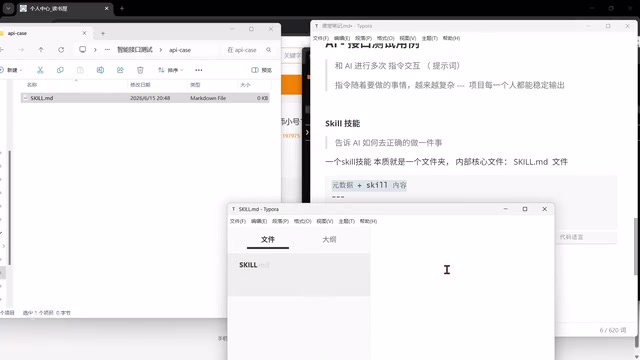
The essence of a Skill is remarkably simple—it's just a folder with a core skill.md file. This Markdown file consists of two parts:
- Metadata section (YAML): Contains
name(skill name) anddescription(trigger scenario, telling AI when to use this skill) - Content section: Tells AI how to correctly perform a task, including test case standards and template formats
The Skill mechanism is essentially an engineering encapsulation of Prompt Engineering. In software engineering, we use functions to encapsulate logic and classes to encapsulate objects; Skills use structured files to encapsulate "interaction paradigms with AI." The description field in the YAML metadata acts as a "routing rule"—AI semantically matches user input to the most relevant Skill, similar to service discovery in microservice architectures. This design makes AI behavior predictable, reusable, and version-controllable. Team members don't need to memorize complex Prompt patterns; they simply invoke predefined Skills to achieve consistent output quality.
The Hard Part Isn't the Technology—It's the Content
The author hits the nail on the head: Skills themselves aren't hard to write—you can even have AI generate them. But the key is—the content within the skill (such as your company's test case format and business standards) still needs to be determined by you.
"AI can help you generate this file, but the format is still what you tell the AI. You can't cut corners on this—this is where your true capability accumulates." This statement cuts through a common misconception about AI usage: people focus on the form, but the real value lies in controlling the content.
Place Skills in the designated directory (e.g., .claude/skills/), restart Claude Code, and they can be invoked directly via slash commands. You can even tell AI "help me install this skill into the current project," and AI will automatically check specifications, create folders, and verify recognition.
AI's Capability Boundaries: What It Can and Can't Do
This is the deepest insight in the entire article. The author clearly delineates AI's capability boundaries in interface automation testing.
AI Can Map Simple Relationships, But Struggles with Complex Business Logic
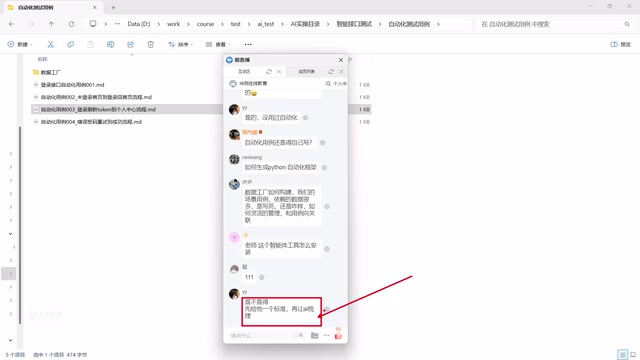
For simple data-passing relationships, AI can independently trace interface dependencies. But when it comes to internal system terminology, special business logic, and field design, AI falls short—because AI only has access to open-source knowledge from the internet and knows nothing about your company's internal business knowledge.
This is where knowledge bases come in. There are two modes: RAG retrieval augmentation (on-demand retrieval) and direct document provision (dumping all content to AI).
RAG (Retrieval-Augmented Generation) is the core technical architecture for solving LLM "hallucination" problems and injecting private knowledge. Here's how it works: when a user asks a question, the system first retrieves document fragments relevant to the question from an external knowledge base (typically using vector similarity search), then concatenates the retrieved content as context into the Prompt before handing it to the LLM for answer generation. Compared to dumping all documents directly to AI, RAG's advantage is its ability to handle massive document volumes (bypassing context window limitations) while precisely locating relevant content during retrieval, reducing noise interference. In enterprise testing scenarios, RAG can be used to manage API documentation, business rules, historical defect databases, and other large volumes of private knowledge.
By creating an "interface field description document" that clearly describes core field meanings, database table designs, and front-end/back-end specifications, AI can truly understand your system.
An Elegant Example
The author uses a "post-login redirect" example to illustrate the challenge of analyzing dynamic business flows: at the code level, the default behavior after login is to redirect to the homepage, but in actual operation, it might redirect to a profile page, a reading page, or any number of other pages. This kind of dynamic runtime data simply cannot be accurately determined through source code analysis alone.
This example reveals the gap between static analysis and dynamic behavior. In software engineering, static analysis examines code without executing the program, capable of discovering code structure, dependencies, and potential defects; while dynamic analysis requires actually running the program to observe its behavior. Much business logic depends on runtime state (user permissions, feature flags, A/B experiment groups, etc.)—these might appear as simple conditional checks in the code, but the actual execution path depends on real-time data. When AI analyzes source code, it can only perform static analysis; judgment about runtime behavior must rely on business knowledge provided by the tester.
The conclusion: AI can assist in generating process-oriented test cases, but "what humans can't map out, AI can't map out either." The tester's value lies precisely in providing the correct process template—"Since I have to tell it the correct workflow anyway, why not just write it down?"
The True Value of Testers in the AI Era
This methodology ultimately points to a clear positioning. Testers in the AI era need to do two things:
First, encapsulate each project team's work standards and workflows into Skills, crystallizing project experience and capabilities. Some Skills require code implementation, but that too can be accomplished through AI-assisted programming.
Second, combine the data from AI's production process according to specific rules—where to store documentation, where to store test cases, how to manage knowledge bases, how to build data factories—building the complete system from interface analysis, test case generation, and automation execution to test report generation.
This is essentially an "AI Orchestration" capability. Similar to how DevOps engineers don't write business code directly but instead build CI/CD pipelines to orchestrate the full process of building, testing, and deploying; testers in the AI era are also transforming from "executors" to "orchestrators"—designing AI workflows, defining input/output specifications, managing knowledge assets, and monitoring output quality. This role shift requires testers to develop stronger systems thinking and architectural capabilities.
The author draws an analogy with "farming": mechanized farming replaced manual labor, but it can't solve the problem of "a person who doesn't know how to farm." AI only makes automation more efficient—it doesn't replace automation or testing thinking, but integrates as an efficiency tool within them. Testing already demands deeper business understanding than development, and this deep understanding of business is precisely the core competitive advantage that AI cannot replace.
In this new era, not knowing how to write code is no longer a barrier. But if you can't even clearly express your requirements to AI, then you truly will be left behind by the times.
Related articles

Getting Started in Machine Learning Research: Essential Paper Reading List and Research Internship Application Path
A complete path from zero to research internship for ML beginners, covering essential classic papers (AlexNet, ResNet, Transformer), paper reading methods, reproduction tips, and practical advice for research internship applications.

Claude Code Hands-On Tutorial: Complete Guide from Installation to Automated Development
Complete guide to Claude Code covering environment setup, permission configuration, Go Goals autonomous loops, Skills system, MCP protocol integration, and version control for automated development.

Gemini 3.7 Flash Release and GPT-5.6 Ultra-Fast Mode: AI Open Source Enters the Ecosystem Era
Google releases Gemini 3.7 Flash for coding and Agent optimization while OpenAI launches GPT-5.6 Ultra-Fast mode with 14x speed gains. AI open source shifts from open models to open ecosystems.