AI Video Generator Mobile Experience Ranked: Testing 8 Tools on Android and iOS

Ranked: 8 AI video generators tested on mobile — most are desktop-first, but a few truly deliver.
A hands-on cross-platform test of 8 AI video generators on Android and iOS, evaluated on native app availability, mobile-optimized UI, performance, and ads. Most tools remain desktop-first adaptations. Higgsfield tops the list as the only tool fully rebuilt for mobile via PWA, while Runway impresses with design but lacks depth. VO 3.1 scores last due to no dedicated app.
Why Test AI Video Tools on Mobile
Most AI video generators are designed for desktop. But in a mobile-first era, more and more creators want to produce professional videos with nothing but a smartphone. The focus of this hands-on test isn't comparing model output quality — it's about real-world mobile usability: how smooth the experience is, whether the interface was genuinely redesigned for phones, and whether full functionality is preserved.
It's worth noting that "mobile-first" isn't just a UI adaptation issue — it's a design philosophy that rethinks user interaction from the ground up. Since Google announced mobile-first indexing as its primary standard in 2016, the concept has spread from web development into all areas of app design. Yet AI video generators inherently depend on high-compute servers for training, inference, and rendering pipelines, with control parameters (frame rate, motion intensity, seed values, etc.) often numbering in the dozens — creating an inherent tension with mobile's "clean, touch-friendly, one-handed" design principles. This explains why most tools default to "desktop-first, mobile-second": simply scaling down the desktop UI is the lowest-cost path to mobile, but user experience often suffers as a result.
This article is based on a Bilibili creator's cross-platform review of 8 mainstream AI video tools. Testing covered both Android and iOS, scored across dimensions like "native app availability," "mobile-rebuilt interface," "performance smoothness," and "ads and interruptions," culminating in a complete ranking. The verdict is clear: most tools are desktop-first and mobile-second, with very few products genuinely polished for phone use.
Bottom of the Rankings: Mobile Experience Clearly Drags Overall Performance
#8 VO 3.1: Great Model, Nearly Unusable on Mobile
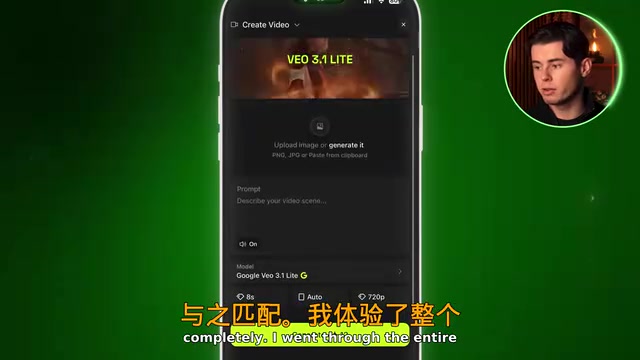
Google's VO 3.1 model quality is genuinely strong, with stable and reliable output. But it has no dedicated mobile app — users must either go through the Gemini app or open Google AI Studio in a mobile browser.
The Gemini path buries VO inside a general-purpose chat interface — you're not working with a video tool but a chatbot, relying on text descriptions and hoping for the best. Even more limiting: just 3 generations per day, no duration control, no manual parameters. The only bright spot is a cancel button that lets you cut a generation short mid-process, saving your precious quota. The AI Studio browser path does offer real settings, but the interface is entirely desktop-layout — on a phone you're constantly pinching to zoom in and out, making it one of the slowest workflows in the entire test.
#7 Pika: Android Users Locked Out of the Native Experience
Pika has a native iOS app called PikaFX with a complete experience, but no official Android app — Android users are stuck with the browser version. To its credit, pika.art's browser interface was designed with mobile in mind: top tabs for inspiration feed, PikaFX, and Vibrate; a clean prompt bar at the bottom; smooth scrolling and natural transitions; native support for uploading from your camera roll; and no pop-up ads. But locking out half of all users from the native experience is a real weakness in a test specifically evaluating mobile.
#6 Pixverse: Pop-Up Overload Is the Biggest Turn-Off
Pixverse currently has no dedicated iOS app — Apple users are stuck with the limited Pixverse Lite, which has also led to a flood of counterfeit clones on the App Store. Testing was done on Android. Opening the app triggers a barrage of pop-ups — dismiss one and another immediately appears. Inside, you're greeted by a cluttered social-style discovery feed that feels more like a social platform than a creation tool. The text-to-video interface itself is reasonably clean with plenty of templates and effects, but the double pop-ups, messy homepage, and lag combine to make this the most frustrating experience in the entire test.
#5 Hylo AI: Clean Creation Pages, Too Many Upfront Ads
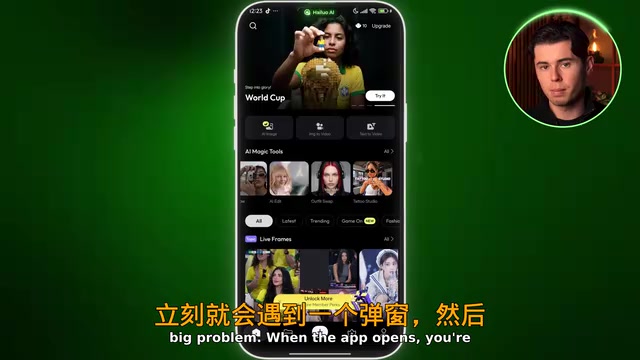
Hylo AI has a native app. Once inside the text-to-video or image-to-video interface, the layout is minimal, the prompt area is clear, and image references work natively — the core creation experience is solid. The problem is the "entry" — opening the app triggers a series of pop-ups, and the homepage navigation stutters and scrolls sluggishly. Users have to push through a layer of "shell" before reaching the actual tool. The overall feel is like two different apps stitched awkwardly together.
Mid-Tier: Experience Becomes Workable
#4 Kling AI: Strong Creative Core, Social Homepage Holds It Back
Kling AI has well-maintained native apps on both Android and iOS, with no counterfeit app issues. Once inside the actual workflow, the experience is quite good: minimal UI, easily findable controls, responsive performance, and advanced features like intelligent multi-shot and motion controls are fully accessible on a small screen.
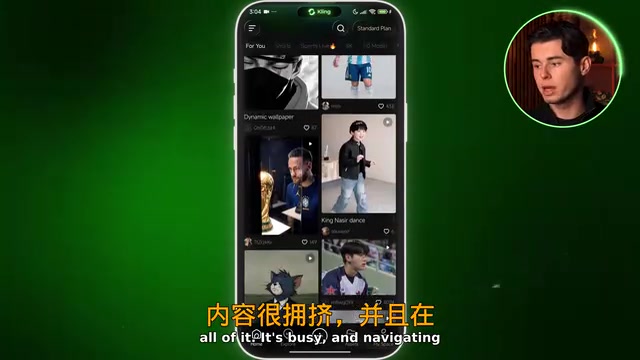
The real weakness is the homepage — built out as a social platform with rotating top banners, feature tiles, a trending section heavy on sports content, and a recommendation feed that stutters noticeably during navigation. This design phenomenon reflects a deeper logic in AI tool productization: balancing user retention, UGC content ecosystems, and monetization efficiency. Drawing from TikTok and Instagram's infinite scroll model, social feeds can significantly boost time-on-app and DAU numbers — metrics that matter greatly for early-stage startup fundraising narratives. Yet for "task-oriented" users (creators who know exactly what they want to generate), the social feed increases cognitive load by forcing constant switching between "consumption" and "creation" mindsets. This stands in sharp contrast to professional design tools like Figma and DaVinci Resolve, which commit to "open and you're in the workspace" design. For users who simply want to generate video, the social structure becomes an obstacle. A strong creative core, dragged down by a homepage trying to do too much.
#3 Imagine Art: A Reliable, Feature-Complete Dark Horse
Imagine Art is the kind of tool you don't appreciate until you actually use it. Native apps are available on both Android and iOS. There's one upgrade pop-up on launch, but once dismissed, everything is clean. The homepage displays a clear row of AI tools — AI Assistant, AI Image, AI Video, AI Edit — with prominent icons. There's slight input latency and transitions aren't perfectly smooth, but nothing gets in the way of actually getting things done.
What's most impressive is how much you can do on mobile: AI video, AI images, AI editing, UGC templates, and AI portraits are all fully unlocked with nothing gated behind a paywall. The video generation workflow runs smoothly and stays focused. For a tool without a big reputation, the feature depth is genuinely remarkable. Reliable, complete, and not in a rush to charge you — that combination is more valuable than it sounds.
Top Two: Genuinely Built for Mobile
#2 Runway: Best First Impression
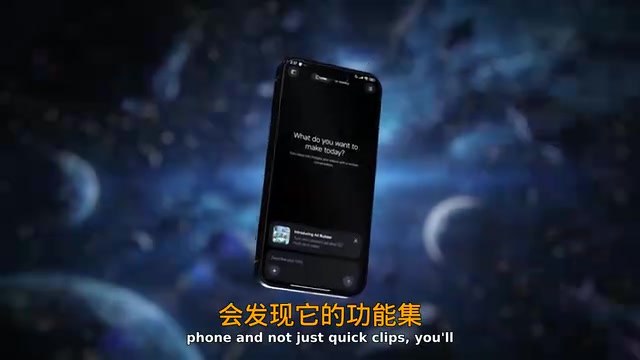
Opening Runway reveals a clean dark screen that simply asks "What do you want to create today?" — no pop-ups, no social feed, no distractions. After testing so many apps, that feels remarkable. Available on both platforms, with a well-organized side menu, full access to Gen 4.5 video features, and thoughtfully designed mobile navigation throughout the app.
From a design standpoint, Runway's UI is best-in-class. But if you want to do professional work on your phone rather than just quick short clips, you'll find it lacks functional depth — the mobile version keeps only the core generation tools, trimmed for simplicity rather than depth. If you're trying to build a complete mobile workflow, you'll hit a ceiling sooner than expected.
#1 Higgsfield: The Only Tool Fully Rebuilt for Mobile — and a Complete Package
Highsfield takes the top spot for one key reason: it delivers a near-native experience through a PWA (Progressive Web App). PWA is a set of web technology standards championed by Google around 2015, built on three core technologies: Service Worker (enabling offline caching and background sync), Web App Manifest (allowing it to be added to the home screen and run fullscreen), and HTTPS secure transport. The key advantage of PWA is distribution without App Store review, with a single codebase covering iOS, Android, and desktop simultaneously — for an AI tool, this also means bypassing Apple's 30% in-app purchase commission and enabling more flexible iterative updates. Open Higgsfield.ai in any browser and it runs fullscreen — no installation required. What's most impressive is that the UI isn't a scaled-down version of the desktop — it's been completely rebuilt around how you hold and operate a phone, with layout, navigation, and element positioning all designed for mobile. Higgsfield's choice of PWA over a native app is fundamentally an engineering efficiency vs. experience completeness trade-off: a unified codebase for cross-platform consistency, at the cost of occasional re-login session management.
Performance fully matches the design: running through the entire platform without a single stutter — the only tool on this list to achieve that. As an all-in-one platform, it integrates popular models including Seedance 2, Kling 3, and VO 3.1. This multi-model integration architecture represents an emerging pattern in the AI application layer — the Model Aggregator. These platforms don't train foundational models themselves; instead they call multiple model providers via API and let users choose on demand within a unified interface. The business logic resembles a cloud service broker, with core competitiveness rooted in workflow integration and user experience rather than the models themselves. Most critically, every feature available on desktop is accessible on mobile — Cinema Studio, Supercomputer, top-tier image and video models, all controllable from a phone screen. The only minor downside is that as a PWA it may occasionally require re-login, but given how smooth and complete the experience is, that's easy to overlook.
Conclusion: Desktop-First Remains the Industry Norm
This test exposed a clear reality: most AI video generation tools are still desktop-first, mobile-second. VO may have a powerful model, but it's nearly unusable on mobile. Kling has an excellent creative core but is dragged down by its social homepage. Runway has the most impressive interface, but functionality is cut down on phones.
If you just need to generate short clips occasionally, Runway's simplicity and Imagine Art's completeness are both solid choices. But if your goal is professional, full-workflow AI video creation on your phone, Higgsfield is currently the only product that genuinely delivers. It should be noted that the original material for this article comes from a single review source, and the recommendation of Higgsfield has a promotional nature — readers should combine their own needs with additional independent reviews before deciding.
Key Takeaways
Related articles

Vibe Coding Full-Stack in Practice: AI Programming from Beginner to Enterprise Deployment
From Cursor to Claude Code, this Bilibili AI programming course uses four progressive projects to cover full-stack development, open-source secondary development, and team collaboration. The article analyzes the shock to frontend roles, the efficiency shift from 50 people to 5, and the methodology required for enterprise-grade projects.

David Blaine's Global Quest for Real Magic: From South Africa to Japan and India
David Blaine travels to South Africa, Japan, and India in his Do Not Attempt special, documenting Spinning drivers, black mamba rescuers, iaijutsu masters, and ascetics—exploring the boundary between magic and real human极限 challenges.

Is a Touchscreen MacBook Coming? Vergecast Reveals Apple Executive's Response
Vergecast podcast reveals a conversation between a reporter and Apple executive John Ternus about a touchscreen MacBook and Apple Pencil support. Ternus says iPad is the best device for a stylus, while the reporter bets MacBook will eventually support Apple Pencil.