Alex AI Development Assistant: Maya Artists Generate Plugin Code Using Natural Language

Alex AI lets Maya artists generate plugin code using natural language — no coding required.
Alex AI Development Assistant is a Maya plugin that automatically generates executable Maya Python plugin code from natural language descriptions, dramatically lowering the programming barrier for artists. It supports both cloud-based and local LLM integration, balancing efficiency with data security. With additional features like AI chat, tool library management, and MCP extensions, it helps artists reduce their dependence on TD/TAs and quickly address repetitive workflow needs.
Overview: AI Empowering 3D Artists with Programming Capabilities
For Maya users, developing custom plugins has always been a technically demanding task. In the traditional workflow, artists need to rely on TDs (Technical Directors) or TAs (Technical Artists) to write tool scripts. In large film or game studios, TDs are responsible for building render pipelines and writing complex automation scripts, while TAs focus on tool development and workflow optimization — a single TD/TA often serves dozens of artists, and waiting days or even weeks for requests to be fulfilled is the norm. For small to mid-sized studios or independent artists, dedicated TD/TA resources are even scarcer. The emergence of Alex AI Development Assistant changes this by allowing artists to describe their needs in natural language and directly generate executable Maya plugin code — truly achieving "programming by speaking."
Installation and Basic Feature Overview
Installation
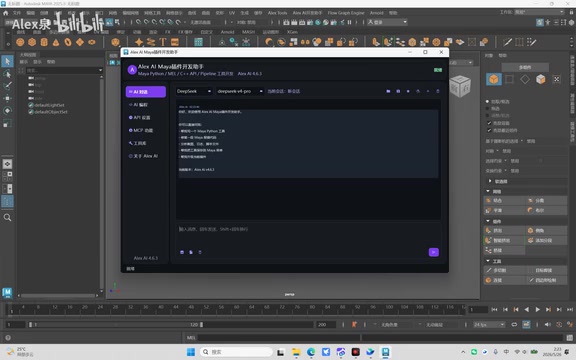
Installing Alex AI is straightforward. Users simply need to check "Alex AI Maya" in Maya's Plug-in Manager and load it. Once loaded, an Alex AI entry will appear in Maya's menu bar.
Feature Modules at a Glance
Upon opening the Alex AI Development Assistant, you'll find the following core modules:
- AI Chat: Consult the AI about Maya features — ask questions directly when encountering technical challenges
- AI Programming: The core feature — generate Maya plugin code by describing your needs in natural language
- API Settings: Supports custom API or local LLM integration with high flexibility
- MCP Features: Extended connectivity capabilities (detailed below)
- Tool Library: Manage previously generated and saved plugin tools
Regarding API settings, the tool supports two integration methods: connecting to cloud-based LLM APIs (such as DeepSeekAd) or using locally deployed LLMs. Local deployment holds special significance in the film and game industries — project assets, character designs, and storyline content in production are often bound by strict non-disclosure agreements (NDAs), and transmitting code requests through cloud APIs may pose data leakage risks. Using tools like Ollama or LM Studio to run open-source models such as Llama, Qwen, or DeepSeek locally allows studios to leverage AI programming capabilities in a completely isolated intranet environment, balancing both efficiency and security. This means users can flexibly choose based on their network environment and privacy requirements.
About MCP Features
MCP (Model Context Protocol) is an open standard protocol proposed by Anthropic in late 2024, designed to address the standardized connection between large language models and external tools and data sources. Its core idea is to provide AI models with a unified "tool invocation" interface, enabling models to proactively query file systems, call external APIs, operate applications, and more. In the Maya context, MCP functionality means the AI assistant can not only generate code but also potentially interact directly with Maya's scene state, reading current scene information to generate more precise context-aware code — representing a deeper evolution in AI tool integration.
Hands-On Demo: Generating Maya Plugins with Natural Language
From Requirement Description to Code Generation
In the demonstration, the author selected the DeepSeek model (V3 version) and entered a request in the AI Programming module: "Help me write a Maya tool that randomly creates cubes." DeepSeek V3 is a large language model developed by DeepSeek, which performs particularly well in code generation capabilities, achieving industry-leading results in multiple programming benchmark tests. Its open API pricing strategy also offers a significant cost advantage over the GPT series, making it a popular choice for developer tool integration. For tasks like Maya plugin generation that require precise understanding of API call relationships, code-optimized LLMs can more accurately generate executable code that conforms to maya.cmds specifications.

After clicking send, a "Generating" status indicator appears in the upper right corner. The AI progressively loads and generates the corresponding code — in this case, a script based on Maya's Python API (maya.cmds module). Maya has gradually refined its Python support since 2008, offering a more modern interface compared to its native MEL scripting language, but it still requires months of systematic study for artists without programming backgrounds. When code generation is complete, a "Code Generation Complete" notification pops up in the upper right corner.
One-Click Execution and Result Verification
Once the code is generated, users simply click the "Execute" button, and the generated tool interface pops up directly in Maya. In the demo case, the generated tool included options for position settings, world coordinate parameters, and edge length controls, allowing users to perform batch creation operations and generate a large number of randomly distributed cubes with a single click.
The entire process — from describing requirements to having a usable tool — requires virtually no programming knowledge. This is precisely the core value of the natural language programming trend: lowering the barrier to "programming" from the syntax level to the logical description level, enabling domain experts to directly transform their professional knowledge into automation tools without mastering the formal specifications of programming languages.
Plugin Saving and Tool Library Management
Saving Generated Code as Menu Tools
Alex AI not only generates and executes code but also supports saving generated plugins to custom menus. When saving, you can configure:
- Primary menu name: e.g., "Create"
- Secondary menu name: e.g., "Random Create" (optional — delete if not needed)
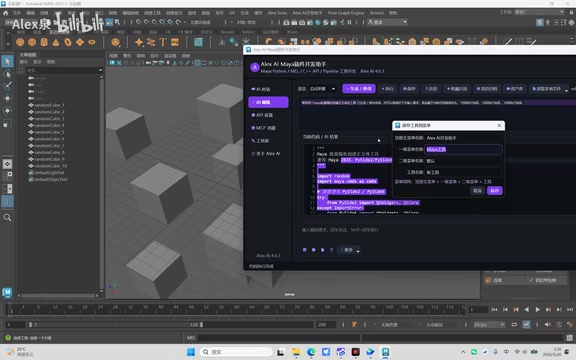
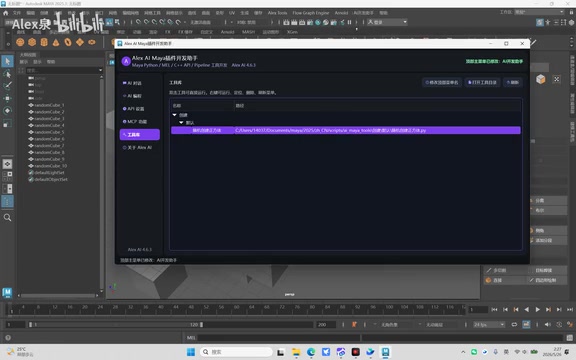
Once saved, users can call the tool directly from Alex AI's menu bar, and all saved AI-generated code is also visible in the Tool Library.
Customizing Menu Names
It's worth noting that the menu bar name is also customizable. If users find "Alex AI Development Assistant" unsuitable, they can change it to a preferred name, such as "AI Assistant."
Core Value: Lowering Technical Barriers, Boosting Production Efficiency
The greatest value of this tool lies in the following:
Giving artists development capabilities: No need to learn Python or MEL scripting — create the tools you need using natural language. Maya's MEL language has had unique syntax and a steep learning curve since its inception in 1998, and even the relatively friendlier Python requires systematic study. The AI programming assistant completely bypasses this obstacle.
Reducing dependence on TD/TAs: Repetitive tools that previously required technical staff to write can now be handled by artists themselves, freeing TD/TAs to focus on more complex technical challenges.
Eliminating repetitive work: When facing large volumes of repetitive operations, you can quickly generate automation tools to improve efficiency.
Instant technical support: When encountering Maya usage issues, the AI Chat feature serves as an always-available technical consultant.
Conclusion
The Alex AI Development Assistant represents an important application direction for AI tools in the professional 3D software domain. It's not meant to replace professional TD/TAs, but rather to empower artists to independently address small-scale tool needs in their daily work. This trend aligns with the penetration of AI programming tools like GitHub Copilot and Cursor in general software development — liberating programming capabilities from the hands of a few specialists and granting them to every domain expert. For Maya users who frequently need batch operations and automated workflows, tools like this can significantly boost productivity. As LLM code generation capabilities continue to improve and standard protocols like MCP become more widespread, the future of "natural language programming" tools in the creative industry holds even greater promise.
Related articles
 Product Reviews
The Programmer's Desk Setup Guide: Building a Workspace That Feels Like Home
Discover how programmers build productive, comfortable workspaces. From multi-monitor setups to ergonomic design, explore the desk philosophy that drives focus and flow.
 Product Reviews
Qoder vs Cursor Real-World Comparison: Which $20/Month AI IDE Is Better?
Hands-on comparison of Qoder vs Cursor AI IDEs: Agent autonomy, human interaction count, and architecture decisions. Qoder needed only 2 interactions vs Cursor's 8.
 Product Reviews
Cursor Cloud Agent Demo: Eliminating Bottlenecks Across the Entire Software Development Lifecycle
Deep analysis of Cursor's Cloud Agent demo showing how cloud VMs, automated test artifacts, and a full-chain control plane systematically eliminate human bottlenecks across the software development lifecycle.