An 110K GPU Can't Fit a 195B Model: Which Way Should a 32G Machine Go?

For local large models, check if it fits first, then spend on speed—an 110K GPU can't fit a 195B model.
Bilibili creator AIPC Yusen points out through hands-on comparison that the primary issue for running large models locally is capacity, not speed. An RTX Pro 6000 priced at around 110K RMB has 96GB of VRAM, yet can't fit the 195-billion-parameter DeepSync V4.1 Flash that needs 122.4GB—26GB short. A 192GB unified-memory mini PC costs only a fraction of the GPU path and, although slower, can fit the model. The creator emphasizes that VRAM and system memory hold the same thing, differing only in distance from the chip. The purchase criterion should be to first confirm the model fits, then spend on speed.
When running large models locally, many people's first instinct is to spend big on a good GPU. But Bilibili creator AIPC Yusen offers a counterintuitive conclusion: the more expensive path is the one that hits a dead end first. An NVIDIA RTX Pro 6000 priced at around 110K RMB, with 96GB of VRAM, still can't fit DeepSync V4.1 Flash with 195 billion parameters. The problem isn't speed—it's whether it can fit at all.
First Figure Out If It Fits, Then Talk About Speed
The creator puts the conclusion right up front: one card costs 110K, and if it doesn't fit, it doesn't fit. This model has 195B parameters—that is, 195 billion parameters—and even compressed to the minimum it needs 122.4GB of space, which is roughly the entire capacity of a 128G machine, still 26GB short. Some people even buy a whole machine just to tear out the card for that bit of space.
The key insight here is: VRAM and system memory hold the same thing—model parameters. The only difference between them is how close they sit to the chip. VRAM sits right next to the chip, so data doesn't have to take a detour; system memory is a stretch away, so it's slower. So the comparison between these two paths was never about who runs faster, but about who can fit the model in first. If it doesn't fit, speed is meaningless.

Model parameters are stored in bytes. A parameter is usually saved as a 16-bit floating point number (FP16/BF16), taking 2 bytes; quantized to 8 bits (INT8) it takes 1 byte, and to 4 bits (INT4) it takes 0.5 bytes. 195B parameters stored as FP16 need 390GB, as INT8 need 195GB, and as INT4 need about 97.5GB. The 122.4GB mentioned in the article corresponds to some hybrid quantization or a 4-bit scheme with extra overhead. In addition, inference requires reserving space for the KV Cache, which grows with context length and concurrency. So "fitting" doesn't just mean the weights can go into VRAM/memory—you also need headroom for the KV Cache and runtime buffers, otherwise it will still overflow with long contexts or concurrent requests.
The GPU Path: Fast, But It Doesn't Fit
Let's look at the GPU path first. This RTX Pro 6000 retails for $16,499 in the US, which converts to about 110K RMB. Interestingly, Dell takes the same card and builds a whole machine around it, and the single card costs 30% more than the whole machine, so now some people just buy the whole machine and tear the card out.
Spread across 96GB of VRAM, the price per G is clearly higher than the system-memory path. It is indeed fast, with VRAM bandwidth reaching 1792GB per second. VRAM bandwidth is how much data can be moved out of VRAM per second—move it fast, and tokens come out fast. But what's fast is token generation; it doesn't solve whether it fits. The model needs 122.4GB, the card has only 96GB, 26GB short—it won't negotiate with you, it just errors out halfway through loading. Some people stuff the excess into system memory and get it running, but the speed drops to the level of the memory path.
VRAM bandwidth refers to how much data the GPU can read from VRAM per second, in GB/s. It determines the data supply speed for matrix multiplication during large model inference, directly affecting token output speed (tokens/s). The RTX Pro 6000's 1792GB/s is far higher than DDR5 memory's 270GB/s, but bandwidth only solves "moving fast," not "fitting." When model weights exceed VRAM, the system offloads some layers to system memory, and each computation must move data over the PCIe bus, making PCIe bandwidth (about 64GB/s) the new bottleneck and causing a sharp drop in speed. So "make up for insufficient VRAM with system memory" works, but performance falls back to the level of the memory path.
The Whole-Machine Path: Slow, But It Fits
Now let's calculate the whole-machine path. A mini PC with 192GB unified memory costs about a fraction of the GPU path. Unified memory means the CPU and GPU share one block—no separation—and the space the model needs is carved out of this single block. Spread across 192GB, the cost per G is less than a quarter of the GPU path.
It's slow, with memory bandwidth of just over 270GB per second, but it fits the 122.4GB model, leaving 70GB of breathing room. Between "doesn't fit" and "slow," you can only choose one. The cost of choosing wrong isn't being a bit slower—it's not being able to start at all. On one side, you've spent the money and can't use it; on the other, you can use it, it's just slow.
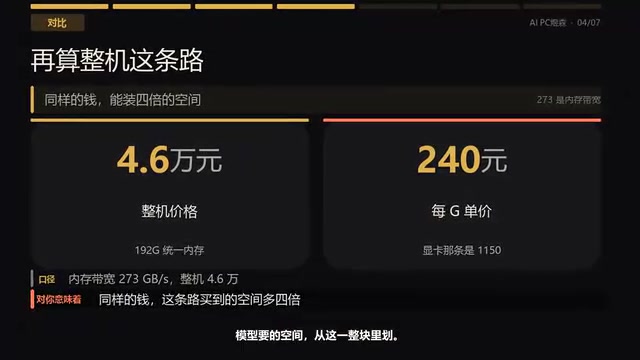
Unified Memory means the CPU and GPU share the same physical memory pool, with no need to explicitly copy data. On a mini PC, this means the GPU can directly access all 192GB of memory as VRAM, but it's limited by memory bandwidth (about 270GB/s) and the integrated GPU's compute power. Its advantage is large capacity and low cost, suitable for fitting very large models; its disadvantage is low bandwidth and slow token output. For local large models, if the model fits into unified memory, it can run—just not as fast as with a discrete GPU. This architecture is common in Apple's M-series chips and AMD/Intel integrated-GPU mini PCs.
One-Sentence Criterion: Check Space First, Then Spend on Speed
The creator gives a one-sentence criterion: first check whether it fits. If it doesn't fit, no amount of speed matters to you, because the model simply won't start. Once it fits, then compare who's faster—that's when VRAM comes into play. The order can't be reversed—first calculate how big the model you want to run is; if it's bigger than the machine's usable space, change the model, don't change the machine or the card; once space is sufficient, then spend on speed, and that money is well spent.
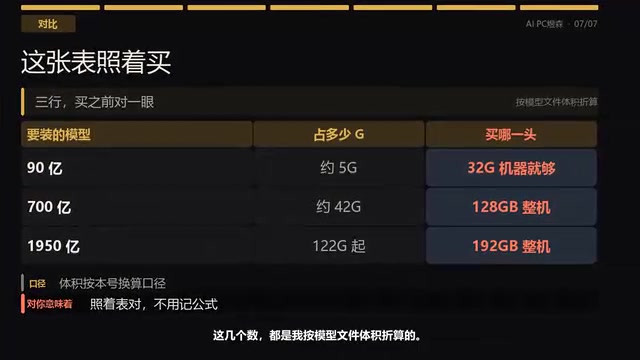
He provides a reference table you can check before buying a machine: a 9-billion-parameter model, that is 9B, is about 5G, and a 32G machine is enough; 70 billion, that is 70B, is around 40-something G, requiring a 128GB memory whole machine; 195 billion, that is 195B, needs 122.4GB at minimum, requiring a 192GB whole machine. These numbers are all converted from model file size—just compare how many G the model file is and you'll know.
The Essential Trade-Off Between the Two Paths
The core of this comparison isn't whether a GPU or a whole machine is stronger, but the collision of two approaches to resource allocation. The GPU path concentrates the budget on VRAM closest to the chip, trading for extreme bandwidth; the whole-machine path spreads the budget across large-capacity unified memory, trading for fitting headroom. For local large models that routinely run into hundreds of GB, the capacity threshold often arrives before the speed threshold. First confirm the model can fit, then decide how much premium to pay for speed—this is the purchasing logic the creator repeatedly emphasizes.
His review series focuses on running local large models on mini PCs, testing one machine at a time. In the future he'll also discuss whether running multiple AIs simultaneously on the same machine will lag, and a few numbers to check before buying a mini PC.
One-line Summary
For local large models, first check if it fits, then spend on speed—an 110K GPU can't fit a 195B model.
Paragraph Summary
Bilibili creator AIPC Yusen points out through hands-on comparison that the primary issue for running large models locally is capacity, not speed. An RTX Pro 6000 priced at around 110K RMB has 96GB of VRAM, yet can't fit the 195-billion-parameter DeepSync V4.1 Flash that needs 122.4GB—26GB short, making it impossible to load. Meanwhile, a 192GB unified-memory mini PC costs only a fraction of the GPU path and, although lower in bandwidth, can fit the model. The creator emphasizes that VRAM and system memory hold the same thing, differing only in distance from the chip, which determines speed rather than capacity. The purchase criterion should be to first confirm the model fits into the machine, and once space is sufficient, then spend on speed—the order can't be reversed.
Related articles
 Tech Frontiers
Gemini Omni 1.2 Flash: AI Video Moves Toward Draft-Style Editing
Google's Gemini Omni 1.2 Flash update enables conversational, draft-style editing of the same video—swap scenes while keeping products, adjust lighting while keeping characters. Clips up to 15s, 720p costs 30% less than the previous Flash—ideal for e-commerce ads, previs, and short-asset production.

Codex Tutorial: One-Command Install and Run Your First Task
Codex tutorial: one-command install and run your first task. Covers the four Codex forms, sandbox and approval guardrails, AGENTS.md and MCP configs, cloud network policy, and the iron rule of human review—everything you need to get started with this autonomous coding agent.
 Tech Frontiers
Localix: An Open-Source Agentic Development Environment with Multi-Model and Local AI Integration
Localix is an MIT open-source Agentic Development Environment (ADE) supporting seamless Claude Code plugin loading, multi-model cloud and local execution, Mini Apps extensions, and agent context management—an open AI collaboration workbench for developers.