Android Developer Verification: Four Paths and Global Rollout Timeline

Google details four Android Developer Verification paths, automation APIs, and the 2026 global enforcement timeline.
At the Android Developer Summit, Google presented Developer Verification, designed to curb malware by binding each app to an accountable legal entity. It covers four paths: automatic Play developer syncing, Android Developer Console registration for independent distributors, free limited accounts for students and hobbyists (device limit raised to 50), and an Advanced Flow for power users with mandatory restart and 24-hour countdown. Two APIs enable large-scale programmatic registration and status queries, and regional enforcement begins September 30, 2026, in Brazil, Indonesia, Singapore, and Thailand; organizations should apply for a DUNS number early.
At the Android Developer Summit (ADS), Google detailed the latest progress and complete implementation path for Android Developer Verification. This mechanism aims to break the malware distribution chain by binding every distributed app to a verified legal entity or developer, thereby thwarting malicious actors who exploit anonymity to rapidly spread harmful apps. Rob Clifford from the Android Developer Relations team and Nahid Vora, Product Manager for App & Ecosystem Trust, shared the four verification paths, automation tools, and key global rollout milestones.
Why Developer Verification?
Nahid Vora opened by getting straight to the core issue: financial fraud, banking trojans, and other malicious activities cause billions of dollars in user losses every year. Analyzing these attacks reveals a common pattern—malicious groups exploit anonymity to spread harmful apps quickly and repeatedly; by the time security teams identify a malicious package, the attackers have already moved on to the next target.
Developer verification is designed to break this asymmetry. By linking every app to a verified, accountable legal entity, verification significantly raises the economic barrier for scammers and dismantles the viability of "disposable" malware networks. According to official data, since verification opened to all developers in March, millions of apps worldwide have completed registration; in markets with regional protection already active—such as Brazil, Indonesia, Singapore, and Thailand—registered apps cover over 99% of app installs.
Package name and signing key are the two core identifiers of an Android app's identity. The package name (e.g., com.example.app) is the app's unique identifier in the system and stores, while the signing key is the developer's private key used to digitally sign the app, proving the integrity and authenticity of the app's origin. When installing and updating apps, the Android system verifies that the new version is signed by the same key to prevent malicious replacement. Developer verification binds these two identifiers to a verified legal entity: after registering the package name and signing key, the system can determine whether an app is distributed by an accountable developer. If a developer uses different package names or signing keys across different channels, these variants will not be automatically associated, so they must be registered manually—otherwise they may be blocked by regional enforcement.
Four Verification Paths: Matching Different Developer Types
Google designed four clear paths for different types of developers:
1. Google Play Developers
Over 99% of Play developers have completed Trader ID verification, and over 99% of apps are already registered on Play. Play Console automatically syncs registered package names to the backend registry. But there's one key scenario to watch: many developers distribute enterprise variants or list on other app stores outside of Play. If they use different package names or signing keys, the system won't recognize them. Such apps must be manually registered through the "Developer Verification" tab in Play Console.
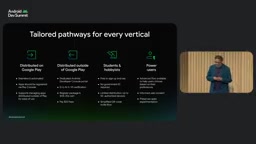
2. Independent Distributors Outside of Play
For developers who don't rely on Play Console, Google created a standalone Android Developer Console (at android.google.com/developer-console). The entire process takes just three steps: create an account (register as an organization or individual), complete ID verification (organizations need a Dun & Bradstreet number; if you don't have one, it takes at least 30 days—start the application immediately), and register package names and signing keys. The process of uploading packages and proving ownership of signing keys is very straightforward.
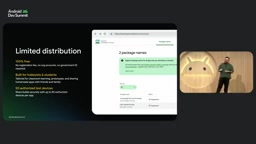
3. Students and Hobbyists: Limited Distribution Accounts
This path is completely free, requires no ID verification, and has no annual fee, DUNS number, or business registration documents—just a Google account. Developers can register a valid package name (e.g., Cameramagic) in the console and add the SHA-256 public key in the build step to bind the package name to the account. For sharing, developers add associated devices through the console, generate a QR code or link to send to the device owner; after the recipient confirms trust and agrees to install, they receive a verification code to send back to the developer, completing authorization.
Notably, based on developer feedback, Google announced it will raise the associated device limit from 20 to 50, to be rolled out soon.
4. Advanced Users and Open Source Experimenters: Advanced Flow
For advanced users who want to decide for themselves whether to install unregistered apps, Google offers an "Advanced Flow." Users must first enter developer mode (tap the build number seven times in "About phone"), then enable "Allow apps from unverified developers" in developer options. After enabling, they must confirm a warning prompt—if someone is guiding you to do this, it's likely a scam.
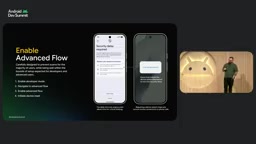
The key security design is that users must restart the device and wait through a non-skippable 24-hour countdown. This mechanism targets real-world financial scams that use urgency, fear, and phone coercion to force victims into sideloading malware. The 24 hours gives users a window to cool down and seek help. After the countdown ends, users can choose to temporarily disable verification (7 days) or permanently disable it, and must confirm the risk once more before final confirmation.
Automation Tools: APIs Make Large-Scale Compliance Possible
For large studios and third-party distributors managing dozens to thousands of apps, manual registration becomes a bottleneck. To address this, Google launched two APIs:
-
Android Developer Console API: Supports programmatic registration, allowing third-party stores to integrate the compliance process directly into their own user experience. The API includes conflict resolution rules based on real install counts—keys accounting for more than 50% of known installs take precedence, preventing unauthorized takeover of established package names. Because verification binds to a legal entity under a Google account, traditional service accounts and API keys cannot be used; CI/CD environments (such as GitHub Actions or Cloud Build) need to obtain a refresh token through a one-time OAuth 2.0 offline authorization, then generate short-lived access tokens as needed.
-
Android Developer Status API: A server-to-server API for IDEs and CI/CD tools to query whether a package name is registered to a verified developer and to verify that the signing certificate matches the registered credentials, prompting users to register unrecognized apps.
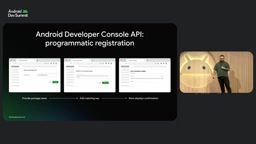
OAuth 2.0 offline authorization is an authorization framework that allows apps to access protected resources over the long term without direct user involvement. In CI/CD scenarios, traditional service accounts and API keys are disabled because they cannot be bound to a specific legal entity; developers must obtain a refresh token through a one-time OAuth 2.0 authorization flow. This refresh token can be securely stored in the CI/CD secret management system and later exchanged for short-lived access tokens as needed to call the Android Developer Console API for programmatic registration. This approach both satisfies automation needs and ensures every operation is traceable to a verified developer account.
Global Rollout Timeline
- Phase 1: March 2026, Android Developer Console launches.
- Phase 2: Five months later, developer tools become more broadly available.
- Phase 3: September 30, 2026, regional enforcement begins in Brazil, Indonesia, Singapore, and Thailand, with seven partner stores enforcing verified developer requirements.
- Phase 4: Protection scope will gradually expand throughout 2026.
Note: if a developer is located in China but distributes apps to the above enforcement regions, they must also complete registration.
What Developers Should Do Now
The official action list is very clear: Play developers should immediately audit the app registration status in Play Console, especially for variants distributed outside of Play; developers who distribute only outside of Play should create an Android Developer Console account and complete ID verification as soon as possible; students and hobbyists can create a free account and distribute apps to up to 50 devices.
Background
Dun & Bradstreet number (DUNS) is a globally used nine-digit business identifier assigned by Dun & Bradstreet to uniquely identify legal entities. In developer verification, organization identities (not individuals) need to provide a DUNS number to complete business identity verification. Because the DUNS application and review process typically takes several weeks, and the official recommendation is to allow at least 30 days, organizations planning to distribute through the standalone console should start their application as early as possible to avoid delays in app registration and distribution. Individual developers do not need a DUNS and can complete ID verification directly as individuals.
Social engineering scams are tactics in which attackers use psychological manipulation rather than technical vulnerabilities to induce users into performing unsafe actions. Common forms include impersonating customer service, creating urgent threats (such as "your account will be frozen"), or posing as technical support to guide victims into sideloading malicious apps under pressure. The mandatory restart and non-skippable 24-hour countdown in the Advanced Flow are specifically designed to interrupt this "urgency"-driven decision chain: restarting the device interrupts the attacker's real-time call or remote control with the victim, while the 24-hour waiting period provides a cooling-off window that gives users a chance to verify information or seek help from friends and family. This design shifts security decisions from emotional reaction to rational evaluation.
One-line Summary
Google details the four Android Developer Verification paths, automation APIs, and the 2026 global enforcement timeline.
Paragraph Summary
At the Android Developer Summit, Google presented the latest progress on Developer Verification, designed to curb malware spread by binding every app to an accountable legal entity. The article details four verification paths: automatic syncing for Play developers, registration through the Android Developer Console for independent distributors, free limited distribution accounts for students and hobbyists (device limit raised to 50), and an Advanced Flow for power users to install unregistered apps via mandatory restart and a 24-hour countdown. Google also launched two APIs for large-scale programmatic registration and status queries, and announced a timeline for regional enforcement starting September 30, 2026, in Brazil, Indonesia, Singapore, and Thailand, emphasizing that organizations need to apply for a DUNS number in advance.
Related articles

After Affirmative Action Ends: Sharp Drop in Black Enrollment and the Rise of HBCUs
After the Supreme Court ended race-conscious admissions, Black freshman enrollment at the top 50 most selective universities fell 27%, with Harvard dropping from 18% to 11.5% and Yale from 9.5% to 8%, as more Black students turn to HBCUs.

Claude Rolls Out Watermarking Across the Board: Paid Users Can't Opt Out, But Only a Select Few Can Detect It
Anthropic extends Claude's invisible text watermark to Mythos 5, Opus 4.7 and more, globally and with no paid opt-out. Even proofreading and translation get marked, yet detection is limited to regulators and enterprises.
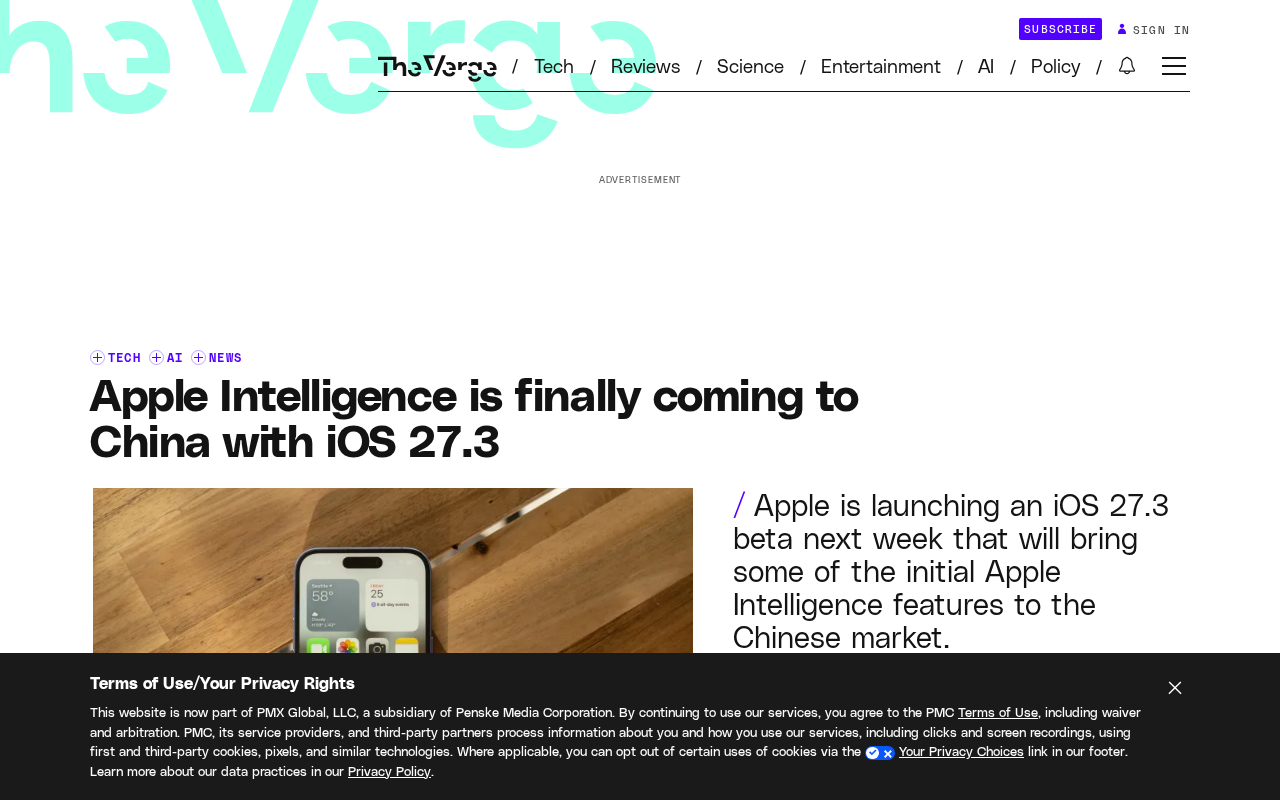
Apple AI Finally Enters China: iOS 27.3 Brings Apple Intelligence to the Chinese Market
Apple announces Apple Intelligence will enter China with iOS 27.3, beta on November 4, official release in December. This article analyzes the feature trade-offs, localization logic, and the practical impact on users and developers.