Android Studio Opens Up to Any Coding Agent: The BYOA Era Begins

Android Studio launches Bring Your Own Agent, letting external coding agents connect and use core IDE capabilities.
The Android Studio team released Bring Your Own Agent (BYOA), so developers are no longer locked into the built-in AI assistant and can connect any coding agent in the IDE; official examples include Cloud Agent, Codex, and Anti-Gravity. Integration takes three steps—select an agent, authenticate, and assign a task—and the account system is decoupled from the IDE. More importantly, external agents can access the emulator, build system, Compose preview, and Agent Skills, forming a real engineering loop from code generation to compile, run, observe, and fix, rather than stopping at text generation. The article argues this open strategy turns the AI assistant from a bundled feature into a pluggable component, reducing migration costs and vendor lock-in and enabling fairer comparison of agents on the same capability baseline; however, permission boundaries and resource scheduling details have not yet been explained officially.
From a Single Assistant to "Bring Your Own Agent": Android Studio's Open Strategy
Android Studio is changing how developers collaborate with AI. In an official demo video, the Android Studio team formally introduced the Bring Your Own Agent (BYOA) feature: developers are no longer locked into a single built-in AI assistant and can instead connect any coding agent of their choice within the IDE. The examples given in the video include Cloud Agent, Codex, and Anti-Gravity; users simply select an agent, complete authentication, and assign it their first task.
The essence of this change is turning the "AI assistant" from an IDE built-in feature into a replaceable, plug-in-style component. In the past, choosing Android Studio often meant accepting its bundled AI capabilities; now the choice of agent is handed back to the developer. For teams that have already established habits in other toolchains, this means a significant reduction in migration cost—there is no need to give up Android Studio's engineering capabilities just to use a particular agent.
Which Agents Can Be Connected?
The agents explicitly named in the video include Cloud Agent, Codex, and Anti-Gravity. These three names cover different usage scenarios: some lean toward cloud-hosted execution, some focus on code generation and completion, and others emphasize more autonomous task execution. The official video did not break down the capability boundaries of each agent one by one, but the phrase "any agent" indicates that this is an open integration framework rather than a whitelist limited to three products.
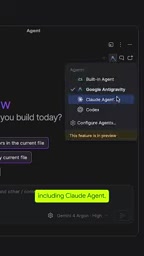
For developers, the key is not how long the current support list is, but whether the integration mechanism is standardized. The process described in the video is very lightweight: select an agent, authenticate, assign a task—three steps to get started. The presence of an authentication step shows that the agent's account system is decoupled from the IDE, so developers can use their existing subscriptions or credentials without having to repurchase services inside the IDE.
Codex was originally a code generation model released by OpenAI in 2021 and was also the technology foundation behind early GitHub Copilot; in 2025, OpenAI launched a cloud-based agent product for software engineering under the name "Codex," capable of executing coding tasks in parallel within a sandbox environment. Cloud Agent generally refers to a coding agent hosted and running in a cloud sandbox, where tasks are completed in remote containers and the local machine is only responsible for initiation and review. Anti-Gravity is an agent-first development environment launched by Google in recent years, emphasizing autonomous planning and execution of multi-step development tasks by the agent. What all three have in common is the ability to "accept a natural language task → autonomously invoke tools → produce reviewable changes," rather than mere code completion. This is precisely the prerequisite for them to be integrated into the IDE as plug-ins and to operate the emulator and build system.
Which IDE Capabilities Can Agents Access?
The core value of BYOA lies not in "being able to connect," but in "what can be done after connecting." According to the video description, these agents can access the latest IDE tooling components, including the emulator, build system, Compose preview, and Agent Skills.

This point deserves elaboration. The emulator means an agent can run the app itself and observe UI behavior; the build system means it can trigger compilation, read errors, and modify code accordingly; and Compose preview gives the agent immediate feedback at the UI level without having to guess layout effects. Combined, these capabilities upgrade the agent's behavior from "generating code snippets" to "a closed loop that validates changes in a real engineering environment." Agent Skills further suggests an extensible skill mechanism that allows agents to invoke preset combinations of capabilities to complete specific types of work.
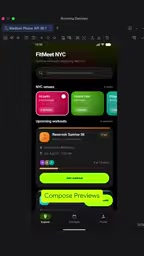
In other words, Android Studio turns the IDE itself into an agent "control console": an agent is not just a text generator in a chat window, but a participant that can operate builds, runs, and previews. The improvement in automation for complex tasks is structural rather than simple prompt optimization.
Agent Skills is a pattern gradually taking shape in agent engineering in recent years: packaging a reusable type of operation flow (for example, "add a new page and wire up navigation" or "fix a build failure") into a skill package with documentation, which the agent loads on demand rather than stuffing all instructions into the context at once. This approach both reduces token overhead and allows teams to solidify internal conventions into shareable capability units. In the BYOA context, Agent Skills means the IDE can provide a unified skill interface to different agents, so that external agents do not have to understand Android engineering conventions from scratch, thereby narrowing the starting-point gap between different agents.
Impact on Development Workflows
The first direct change brought by BYOA is the return of tool choice. Teams can select suitable agents according to their own tech stack, compliance requirements, and budget, without being locked into the IDE vendor's default options. The second change is increased comparability among agents—with the same set of IDE capabilities exposed to different agents, developers can more fairly evaluate who performs better on real engineering tasks, rather than making distorted comparisons across different tool environments.
Of course, open integration also brings new questions: whether different agents invoke IDE capabilities in a consistent way, how permission boundaries are defined, and how resource overhead is managed when agents execute builds and emulator operations. None of these were elaborated in the video. The official information remains at the level of "can be connected and can access these capabilities," and the specific permission model and scheduling details still await follow-up documentation.
The permission model for agent integration into the IDE is a key constraint of this kind of open framework. If an agent is to trigger builds, launch emulators, and modify project files, it effectively gains write permissions and process control over the local development environment. Therefore, it is usually necessary to distinguish three tiers of permissions: read-only (reading code and errors), controlled execution (running commands in a sandbox or restricted directory), and full autonomy, and to set confirmation or blocking for sensitive operations (such as signing configuration, network requests, and credential reading). Common industry practices include declaring a list of available tools based on protocols such as MCP, granting temporary credentials per session, and keeping audit logs for each command. These mechanisms determine whether BYOA can be adopted in enterprise environments and are the parts most in need of completion in official follow-up documentation.
Getting Started
According to the official description, the enablement process is quite straightforward: select an agent, complete authentication, and assign the first task. No complex configuration files are involved, and no additional plugin marketplace steps are mentioned. This low-barrier design fits BYOA's positioning—it aims to solve "let developers use the agent they are accustomed to," not to add a layer of configuration burden.
For developers already using Cloud Agent, Codex, or Anti-Gravity, this means they can bring their existing agent workflows directly into Android Studio while retaining Android-specific engineering capabilities such as the emulator, build system, and Compose preview. At the end of the video, the official team said it looks forward to seeing what developers build, but did not announce more detailed technical documentation or a timeline.
Conclusion
Android Studio's Bring Your Own Agent turns the AI coding assistant from a bundled feature into a pluggable component and enables external agents to invoke core IDE capabilities such as the emulator, build system, and Compose preview. This open integration approach may influence developers' daily tool choices more than any single agent's capability improvement.
One-line Summary
Android Studio launches Bring Your Own Agent, allowing external coding agents to connect and invoke core IDE capabilities.
Paragraph Summary
The Android Studio team has released the Bring Your Own Agent (BYOA) feature, so developers are no longer locked into the built-in AI assistant and can connect any coding agent within the IDE; official examples include Cloud Agent, Codex, and Anti-Gravity. The integration process requires only three steps—select an agent, complete authentication, and assign a task—and the account system is decoupled from the IDE, allowing developers to use existing subscriptions. More importantly, after integration, external agents can access the emulator, build system, Compose preview, and Agent Skills, forming a closed loop of "generate code—compile—run—observe—fix" in a real engineering environment rather than stopping at text generation. The article argues that this open strategy turns the AI assistant from a bundled feature into a pluggable component, reducing migration costs and vendor lock-in and enabling fairer comparison of different agents on the same capability baseline; however, details such as permission boundaries and resource scheduling have not yet been explained officially.
Related articles

OpenAI Breaks ETH? P=NP Could Upend the Cryptography World
OpenAI reportedly disproved ETH with a sub-exponential algorithm, sparking P=NP speculation. What it means for RSA, blockchain, and protein folding.
When an Anti-Fingerprinting Script Is …
When an Anti-Fingerprinting Script Is Flagged as a Bioweapon: The Detection Dilemma of Security Tools
An anti-fingerprinting script was flagged as a bioweapon by security scanning, sparking Hacker News debate. This analysis covers the causes of keyword-matching false positives, how developers respond, and the long-term imbalance between automation and precision in security tools.
41,000 DHS Employee Records Leaked, Including Undercover ICE Agents
Data breach exposes 41,000 DHS employees, including undercover ICE agents. Analysis of sensitive data risks, law enforcement security gaps, and protection measures like access control and auditing.