Annotate: A New Tool That Turns Screen Recordings into AI Coding Prompts

Annotate converts screen recordings with annotations and voice into prompts for AI coding agents.
Annotate is a free, local-first tool that lets developers create multimodal prompts by recording their screen, drawing annotations, and narrating their intent. These video prompts integrate directly with AI coding agents like Cursor, Claude, and Codex, solving the challenge of expressing complex UI and interaction requirements that are difficult to convey through text alone.
When Prompts Go From Text to Video
As AI coding tools become increasingly prevalent, accurately communicating requirements to AI agents has become a new challenge for developers. Traditional text prompts often struggle to describe specific locations on an interface, interaction flows, or visual details—you end up spending considerable effort explaining exactly what "that button in the top-left corner" or "that area in the middle when you scroll down" means. Annotate, a new tool that recently ranked fifth on Product Hunt, offers an imaginative solution: turning screen recordings directly into AI coding prompts.
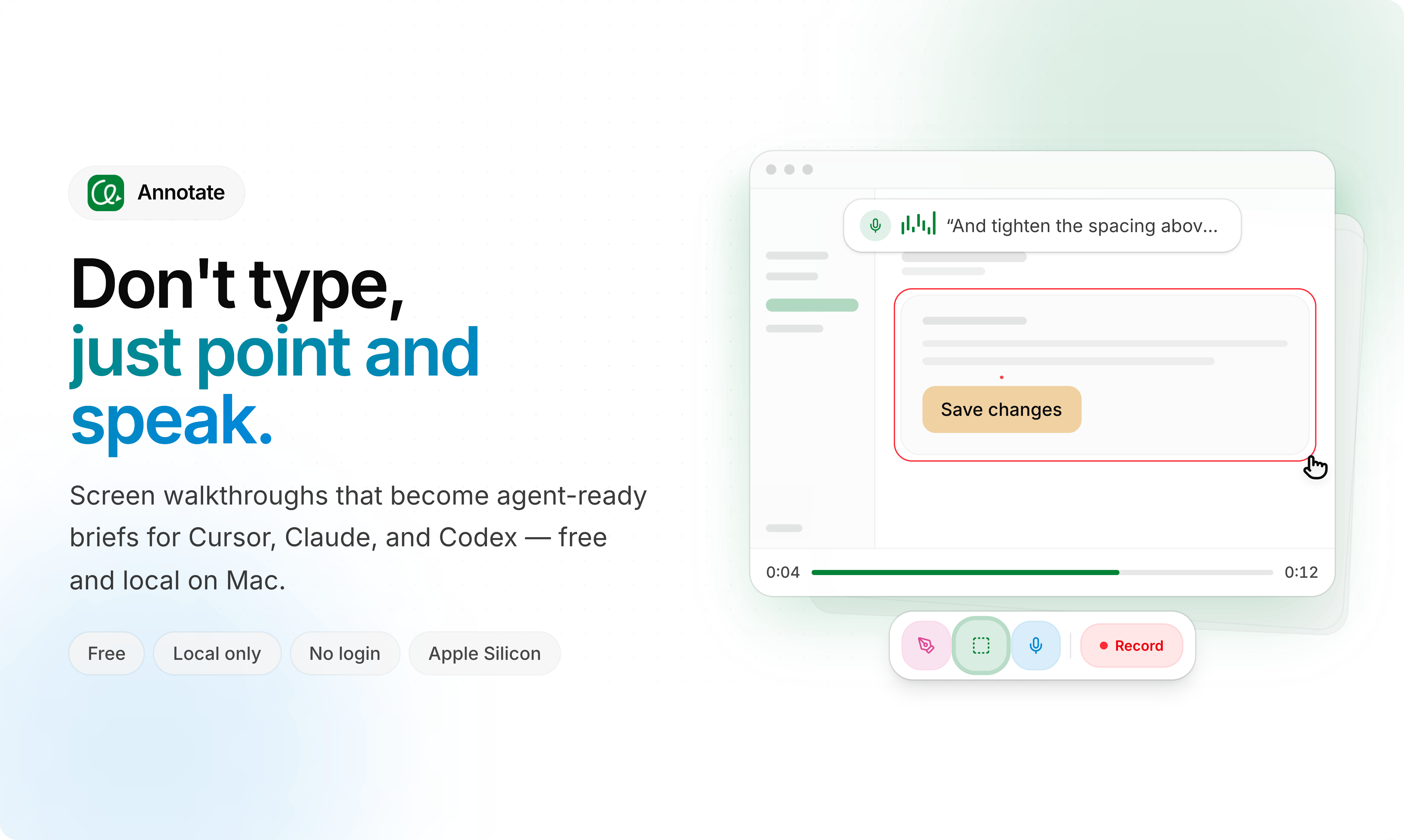
Annotate's core concept is captured in its slogan—"Screen recording as prompts." Users simply record their screen, use drawing tools to annotate and circle elements on screen, narrate their intent via voice, and then hand this annotated video to an AI agent. This multimodal expression method of "record + circle + speak" nearly replicates the natural process of communicating requirements face-to-face.
Which AI Coding Agents Does Annotate Support?
Interestingly, Annotate isn't trying to become yet another AI coding tool—it positions itself as an "input frontend" for existing tools. According to its official description, the video prompts it generates can directly interface with Cursor, Claude, and Codex, as well as any AI coding agent.
Cursor is an AI-native IDE built on the VS Code architecture that deeply integrates large language models to assist with code writing, debugging, and refactoring, representing the mainstream form of current AI coding tools. Developers describe requirements in natural language within the editor, and AI directly generates or modifies code. Similar tools include GitHub Copilot, Windsurf, and others. OpenAI's Codex is an AI agent focused on code generation, capable of executing more complex multi-step programming tasks. These tools form the core ecosystem of AI-assisted programming today, but their input interfaces are almost entirely text-based—precisely the gap Annotate aims to fill.
This means Annotate takes a "complementary" rather than "competitive" approach. In developers' current workflows, AI IDEs like Cursor already handle substantial code generation and modification tasks, but their understanding of complex interface requirements remains limited by text description capabilities. Annotate aims to intervene at this point, letting developers convey intent to these agents more intuitively. For scenarios involving UI adjustments, interaction refactoring, and bug reproduction, a screen recording with annotations and narration is clearly more efficient than lengthy text descriptions.
The Core Value of Multimodal Prompts
From a technical trend perspective, Annotate's approach aligns with the current development direction of multimodal large models. Multimodal large models are AI models capable of simultaneously processing and understanding multiple information types including text, images, audio, and video. Since 2023, GPT-4V (Vision) first demonstrated the ability to integrate image understanding into language models, followed by Claude 3 series, Gemini, and other models supporting image input. During 2024-2025, these models further expanded into video understanding, capable of frame-by-frame video analysis, understanding temporal relationships and spatial layouts. This technological advancement laid the foundation for tools like Annotate—only when downstream AI models truly possess the ability to "see" and understand video can video serve as an effective prompt medium.
Compared to pure text, video contains operational flows in the temporal dimension, interface layouts in the spatial dimension, and tone and emphasis conveyed through voice—together forming far richer context than text alone.
For typical needs like "reproducing a bug," developers previously had to write lengthy step-by-step instructions, but now they simply record the entire process of triggering the bug, and AI can "see" the problem. This shift from "describing" to "showing" may be an underestimated direction in prompt engineering evolution.
Local-First and Free Usage Strategy
Another distinctive feature of Annotate is being local-first (local-only) and completely free. Local-first is a software design philosophy emphasizing that data storage and core computation happen on the user's local device rather than relying on cloud servers. This philosophy was systematically articulated by Ink & Switch lab in a 2019 paper and has gained more attention in recent years as privacy awareness grows and edge computing capabilities improve.
In an era of increasing data privacy concerns, local processing means users' screen recordings aren't uploaded to third-party servers—particularly important for developers working with sensitive code or commercial interfaces. Screen content may include unreleased product interfaces, internal codebases, trade secrets, or even personal privacy information. Keeping this data local not only avoids data breach risks but also sidesteps compliance pressures from data protection regulations like GDPR.
The free strategy lowers the barrier to trying the tool. As a utility product, Annotate clearly prioritizes establishing user habits and ecosystem positioning first. This aligns with the cold-start logic of many developer tools—attract early users with free and privacy-friendly positioning, then consider monetization paths later.
Judging from its performance on Product Hunt with 116 votes and fifth place ranking for the day, this strategy has achieved solid initial response. It was simultaneously categorized under Design Tools, Developer Tools, and Artificial Intelligence, reflecting the product's cross-domain nature.
What Real Pain Point Does Annotate Solve?
To understand Annotate's significance, the key is identifying the real pain point it targets: the "requirement expression gap" in the AI coding era.
AI agents are becoming increasingly capable, but they ultimately still depend on the quality of human input. When a developer faces a complex frontend interface and wants AI to "make the border radius on this card a bit smaller, then align the spacing here with the element below," pure text often falls into ambiguous reference problems. Annotate uses screen recording and annotations to make these vague references concrete, essentially increasing the bandwidth of human-machine communication.
"Bandwidth" is an apt metaphor here: text-only prompts are like narrowband connections with limited information transmission rates prone to distortion; multimodal prompts combining video, annotations, and voice are equivalent to increasing communication bandwidth by several orders of magnitude, allowing developers to convey more and more precise contextual information in a single interaction.
Use Cases and Potential Limitations
As an early-stage product, Annotate faces some questions yet to be validated. First, can all downstream AI agents properly parse video prompts? Support for multimodal input varies across tools, and whether Annotate's output can be accurately understood by Cursor, Codex, and others directly determines its practical value.
Second, video as prompts also raises cost considerations—processing video typically consumes more tokens and compute than text. In LLM API calls, tokens are the unit of measurement, with one English word roughly equaling 1-2 tokens. Text input token consumption is relatively manageable, but image and video token overhead increases dramatically. Taking Claude 3.5 as an example, a single image might consume hundreds to thousands of tokens, while a video processed frame-by-frame could consume tens of thousands or more. At current mainstream API pricing (e.g., GPT-4o at approximately $2.5-10/million tokens), frequently using video as prompts could cost one to two orders of magnitude more than pure text, creating real constraints for budget-limited indie developers or small teams.
Additionally, while "record + narrate" is intuitive, for simple requirements it may actually be more cumbersome than typing a few lines of text—the tool needs to identify its optimal use cases.
The Next Stop for Prompt Engineering: From Text to Multimodal
Annotate's emergence represents a concrete attempt at evolving prompt engineering from "text optimization" toward "multimodal expression." Prompt Engineering as a practical discipline has already developed a rich system of techniques in the text dimension—from early simple instructions, to Chain-of-Thought reasoning, Few-shot Learning, structured prompt templates, and system prompt design. However, as AI application scenarios expand from pure text to visually intensive domains like interface design and interaction development, the expressiveness bottleneck of text prompts becomes increasingly apparent. The principle that "a picture is worth a thousand words" applies equally to AI interaction, driving industry exploration of multimodal prompts.
Annotate hasn't tried to reinvent AI coding agents but smartly works on the communication layer between humans and AI, using screen recording, drawing, and voice—three of the most natural forms of expression—to fill the gaps left by text prompts.
Regardless of whether Annotate itself ultimately succeeds, the direction it points to deserves attention: as AI agent capabilities improve, how to more efficiently and naturally convey intent to them will become a key variable determining productivity. And "screen recording as prompts" may well be an inspiring milestone along this evolutionary path.
Key Takeaways
Related articles

RAG Getting Started in Practice: From Principles to Building an Enterprise Knowledge Base
Bilibili RAG course highlights: from retrieval-augmented generation principles, document chunking and vectorization, to five accuracy factors and enterprise knowledge base boundaries, with fine-tuning vs RAG selection advice.

AI Model Selection Guide: DeepSeek vs. Qwen3 in Practice
How should AI developers choose models? Based on a Bilibili tutorial, this article breaks down the Function Calling differences between DeepSeek V3 and R1, Qwen3's programmatic thinking mode switching and agent capabilities, and outlines a multi-model learning path and practical selection logic.

Anchoring, Loss Aversion, and Nudges: 5 Psychological Tactics Retailers Use to Make You Spend
Behavioral economics reveals how retailers use anchoring, framing, loss aversion, and nudge theory to manipulate your spending decisions. This article breaks down 5 common psychological tactics and offers counterstrategies like slowing down decisions and setting your own anchors to see through the pricing design behind discounts.