Anthropic Engineers Move Beyond Monolithic Agents: 4 Keys to Skills-Based AI Development

Anthropic engineers replace per-task agents with reusable Skills — 4 keys to make them work.
Anthropic engineers Barry Jeng and Mahesh Murag propose a shift from building separate agents for every task to equipping a single general-purpose agent with reusable "skills" — much like apps on a smartphone. The approach hinges on four principles: saving validated code to avoid redundant generation, writing precise skill descriptions to enable progressive disclosure and prevent context bloat, converting every human correction into persistent workflow instructions, and embedding objective verification steps so the AI self-reviews before delivering output. The goal is a self-improving system that handles its own quality checks, freeing human attention for taste, strategy, and business judgment.
From Building Agents to Building Skills: A Shift in AI Development Thinking
Two Anthropic engineers — Barry Jeng and Mahesh Murag, the very creators of the Skills mechanism — recently shared a counterintuitive insight: they no longer rebuild a separate agent for every task. The reason is that the underlying models' general capabilities have far exceeded expectations. Rather than reinventing the wheel each time, it makes more sense to equip a single, general-purpose agent with reusable "skills."
Think of it like a smartphone: the model is the processor, the agent runtime is the operating system, and skills are the apps. The processor and OS come from a handful of vendors — you rarely touch them — but you're free to install any app you want, each one giving the same device a specific capability. Claude Code can already read files, write code, and use tools to get things done. There's no need to build from scratch every time you want a presentation, a company research report, or a LinkedIn post — just give it a skill containing the workflow, context, scripts, and examples.
This approach is reshaping how AI systems get built. Here's a breakdown of the four keys that make skills genuinely useful.
Key 1: Save Validated Code — Stop Reinventing It
The Anthropic team repeatedly noticed the same pattern: nearly every time Claude styled a set of slides, it wrote essentially the same Python script. This wastes a huge number of tokens reconstructing code that's already been written, and regenerating it from scratch each time produces inconsistent results.
The fix is straightforward — have Claude save the script into the skill, or as they put it, "leave a tool for its future self." The next time styling is needed, it just runs the version that's already been validated. This is essentially the DRY principle from software development (Don't Repeat Yourself): once a solution works, store it for reuse instead of rewriting it every time.
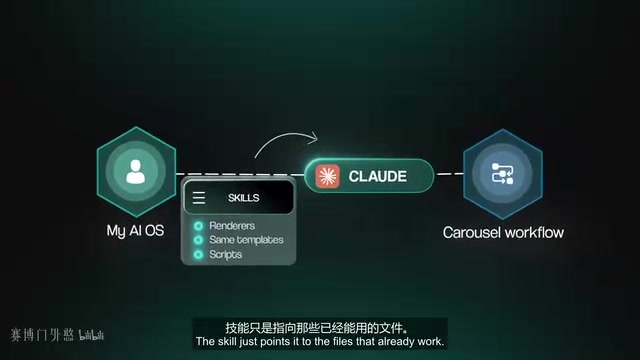
In practice, when Claude produces a script you're happy with, don't let it get buried in a chat history. When you start a new conversation, tell it: save the script you just used to the skill's scripts folder, update the skill's MD file, and execute that file directly going forward. Then run it again to verify. The key is comparing two outputs of the same task to confirm the skill is actually calling the saved file. The output may still vary slightly, but you've replaced a fresh guess with a piece of validated code.
Key 2: Write Precise Skill Descriptions So Claude Loads Only the Right One
Just as a mechanic doesn't dump every tool on the bench before changing a tire, Claude doesn't read every skill's full documentation at startup. Anthropic designed a "progressive disclosure" mechanism: at launch, it reads only each skill's name and description (the YAML front matter). Only when your prompt matches a skill's description does it load the full skill MD file — and larger reference files and scripts stay in the folder, loaded on demand.
This "lazy loading" approach keeps irrelevant instructions out of the working context, preventing bloat and what's known as "context poisoning." But it only works if descriptions are clear enough. If one skill says "help with content" and another says "create marketing assets," with overlapping descriptions and no guidance on when each triggers, Claude can only guess.
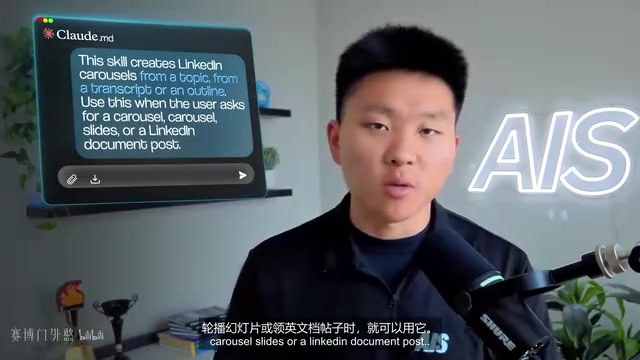
A better approach is to write descriptions in plain language that spell out purpose and trigger conditions — for example: "This skill generates LinkedIn carousel posts from a topic, transcript, or outline. Use it when the user asks for a carousel, carousel slides, or a LinkedIn post." You can even have Claude Code audit itself: list what each skill does, when it triggers, and where it overlaps with others — then rewrite only the ambiguous descriptions. Afterward, test with three types of requests: an obvious request that should trigger it, a rephrased request that should still trigger it, and a completely unrelated request that absolutely should not. Remember: a skill that can't be found is essentially nonexistent.
Context Poisoning / Context Bloat is a common engineering problem in LLM applications. Because a model processes all context during inference, stuffing the context window with irrelevant instructions, tool documentation, or history causes the model's attention to scatter, actually degrading performance on the relevant task — similar to trying to focus in a noisy environment. YAML Front Matter is a structured data format wrapped in
---delimiters at the top of a Markdown file, commonly used to store metadata like titles, descriptions, and trigger conditions. Anthropic's progressive disclosure mechanism uses this format so the system only parses lightweight metadata fields at initialization, rather than loading every skill's full content into context — keeping the system precise and efficient even as the number of skills grows.
Key 3: Turn Every Correction into a Persistent Instruction
Many people correct Claude and then close the conversation, and that lesson disappears with it. Maybe it used the wrong tone, skipped a verification step, or produced an output format you never want to see again. If you just say "fix it," it probably will — but the underlying process stays broken.
A better approach is to have the agent retrace its steps and explain its work. For example, if it hits a "file not found" error, don't just hand it the correct path — have it explain where it searched and why it missed it, then update the routing or skill so the next run starts from the right place.
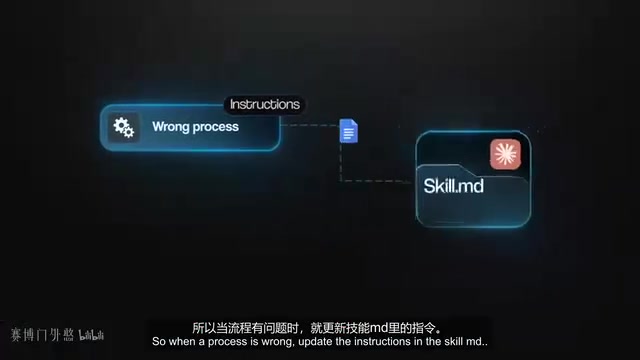
Skills store procedural knowledge for completing specific tasks — not recordings of individual conversations. So when a process has a flaw, update the instructions in the skill's MD file. If tone, brand voice, or examples are missing, add a reference file. If the same error keeps recurring, add an explicit rule to prevent it. Then re-run the same task to verify the fix. Over time, the skill becomes a living record of how you want the work done.
One important caveat: no skill can make a weaker model perform exactly like a stronger one — different models still vary in output and comprehension. But your workflow is portable. Agent Skills is an open format, and the same skills folder works across compatible frameworks like Codex and Hermes. Test a key skill in another framework; if it breaks, look for hidden assumptions or instructions that only make sense in a specific model, then tighten the skill.
The procedural knowledge mentioned here comes from cognitive science — it refers to knowing how to do something, as opposed to declarative knowledge (knowing what something is). A skills file stores the steps, rules, and workflows for completing a task, not the specific content of any given conversation. This makes skill accumulation more like building a company's Standard Operating Procedures (SOPs) than archiving chat logs. The Agent Skills open format means the skills folder is a portable, cross-framework specification — not tied to any specific AI platform. Codex and Hermes are examples of compatible frameworks. This interoperability reduces vendor lock-in risk: the workflow knowledge you accumulate is stored in a universal format that can migrate as your toolchain evolves, without rebuilding from scratch.
Key 4: Build Verification into the Skill — Don't Let It Hand You a First Draft
This may be the most important point — and the biggest gap in most AI workflows. A skill generates something, saves a file, and tells you "done." You open it and find broken formatting, sources that don't support the conclusions, or a script that completely misses the target audience. The AI finishes seventy or eighty percent of the work, and the last twenty or thirty percent still falls on you.
If you already know how to check the output yourself, write those checks into the skill. For slide decks, have it render each slide as an image, review the screenshots, fix anything clipped or out of bounds, and re-render before finishing. For research reports, have it open the original sources and map each claim to its evidence, removing anything that can't be verified.
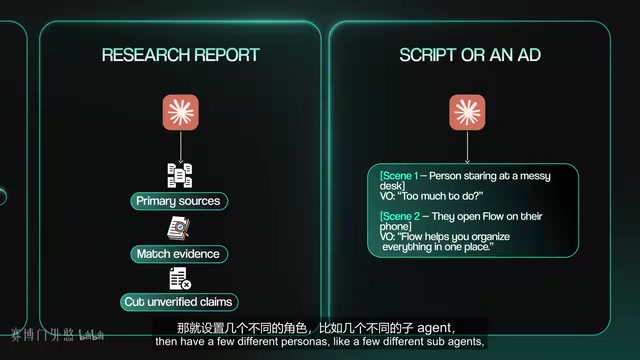
For more subjective content, set up multiple sub-agents playing different reviewer roles: a newcomer who flags what's confusing, a skeptical buyer who identifies what they won't believe, and a target reader who marks where they'd scroll past. You don't have to accept every piece of feedback, but the skill can surface recurring issues and make the most impactful revisions.
The critical point: verification can't be Claude reading its own work and saying "looks good." It needs objective evidence beyond the output itself — screenshots, test results, source references, or multi-perspective feedback. You can add this kind of process to almost any skill: define acceptance criteria, create an initial draft, check it with your verification method, fix all issues and re-run, only output when everything passes, and include a brief summary of what was checked. Where verification isn't possible, say so explicitly. That way, the first thing you see isn't the agent's rough draft — it's the version that's already been through its fourth, fifth, or sixth round of self-review.
Multi-Agent Review is a technique that uses multiple AI instances with different role prompts to simulate multi-perspective evaluation. The theoretical basis: a single model reviewing its own output has a systematic bias — it tends to agree with its own reasoning and struggles to spot logic gaps or audience experience issues. By assigning sub-agents roles like "skeptical buyer" or "target reader newcomer," you can partially break this self-confirmation bias and get more diverse feedback signals. This approach essentially automates a human editorial review process within the workflow. That said, multi-agent feedback is not equivalent to real user testing — in scenarios requiring highly contextual judgment (brand voice, cultural sensitivity), human final review is still essential.
Conclusion: One General-Purpose Agent, Trained to Work Your Way
Tying all four points together, what Anthropic's engineers are really building is a self-improving system: save validated code instead of rewriting it, give each skill a precise description so Claude loads only the right one, convert every correction into a persistent instruction, and complete verification before the output ever reaches you.
The human still makes the final call — especially on taste, strategy, and business judgment. But the goal is to hand off everything the AI can discover on its own, so you're no longer burning energy catching low-level mistakes. That's the core value of moving from "building agents blindly" to "building with skills."
Related articles

Chain of Thought Isn't Just for AI: How Humans Can Use CoT to Improve Thinking Quality
Chain of Thought isn't just a prompt trick for large models. Starting from a Hacker News discussion, this article analyzes why CoT works for human thinking too, breaks down actionable ways to transfer it, and highlights the key differences between human CoT and machine CoT.
Cloudflare Teams Up with OpenAI: Closi…
Cloudflare Teams Up with OpenAI: Closing the Loop from Vulnerability Discovery to Defense with AI
Cloudflare uses OpenAI Daybreak to investigate security vulnerabilities and generate reviewable remediation plans, while developers use Codex to boost coding efficiency and quality.

Orca Multi-Agent Orchestration in Practice: A Guide to Parallel Collaboration with Claude and Codex
Orca is Stable AI's free open-source agent workbench supporting 34 agents like Claude Code and Codex in parallel. Learn its Git worktree isolation, multi-model orchestration, and mobile management.