Anthropic Python SDK v1.5.0 Released: Managed Agents and Tool Use Get Major Upgrades

Anthropic Python SDK v1.5.0 upgrades Managed Agents, simplifies tool use, and tightens credential security.
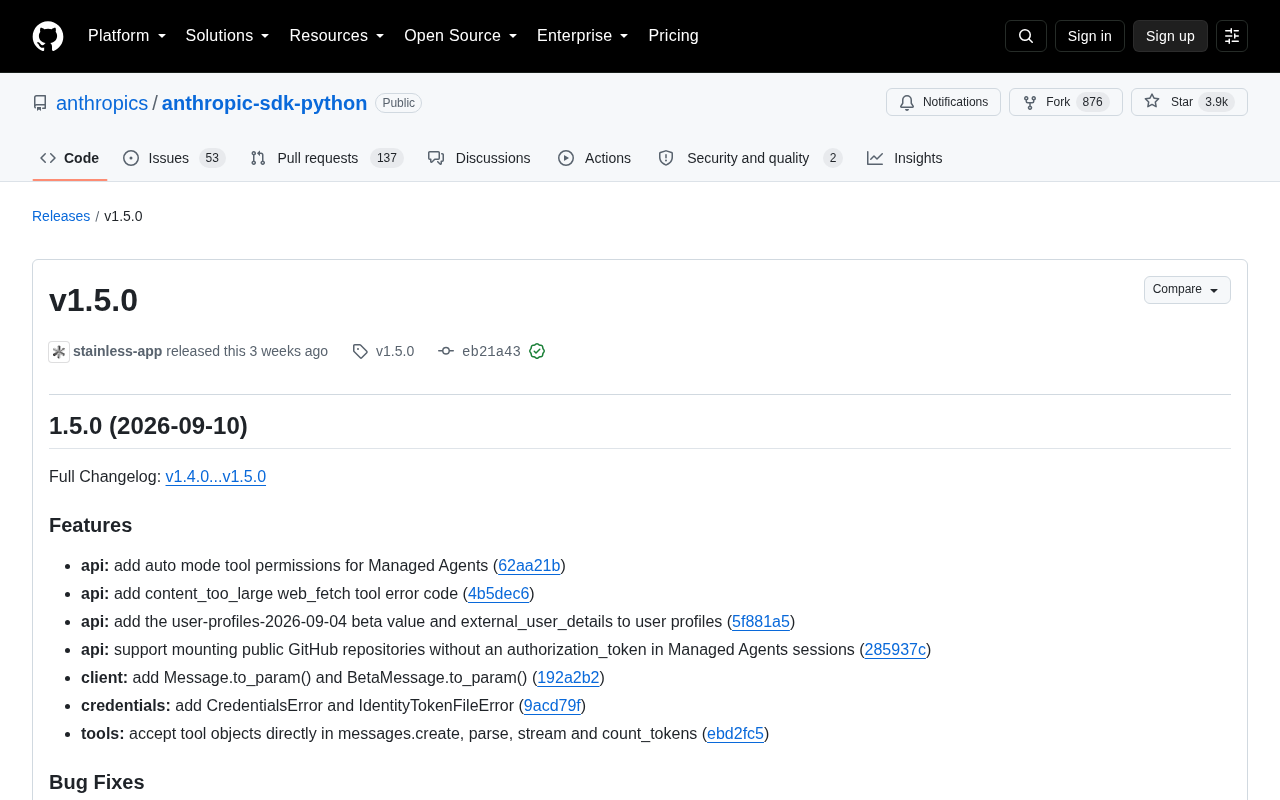
Anthropic Python SDK v1.5.0 delivers upgrades across three fronts: Managed Agents gain auto mode tool permissions and support for mounting public GitHub repos without an authorization token; core methods like `messages.create` and `stream` now accept tool objects directly, and a new `Message.to_param()` method simplifies multi-turn conversation workflows; on the security side, the SDK now rejects credential files with overly permissive access, following SSH key security conventions, with new dedicated exception types for better error traceability. A streaming bug where partial tool input JSON polluted content blocks has also been fixed, and `idempotency_key` is now deprecated. Check credential file permissions carefully before upgrading.
Anthropic's official Python SDK has landed its v1.5.0 update. This release revolves around three main themes: Managed Agents, tool use experience improvements, and secure credential handling. It both expands the capability boundaries of agent workflows and fixes several issues related to streaming output and credential security. For developers building Claude applications in Python, this is an upgrade worth picking up sooner rather than later.
Enhanced Managed Agent Capabilities
A significant portion of this update focuses on API improvements for Managed Agents. The new version introduces auto mode tool permissions for managed agents, meaning agents can acquire and use tools in automatic mode during task execution — without requiring explicit authorization configuration at every step. This simplifies the setup of multi-step agent workflows considerably.
Another practical change is support for mounting public GitHub repositories without an authorization_token. Previously, connecting to a code repository typically required configuring an authorization token, which felt unnecessary for public repos. The new version allows direct mounting of public repositories within Managed Agent sessions, lowering the barrier for code-focused agents. Typical use cases include code review, documentation generation, and repository Q&A.
On the API side, a new user-profiles-2026-09-04 beta value and an external_user_details field in user profiles have been added, enabling more granular context management for multi-user and multi-identity agent deployments.
What are Managed Agents? Managed Agents is a server-side orchestration mechanism provided by Anthropic that lets developers host multi-step agent workflows on Anthropic's infrastructure, without having to manage the tool-calling loop, state management, or error retry logic themselves. Unlike traditional single-turn API calls, Managed Agents can execute tasks continuously across multiple reasoning steps — autonomously deciding which tools to call and how to handle results at each step until the goal is achieved. This is particularly well-suited for complex scenarios requiring multiple rounds of interaction, such as code execution, file operations, and web retrieval. The introduction of auto mode tool permissions means that in managed mode, agents can dynamically acquire and use a pre-registered set of tools without the developer needing to declare permissions on each individual call — significantly reducing the configuration complexity of building long-running automated tasks.
Smoother Tool Use and Message Handling
Tool use is a high-frequency part of Claude application development, and v1.5.0 delivers noticeable usability improvements in this area. The most direct change: messages.create, parse, stream, and count_tokens can now accept tool objects directly. Developers no longer need to manually convert tools into a specific parameter structure, resulting in cleaner code and fewer call failures caused by formatting errors.
Complementing this are the new Message.to_param() and BetaMessage.to_param() methods. These allow developers to conveniently convert existing message objects back into parameter form — particularly useful in multi-turn conversations, message replay, or caching scenarios.
The web fetch tool has also been improved with a new content_too_large error code. When fetched web content exceeds the processing limit, the SDK now returns a clear, specific error type rather than leaving developers to face an ambiguous failure — a practical improvement for building agents with live web retrieval capabilities.
What is Tool Use? Tool Use is a mechanism in the Claude API that allows the model to proactively request calls to external functions or services while generating a response. Developers define a set of tools in advance (such as a search engine, calculator, or database query interface). During reasoning, if the model determines it needs external information, it returns a structured tool call request in its response. The application layer then executes the call and passes the result back to the model to continue reasoning. Previously, developers had to manually serialize tools into a specific dictionary structure when calling methods like
messages.create— any format deviation would cause the request to fail. v1.5.0 allows tool objects to be passed in directly, with the SDK handling serialization internally, reducing boilerplate code and the likelihood of errors. TheMessage.to_param()method addresses the pain point of re-injecting historical messages into context during multi-turn conversations — when implementing memory-enabled dialogue or message replay logic, developers can directly convert existing message objects into the API parameter format, avoiding manual message structure assembly.
Critical Fixes for Credential Security and Streaming
On the security front, the new version tightens credential handling policy. The SDK will now reject credential files that are accessible by group or other users — in other words, if a credential file's permissions are too permissive, the SDK will actively throw an error rather than continue loading. This behavior follows the security conventions of SSH keys and effectively prevents keys from being accidentally read in multi-user environments. Two new exception types, CredentialsError and IdentityTokenFileError, have been added to make credential-related error handling more targeted.
For streaming output, a subtle but impactful bug has been fixed: previously, when parsing tool calls in a stream, incomplete tool input JSON could remain in content blocks, causing abnormal parsing results. The new version ensures these partial JSON fragments don't pollute content blocks. Related to this, parsed_output is no longer written into exported text blocks, preventing redundant data during serialization.
In terms of client behavior, extra_body is now merged before client hooks run, ensuring that the execution order of custom request body logic and hook logic matches expectations.
About the credential permission policy: This approach is borrowed from Unix systems' security conventions for SSH private keys: SSH clients refuse to use key files with
grouporotherpermission bits set (i.e., file permissions must be no broader than600), otherwise treating them as insecure and terminating the connection. Similarly, Anthropic SDK's new policy requires that credential files be readable only by the file owner. If the file permissions allow access by group members or other users, the SDK will throw aCredentialsErrorand abort the credential loading process. This change is especially important in multi-user servers, containers with shared mounted volumes, or CI/CD environments — contexts where credential file permissions are easily overlooked and have historically been a common path for API key leaks. After upgrading, developers can runchmod 600 <credential-file-path>to correct permissions and resolve the error.
Cleanup and Deprecations
v1.5.0 also includes an internal cleanup pass. Unused portions of the idempotency request option have been removed, while idempotency_key is retained as a deprecated no-op — meaning existing code won't immediately break, but developers should plan to migrate. On the documentation side, descriptions of environment-scoped fields have been corrected. Internally, the package version number is no longer stamped into generated files, and header comments have been removed from generated files. These changes are invisible to end users but help with ongoing maintenance and reduce meaningless diffs.
Upgrade Recommendations
Overall, v1.5.0 is a release that combines both feature enhancements and security hardening. For teams using Managed Agents, auto mode tool permissions and public repository mounting are worth trying immediately. For general application developers, direct tool object passing and the streaming fix will directly improve the day-to-day development experience. Note that the tightened credential file permission policy may cause errors in some deployment environments — it's worth checking credential file access permissions before upgrading. Since idempotency_key is now deprecated, projects with idempotency logic should also plan their migration paths in advance.
Related articles

DeepCell: One-Click AI Generation of Documents, Spreadsheets, and Slides
DeepCell tops Product Hunt with one-click generation of documents, spreadsheets, and slides, using the .deepcell format for linked updates, designed for System 2 tasks like modeling and sales reviews.

Doneas: 15-Minute Daily Accountability Calls That Keep Indie Developers From Procrastinating
Doneas is a daily accountability tool for indie developers: plan tasks on Monday, join a 15-minute call with five builders each day, and log deliveries on a public progress page. This article analyzes its core mechanics, effectiveness, and potential issues around retention and matching.

Fastlane 2.0: Fully Automated AI Ad Campaigns, From Creative to Optimization
Fastlane 2.0 is an AI ad automation tool: enter your website and it learns your brand, generates video and image ads, and runs and optimizes them on Meta, TikTok, Instagram, and YouTube.