AppleFileViewer: An Open-Source Tool for Browsing iPhone Backups Across Platforms

A free, open-source cross-platform tool for browsing iPhone backups locally and offline.
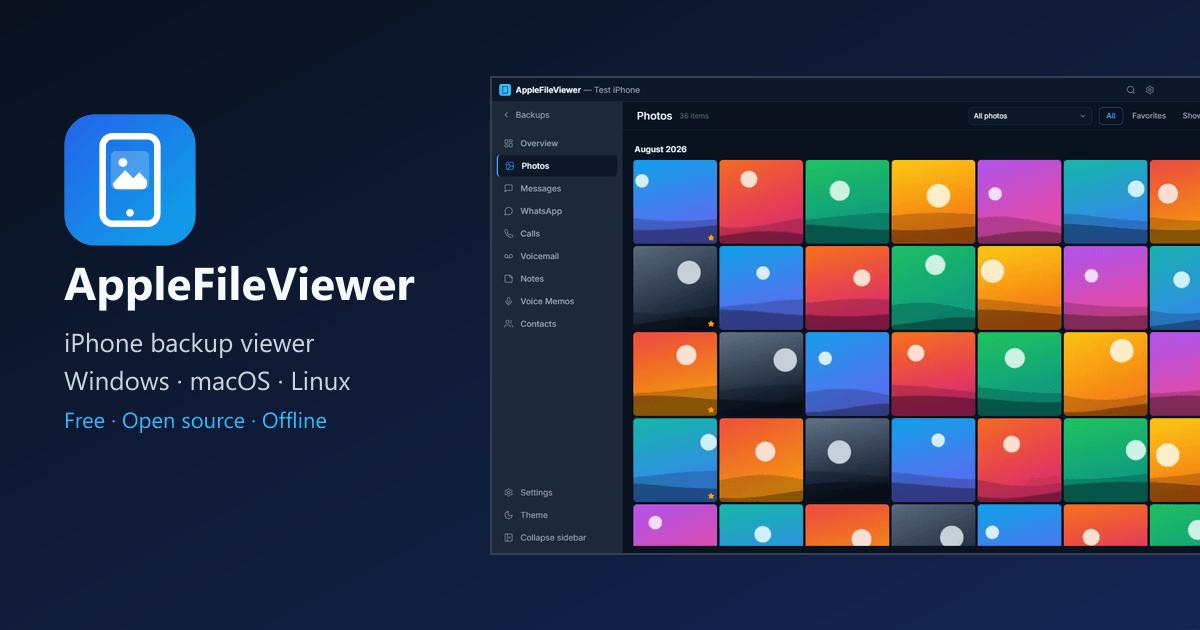
AppleFileViewer is an open-source desktop app for Windows, macOS, and Linux that lets users browse local iPhone backups without an internet connection or account. It parses photos, iMessage, WhatsApp, call logs, contacts, and more — including encrypted backups with password unlock. With global search and PDF/CSV export, it covers both casual retrieval and professional archival needs. Its standout feature is a fully offline, auditable-code privacy model, setting it apart from paid or cloud-dependent alternatives. It's especially valuable for Windows and Linux users underserved by Apple's ecosystem.
Apple's backup system has always been notoriously closed off. For everyday users, retrieving a few photos or chat messages from a local backup means wrestling with an opaque file structure and encryption barriers. An open-source desktop app called AppleFileViewer aims to solve exactly this problem — letting you browse local iPhone backups on Windows, macOS, and Linux, entirely offline.
What It Actually Does
AppleFileViewer is, at its core, a local iPhone backup browser. When you back up your iPhone to your computer via iTunes or Finder, the data ends up scattered across system directories in either encrypted or unencrypted form — in a format that's essentially unreadable to humans. This tool reorganizes everything into a clean, readable interface.
According to its official description, the range of supported content is comprehensive: photos and albums, iMessage conversations, WhatsApp chats, call logs, voicemail, notes, voice memos, and contacts. For users who frequently need to retrieve old data or verify backup integrity after switching devices, this coverage handles the vast majority of everyday use cases.
One standout feature is its support for encrypted backups. Many similar tools simply give up when they encounter an encrypted backup, but AppleFileViewer lets you supply your password and parse the encrypted contents normally — which matters a lot in practice, since Apple actively encourages users to enable backup encryption.
iTunes/Finder stores backups on Windows at
%APPDATA%\Apple Computer\MobileSync\Backup\, and on macOS at~/Library/Application Support/MobileSync/Backup/. Each backup folder is named after the device's UDID, and internal filenames are SHA-1 hashes of the original file paths, distributed across 256 subdirectories by the first two characters of each hash — meaning you can't identify any file by its name alone. The actual file metadata lives inManifest.db(a SQLite database), while app-specific data is spread across various SQLite databases or plist files. Without a dedicated tool, manually recovering a single photo from a backup is essentially impossible.
Why Privacy-Conscious Users Will Love It
One of the app's biggest selling points is that it's completely offline. There's no account registration, no data uploads, and no telemetry. All parsing and browsing happens locally — the sensitive contents of your backup never leave your machine.
In an era of growing privacy awareness, this design philosophy directly addresses user concerns. iPhone backups contain some of the most sensitive data imaginable: private photos, chat histories, contact networks. Any tool that requires an internet connection or file upload carries a potential exposure risk. AppleFileViewer sidesteps that entirely with one simple principle: no network access.
The fact that it's open source adds another layer of trust. For technically minded users, being able to review the source code and confirm that nothing is being silently uploaded is far more convincing than any privacy promise.
Telemetry refers to software silently collecting user behavior data in the background and sending it to developer servers — things like feature usage frequency, crash reports, hardware specs, or even file paths. Many well-known commercial apps (including some that market themselves as privacy-focused) include varying degrees of telemetry that users rarely notice. The advantage of open-source projects is that anyone can independently verify a "no telemetry" claim by auditing the source code or analyzing network traffic — no need to take the developer's word for it. This is especially important for a tool handling something as sensitive as iPhone backup data.
Practical Features: Global Search and Export
Beyond basic browsing, AppleFileViewer offers two features that significantly boost its utility. The first is global search, which lets you quickly locate content across all data types without having to manually sift through photos, messages, and contacts one by one. When a backup is large, this capability becomes invaluable.
The second is data export, with support for PDF and CSV formats. You can export chat histories as PDF archives, or organize contacts and call logs into CSV spreadsheets for further processing. For users with forensic, archival, or migration needs, this feature is essential.
Who It's For
Based on its Product Hunt categorization, this tool falls under productivity, open-source tools, and developer tools — created by Gokhan Ozgezer. Its traction on Product Hunt is still modest (4 upvotes, ranked #19), marking it as a niche but clearly focused utility.
The target user is pretty well-defined: anyone who needs cross-platform access to iPhone backups. This is especially true for Windows and Linux users, where Apple's official ecosystem support is essentially nonexistent, making third-party open-source tools a necessity rather than a luxury. It's equally appealing to privacy-conscious users who reject cloud-based solutions, and to professionals with data forensics or archival requirements.
As a free, open-source application, AppleFileViewer isn't chasing flashy commercial features. Instead, it doubles down on a few core principles: local, offline, cross-platform, and auditable. In a market crowded with tools requiring paid subscriptions or mandatory internet access, that restraint is actually its competitive differentiator.
Conclusion
AppleFileViewer addresses a real but often overlooked pain point: how to browse iPhone backups on non-Apple platforms in a privacy-safe way. It's not a groundbreaking product, but it's feature-complete and principled. If you have a pile of local iPhone backups you're not sure how to access, or you're skeptical of the privacy policies of existing tools, this open-source solution is worth a try.
Related articles

Chain of Thought Isn't Just for AI: How Humans Can Use CoT to Improve Thinking Quality
Chain of Thought isn't just a prompt trick for large models. Starting from a Hacker News discussion, this article analyzes why CoT works for human thinking too, breaks down actionable ways to transfer it, and highlights the key differences between human CoT and machine CoT.
Cloudflare Teams Up with OpenAI: Closi…
Cloudflare Teams Up with OpenAI: Closing the Loop from Vulnerability Discovery to Defense with AI
Cloudflare uses OpenAI Daybreak to investigate security vulnerabilities and generate reviewable remediation plans, while developers use Codex to boost coding efficiency and quality.

Orca Multi-Agent Orchestration in Practice: A Guide to Parallel Collaboration with Claude and Codex
Orca is Stable AI's free open-source agent workbench supporting 34 agents like Claude Code and Codex in parallel. Learn its Git worktree isolation, multi-model orchestration, and mobile management.