Arc: The Mobile AI Assistant That Can Read Any Screen

Arc is a free cross-platform AI assistant that reads your screen directly to summarize, narrate, rewrite, and automate — no copy-paste required.
Arc is a new AI assistant on Product Hunt supporting Android and Mac, free to start. Its core design bypasses the traditional "copy-paste into a chat box" interaction by letting AI read the user's current screen directly, enabling instant summaries, text-to-speech, in-place rewriting, and cross-app automation. This represents a broader trend of AI assistants evolving toward ambient intelligence — the same track Apple and Google are pursuing with native screen-awareness features. As a third-party, cross-platform tool, Arc takes a differentiated approach, though its screen-reading capability raises inherent privacy questions that the team has yet to address in detail.
A Different Way to Use an AI Assistant
Most AI assistants follow the same basic flow: open a chat window, copy and paste your content in, then wait for a response. On mobile, this process is especially clumsy — switching apps, selecting text, copying, jumping back — every step breaks your concentration. Arc tries to sidestep this entirely by letting AI directly "see" your current screen.
As a new product launched on Product Hunt, Arc has a clear positioning: a free AI assistant that works on top of any interface you already have open. It's currently available on Android and Mac, free to start, and ranked #19 on the leaderboard with 68 upvotes.
Core Capability: Reading the Screen Instead of Pasting
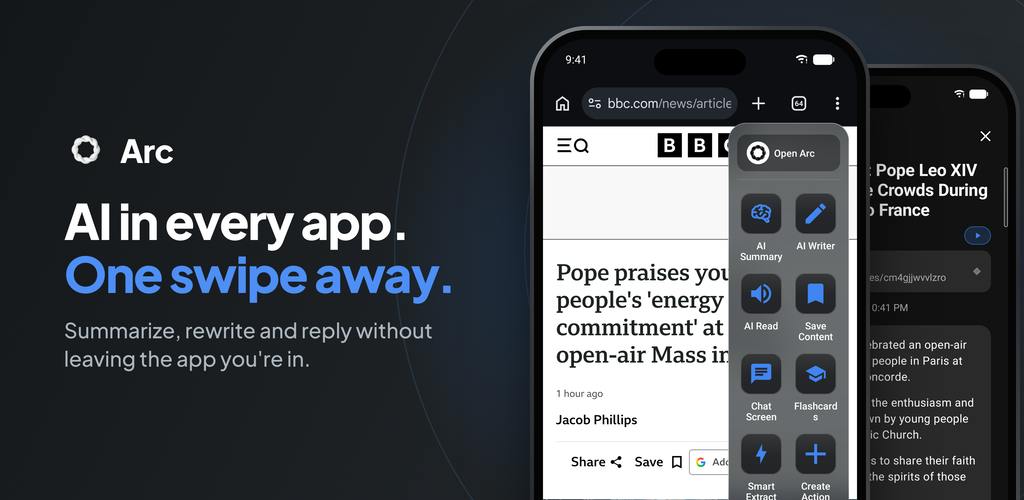
Arc's biggest difference from traditional chatbots lies in its interaction entry point. Instead of moving text into a dialog box, you summon Arc on top of any app and let it read the current screen directly. Built around this capability, the team highlights four main feature areas.
Instant Summaries
Arc can instantly summarize articles, chat histories, emails, and documents. For dense long-form content or lengthy work group chats, this "read in place, summarize in place" approach eliminates the cost of constantly switching between apps.
Read Any Screen Aloud
Arc can read the current screen content out loud. This is genuinely useful during commutes, while doing chores, or any time you can't stare at your screen — expanding content consumption from reading to listening.
Rewrite In Place
Whether you're replying to a message or drafting an email, Arc can directly adjust your tone and wording right where you're typing. Compared to opening a separate writing tool and copying the result back, this embedded rewriting fits much more naturally into real communication workflows.
Cross-App Automation
Arc also offers automation for repetitive steps across apps. While the official description is brief, this hints that it aspires to be more than a passive Q&A tool — it wants to take on some "agent"-style operational tasks.
"Agent"-style AI is an important evolutionary direction for large model applications. It refers to AI that not only answers questions but can autonomously plan steps, call tools, and operate interfaces to complete multi-step tasks. Unlike the traditional "one question, one answer" chatbot model, an agent-mode AI can perceive current state and decide the next action — for example, automatically opening an app, filling out a form, extracting data, and writing it somewhere else. Cross-app automation on mobile is especially complex, because Android and iOS app sandbox mechanisms restrict direct interaction between apps. Implementing this kind of capability typically requires Accessibility Services or system-level permissions — which is precisely why these tools tend to be privacy-sensitive from a technical standpoint.
Why "Screen Reading" Is an Interesting Direction
Arc's product philosophy represents a current trend in AI assistant evolution: moving away from standalone conversational apps toward "ambient intelligence" embedded within the operating system and application layer. When AI can perceive what you're currently doing, it can genuinely reduce the friction of context-switching.
This path isn't unique to Arc. System-level AI assistants and screen-understanding capabilities have become hotly contested territory for both mobile and desktop platforms. Arc's differentiation lies in being a third-party, cross-platform, free-to-start option that bridges Android and Mac — two ecosystems that are usually treated separately.
Worth noting: screen-reading capability inherently bumps up against privacy boundaries. A tool that continuously reads your screen content raises important questions about how it handles sensitive information — passwords, chats, financial data. This is a critical point for users to evaluate before adopting it, and the official materials don't go into detail about how this is handled.
The concept of "Ambient Intelligence" was proposed back in the smart home era. Its core idea is to embed computing capability into the background — sensing a user's context and proactively offering help, rather than requiring the user to explicitly initiate an interaction. In the AI assistant space, the latest manifestations of this idea include Apple Intelligence's deep integration with iOS context, and Google's push to advance Gemini's screen-awareness on Android (Circle to Search, Gemini Overlay). Screen Understanding technology is the key underlying capability enabling ambient intelligence — it allows AI to parse the text, layout, and even interactive elements of a current interface, so it can "know what the user is doing." As a third-party tool, Arc is attempting to deliver a similar experience without relying on native system integration, which means its technical approach and permission model are fundamentally different from platform-native solutions.
Who It's For — and What to Watch Out For
For users who regularly process large volumes of text on their phones, frequently switch between apps, or have a need for content to be read aloud, Arc's "AI in place" experience can genuinely improve efficiency. The free starting point also lowers the barrier to trying it.
That said, as a newly launched product, user reviews and real-world feedback are still very limited (just 1 review on Product Hunt). The actual accuracy of its screen reading, the naturalness of its text-to-speech, and the reliability of its automation capabilities all still need more real-world testing. How far the cross-app automation actually goes is also the key question that will determine whether Arc evolves from a "handy utility" into a true "daily assistant."
If you're looking for an AI assistant that doesn't interrupt your workflow, Arc is worth adding to your watchlist — but proceed with caution in any scenario involving sensitive information.
Related articles

Chain of Thought Isn't Just for AI: How Humans Can Use CoT to Improve Thinking Quality
Chain of Thought isn't just a prompt trick for large models. Starting from a Hacker News discussion, this article analyzes why CoT works for human thinking too, breaks down actionable ways to transfer it, and highlights the key differences between human CoT and machine CoT.
Cloudflare Teams Up with OpenAI: Closi…
Cloudflare Teams Up with OpenAI: Closing the Loop from Vulnerability Discovery to Defense with AI
Cloudflare uses OpenAI Daybreak to investigate security vulnerabilities and generate reviewable remediation plans, while developers use Codex to boost coding efficiency and quality.

Orca Multi-Agent Orchestration in Practice: A Guide to Parallel Collaboration with Claude and Codex
Orca is Stable AI's free open-source agent workbench supporting 34 agents like Claude Code and Codex in parallel. Learn its Git worktree isolation, multi-model orchestration, and mobile management.