Automate Google Review Requests with n8n: A Free Workflow That Costs Pennies

Use an n8n workflow to auto-request reviews and have AI draft replies for pennies per customer.
This article walks through a low-cost automation built on the open-source tool n8n, designed to solve the "nobody ever asks for reviews" problem. Since 97% of consumers read reviews before choosing a business, review volume and freshness directly affect Google Map Pack rankings. The workflow handles two things: automatically sending a personalized SMS or email with a direct review link about an hour after a job is complete (with one follow-up after three days), and drafting AI-generated replies whenever a new review appears — published only after the owner approves. Self-hosted n8n is free forever; total running costs are roughly $10/month for a server plus ~$0.01 per SMS. A ready-to-import Starter Pack is available for free.
97% of customers read reviews before contacting a business — that's according to a BrightLocal survey of 1,000 U.S. consumers, with 41% saying they "always" check reviews first. Yet most of your happiest customers never leave one, for a simple reason: nobody asked. This article breaks down a free n8n automation workflow that removes all manual effort from both requesting reviews and drafting replies, at a cost of just pennies per customer.
Why Reviews Are Worth Real Money
When someone searches "plumber near me," Google shows a short list known as the "map pack." Reviews are one of the signals Google uses to decide who makes the cut: more reviews, fresher reviews, and replied-to reviews all push your ranking higher.
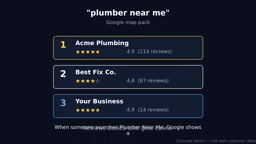
The same BrightLocal survey drives the point home: 97% of people looking at that list read reviews before making a choice, and 31% won't even consider a business rated below 4.5 stars. In other words, reviews aren't a vanity metric — they're real estate. Every review you fail to ask for is a ranking slot you're handing to a competitor.
As the video's author puts it, a competitor with 200 reviews isn't necessarily better than you — they just asked. And they asked automatically, every time a job was done.
What is the Google Map Pack? The Google Map Pack (also called the Local Pack) is the set of three business cards Google displays at the top of search results pages for queries with local intent, typically accompanied by a map, ratings, business hours, and a phone number. This placement gets far more clicks than standard organic results, and there are only three spots available. Google's local search algorithm weighs three core factors: relevance (how well the business profile matches the search query), distance (proximity to the searcher), and prominence (online reputation and signal strength). Review count, average rating, recency, and whether the owner actively replies are all direct signals under the "prominence" dimension. When distance and category are similar, review quality often becomes the deciding variable in rankings.
Why Most People Never Do It
The author identifies three reasons business owners don't proactively ask for reviews — and these are exactly the pain points this automation addresses:
- Nobody remembers: You're already onto the next job before the last one cools.
- It feels awkward: "Can you leave me a five-star review?" is a hard thing to say out loud.
- The timing is off: Asking a week later means the goodwill has faded — and it just feels annoying.
The solution isn't willpower. It's removing the act of asking from the human entirely. The request goes out at the perfect moment automatically — right when the service is complete and the customer is most satisfied. You don't have to remember, and you don't have to feel awkward.
Part One: Automating the Request
The entire flow begins with a trigger, and what that looks like depends on how "job complete" is defined in your business: a CRM status flipping to "Done," a new row added to a spreadsheet, or an invoice being sent. n8n listens for that moment.

Rather than firing immediately, it waits about an hour — long enough to feel human, short enough that the experience is still fresh. The customer then receives a short, personalized text with a single link: "Thanks for choosing us — would you mind leaving a Google review?" No app download, no account creation, one tap to the review form.
No review after three days? One polite follow-up goes out. Still nothing? The workflow stops — nobody likes being pestered.
Two things matter here. First, the link must go directly to the review form; every extra click bleeds response rate. Second, an honest note: in the United States, commercial text messages require customer consent and a registered number, and can only be sent to people who've opted in to receive messages. If you prefer email, the flow is identical — and email delivery costs essentially nothing.

What are n8n and Twilio? n8n is an open-source workflow automation tool, similar in concept to Zapier or Make, but fully self-hostable — and the core functionality is free forever. It works by visually connecting "nodes": a trigger node listens for an event, and subsequent nodes handle HTTP requests, data transformations, conditional branching, wait timers, and more. Self-hosting means you deploy n8n on your own server (typically a cloud VPS for $5–10/month, such as DigitalOcean, Hetzner, or Railway), your data never passes through a third-party platform, and there are no per-execution subscription fees. Twilio is a communications API platform that provides SMS-sending capabilities — developers call its API to send messages to any number. n8n includes a built-in Twilio node, so once you configure your API key, you simply fill in the recipient number and message body. No code required.
Part Two: AI Drafts the Replies
Getting the review is only half the job. The same BrightLocal survey found that 97% of people who read reviews also read the owner's responses. A blank reply section tells potential customers "nobody's minding the store."
When a new review appears, n8n captures it and an AI agent drafts a reply. Five-star review? A warm thank-you that references the specific service. Three-star review? A calm, professional response that invites the customer to continue the conversation offline — the kind of reply that builds trust with the next person reading it, rather than eroding it.

The most important detail: nothing gets published without your approval. The draft lands in your inbox or on your phone. One tap to approve, rewrite, or delete — the final call is always yours. The AI only writes the first draft. Replying to a review takes no more than five seconds. Keep it up consistently, and potential customers see an owner who genuinely cares; your profile stays active and fresh, feeding directly back into your rankings.
How does the AI agent work? In the n8n context, the AI agent is typically a node that calls a large language model — such as OpenAI's GPT-4o or a locally deployed Ollama model. The workflow passes the review text, star rating, and basic business information as part of the prompt to the model, which generates a reply draft based on preset instructions (for example: "For five-star reviews, mention the specific service and express genuine thanks; for three stars or below, stay calm and invite offline follow-up"). The key architectural decision is Human-in-the-Loop: the AI only generates a draft, which is pushed to the owner via email or a notification. Only after the owner clicks the approve button does n8n call the Google Business Profile API to actually publish the reply. This saves the time of writing from scratch while preserving human review, avoiding the risks that come with AI publishing directly.
Real Costs and How to Get It
The overhead here is almost negligible:
- The self-hosted version of n8n is permanently free; the only fixed cost is a $5–10/month server.
- Sending each SMS via a provider like Twilio costs roughly $0.01 per message (rates vary — check current pricing).
- Email requests are completely free.
Roughly speaking: about $10/month plus a few cents per customer. Compare that to paying a monthly subscription fee to a third-party review platform for the same functionality — and with this workflow, you own it entirely.
The author has packaged this complete workflow — including request timing, follow-up reminders, and AI reply drafts — into a free "n8n Workflow Starter Pack," available in the video description and on the channel page. Import it into n8n, connect your accounts, point it at your review link, and it's ready to run. He notes that the visuals shown in the video are for illustration purposes only; the workflow files are the real deliverable, and every file in the pack has been tested with an actual n8n import.
Wrap-Up
Reviews determine who gets chosen. Nobody asks for them because everyone's too busy. Automate the ask (one text after every job), and automate the first draft of every reply (which you approve one by one), and you can consistently build your review count, protect your reputation, and feed your Google rankings — all at minimal cost. For small business owners without a technical background, this is a low-barrier, high-ROI entry point into automation.
Related articles

AI + SRC Automated Vulnerability Hunting: Rebuilding the Three-Step Method with AI Agents
A complete guide to AI+SRC automated vulnerability hunting — comparing traditional methods with AI Agent-powered workflows covering asset recon, false positive filtering, and report generation.

Testing DeepSeek Desktop Agent: Auto-Generate a Full Video for Just $0.35
A blogger tested DeepSeek Harness desktop Agent: auto-generated a full video for $0.35, built a daily briefing, and an app from plain English — all for $0.59 total.

Antigravity 2.0 Complete Guide: MCP, Skills, and Automation Explained
A complete guide to Antigravity 2.0 covering Projects/Conversations/Agents, MCP with Figma, Skills, automation, and 6 real-world use cases including design-to-code and Android app generation.