Automating Content Proofreading with n8n + AI: File Comparison and HTML Report Generation in Practice

Use n8n + GPT-4.1 to auto-compare client copy vs. design files and pinpoint text differences in hours.
This article introduces an automated text content proofreading solution built on n8n and OpenAI GPT-4.1, targeting the most time-consuming part of manual testing: copy validation. The workflow accepts two uploaded files, standardizes them via naming conventions, converts PDF/DOCX to plain text, merges comparison data into single rows for the AI, applies multi-layer output validation, and generates an HTML diff report that precisely flags mismatches and omissions down to the subject/bullet level — compressing days of manual work into hours.
Starting with a Real Pain Point
There's a particularly tedious yet error-prone task in manual testing — copy validation. The automation solution shared by the author on their YouTube channel, Trip Tech Solution, was inspired by a real struggle faced by a friend who works in manual testing: clients provide copy content, designers use it to create images and layouts, and testers must then go line by line to verify that every piece of text in the design matches the client's original 100%.
The problem is scale. These files can easily contain thousands of entries. Manual line-by-line comparison takes days, slows down delivery, and consumes significant labor costs — a constant, hidden expense for any company. What makes it worse is that reading thousands of lines of text manually is itself error-prone, creating a vicious cycle of "using a fallible method to check for mistakes."
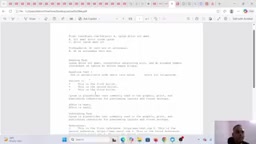
The author narrows the problem down to two most common scenarios: first, whether copy was fully copy-pasted (i.e., no lines were missed); and second, whether any errors crept in during copying — such as an extra period, an extra character typed, or a section of text accidentally deleted. These errors may seem minor, but they can shift the meaning of entire passages.
The Core Logic of the Automation
The logic behind the entire solution is straightforward: testers simply upload two files — the original copy provided by the client (actual file) and the design file produced by the designer (design file) — and the system automatically performs the comparison and outputs a readable diff report.
The author emphasizes that this demo only covers plain text comparison. While designers typically produce image-based deliverables, the real bottleneck in manual testing is text verification, so the demo intentionally strips out images and focuses purely on text to illustrate the problem. He also reminds viewers that in real-world deployments, additional case scenarios can be layered on top — this workflow is a scalable starting point, not a solution limited to just these two error types.
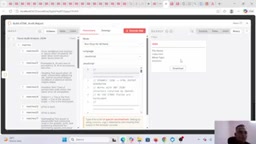
The output step also accounts for flexibility: reports can either be downloaded directly to a local system or published to a website via an API integration, depending on client needs. The author even builds a download button into the workflow for easy use across different scenarios.
Breaking Down the n8n Workflow
The author openly admits that this workflow reuses many of the node objects from his previous videos — the only real changes are how information flows between nodes and how each node is configured. The entire process starts with an on-form submission trigger that accepts two uploaded files.
File Standardization and Naming Conventions
Uploaded files can be in PDF, DOCX, or other formats. The author introduces a key design decision here — a naming convention. Regardless of what the uploaded files are actually named, the workflow internally maps them to standard identifiers like file1 and file2. The benefit is that all downstream code nodes can reliably reference fixed variable names without breaking whenever a filename changes.
Within the code nodes, the author handles several key fields: binary data, file name, and MIME type — and adds a validation check: at least two files must be uploaded, otherwise the workflow halts. The two files are then individually converted and mapped, along with their type identifiers, and passed downstream.
Naming conventions are a foundational engineering practice for building robust automation workflows. In low-code tools like n8n, nodes reference data via variable names. If upstream field names change with each user input, every downstream node that depends on those field names can fail — either with an error or, worse, silently. By performing a field remapping at the workflow entry point — forcing any filename into internal standard identifiers like
file1andfile2— you confine unpredictability to outside the workflow boundary, letting the core logic operate only on known, structured data. This approach is known as schema normalization in data engineering, a standard technique in ETL pipelines and equally applicable in automated testing frameworks. MIME type validation adds another layer of protection: different file formats (PDF, DOCX, TXT) require different parsing paths downstream, and identifying the type early prevents binary PDF streams from being treated as plain text, which would produce garbled output or parsing errors.
Converting Files to Text Is a Prerequisite for Comparison
An easy-to-overlook but critical step: PDF and DOCX are binary formats, while quality checking requires plain text strings. The author uses JSON.stringify (referred to verbally in the video as "dollar json") to convert file content into a text format and stores it in a variable. He explicitly states: "You can't do a quality check on a file — you need to have the data (text) first." This step is what makes the entire AI comparison work.
Merging Data and Feeding It to OpenAI
After text conversion, the content of both documents is merged into a single data structure. The author makes a clever design choice here: rather than passing the two columns of data separately to the AI, he stuffs both values into a single row within a single column. The reason is that feeding two separate columns tends to cause the model to "misunderstand, requiring a lot of prompting to explain which column is which," while combining them into one row makes the mapping clearer and easier for the model to align.
For the model, the author uses GPT-4.1 (noting that GPT-4.1 mini can also be used), called via an HTTP request node with standard headers including authorization and content-type, and comparison rules written into the JSON body.
Merging two columns into a single row before passing the data to the model reflects an empirical response to how large language models allocate attention when processing structured data. GPT-series models are fundamentally sequence-processing systems built on the Transformer architecture. When processing multi-column tabular data, the model must understand the correspondence between columns from the prompt alone — which requires precise prompt engineering, otherwise the model may cross-match rows or ignore column headers. By concatenating the two column values from the same row into a single string (e.g.,
"Original: AAA | Design: BBB"), the relationship between the two values being compared is encoded directly in the data itself, dramatically reducing ambiguity in the model's interpretation. GPT-4.1, released by OpenAI in 2025, offers improvements over GPT-4o in long-context handling and instruction following. Its mini variant maintains high accuracy while significantly reducing API costs, making it well-suited for batch text comparison tasks where call frequency is high but latency tolerance is relatively relaxed.
From Validation to a Readable Report
After the AI returns its results, the author doesn't trust them blindly — multiple layers of validation are added: checking whether the API actually returned output text, whether the returned JSON is valid, and whether any exceptions were triggered. His reasoning is practical: "Checking my output is extremely important. Even if OpenAI is 100% working, I still need to confirm it actually produced output." Exception handling is explicitly emphasized here.
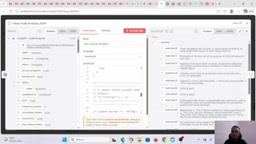
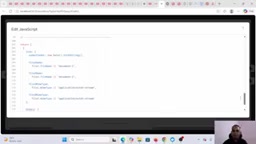
Once validation passes, the results are organized into a standardized, readable structure (using markers like matches 0, matches 1, matches 2), then converted into an HTML table via a short code snippet, and finally packaged as a downloadable report.
Enforcing strict validation on AI output rather than trusting it directly highlights the key difference between a production-grade automation workflow and a demo script. Large language model outputs can, in edge cases, produce incomplete JSON, missing fields, or truncated responses due to context length limits — and even when the model itself runs fine, network timeouts or API rate limiting can result in empty responses. In n8n, if these exceptions aren't explicitly caught, downstream nodes will receive
nullorundefineddata, causing hard-to-trace silent failures. The multi-layer validation the author adds here — sequentially checking the HTTP response status, whether the response body contains output text, and whether the JSON can be legally parsed — forms a simple defensive programming chain. This pattern is standard practice in enterprise-grade RPA (Robotic Process Automation) and API integrations, significantly improving workflow observability and fault diagnosis efficiency.
Testing Two Real Error Scenarios
The author validates the solution with two real-world scenarios.
Scenario 1 (Incorrect modification): The original copy has normal text at a certain point, but the designer accidentally added content or changed a character during copying (e.g., changing a word to "not"). The report accurately flags the discrepancy, indicating what the actual value was and what it became in the designer's document.
Scenario 2 (Missed copy / deletion): The original copy contains a section labeled "BC," which the designer simply left out of the document. The report identifies this as a delete-type omission and pinpoints which subject and which bullet position it should appear in.
This localization capability is what the author repeatedly emphasizes as the core value: when dealing with thousands of lines of text, the report will directly tell testers "check subject, after position one bullet" — rather than making them re-read everything from the start. Even more importantly, the system can return multiple discrepancies in a single pass — if there are several issues, each one is listed separately (rule 1, rule 2, rule 3…) rather than reporting just one.
Value and Boundaries
The benefits of this solution are clear: what previously required days of manual line-by-line comparison is compressed to a matter of hours or less. Testers can take the diff report and directly forward the issues to the designer, who can then locate, fix, and update the files before returning to the testing stage — forming an efficient closed loop.
That said, its boundaries deserve an honest look. This is a demo-level tutorial demonstrating text comparison only; validating images, layout, and formatting in real business scenarios would require additional design work. The solution also relies heavily on OpenAI's output quality. While the author has added multiple validation layers, the accuracy of AI-based comparison at scale still needs further validation in production settings. For teams looking to build similar automated testing workflows in n8n, this approach — standardized naming, file-to-text conversion, single-column mapping for AI input, enforced output validation, and readable report generation — provides a reusable reference framework.
Related articles

FastAPI: A High-Performance Python Framework and a Production-Ready API Development Powerhouse
FastAPI is a high-performance web framework based on Python type hints, supporting async and automatic OpenAPI docs. With over 100k GitHub stars, this article analyzes its core strengths, production readiness, and selection advice.

Tesla Optimus Begins Mass Production: Can the Goal of 20,000 Units Per Week Be Achieved?
Tesla Optimus officially begins mass production as Musk sets a target of 20,000 units per week. This article analyzes the supply chain challenges behind mass production, the real gap in capacity ramp-up, and the competitive landscape for humanoid robots.

PCL: A Minecraft Launcher with 8.5k Stars — Why Was It Written in VB.NET?
An in-depth analysis of PCL, the GitHub Minecraft launcher with 8,500+ stars: why it chose VB.NET, its features and China network advantages, and the limits of Windows-only.