Awnsy: A Mac Offline AI Translation Tool That Translates with Double ⌘C

Awnsy is a macOS offline translation tool — double ⌘C or drag to translate text and images locally.
Awnsy is a lightweight macOS menu bar translation tool focused on offline operation and minimal interaction. Its signature feature repurposes the double ⌘C shortcut as a translation trigger, surfacing translations as an overlay without switching apps. It also integrates OCR to handle text in images, scanned PDFs, and video frames. The model runs entirely on-device — no account or API key required, nothing uploaded to third-party servers — while optionally supporting OpenAI or Anthropic for higher-quality output. Currently in early stages, its long-term viability hinges on the built-in model's translation quality and OCR accuracy in complex scenarios.
Translation tools have long been a necessity for multilingual work and reading. But most mainstream solutions either rely on the cloud and require account registration, or fall short when it comes to handling images and scanned documents. Awnsy, a macOS tool that recently appeared on Product Hunt, aims to reimagine translation through a single, minimal interaction — double-pressing ⌘C — and it works entirely offline.
Core Interaction: Select Text, Double-Press Copy
Awnsy is a lightweight translation tool that lives in your menu bar. Its core workflow is refreshingly direct: select text in any app, press ⌘C twice, and the translation appears as an overlay on your current window. This design eliminates the friction of traditional translation tools — no more switching apps, pasting text, and copying the result back.
For users who frequently need to quickly understand content in a foreign language — reading English documentation, browsing foreign-language websites — eliminating even one context switch translates to a real productivity gain. Repurposing the already-ubiquitous copy action as a translation trigger is genuinely clever UX design.
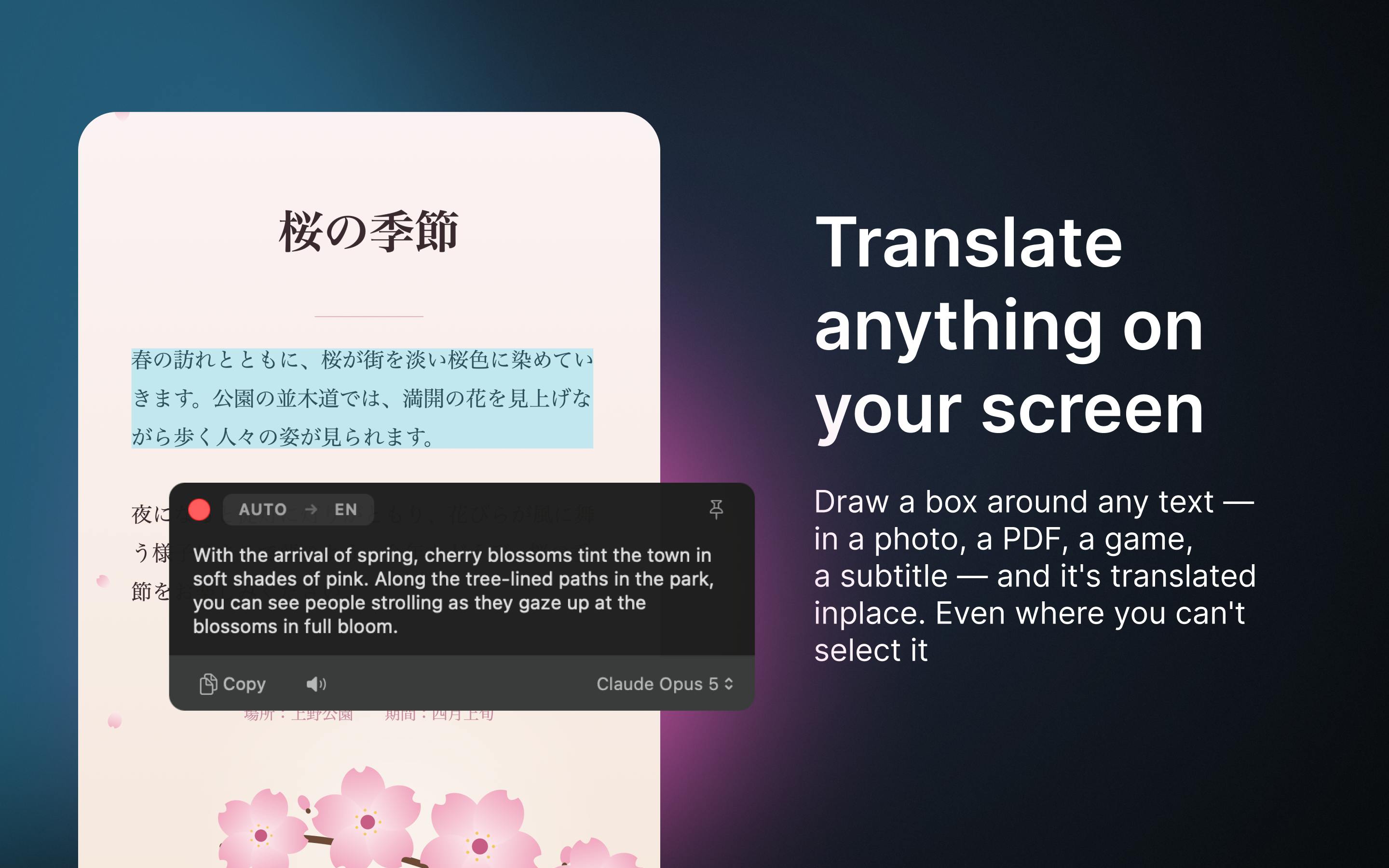
Beyond Text: Drag to Translate Images and Video
Another standout feature is Awnsy's ability to handle content you can't select. For text embedded in images, scanned PDFs, or video frames, you simply drag a selection box over the area, and Awnsy automatically recognizes the text and translates it.
This effectively integrates OCR (Optical Character Recognition) directly into the translation workflow. For users reading scanned documents or watching foreign-language videos, the inability to copy text is often the biggest pain point. Drag-to-translate addresses this common but frequently overlooked need, extending the tool's reach from plain text to a much broader range of visual content.
OCR (Optical Character Recognition) is a decades-old technology that converts printed or handwritten text in images into editable text. Traditional OCR tools like Tesseract run as separate processes and output raw text, requiring a separate translation step. Modern on-device AI models — such as Apple's Vision framework or compact built-in multimodal models — can combine OCR and semantic understanding into a single inference pass, dramatically reducing latency. Awnsy hides this entire pipeline behind a drag gesture, making it completely transparent to the user. Whether it's recognizing or translating under the hood doesn't matter — this is a textbook example of on-device AI landing cleanly in a productivity tool.
Offline-First: Balancing Privacy and Usability
Awnsy's most notable positioning is its offline-first approach. The translation model is bundled inside the app and runs directly on the user's Mac. This delivers several concrete benefits: no account registration required, no API keys needed, works without an internet connection, and most importantly — your translated content never leaves your device.
For users handling sensitive documents, business materials, or personal information, local execution means data is never uploaded to any third-party server. That's a level of trust that cloud-based translation tools simply cannot offer.
At the same time, Awnsy remains flexible. Users who prioritize translation quality can bring their own OpenAI or Anthropic API keys and switch to cloud-based large language models for higher-quality output. This dual-track design — local as the default, cloud as an option — balances privacy, availability, and quality all at once.
Running translation models on-device relies on the rapidly maturing field of Small Language Models (SLMs). Apple Silicon's M-series chips, for instance, include a dedicated Neural Engine capable of efficiently running quantized models with billions of parameters, fast enough to support real-time translation without noticeably slowing down the system. Common on-device deployment frameworks include Core ML and llama.cpp, which can compress model weights to anywhere from a few hundred MB to several GB. This also explains why offline translation quality typically falls short of cloud models at the GPT-4 level — the ceiling is set by physical constraints on parameter count and compute. Awnsy's "local by default, cloud optional" design essentially gives users a dynamic dial to trade off between the convenience of on-device models and the quality of large cloud models.
Product Analysis: The Philosophy of Small, Focused Tools
In terms of product form, Awnsy takes the classic "small but excellent" approach. Rather than building a sprawling translation platform, it pushes the lightweight, fast nature of a menu bar tool to its limits. Developer Alexey Doroshenko has clearly set his sights on Mac users who are privacy-conscious and value operational efficiency.
The product is still in its early days on Product Hunt, with relatively few upvotes and comments (5 votes, 1 comment, ranked #20). Tools like this tend to succeed or fail based on whether the built-in model's translation quality clears the bar for practical use, and how accurately the drag-to-translate OCR performs in complex real-world scenarios.
For Mac users who regularly work with multilingual content, Awnsy offers a privacy-friendly, interaction-smooth alternative. Whether it's worth replacing your existing tools ultimately comes down to verifying its translation quality and reliability in actual day-to-day use.
Related articles

JobRunner MCP Server: AI Agents Can Now Fix Failed Java Jobs
JobRunner launches an open-source MCP server enabling AI agents to view cluster status, diagnose failures, and recover Java jobs—incident response from any cloud coding environment or existing agent.

MLAI Digital Launches 9 Security Agents: MCP Server Safeguards the Full Lifecycle of Agentic AI
MLAI Digital launches Security MCP Server with nine built-in specialized security agents covering vulnerability discovery, attack simulation, prompt injection detection, API and infrastructure assessment, and accelerated remediation—embedding security validation across the full Agentic AI lifecycle from development to production.

Running Isaac Lab on H100 GPUs: Exploring Better Approaches
Exploring optimization methods for running Isaac Lab on NVIDIA H100 GPUs, including MIG configuration, mixed precision, TensorRT acceleration, and community experience to improve robotics simulation and reinforcement learning efficiency.