Azure SQL Hyperscale Architecture Explained: A Cloud-Native Database with Decoupled Compute and Storage

Azure SQL Hyperscale decouples compute and storage to independently scale storage, compute, reads, availability, and log throughput, with integrated vector search and AI.
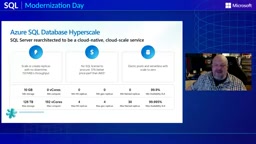
Azure SQL Database Hyperscale is a cloud-native architecture that decouples the SQL engine from transaction log processing and persistent storage, enabling independent scaling of compute, log, and storage. It supports single-database auto-growth to 128 TB, up to 192 vCores, up to 30 Named Replicas for read scale-out, and up to 99.995% availability SLA. Tiered caching and Page Servers optimize read/write performance, while backups and restores are pushed down to storage for fast recovery of multi-TB databases. Built-in vector search lets AI applications coexist with operational data, and elastic pool and Serverless options suit different workload shapes.
Azure SQL Hyperscale Architecture Explained: A Cloud-Native Database with Decoupled Compute and Storage
When a database grows from tens of GB to tens of TB, traditional SQL Server architectures often force you to pay for peak capacity early on—provisioning large amounts of compute and storage, a significant portion of which sits idle for years. Microsoft Azure SQL Database Hyperscale aims to fundamentally change that equation. In an official Microsoft technical session, program manager David Plus systematically explained the design logic behind this architecture: it's not about turning every database into a giant system, but about letting storage, compute, reads, and availability each scale on demand.
Interestingly, Hyperscale is not an MPP data warehouse, nor is it a multi-primary write architecture. It's still Azure SQL Database, still the familiar T-SQL programming model for developers—what changes is the underlying distributed cloud-native architecture.
Compute and Storage Separation: The Architectural Cornerstone of Hyperscale
The core design of Hyperscale is to decouple the SQL database engine from transaction log processing and persistent storage. The primary replica in the compute tier runs the familiar SQL engine, handles read/write workloads, and uses an in-memory buffer pool and local SSD cache to keep hot data close at hand. When a requested page isn't available locally, the compute replica fetches it from the corresponding Page Server—each Page Server manages a portion of the database, maintains its own SSD cache, and persists data files redundantly in Azure Storage.
This tiered design allows storage capacity to grow independently of compute scale. A single database can automatically grow to 128 TB without being forced to upgrade compute specifications just because the database got bigger. Transaction logs take a separate path: the primary replica generates log records, and the log service persists and distributes them to Page Servers and secondary compute replicas. Compute, log, and storage each handle their own responsibilities—this is the foundation for all the elasticity capabilities that follow.
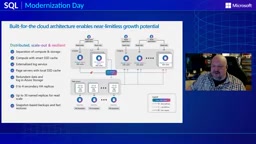
Page Servers are the core storage component in the Hyperscale architecture. They manage a portion of the database's data pages and maintain their own SSD cache to accelerate reads. Each Page Server handles only a specific range of data pages, and this sharding design allows the storage tier to scale horizontally. When a compute replica needs a particular data page, it sends a request to the corresponding Page Server based on the page's log sequence number (LSN). The Page Server first checks its own cache; if it misses, it reads from the persistent files in Azure Storage. Page Servers are also responsible for consuming transaction logs, applying log records to their own data pages to ensure persistent data stays consistent with the log. This design distributes storage read/write load across multiple Page Servers, avoiding single-point bottlenecks while reducing remote storage access latency through local SSD caching.
Five Dimensions of Scalability: Storage, Compute, Reads, Availability, and Log Throughput
Hyperscale's scalability manifests across multiple independent dimensions. For storage, a single database automatically grows to 128 TB with no capacity provisioning required. For compute, it scales up to 192 vCores, and scaling compute doesn't require moving the database. For reads, it supports up to 30 Named Replicas, each independently configurable in compute resources, isolating read-intensive workloads like reporting, analytics, and AI from the primary replica's transactional workload.
For availability, with zone-redundant configuration, Hyperscale offers an availability SLA of up to 99.995%. For transaction log throughput, the log service can deliver up to 150 MB/s, independent of the primary replica's compute specification. It's worth emphasizing that not every application needs to hit these ceilings—the value of Hyperscale is that you start from your current needs and scale each dimension independently as demand grows.
How to Choose Among the Three Service Tiers
Hyperscale is one of three service tiers in the Azure SQL Database vCore model. General Purpose is the cost-balanced choice, using remote persistent storage; Business Critical targets transaction-intensive scenarios requiring low-latency IO and high availability, using local SSD with multiple replicas; Hyperscale adopts a distributed cloud-native architecture, offering independently scalable compute and storage, automatic storage growth, and independent read scale-out.
When choosing a tier, don't look only at database size. A smaller database might need Business Critical's low-latency performance, while a growing database might be better suited to Hyperscale's independent scaling and read isolation. Also, Serverless is not a fourth service tier but a compute option available for both General Purpose and Hyperscale.
Named Replicas are read-only compute replicas in Hyperscale used for read scale-out. Each Named Replica has its own connection endpoint, and applications can direct read-only workloads to a specific Named Replica. Unlike high-availability replicas, Named Replicas don't participate in automatic failover—they're designed specifically to isolate read-intensive workloads (such as reporting, analytics, and AI inference). Named Replicas share the primary replica's Page Servers and storage tier, so creating one doesn't require copying data—you just provision independent compute resources (CPU, memory, and cache). Each Named Replica can have its compute specification set independently and can be added or removed at any time. This architecture allows read capacity to scale linearly with demand without affecting the primary replica's write performance, and because storage is shared, data consistency is guaranteed by the log service.
Breaking Down the Read/Write Path: How Tiered Caching Avoids "Every Read Going to Remote Storage"
The key to understanding Hyperscale is distinguishing "when a transaction is persisted" from "when all distributed components apply changes." On the write path, the primary replica's SQL engine executes the request, modifies in-memory pages, and generates log records. The log service provides the durability path—transactions don't need to wait for every changed page to write through all tiers; as long as the log is persisted, downstream components can continue applying changes. Page Servers consume logs for the data range they own, and high-availability and read-only replicas also consume logs to stay in sync. Ultimately, Page Servers persist updates to Azure Storage.
The read path relies on tiered caching. Queries execute on a selected compute replica—the primary, a high-availability replica used for read scale-out, or a Named Replica. When the engine needs a data page, it first checks the in-memory buffer pool; on a miss, it checks the Resilient Buffer Pool Extension on local SSD; on a further miss, it requests the page from the corresponding Page Server by the required LSN, and the Page Server reads from the persistent files in Azure Storage as needed. Returned pages populate the caches at each tier, so subsequent requests complete closer to the compute tier.
The Resilient Buffer Pool Extension is a local SSD caching mechanism on Hyperscale compute replicas that extends the capacity of the in-memory buffer pool. When the in-memory buffer pool misses, the database engine checks the Resilient Buffer Pool Extension on local SSD, which caches data pages fetched from Page Servers. This tiered caching design significantly reduces the number of remote requests to Page Servers, because frequently accessed pages are cached on local SSD even when they're not in memory. The size of the Resilient Buffer Pool Extension is tied to the compute replica's local SSD capacity and can be adjusted based on the compute specification. By keeping hot data close to the compute tier, Hyperscale delivers read performance close to local storage while maintaining storage separation.
High-Availability Replicas and Named Replicas: Elasticity from a Shared Storage Tier
The primary replica, high-availability replicas, and Named Replicas share the same storage architecture. You can configure 0 to 4 high-availability replicas as hot-standby compute for automatic failover, and because they share Page Servers with the primary replica, adding an HA replica doesn't require creating another full copy of the database. Named Replicas number up to 30, each read-only, with its own connection endpoint and independently configurable CPU, memory, and cache. Applications still write through a single primary replica, while read-only workloads can be directed to Named Replicas.
Backup and restore are also pushed down to the storage tier, performed using file snapshots. Backups are nearly instantaneous and don't consume compute resources on the primary or secondary replicas. Same-region restore with identical storage configuration completes within minutes, even for multi-TB databases—restore time no longer grows linearly with database size.
The Performance Story: Log Throughput, Caching, and Compute Scale-Out in Parallel
Hyperscale's performance design principle is to stop database growth and performance from scaling in lockstep as a tightly coupled whole. On the write side, an externalized log architecture boosts transaction log throughput; on the read side, tiered caching reduces remote page fetches, and the Resilient Buffer Pool Extension leverages local SSD on both compute replicas and Page Servers; read capacity can scale independently, with Named Replicas giving reporting, analytics, and AI workloads their own compute resources. When more compute is needed, the Premium-series configuration scales up to 192 vCores, 843 GB memory, and 816,000 local SSD IOPS.
One easily overlooked detail is "Continuous Priming." During failover, a high-availability replica may have fully caught up with the log and be ready to become primary at any moment—yet its working set is still cold: connections are restored, but query performance isn't. Continuous Priming has Hyperscale track the active pages accessed by the primary replica, and Page Servers feed these active pages back to HA replicas, pre-filling their buffer pools and local SSD caches. The goal isn't to copy the entire database but to bring the active working set closer to the HA replica, shortening performance recovery time after failover.
Cost Model: Elastic Pools and Serverless Suit Different Workload Shapes
The key to cost efficiency isn't using less compute—it's choosing a consumption model that matches your workload. Hyperscale elastic pools target multiple databases with different usage patterns; a typical scenario is multi-tenant SaaS applications—rather than provisioning resources for each database's individual peak, you share compute and log resources within the pool, exploiting peak-time differences to improve utilization. Hyperscale Serverless, meanwhile, targets intermittent or unpredictable demand for a single database, letting you define a min and max compute range for auto-scaling, with auto-pause and auto-resume supported for eligible databases—compute billing stops during pause while storage charges continue.
AI and Vector Search: Semantic Search and Operational Data Coexisting in the Same Database
Azure SQL builds vector capabilities directly into the database. You can generate and store embedding vectors alongside relational data, combine vector similarity with familiar SQL predicates and filters, and get indexed vector search via disk-based approximate nearest neighbor (ANN). In the RAG pattern, applications retrieve relevant context from SQL and provide it to the language model to generate more grounded responses. SQL remains the authoritative source of operational truth, and models generate experiences based on those facts.
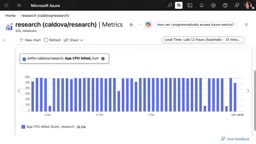
The demo showcased a biomedical evidence retrieval application: each article is split into paragraphs and embedding vectors generated, with the vector index covering all content. Search runs both vector retrieval (for semantics) and keyword retrieval (for exact strings like gene names and drug codes), merging rankings with Reciprocal Rank Fusion (RRF). The query runs on Hyperscale Serverless, auto-scaling within the configured vCore range and auto-pausing after an hour of idleness. As the application grew, the database scaled to 192 vCores, roughly 8 TB, and over a billion rows across tables—and the same vector index and same search still completed in milliseconds. Going further, Named Replicas share Page Servers and the vector index with the primary replica—no data copy, no rebuilding a second index, configured within minutes.
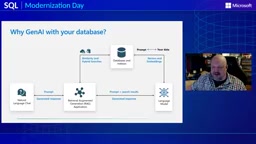
This means applications don't have to switch search architectures at every growth stage: start with a Serverless pilot, keep the same hybrid search pattern as the database expands, and add Named Replicas with independent specifications when read demand grows. AI retrieval therefore doesn't have to compete directly with transactional workloads for resources.
Reciprocal Rank Fusion (RRF) is an algorithm used to merge multiple retrieval result lists, commonly used in hybrid search scenarios. In the Hyperscale demo, vector retrieval and keyword retrieval each return a relevance-ranked result list, and RRF generates a combined ranking by summing the reciprocals of each document's rank in each list. The specific formula: for each document, take the reciprocal of its rank in each list and sum them (usually adding a constant k to avoid division by zero), then sort in descending order of total score. RRF's advantage is that it doesn't require tuning score weights across different retrieval methods and can balance the contributions of semantic similarity and exact matching. In the biomedical evidence retrieval application, RRF fuses the results of vector search (capturing semantic similarity) and keyword search (capturing precise terms like gene names and drug codes) to provide more comprehensive rankings.
Security: Migrating the Security Model, Not Just the Data
Hyperscale's security capabilities are layered, but the security posture depends on how you combine configurations. The identity and access layer handles authentication via Microsoft Entra ID; SQL roles, permissions, and row-level security determine what authenticated identities can see and do—Azure RBAC governs Azure resources, while database permissions govern data access. The data protection layer includes transport layer security, Transparent Data Encryption (for data at rest and log files), Always Encrypted (client-side encryption, with keys invisible to the database engine), dynamic data masking, and Ledger tamper-evident integrity. The network layer controls how applications reach the database through firewall rules, virtual network controls, and Private Link. The governance and visibility layer includes data classification and SQL auditing, and the threat protection layer uses Microsoft Defender for SQL to detect anomalous activity such as SQL injection and brute-force attacks.
For modernization migrations, the focus should be on migrating the security model, not just the data: verify that authorized identities can access successfully, unauthorized identities are denied, network access behaves as expected, operations that depend on encryption work correctly, and auditing is actually captured.
The Convergence of Four Pillars
The Hyperscale story comes down to four pillars. Familiarity: retain the SQL engine, T-SQL, and the skills SQL professionals already have. AI: vectors stay in the same database as governed operational data, semantic search combines with SQL filters, and independent read compute is used when isolation is needed. Security: the platform provides capabilities, but identity, permissions, encryption, network, auditing, and threat protection still require deliberate configuration and validation. Scalability: start small and scale storage, compute, availability, and read capacity as the application grows—no need to deploy maximum configuration on day one.
Hyperscale isn't always the right choice, but when these capabilities match an application's performance, availability, security, and cost requirements, it offers elasticity that traditional database architectures struggle to replicate.
One-line Summary
Azure SQL Hyperscale decouples compute and storage to independently scale storage, compute, reads, availability, and log throughput, with integrated vector search and AI capabilities.
Paragraph Summary
Azure SQL Database Hyperscale is a cloud-native database architecture whose core is decoupling the SQL engine from transaction log processing and persistent storage, allowing the compute, log, and storage paths to scale independently. The architecture supports automatic growth of a single database to 128 TB, compute up to 192 vCores, read scale-out to up to 30 Named Replicas, and an availability SLA of up to 99.995%. Through tiered caching and Page Server design, Hyperscale optimizes read/write performance while pushing backup and restore down to the storage tier for fast recovery of multi-TB databases. Additionally, Hyperscale has built-in vector search capabilities, enabling AI applications to coexist with operational data in the same database. The cost model includes elastic pools and Serverless options to suit different workload shapes. Overall, Hyperscale delivers elasticity and scalability that traditional architectures struggle to replicate while preserving SQL familiarity.
Related articles

Chain of Thought Isn't Just for AI: How Humans Can Use CoT to Improve Thinking Quality
Chain of Thought isn't just a prompt trick for large models. Starting from a Hacker News discussion, this article analyzes why CoT works for human thinking too, breaks down actionable ways to transfer it, and highlights the key differences between human CoT and machine CoT.
Cloudflare Teams Up with OpenAI: Closi…
Cloudflare Teams Up with OpenAI: Closing the Loop from Vulnerability Discovery to Defense with AI
Cloudflare uses OpenAI Daybreak to investigate security vulnerabilities and generate reviewable remediation plans, while developers use Codex to boost coding efficiency and quality.

Orca Multi-Agent Orchestration in Practice: A Guide to Parallel Collaboration with Claude and Codex
Orca is Stable AI's free open-source agent workbench supporting 34 agents like Claude Code and Codex in parallel. Learn its Git worktree isolation, multi-model orchestration, and mobile management.