Backspin: Learn DJing in Your Browser with Real Vinyl Decks

Backspin brings real vinyl turntables into the browser, teaching DJ basics with 21 short lessons and corrective feedback.
Backspin is an interactive product that simulates real vinyl turntables in the browser for introductory DJ instruction, earning 76 upvotes and #6 for the day on Product Hunt. Its core is a "demonstrate—attempt—correct" lesson loop. With built-in practice tracks, no hardware, no music import, no account, and free access, it removes common cost barriers. It breaks scratching, mixing, and beatmatching into 21 short lessons, favoring preset lesson judgment over open free mixing to avoid browser simulation limits. It suits beginners and hobbyists, but not advanced users seeking free creative space.
Learning to DJ in your browser sounds like just another simulator toy—but Backspin does something different: it brings real vinyl turntables into a webpage, letting you practice scratching, mixing, and beatmatching on virtual platters. This product, which earned 76 upvotes and ranked #6 on Product Hunt, attempts to break down DJ basics into 21 short lessons that form an interactive flow you can follow along with and get corrected on.
Putting turntables in the browser, not making a rhythm game
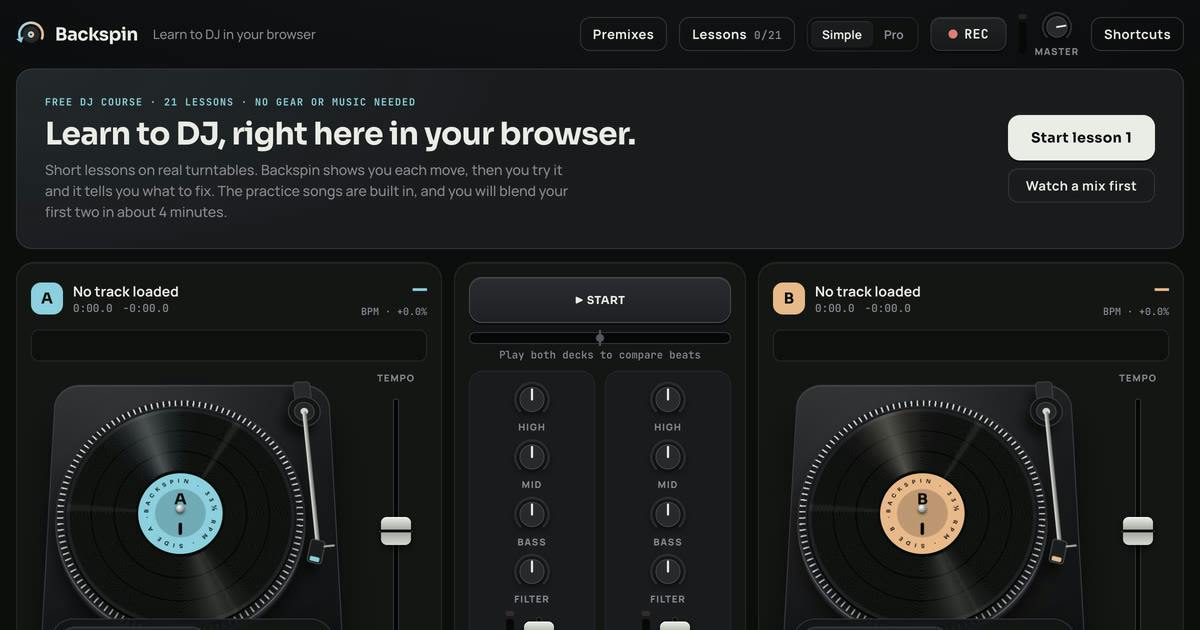
Backspin's core premise is "on real vinyl decks"—lessons run on real turntables in your browser, not a simplified rhythm-game interface. It first demonstrates each move on the platter in front of you, then it's your turn, and the system points out what you're doing wrong.
This "demonstrate—attempt—correct" loop is what sets it apart from typical music tutorial videos. The problem with learning DJing from videos is the lack of feedback: you don't know whether your hand position, pressure, or timing is right. Backspin fills in the feedback loop, effectively giving every move a coach who's always present.
From a positioning standpoint, it's closer to an "interactive driving instructor" than a "music player." The granularity of 21 short lessons also shows the designers wanted to lower the entry barrier as much as possible—each lesson tackles just one specific move, rather than jumping straight into full set arrangement.
Scratching is one of the most recognizable techniques in DJ culture. The principle is manually rotating the vinyl back and forth so the stylus rapidly moves over the same audio segment, creating rhythmic friction sounds. The difficulty of scratching lies in: the speed, direction, and force of rotation must lock onto the beat, while also controlling the fader to cut the sound. For beginners, the biggest barrier to scratching is "feel"—how large the motion should be, when to cut the sound—which is hard to grasp from watching videos. Backspin breaks scratching into standalone lessons with corrective feedback, precisely targeting this pain point: letting learners repeatedly practice the movement framework without risking real stylus wear, building initial muscle memory for the relationship between rotation speed and rhythm.
Beatmatching is the cornerstone of mixing—aligning the beats of two tracks so they play in sync at the same tempo. The traditional approach is adjusting the pitch of the second turntable so the drum hits of both songs coincide, relying entirely on your ears. Beatmatching tests auditory discrimination and fine manual adjustment, and it's the part of DJ basics that most needs repeated practice. Backspin simulates this process in the browser, letting learners first understand the logic of "tempo alignment" before gradually transitioning to auditory beatmatching on real equipment.
Zero barrier: no equipment, no music library, no account
Backspin has radically simplified the cost structure. Practice tracks are built into the product—you don't need any hardware, you don't need to import music files, you don't even need to register an account, and it's free.
Together, these remove the most common walls to learning DJing. In the traditional path, wanting to learn DJing requires at least a controller or turntable, a batch of usable tracks, and software—a significant investment. Backspin absorbs all of that upfront, so users can start their first lesson just by opening a browser.
For people who just want to "try it out," this zero-commitment entry design makes sense: first verify whether you're genuinely interested, then decide whether to buy equipment. The product itself thus functions more as a top-of-funnel experience layer than a training tool meant to replace real equipment.
What's hard about vinyl simulation in the browser
Putting a turntable in the browser isn't easy. Vinyl turntable interaction involves platter inertia, stylus position, and hand speed and direction during scratching—all of which need to feel responsive enough in a web environment, or the "real turntable" promise falls flat.
By choosing lessons rather than free play as its core, Backspin somewhat sidesteps the extreme challenges of simulation accuracy—lesson moves are preset and judgeable, so the system only needs to give correct/incorrect feedback on specific moves, rather than supporting fully open free mixing. This is a pragmatic trade-off: ensure the teaching loop works first, then talk about the upper limits of simulation fidelity.
Another notable point is how its correction mechanism determines "what you did wrong." Without dedicated hardware, the browser can only capture input via mouse, trackpad, or touchscreen, meaning its judgment of moves is necessarily based on interface interaction rather than a physical turntable. For introductory teaching this is sufficient, but it also means it teaches movement frameworks, not the feel of a real turntable.
Real-time audio processing in the browser relies on the Web Audio API, a low-level audio programming interface provided by modern browsers that can generate, process, and play sound with extremely low latency. The key to vinyl simulation is: platter rotation requires real-time changes to audio playback rate and pitch, while scratching requires rapid speed changes—even reverse playback of audio segments—based on operation direction. These operations are highly sensitive to audio scheduling latency—if there's noticeable delay between mouse movement and sound response, the "responsive" feel disappears and the simulation loses its meaning. For Backspin to achieve acceptable feel in a web environment, it must balance audio buffering, event sampling, and the rendering loop—a technical threshold that browser-based music interaction products commonly face.
Who Backspin is for
The first group is beginners who want to validate their interest at low cost. 21 short lessons, built-in tracks, no account, and free—this combination lowers the psychological cost of "starting to learn DJing" to a very low level, suitable for testing the waters before buying equipment.
The second group is people who already treat DJing as a hobby and want to shore up foundational moves. The lessons break scratching, mixing, and other moves into standalone short lessons with corrections, serving as supplementary material for daily practice.
Less suitable are users who already have some foundation and seek free creative space. Backspin's current focus is the teaching loop rather than open performance, and built-in tracks and preset lessons also limit room for free expression. It's more like an introductory school than a practice room you can use anytime.
Product logic under a free model
Backspin choosing to be completely free with no account required is uncommon among tool products. One reasonable interpretation: it's first and foremost a teaching demo piece—the team (Mauro Miotti et al.) cares more about getting the idea of "real turntable teaching in the browser" working and showing it off than immediately building a subscription business.
Judging by its Product Hunt performance—76 upvotes, 6 comments, #6 for the day—it's gained some attention but hasn't yet built viral momentum. For this kind of interactive teaching product, the real test lies in course completion rates and subsequent retention—whether users can actually build foundational skills transferable to real equipment after 21 lessons.
If Backspin wants to move forward, opening a free-practice mode, supporting import of your own tracks, or integrating with real controllers are all natural directions. But before that, it has already answered the question "can the browser teach people to DJ?" with a sufficiently lightweight form.
One-line Summary
Backspin brings real vinyl turntables into the browser, teaching DJ basics with 21 short lessons and corrective feedback.
Paragraph Summary
Backspin is an interactive product that simulates real vinyl turntables in the browser and provides introductory DJ instruction, earning 76 upvotes and #6 for the day on Product Hunt. Its core is a "demonstrate—attempt—correct" lesson loop: first demonstrating a move on the virtual platter, then letting users try it, with the system pointing out errors. The product adopts a thoroughly zero-barrier design—built-in practice tracks, no hardware, no music import, no account registration, and completely free—removing the common equipment, music library, and software cost walls to learning DJing. It breaks scratching, mixing, beatmatching, and other specific moves into 21 short lessons, choosing lesson-based preset judgment rather than open free mixing, pragmatically avoiding the limits of browser simulation accuracy. The product suits beginners validating their interest at low cost and hobbyists wanting to shore up foundational moves, but not advanced users seeking free creative space.
Related articles

Prompt Engineering for Beginners: From Writing Prompts to Engineering Thinking
Starting from the essence and four functions of prompts, this article systematically explains the six-step process, four success criteria, learning value, and practical limitations of prompt engineering to help you build a complete understanding.

Anthropic Launches Nasdaq IPO: AI Giant's Listing and Risk Disclosures
Anthropic officially launches its Nasdaq IPO under ticker ANT, with market valuation expected to potentially exceed SpaceX's record. The prospectus devotes nearly 100 pages to AI risks, while first-half revenue grew over 14x but net losses widened sharply, reigniting the AI bubble debate.

Rust cURL Clone Uses 4,832 unsafe Blocks—Is the Memory Safety Myth Broken?
A Rust cURL clone uses 4,832 unsafe keywords, challenging Rust's memory safety narrative. We analyze what unsafe really means, compare Fil-C, and examine rewrite motives.