BaoMiao AI Manager Hands-On Review: An All-in-One Efficiency Platform for Managing Overseas AI Tools

BaoMiao AI Manager consolidates overseas AI tool access, monitoring, and workflow management into one platform.
BaoMiao AI Manager is an all-in-one platform designed to solve the fragmentation of managing multiple overseas AI services like ChatGPT, Claude, and Gemini. It offers network optimization, one-click AI Agent installation, Token usage monitoring, Skill/MCP management, and cross-platform conversation archiving — lowering barriers for newcomers while boosting efficiency for power users.
Why You Need an AI Management Platform
With the explosive growth of AI tools, many users have gradually fallen into a kind of "management anxiety": accounts, configurations, and usage habits across different platforms are becoming increasingly scattered, there's no clear sense of when Token quotas will run out, and accessing overseas AI services often gets stuck at the network and registration stages. The more tools you use, the more management overhead becomes the bottleneck to efficiency.
The "overseas AI services" mentioned here primarily refer to globally leading AI platforms such as OpenAI's ChatGPT/API, Anthropic's Claude, and Google's Gemini. These services impose varying degrees of restrictions on users in mainland China regarding registration and usage, involving network connectivity, phone number verification, payment methods (typically requiring overseas credit cards), and other hurdles. Users often need to combine multiple tools to complete the entire process from registration to stable usage, and this fragmented approach not only increases time costs but also introduces security and stability concerns.
The "BaoMiao AI Manager" introduced in this article is precisely an AI management platform that attempts to solve these pain points. Its core positioning isn't about changing AI's inherent capabilities, but rather optimizing "the entire process of using AI" — from access and registration to quota monitoring and workflow accumulation, consolidating previously scattered steps into a single entry point.
For newcomers just getting started with overseas AI, it lowers the barrier to entry; for long-term power users, it provides a more centralized management approach. Let's look at what real-world problems it actually solves based on hands-on experience.
Getting Started: Network Optimization and Localization Design
After opening the software, the overall page design is fairly intuitive. For users new to overseas AI, the first challenge they typically face is the network environment. On this platform, you don't need to separately find and configure multiple tools — you can directly optimize network connectivity for AI services.

Worth mentioning is the team's background. According to the reviewer, the platform is backed by a team with game acceleration experience, so in terms of connection stability and overall experience, it offers more reliability compared to small tools from individual developers. The core of game accelerator technology lies in intelligent routing selection and protocol optimization, maintaining low-latency, high-stability connections in complex network environments — this technical accumulation transferred to AI service access scenarios means users don't need to worry much about "conversations suddenly disconnecting midway" or "API calls frequently timing out." This is especially critical for users who depend on overseas AI services — after all, even the best features are useless if you can't connect.
Additionally, the platform has added two practical localization features for domestic users: first, Chinese interface translation, making it easier for users unfamiliar with English interfaces to understand operations; second, verification code reception assistance, reducing obstacles during registration and login processes. These seemingly minor details are precisely where newcomers most often get stuck.
Hands-On Testing of Four Core Features
One-Click AI Agent Installation: Say Goodbye to Tedious Configuration
The first feature worth experiencing is the one-click installation of AI Agents. It's necessary to first explain the concept of AI Agents: an AI Agent is an AI system capable of autonomously perceiving its environment, making decisions, and executing actions. Unlike traditional conversational AI, Agents possess tool-calling, multi-step reasoning, and task planning capabilities, and can automatically complete complex tasks such as code writing, file operations, and information retrieval. Currently mainstream Agent frameworks include LangChain, AutoGPT, CrewAI, and others, which typically require configuring Python environments, installing dependency packages, setting up API keys, and multiple other steps.
The biggest hassle of manually installing AI Agents in the past was that the entire process was too fragmented: first find the corresponding project, confirm the version, download installation files, configure the runtime environment, and sometimes resolve various dependency conflicts and errors. For users new to Agents, these steps could consume enormous amounts of time.
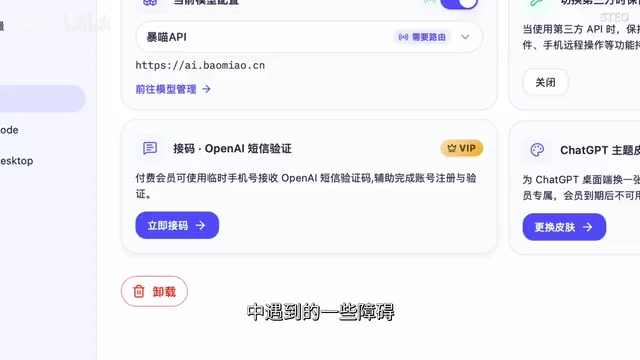
The platform integrates this process into one-click installation, and if issues arise during configuration, they can be handled through a diagnostic feature. This dramatically reduces repetitive operations, letting users spend their time actually using AI rather than wrestling with environments. Tools like Codex are also included. Codex is OpenAI's code generation and execution Agent, capable of autonomously writing, running, and debugging code in a sandbox environment. Its installation and configuration presents a relatively high barrier for ordinary users, making the value of one-click installation particularly evident for such tools.
Token Usage Monitoring: Quota Consumption at a Glance
The second feature is Token usage monitoring. To understand the value of this feature, you first need to understand the Token billing mechanism: Tokens are the basic units by which large language models process text, and they don't simply equal one character or one word. In English, one Token corresponds to approximately 4 characters or 0.75 words; in Chinese, one character is typically encoded as 1-2 Tokens. Mainstream AI services all use Token-based billing, with input and output priced separately, and pricing varies dramatically between models — for example, Claude Sonnet is far cheaper than Claude Opus, and GPT-4o costs significantly more than GPT-3.5-turbo.
As AI call frequency increases, many people discover they have no idea how much quota they've consumed or when they'll hit limits.
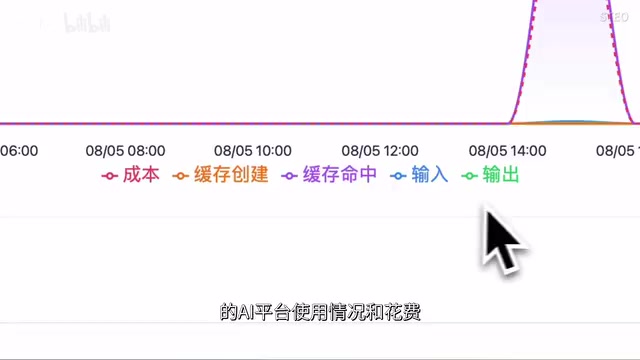
The platform helps users view usage and spending across different AI platforms, making resource consumption transparent. The logic is actually similar to mobile data usage alerts — you don't wait until your data is completely used up to start paying attention; instead, you stay on top of your usage status in advance. For power users who frequently call APIs, this proactive awareness effectively prevents the awkward situation of "suddenly running out mid-use." Especially in team collaboration or multi-project parallel scenarios, clear usage visualization helps users allocate budgets rationally and choose more cost-effective model combinations.
Skill and MCP Management: Building a Reusable Capability Library
The third feature, and the one I consider most important for long-term users, is Skill and MCP storage and management. It solves the organizational challenge that accumulates as AI workflows grow.
Two key concepts need explanation here. MCP (Model Context Protocol) is an open standard launched by Anthropic in late 2024, designed to provide AI models with a unified way to access external tools and data sources. Through MCP, AI can connect to databases, call APIs, operate file systems, access web pages, and more, greatly expanding the model's practical application capabilities — think of it as the "USB port" of the AI world, allowing different tools and data sources to plug into AI models in a standardized way. Skill refers to preset prompt templates, workflow configurations, or instruction sets for specific tasks, essentially packaging repeatedly-used AI operations into reusable modules.
If all Skill and MCP configurations rely on manual saving, subsequent retrieval and invocation becomes very cumbersome. Here you can organize all this content in one place for easy repeated access. One thoughtful design detail: you can designate which AI tool a particular Skill or MCP is best suited for, enabling categorized management. Skills also support subsequent updates, allowing workflows to continuously optimize and iterate. For users who have already formed fixed AI work habits, this is equivalent to building a reusable "capability library" — over time, this capability library itself becomes a valuable digital asset.
Unified History Management: Cross-Platform Conversation Archiving
The fourth feature is history management. It supports browsing, searching, and unified management of historical chat records across Agents.

Whether it's conversations generated on different AI platforms or work content accumulated over time, everything can be viewed and organized centrally. Users can quickly locate target conversations by keyword or platform, batch delete records, or even recover accidentally deleted important records. This gives AI conversations previously scattered across various platforms a unified archiving entry point for the first time.
The value of this feature becomes increasingly apparent with long-term use. Many users generate valuable ideas, code snippets, analytical conclusions, and other content during AI conversations, but because these are scattered across ChatGPT, Claude, Gemini, and other platforms, retroactive review often becomes nearly impossible. Unified archiving gives these scattered knowledge fragments a searchable, manageable structure.
The Real Value of This Type of AI Management Tool
It's important to clarify that this type of management platform won't change the capabilities of AI models themselves. Its value lies in optimizing the entire workflow of using AI.
Often, no matter how powerful a tool is, if the barrier to use is too high and configuration is too tedious, users will struggle to persist long-term. Reducing this extra friction cost is the raison d'être of AI management platforms. This logic is similar to operating systems relative to hardware, or package managers relative to development environments — the underlying capabilities remain unchanged, but the upper-level management and orchestration approach determines actual usage efficiency and experience. For newcomers, it lowers the difficulty of getting started with overseas AI; for veterans, it centralizes scattered accounts, quotas, workflows, and history into a more efficient management approach.
From the hands-on experience, BaoMiao AI Manager integrates network optimization, Agent installation, Token monitoring, Skill management, and conversation archiving together, covering a substantial portion of daily management needs. Of course, whether it can deliver substantive efficiency improvements still needs continuous validation across more real-world workflows. For users who are experimenting with multiple AI tools or just starting to explore AI Agents, this type of platform is definitely worth trying.
Key Takeaways
Related articles

Choosing a Laptop for AI Studies: MacBook vs NVIDIA Laptop — An In-Depth Comparison Guide
In-depth analysis for AI students choosing laptops: MacBook Air M5 with remote GPU vs NVIDIA laptop, comparing CUDA support, portability, battery life, and value.

Self-Hosted LLM Tech Stack: A Complete Guide to Managing Your Local AI Cluster from the Terminal
A deep dive into self-hosting LLM tech stacks: inference engines, model management, vector databases, and how to manage your local AI cluster from the terminal.

How a Hugging Face Engineer Automated His Team's Entire Workflow with AI Agents
Hugging Face ML engineer Niels shares how he automated his Community Science Team's workflow using AI Agents, from deterministic Workflows to autonomous Agents.