Choosing a Laptop for AI Studies: MacBook vs NVIDIA Laptop — An In-Depth Comparison Guide

MacBook Air M5 + remote desktop GPU beats a heavy NVIDIA laptop for AI students who already own a desktop.
This guide helps AI/ML students decide between a lightweight MacBook Air M5 paired with remote GPU access and a heavier NVIDIA laptop. It analyzes CUDA importance, MPS limitations, remote development workflows using Tailscale + SSH + VS Code Remote, and concludes that students who already own a desktop GPU should prioritize portability and battery life with a MacBook while leveraging remote compute for training tasks.
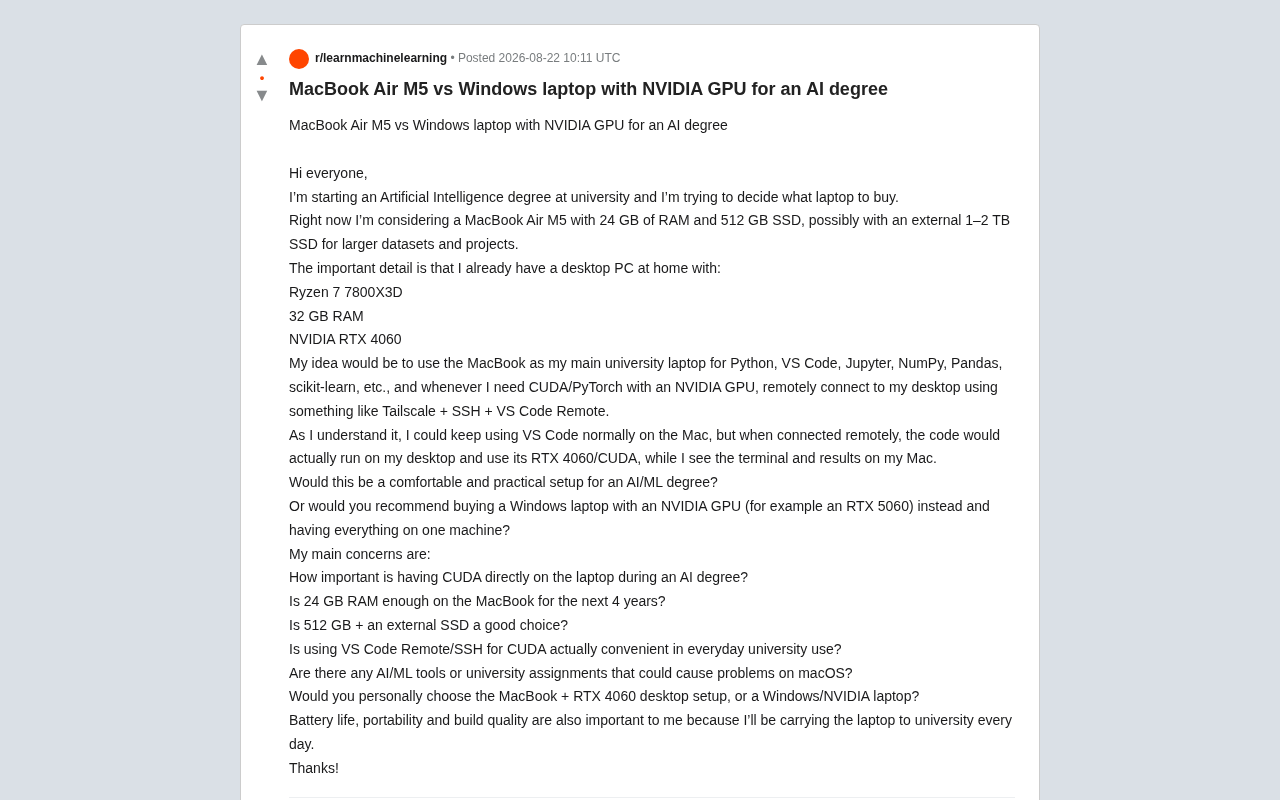
For university students about to enter the field of artificial intelligence, choosing the right laptop is often one of the most agonizing decisions before enrollment. Recently, a Reddit user posed a highly representative question: Should I buy a lightweight MacBook Air M5, or go with a Windows laptop equipped with an NVIDIA discrete GPU?
Behind this question lies a core contradiction in the AI/machine learning learning path — the trade-off between portability and local computing power. This article provides an in-depth analysis of the pros and cons of both approaches based on this user's specific situation, along with practical recommendations.
The Real Dilemma: Ultrabook or Performance Laptop?
This prospective AI student had a fairly specific configuration plan: he was leaning toward purchasing a MacBook Air M5 with 24GB RAM + 512GB SSD, paired with a 1-2TB external SSD for storing large datasets.
The key factor is that he already has a capable desktop at home:
- CPU: Ryzen 7 7800X3D
- RAM: 32GB
- GPU: NVIDIA RTX 4060
The AMD Ryzen 7 7800X3D is an 8-core, 16-thread processor featuring 3D V-Cache technology with a massive 96MB L3 cache. While this CPU is renowned for its exceptional gaming performance due to its huge cache, it's equally useful in AI development scenarios — CPU-intensive preprocessing tasks like data loading, feature engineering, and data augmentation all benefit from the multi-core high-cache design. Paired with 32GB of RAM, it can run multiple data loading workers in parallel, ensuring the GPU doesn't sit idle waiting for data during training.
His plan was to use the MacBook as his daily carry device for Python, VS Code, Jupyter, and routine data science work with NumPy, Pandas, scikit-learn, etc. When CUDA/PyTorch GPU training is needed, he would remotely connect to his home desktop via Tailscale + SSH + VS Code Remote.
This "ultrabook + remote compute" combination has actually become the mainstream choice for an increasing number of AI developers.
How Important Is Local CUDA for AI Learning?
This is the most critical question in the entire decision.
Deep Learning Is Nearly Inseparable from CUDA
In the current machine learning ecosystem, NVIDIA's CUDA remains the de facto standard. Mainstream frameworks like PyTorch and TensorFlow have the most mature CUDA support, and the vast majority of tutorials, open-source projects, and course assignments default to a CUDA environment.
CUDA (Compute Unified Device Architecture) was first released in 2007 and has been evolving for nearly 18 years. It became the de facto standard for deep learning not just because of its mature programming model, but because of the massive ecosystem built around it: cuDNN (deep neural network acceleration library), TensorRT (inference optimization engine), NCCL (multi-GPU communication library), and other components form a complete acceleration stack. Nearly all major deep learning frameworks prioritize CUDA as their primary GPU backend for development and optimization. This first-mover advantage has created a powerful network effect — developers default to CUDA, hardware vendors optimize around CUDA, educational institutions teach based on CUDA, forming a virtually unshakeable closed loop.
While Apple's M-series chips offer the MPS (Metal Performance Shaders) backend, and PyTorch does support GPU acceleration on Apple Silicon, the reality is:
- Some libraries and models have compatibility issues on MPS
- Certain operations fall back to CPU, causing severe performance degradation
- Troubleshooting environment issues consumes significant time
Specifically, MPS is Apple's compute acceleration framework for its GPUs, and PyTorch officially added MPS backend support starting from version 1.12. In principle, MPS allows PyTorch code to execute tensor operations and neural network computations on Apple GPUs. However, in practice, MPS operator coverage still lags behind CUDA — as of late 2024, some PyTorch operations remain unimplemented on MPS. When these operations are encountered, the framework automatically falls back to CPU execution, causing cliff-like performance drops and frequent memory copies. Furthermore, many third-party libraries (such as custom CUDA kernels, FlashAttention, and other high-performance attention implementations) simply don't support MPS, meaning some cutting-edge research code cannot run directly on Mac.
Feasibility of Remote GPU Development
The good news is that the user's envisioned remote development solution is technically mature and practical.
VS Code Remote SSH's working mechanism is worth understanding in depth: it's not a simple remote desktop or terminal connection. Instead, it runs a complete VS Code Server process on the remote server — all file indexing, code completion, linting, and terminal execution happen on the remote machine, while the local VS Code serves only as a lightweight UI rendering frontend. This means your development experience is nearly identical to using VS Code directly on the remote machine — extensions run remotely, the debugger executes remotely, and the file system is remote. The only data transmitted over the network is UI updates and keyboard inputs — extremely small amounts — so even with limited bandwidth, you can maintain a smooth coding experience.
Tailscale solves the problems of NAT traversal and secure connections. Traditional remote connections face a fundamental obstacle: home devices are typically behind NAT (Network Address Translation) without a public IP, making them inaccessible from outside. Tailscale builds a zero-configuration VPN network based on the WireGuard protocol, coordinating connections through DERP relay servers and using NAT traversal techniques to establish end-to-end direct tunnels whenever possible. Once a connection is established, data traffic flows directly between the two devices with extremely low latency. For AI developers, this means you can SSH into your home GPU workstation from a café, classroom, or anywhere with internet access — as easily as accessing a LAN device — without configuring port forwarding or dynamic DNS.
For AI/ML learning, this workflow runs quite smoothly in daily use. The only drawback is: when you're away from home or your network is unstable, you won't be able to access GPU compute power.
Pros and Cons of MacBook Air M5 for AI Development
Clear Advantages
As a device that needs to be carried to school every day, the MacBook Air excels in several key dimensions:
- Battery life: The M-series chip's power efficiency is unmatched — a full day of classes without needing to charge
- Portability and build quality: Slim body and premium construction
- Silent fanless design: The Air series uses passive cooling, perfect for library use
- Smooth daily development: More than sufficient for Python, Jupyter, data analysis, and similar tasks
For the user's stated need of "carrying it to school every day," these are advantages that Windows gaming laptops simply cannot match.
Points to Weigh
Memory considerations: Will 24GB be sufficient over the next 4 years? For routine data science tasks and lightweight model development, 24GB is adequate. Note that macOS has relatively efficient memory management, and Apple Silicon's unified memory architecture means the memory is also shared with the GPU.
This point is worth elaborating on: Apple Silicon's Unified Memory Architecture (UMA) is a design where all compute units — CPU, GPU, Neural Engine — share the same physical memory pool. Unlike traditional PC architecture where the CPU uses system memory, the GPU uses dedicated VRAM, and data must be copied back and forth over the PCIe bus, UMA eliminates this data transfer overhead. This means a 24GB MacBook Air's GPU can directly access data across all 24GB of memory, while a desktop RTX 4060 has only 8GB of VRAM — model parameters exceeding VRAM must be offloaded to system memory, significantly reducing efficiency. This is also why Apple Silicon excels at running local LLM inference — it can load entire models into unified memory for seamless access. For local inference of small models this works well, but training large models is a different story, as gradients, optimizer states, and other intermediate variables during training multiply memory requirements.
Storage configuration: The 512GB internal + external SSD approach is reasonable. Keep the system and frequently used software on internal storage, and large datasets on external storage — great cost-effectiveness. However, you'll need to develop good data management habits.
Windows + NVIDIA Discrete GPU Laptop Analysis
The other option is purchasing a Windows laptop with a discrete GPU like the RTX 5060, achieving an "all-in-one" solution.
Advantages
- Local CUDA always available, no network dependency
- Better environment consistency, more direct learning of the CUDA ecosystem
- Single machine solves all problems, no need to maintain two systems
Disadvantages
- Poor battery life: Gaming/workstation laptops typically can't last half a day
- Heavy and hot: Noticeable carrying burden and fan noise
- Limited mobile GPU performance: Laptop RTX 5060 performance and VRAM often fall short of desktop-grade GPUs
A noteworthy detail: the user's desktop RTX 4060 actually has an advantage over mobile laptop GPUs for sustained training tasks — desktop GPUs have better cooling and can run at full load for extended periods. The desktop RTX 4060 is based on the Ada Lovelace architecture with 3072 CUDA cores, 8GB GDDR6 VRAM, and a TDP of 115W. Mobile laptop GPUs are limited by thermal design with TDPs typically only 60-80W, and inevitably throttle due to high temperatures during prolonged full-load training. In AI training scenarios, 8GB of VRAM is sufficient to cover most computer vision models (such as ResNet, EfficientNet) and small-to-medium scale NLP model training needs — more than adequate for undergraduate AI studies.
Overall Recommendation: Which Approach Suits AI Students Better?
Based on the user's specific situation, the MacBook Air M5 + home desktop remote approach is the better choice, for these reasons:
- The user already owns a capable desktop — buying another laptop with a discrete GPU is essentially duplicate investment in compute power
- Over 90% of daily development work (coding, data processing, debugging) doesn't require a GPU
- Scenarios that truly need GPU training are typically plannable, batch-processing tasks where remote execution is perfectly sufficient
- Portability and battery life have extremely high value for students commuting daily
If budget allows, consider maxing out the MacBook's memory (32GB is safer), leaving enough headroom for the next 4 years.
Practical Tips and Supplementary Solutions
- Learn to use tmux or nohup to keep remote tasks running after disconnection: tmux (Terminal Multiplexer) is an essential tool for remote development. Sessions it creates exist independently of the SSH connection — even if the network drops, the laptop lid closes, or SSH disconnects, programs running in tmux continue executing. For model training tasks that can take hours or even days, this is indispensable. The typical workflow is: SSH to the remote machine → create a tmux session → start the training script within it → disconnect SSH → reconnect at any time to check progress. Combined with tmux's window-splitting feature, you can simultaneously monitor GPU utilization (nvidia-smi), training logs, and system resources in a single session, building an efficient remote training monitoring environment.
- Test in advance whether your school's coursework requires any Windows-exclusive tools (rare but possible)
- Consider cloud GPUs (such as Google Colab, Kaggle) as backup supplements to the home desktop — Colab provides free T4 GPUs, and Kaggle offers 30 hours of GPU quota per week, serving as emergency alternatives when the home desktop is unavailable (e.g., power outages, system updates)
- Pre-configure Tailscale on the campus network to ensure connection stability
Conclusion
On the AI learning journey, tool selection should serve actual needs rather than blindly chasing specs. For this student who already has a desktop, the combination of a portable, efficient MacBook for daily development and remote connections to a desktop GPU is both economical and practical — representing a mature modern AI development workflow. Rather than pursuing limited GPU performance in a laptop, it's better to invest the budget in improving the portable device's user experience, and leave the heavy compute to the desktop or cloud when it's truly needed.
Related articles

Bilibili's Hit Dify Tutorial: A Practical Guide to Building 20+ AI Apps from Scratch
A distilled guide to Bilibili's top-rated Dify tutorial: Windows + Docker deployment, MySQL connection, five app types, model integration strategy, and publishing.

Agent Skills Beginner's Guide: From Concepts to Multi-Agent Collaboration in Practice
A comprehensive guide to Agent Skills: core concepts, components, the importance of Description, standardization, beginner learning paths, and multi-agent collaboration.

One Neuron Detects Both Cats and Cars? We Reproduced It and Found a New Explanation
The cat-car neuron reinterpreted: researcher Cammarata argues it distinguishes pointy from round, not cats from cars. We reproduced the experiment and found the new explanation holds on most inputs—but cars are the exception. The interpretability debate continues on language models.