BaseTab AI: Turn Your Browser's New Tab Page into an AI Workspace

BaseTab AI turns the browser's new tab page into a draggable, AI-generated personal dashboard.
BaseTab AI is a Chrome extension that transforms the browser's new tab page into a draggable personal dashboard, integrating 30+ widgets such as notes, to-dos, calendar, email, and Claude, ChatGPT, and Gemini chat. Its key differentiator is "describe-to-generate": users describe their needs in natural language and AI creates custom components, lowering the barrier to personalization. It also supports multiple workspaces to separate work and life scenarios and can be shared with teams; it's free, requires no account, and follows a restrained permission strategy. The article sees it as representing a trend of AI capabilities sinking into high-frequency browser entry points, but also notes that component richness may cause information overload—how to make AI appear at the right moment rather than becoming a management burden is a question such products need to continuously balance.
The browser's new tab page is usually a blank starting point, but BaseTab AI wants to make it your daily work control center. This Chrome extension, which earned 71 upvotes and ranked 10th on Product Hunt, attempts to redefine what we see the moment we open our browser through a combination of "draggable widgets + AI generation."
From Blank Page to Personal Dashboard
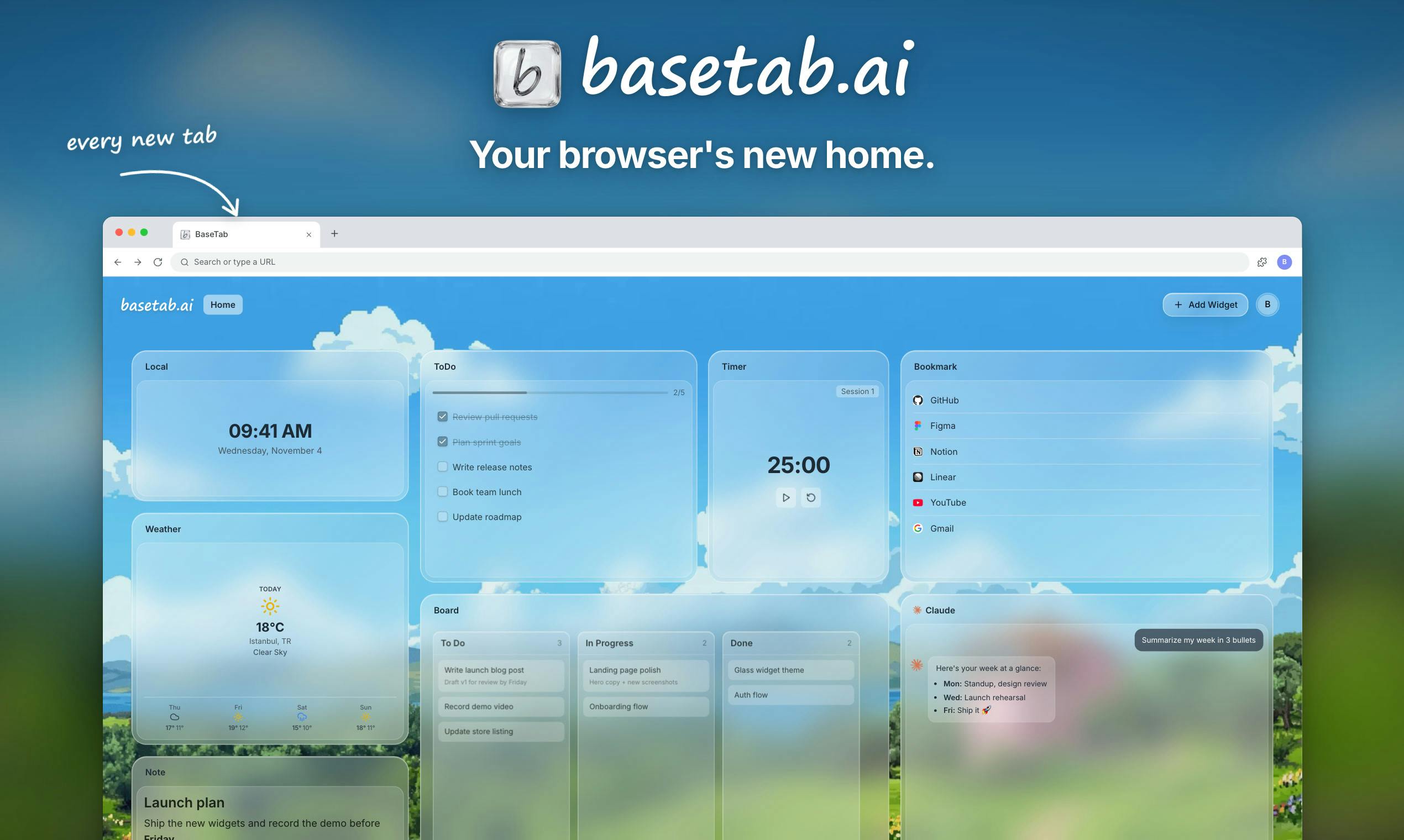
BaseTab's core idea is straightforward: users can freely drag more than 30 types of widgets onto the new tab page, including notes, to-do lists, kanban boards, Pomodoro timers, bookmarks, weather, Google Calendar, Gmail, and chat windows for conversing directly with Claude, ChatGPT, or Gemini. This list covers the most frequent lightweight tasks in daily work—users no longer need to switch back and forth between multiple tabs to check information and perform quick actions on a single page.
This "dashboard-ification" of the new tab page is not entirely new, but BaseTab's differentiator lies in embedding AI capabilities into every step—not just chat, but also how components are created.
The New Tab Extension is a special category in the Chrome ecosystem: it overrides the browser's default new tab page (chrome://newtab), replacing the blank starting point with a custom page. The technical core of such extensions is the chrome_url_overrides configuration in the manifest—once enabled, the extension's designated page loads every time the user opens a new tab or window. Since the new tab page is one of the interfaces users touch most frequently every day, it naturally has "entry point" value, which is why it has become a battleground for dashboard-type tools (such as Momentum and Tabliss). BaseTab's difference on this foundation is that it treats AI capabilities as the underlying support rather than merely offering static components.
AI-Generated Components: Customize Your Workspace with Natural Language
BaseTab's most noteworthy feature is "describe-to-generate": when you need a widget that doesn't exist, describe your requirements in natural language and AI will build it for you. This means the boundaries of the new tab page are no longer limited to the official component library—they can expand dynamically with the user's needs.
From a product design perspective, this lowers the barrier to customizing a dashboard. Traditionally, such tools require users to have some configuration skills or rely on a plugin marketplace, whereas BaseTab hands the task of "building components" to large models. However, the stability, data persistence, and permission management of these generative components remain aspects to watch in actual use.
Technically, "describe-to-generate" typically relies on a large language model (LLM) to transform natural language requirements into structured configurations or executable code. There are two common implementation paths: one is having the model output JSON or a DSL describing the component's data sources, layout, and interaction logic, which a front-end rendering engine then interprets and executes; the other is directly generating HTML/CSS/JS snippets and running them in a sandbox (such as an iframe). The former offers strong controllability but limited flexibility, while the latter offers greater freedom at the cost of security and stability risks. For browser extensions, generated code must also account for the extension's permission model (such as activeTab, host_permissions) and Content Security Policy (CSP), which explains why permission management and persistent storage for generative components are key challenges in real-world deployment.
Spatial Separation of Work and Life
BaseTab supports creating multiple independent workspaces to separate work and personal-life scenarios, and a workspace can be shared with team members. This design addresses a real pain point: the same browser often carries both professional and private matters, and mixing them easily causes attention leakage. Through workspace switching, users can enter the corresponding "mental mode" the moment they open a new tab.
Additionally, users can choose background images to personalize the page. The official team emphasizes "free forever," no account required, and requesting site access permissions only when a widget needs them. This low-barrier, permission-minimization strategy is a plus for privacy-conscious users.
The permission system of browser extensions is the foundation for understanding their privacy strategy. Chrome extensions declare required permissions through the manifest, among which site access rights in host_permissions or permissions (such as reading the current tab's URL or injecting scripts) are sensitive permissions that trigger explicit prompts during installation. BaseTab's claim that it "requests site access permissions only when a widget needs them" corresponds to the optional permissions mechanism: the extension has only basic capabilities by default, and dynamically requests the corresponding permissions only when a user adds a component that needs specific data (such as Gmail or Google Calendar). This Principle of Least Privilege reduces the risk surface if the extension is misused, and is also an important reference for privacy-sensitive users evaluating extensions.
An AI Experiment in the Lightweight Tools Track
BaseTab AI represents a trend in the browser extension space: moving AI down from a standalone chat window to become infrastructure. It does not try to be an all-purpose assistant; instead, it hides AI behind the high-frequency entry point of the new tab page, letting users naturally use it while organizing information.
Of course, the richness of 30+ components also brings the risk of information overload. How to make AI appear at the right moment, rather than letting the dashboard become yet another burden to manage, is a question such products need to continuously balance. For users who want to turn their browser homepage into a productivity panel, BaseTab offers a free, no-registration option to try.
Related articles

AI Tools Quietly Altering Settings: Postman Silently Installs Plugin, Codex Sharing Option Auto-Resets
AI Daily reports: Postman silently installs a Mac plugin and self-approves startup hooks, logged as auto-existing upgrade; Hacker News developers say Codex data-sharing opt-out flips back. Plus Simon Willison's raw float weight experiment with QEN 3.8-27B.

AI Learns to Rewrite AI: MIT's "Weightspace Programming" Redraws the Path to Recursive Self-Improvement
MIT team proposes weightspace programming: GPT-6 Astra reads and edits AI model weights directly. Math scores jump several-fold, hand-written networks beat trained models. Eight experiments analyzed, plus Anthropic's same-day warning and the real boundaries of recursive self-improvement.

Running Qwen 3.8 on a Laptop to Read Raw Weights: 46 Minutes Per Answer
Simon Willison reproduced weight space programming with Qwen 3.8 27B on a laptop: a 17GB model file, 46 minutes per answer, 43,506 reasoning tokens, Pong over an hour, Freeway failed. Suited for interpretability researchers.