Before Letting AI Agents Take Over Your Network, Set These 3 Safety Guardrails First

Experiments reveal AI agent frameworks can silently modify router configs by default — here are 3 essential guardrails.
A network engineer tested open-source agent frameworks Goose and Bionic against a real router, finding that Goose's default auto mode executes write operations without any confirmation, and its "smart approve" mode delegates the approval decision to the AI model itself. The article examines the gate inside every agent loop and proposes three guardrails: ensuring MCP tools return complete, real-time data; layering MCP readOnlyHint/destructiveHint labels with custom permission rules (priority: custom rules > tool labels > model guessing); and understanding your framework's approval boundaries before deployment — Bionic in testing had no interception for MCP write tools at all. A key warning: MCP labels can be faked, so always audit every MCP server you install.
AI Agents are evolving from "chat assistants" into executors that can directly operate production environments. When an AI agent harness gains write access to real network devices, exactly when will it stop to ask for your approval — and when will it just go ahead and change your router configuration? This is a question every network engineer who wants to bring AI into their operations environment must understand clearly.
A YouTuber focused on "AI-augmented engineering" ran a series of experiments against a real router using two locally-run open-source agent frameworks — Goose and LM Studio's new framework Bionic — revealing the real risks these tools carry in their default state, and identifying three guardrails worth deploying as a priority.
The Fundamental Difference Between an Agent Harness and a Chatbot
A regular local LLM just "chats" — you ask it a networking question, it gives you an answer, full stop. An agent harness is fundamentally different: it puts the model inside a loop that selects tools, executes them, feeds the results back into the loop, and repeats until the task is complete.
The critical point is inside that loop: there must be a "gate" that decides whether any given tool call actually gets executed. That gate is the heart of the entire experiment.
The author highlights a dangerous default that's easy to overlook: a fresh Goose installation runs in auto mode, meaning every tool call executes directly with no prompting whatsoever. In other words, Goose out of the box will modify your network configuration without asking for approval. And even when you switch to smart approve mode, whether an approval prompt appears is ultimately left up to the underlying AI model to decide — which is clearly not ideal in a production environment.
MCP (Model Context Protocol) is an open standard proposed by Anthropic in 2024 to unify communication between large language models and external tools and data sources. Before MCP, every agent framework had its own tool-calling interface, and they were all incompatible. MCP standardizes tool definition, discovery, and invocation into a JSON-RPC-style protocol, allowing the same tool server (MCP Server) to be reused directly by different frameworks like Claude, Goose, and Bionic. The readOnlyHint and destructiveHint labels mentioned in this article are metadata fields built into the MCP spec, used to convey the degree of side effects a tool has to the agent framework. Understanding this context helps explain why the trustworthiness of these labels is a systemic issue — any framework following the MCP protocol faces the same trust boundary problem, not just Goose.
Guardrail One: Make Sure Your MCP Tool Output Is Complete
The first guardrail depends entirely on you: you must ensure the information your MCP tools return to the model is complete.
The author shared a real lesson learned. He once used a network configuration tool with caching to pass data to the harness, but the tool's returned data had no timestamp. As a result, the framework assumed it was current, real-time data and made incorrect decisions. He had to go back and modify the tool to actually fetch live configuration data before the model correctly understood the situation.
This detail reminds us that the quality of an agent's judgment is highly dependent on the quality of its inputs. If the information a tool gives the LLM is stale or incomplete, even the smartest approval logic will be built on faulty facts. When building tools, always make sure they return all the information the harness needs to the model.
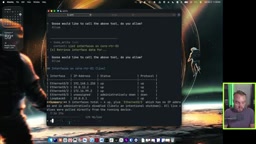
In the experiment, the author set each of the three read-only tools (ping host, list interfaces, show interfaces) to always allow in Goose's "tool permissions" one by one, while keeping write tools separate. This also addresses "approval fatigue" — a single simple read-only operation triggered three separate approval requests (with the built-in to-do tool being called twice), and it's exactly this kind of constant interruption that drives people to switch back to auto or bypass mode and abandon all protection entirely.
Guardrail Two: Label Your Tools, Then Stack Your Own Permission Rules on Top
The second guardrail is the tool labeling mechanism provided by the MCP protocol. Each tool can set a readOnlyHint, using true or false to indicate whether it reads or writes; there's also a more granular destructiveHint to flag whether a write operation is destructive.
The author gives an example: changing an interface port description is a write operation, but it won't cause an outage, so destructiveHint can be set to false; writes that could actually cause failures should be marked as destructive. This gives you considerable configuration flexibility — not just "read vs. write," but also "is the write dangerous?"
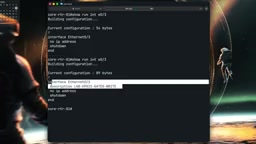
More importantly, the author traced through Goose's source code to map out the real decision order at that gate:
- Rules you set yourself always take priority, applied every time;
- The tool's own labels — if a tool declares itself read-only, Goose trusts it and will never ask the model;
- If there are neither rules nor labels, the local model uses a "best effort" approach to guess.
So the labels are the gate. But there's a massive security trap lurking here: the MCP spec requires that unless a server is trusted, these labels should be treated as untrusted. And Goose defaults to trusting servers you manually add. The author ran a pointed test — he deliberately lied in his own write tool, labeling a write tool as read-only, and sure enough, Goose executed it without asking. It followed the label exactly.
This establishes an iron rule: read every MCP server you install. They can absolutely execute all kinds of write operations without you being ready for it. For vendor-provided MCP servers whose source code you can't inspect, the author's workaround is to hand it to an AI and have it analyze "what write operations does this MCP server perform," then adjust permissions accordingly.
Two layers of protection take shape from this: hint configuration at the MCP tool level + rules at the agent harness level. The author's final Goose ruleset was: three read-only tools set to always allow, the write set interface tool set to ask-before-running, and shell set to never allow — never letting it run shell commands on its own.
The security model at play here is fundamentally a supply chain trust problem. MCP servers can be published by any third party, and their label declarations have no enforced verification mechanism at the protocol level — similar to how package.json in an npm package can have any description filled in arbitrarily. The MCP spec documentation itself explicitly states that clients should not unconditionally trust hints from unknown servers, and that users or administrators should explicitly authorize them. Yet in practice, frameworks like Goose grant full trust by default to servers users manually add, which effectively transfers all security judgment responsibility to the user. This follows the same logic as software supply chain attacks: an attacker only needs to publish a malicious MCP server that claims to be "read-only," get a user to install it, and arbitrary write operations can be executed with zero prompting. Therefore, "read every MCP server you install" is not a suggestion — it's the only reliable line of defense in the current protocol ecosystem.
Guardrail Three: Don't Put Write Tools in a Framework That Won't Stop to Ask You
The third guardrail is about having a clear-eyed understanding of the framework itself. The author then tested LM Studio's new framework Bionic, and the results exposed a serious problem.
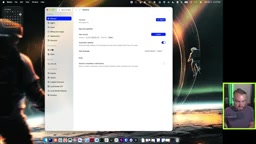
After registering an MCP server in Bionic and filling in the startup command, even with the permissions menu set to "ask every time," it only applied to shell commands. When the author had it run ls -la, Bionic did pop up a confirmation; but when he had it modify a core router's interface description, the write tool executed directly across three different sessions with zero approval prompts.

The reason: in version 1.1.6 tested by the author, Bionic did not yet have MCP-specific rules like Goose does. Its approval menu only covered shell commands, and it did not treat MCP tool calls as shell commands. The conclusion is straightforward: Bionic works and is quite interesting, but using it means you genuinely lose one layer of protection — your only gate is the MCP tool's own configuration.
The problem Bionic exposes reflects a more general framework evaluation dimension: approval granularity. Many early agent frameworks treated "tool calls" and "shell execution" as two fundamentally different types of operations — the former being considered controlled function calls, the latter being dangerous arbitrary code execution. This distinction has some validity in a sandboxed environment where tool behavior is completely predictable, but it fails entirely in scenarios where tools can connect to real network devices. To determine whether a framework is suitable for production operations environments, you need to explicitly ask: Does its approval mechanism cover all MCP tool calls (not just shell)? Does it support different approval policies by tool name or label? Is the approval history auditable? A framework that can't answer yes to all three of these questions should be considered to lack sufficient security controls before touching a production environment.
Core Takeaways from the Three Guardrails
Pulling the experimental conclusions together, there are three points worth remembering for anyone bringing AI Agents into a network environment:
First, the gate inside an agent harness is generic — it has no idea what a "router" is. Goose first checks your permission rules, then looks at the tool's read-only label, and only lets the AI model guess when neither has an answer.
Second, the guardrails that actually hold the line are the ones you set yourself. A tool's read-only label will tell the truth (as long as you haven't lied), and you need to stack your own permission rules on top in Goose.
Third, you must clearly understand what your chosen framework allows and what permission settings it provides. The same write tool placed in Goose versus Bionic has a completely different security boundary.
As "harness engineering" gradually becomes a real and distinct practice area, more and more people are starting to build their own agent frameworks. But whether you're using an existing one or building your own, set these three guardrails before letting an AI agent touch your network — this isn't optional, it's the baseline.
Related articles

JobRunner MCP Server: AI Agents Can Now Fix Failed Java Jobs
JobRunner launches an open-source MCP server enabling AI agents to view cluster status, diagnose failures, and recover Java jobs—incident response from any cloud coding environment or existing agent.

MLAI Digital Launches 9 Security Agents: MCP Server Safeguards the Full Lifecycle of Agentic AI
MLAI Digital launches Security MCP Server with nine built-in specialized security agents covering vulnerability discovery, attack simulation, prompt injection detection, API and infrastructure assessment, and accelerated remediation—embedding security validation across the full Agentic AI lifecycle from development to production.

Running Isaac Lab on H100 GPUs: Exploring Better Approaches
Exploring optimization methods for running Isaac Lab on NVIDIA H100 GPUs, including MIG configuration, mixed precision, TensorRT acceleration, and community experience to improve robotics simulation and reinforcement learning efficiency.