Beginner's Guide to Cursor: A Complete Overview of AI Coding Tools and How They Compare

Compare Cursor, Copilot, Windsurf, and more to pick the right AI coding tool for your needs.
AI coding tools are lowering the barrier from 'know a programming language' to 'describe what you want.' This article breaks down the core logic of AI-assisted development and compares five major tools: GitHub Copilot for code completion, Cursor for full-featured AI-native development, Windsurf for local-first inference, free Chinese tools like Trae and Tongyi Lingma, and the versatile plugin Codeium. Choose based on budget, workflow preference, and use case — and remember, prompt-writing skills matter more than the tool itself.
AI is reshaping the way software gets built. In the past, writing code required fluency in at least one programming language and a solid grasp of complex algorithmic logic — a high barrier with a long learning curve. Today, with AI coding tools, even non-technical users can describe what they need in plain language and generate working code in minutes. This article is based on the first installment of a Cursor tutorial series, walking through the core logic behind AI-assisted development and comparing the most popular AI coding tools on the market — so you can make the right choice without the guesswork.
What Is AI Programming?
Before diving into Cursor, it's worth understanding what AI programming actually changes. Traditional coding is a highly specialized discipline — developers write code line by line, giving the computer precise instructions. It's rigorous, but the barrier to entry is steep.
With AI advancing rapidly, that's changing in a fundamental way. Developers today almost universally use some form of AI assistance. Even without a dedicated coding tool, many turn to DeepSeekAd, ChatGPT, or similar platforms to ask questions, generate code snippets, or get solutions to specific problems. This has become a standard part of the modern development workflow.

At its core, AI programming combines natural language conversation with powerful large language models and intelligent processing capabilities to complete development tasks. The difference from early "ask AI to write some code" experiences is significant: AI is no longer just a generation tool — it acts as a true programming partner that helps you solve problems and save development time.
As the tutorial frames it, the productivity gains can be substantial: a project that used to take one to two weeks — or even one to two months — can potentially be compressed significantly with the right AI tooling. That said, the actual results depend heavily on your ability to communicate effectively with AI. Knowing how to write good prompts and how to make your intent clear is the real skill that separates average and excellent outcomes.
Comparing the Major AI Coding Tools
Beyond Cursor, there are several other AI coding tools worth knowing. The tutorial broadly organizes them into two categories: IDE plugins and standalone IDEs.
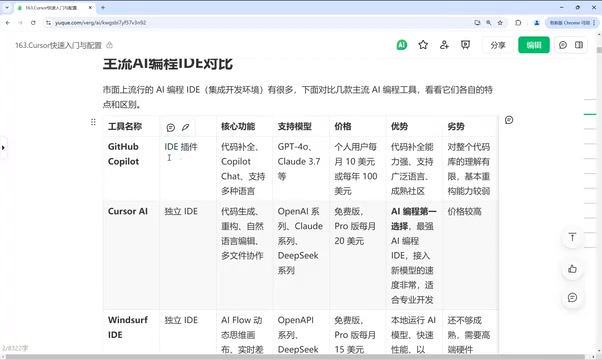
GitHub Copilot: The Established Plugin with Strong Code Completion
Copilot is one of the earlier tools in this space. It's fundamentally an IDE plugin that works inside IDEA, VS Code, and other popular development environments. Its core features include code completion, chat-based interaction, and code editing, with support for models like GPT-4 and Claude 3.5.
Its strengths are clear: exceptional code completion, broad language support, and deep ties to the GitHub ecosystem, which gives it a strong understanding of real-world code patterns. Its main weakness is limited comprehension of entire codebases and relatively weaker refactoring capabilities.
Cursor: The Top Pick Right Now
Cursor is positioned as the leading choice in AI programming at the moment. It excels at code generation, refactoring, natural language editing, and multi-file collaboration. It has strong codebase understanding and supports advanced features like MCP.
The one legitimate complaint is cost — it's on the pricier side. But if you prioritize feature completeness and aren't budget-constrained, Cursor is the tool to consider first.
What is MCP? MCP (Model Context Protocol) is an open protocol introduced by Anthropic in late 2024. It allows AI models to interact with external tools, data sources, and services in a standardized way. Think of MCP as a "plugin interface" for your AI coding assistant. Through MCP, Cursor can query databases, perform file system operations, automate browsers, and call third-party APIs — going far beyond simple code generation. This enables Cursor to participate in more complex development workflows, such as reading a database schema directly to generate matching code, or fetching UI specifications from a design tool. MCP support is one of the key features that sets Cursor apart from pure code completion tools and is central to its positioning as an AI-native development environment.
Windsurf: A Local-First Standalone IDE
Windsurf is a standalone IDE. Its standout features include an AI workflow (flow) system with a dynamic thinking canvas, real-time diff evaluation, and a local-first approach to model inference.
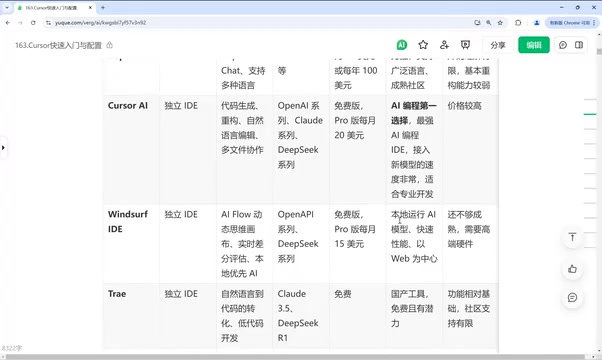
It's web-centric and runs quickly, but the feature set isn't fully mature yet, and it has relatively high hardware requirements. It's best suited for exploratory or early-adopter users.
What does "local-first model inference" mean? It means Windsurf can prioritize routing AI inference requests to models running locally on your machine, rather than relying entirely on cloud APIs. This is a meaningful advantage for users with data privacy concerns, sensitivity to network latency, or a need to work offline — your code doesn't need to be uploaded to a remote server to be analyzed or generated. The tradeoff is hardware demand: running mainstream code models locally typically requires a GPU with 16GB or more of VRAM. That's why the tutorial notes Windsurf's high hardware requirements. By contrast, Cursor and Copilot are primarily cloud API-based, making them more accessible but routing your data through third-party servers.
Trae, Tongyi Lingma, and Other Chinese Tools: Free Is the Biggest Advantage
The tutorial highlights several tools that are free to use. Trae recently released a new version that has apparently improved significantly — it handles natural language code transformation well and supports models including Claude 3.5 and DeepSeek R1, all at no cost.
Tongyi Lingma and other domestically developed tools are also free and reasonably capable. Chinese AI coding tools have broadly adopted a free-tier strategy. The core features — writing and editing code — are all there, making them a solid choice for budget-conscious users. The limitations are that they're somewhat less capable than paid alternatives, and support for advanced features like MCP and surrounding ecosystem tooling is less mature.
Codeium: The Plugin That Works Everywhere
Codeium is another IDE plugin option that stands out for its broad compatibility — it supports virtually every major IDE, including VS Code, IDEA, PyCharm, and more. For developers who already have a preferred environment and don't want to switch, plugin-based solutions like Codeium offer the best adaptability.
How to Choose the Right Tool for You
Overall, you can approach the decision across three dimensions:
Budget is the first filter. If cost matters, start with free Chinese tools like Trae or Tongyi Lingma — their core functionality covers everyday use cases well. If you want full feature coverage and can accept a subscription, Cursor is the safer bet.
Workflow preference determines the format. If you don't want to leave your current development environment, plugins like Copilot or Codeium are the better fit. If you're open to embracing a fully AI-native experience, standalone IDEs like Cursor or Windsurf offer deeper integration.
Use case shapes what features matter most. For pure code completion, go with Copilot. For multi-file collaboration and complex refactoring, Cursor leads. If local execution and speed are priorities, Windsurf is worth trying.
Final Thoughts
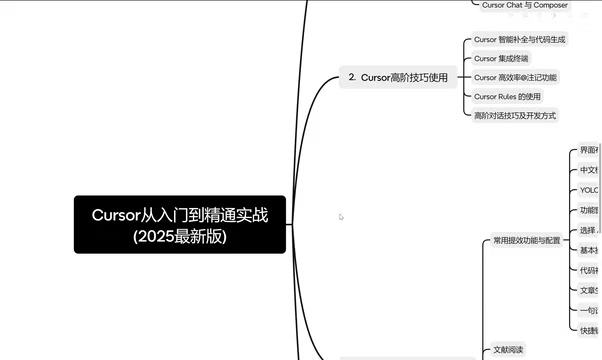
This article is based on an ongoing Cursor hands-on tutorial series. Upcoming installments will cover installation and configuration, interface setup, model selection, using the Chat and Compose features, smart autocomplete, terminal integration, YOLO mode, and more advanced techniques — along with practical walkthroughs for use cases like literature review, research data visualization, and rapid personal website development.
For anyone just getting started with AI programming, understanding the logic behind these tools matters more than memorizing any particular workflow. The essence of AI programming is lowering the barrier to development — enabling more people to quickly bring their ideas to life. Choosing the right tool is just the starting point. What truly makes the difference is your ability to collaborate effectively with AI.
Related articles

How Big Can Stars Really Get? The Physical Limits of the Largest Stars
Red supergiants are the largest stars by volume, with radii up to 2,000 times the Sun, engulfing the inner solar system. But there is no precise upper limit on stellar size—models predict up to 15,000 solar radii. The most massive blue stars are far smaller than red supergiants—biggest and heaviest are two different things.

Apple HomeView Smart Display Full Feature Breakdown: Wall-Mount or Desktop, $299
Apple launches HomeView, a $299 smart display with wall-mount and desktop options, 12MP camera for facial recognition, smart home control, music playback, and recipe step-by-step cooking. Full breakdown of watch faces, apps, privacy, and cooking integration.

Where Did the Promised New Studio Go? Craft Computing Answers After Five Years
Craft Computing's host responds to viewer questions: the new studio promised five years ago was shelved as construction costs soared from $30,000 to $75,000, and was replaced by a 168-square-foot garage conversion.