Behind the Gemini CLI Explosion: Why the Terminal Is Becoming the Ultimate Gateway for AI Agents

The terminal is becoming the critical execution gateway for AI to enter real development workflows.
This article analyzes the deeper logic behind Gemini CLI's explosive popularity: as an "execution gateway," the terminal differs from browsers (information gateway) and IDEs (editing gateway), offering the shortest path for AI to go from "can talk" to "can do." Terminal Agents can orchestrate multi-step engineering tasks into action chains and naturally connect to enterprise CI/CD infrastructure. All three major model companies betting on the terminal simultaneously is no coincidence — it marks the shift in AI's entry point competition from Q&A experience to execution experience.
Why the Terminal? The Fundamental Differences Between Three AI Entry Points
Many people's first reaction is: browsers and IDEs can already integrate with large language models, so why go back to the command line? The answer lies in the fundamental positioning of these three entry points:
- Browser is an information gateway — core actions are searching, reading, and browsing;
- IDE is an editing gateway — core actions are writing code, refactoring, and debugging;
- Terminal is an execution gateway — core actions are running tests, checking logs, modifying configs, executing scripts, and restarting services.
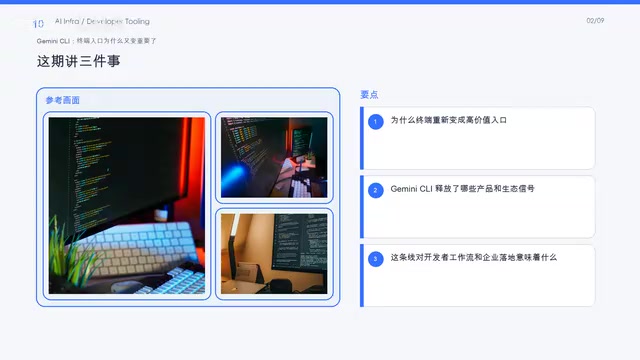
A significant portion of developers' most frequent actions naturally belong to the terminal. Running a test suite, grepping through logs, SSH-ing into a remote server to restart a process — these operations never required opening a browser or IDE. They've always lived in the terminal.
So what Gemini CLI is really competing for isn't just a UI position — it's the shortest path from prompt to real execution. When AI can directly understand intent and execute commands in the terminal, the translation cost in between drops to nearly zero.
Gemini CLI's Design Philosophy: Not Chat, But Engineering Action Chains
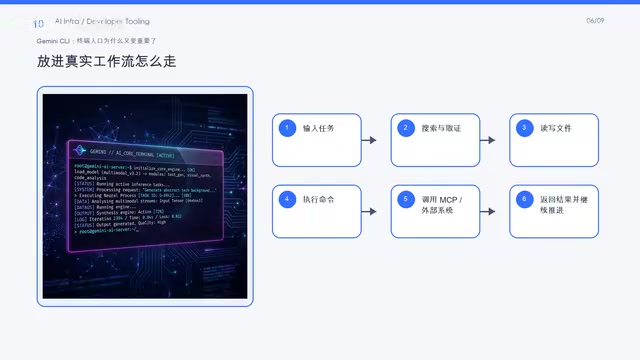
Gemini CLI integrates search, file operations, Shell commands, web access, and MCP (Model Context Protocol) capabilities together — a design choice well worth examining.
What is MCP? MCP is a standardized protocol proposed and open-sourced by Anthropic in late 2024, designed to solve the fragmentation problem of integrating AI models with external tools and data sources. Before MCP, every AI tool needed to develop separate adapters for different data sources and services, creating massive duplication of effort. MCP defines a unified client-server communication specification that allows AI models to invoke file systems, databases, APIs, and other resources through standard interfaces. Gemini CLI's support for MCP means it can reuse the entire existing tool integration ecosystem within MCP — a key reason it can rapidly expand its capability boundaries.
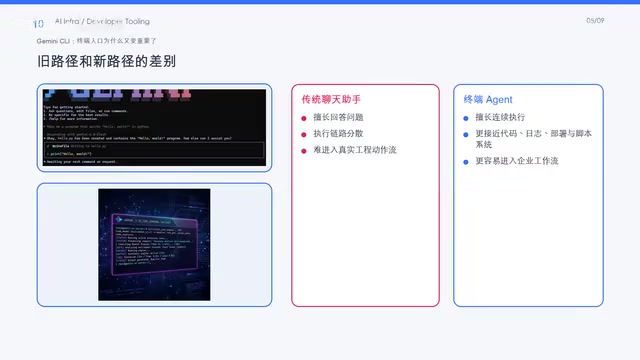
The focus isn't chat — it's orchestrating these capabilities into engineering action chains. This is the biggest difference between terminal Agents and traditional chat assistants:
- Traditional chat assistants excel at answering questions, but their action chains are often fragmented. You ask a question, get an answer, then execute it yourself. Every step requires manual bridging.
- Terminal Agents are closer to continuous execution. They can understand your intent, decompose it into multiple steps, execute them sequentially in the terminal, and adjust the next step's strategy based on the previous step's output.
It's worth noting that terminal Agents are fundamentally different from traditional Shell automation (like Bash scripts or Makefiles). Traditional Shell automation relies on humans pre-defining every execution step and lacks dynamic contextual understanding. Terminal Agents introduce an LLM reasoning layer that enables them to adjust subsequent strategies based on real-time command output — what's known in engineering as "Reactive Planning." For example, when grep returns empty results from a log search, a traditional script can only continue along its preset path, while an Agent can infer that the log path might be wrong and try other locations. This dynamic adaptability is the core leap of terminal Agents over static automation scripts.
This difference isn't obvious in simple scenarios, but it's dramatically amplified in complex engineering tasks. For instance, "find the logs from the most recent failed deployment, identify the error cause, and roll back to the last stable version" — this task involves log querying, text analysis, version management, and deployment operations across multiple steps. A terminal Agent can chain these into a complete execution pipeline.
Key Enterprise Advantage: The Terminal Naturally Connects to Infrastructure
For enterprises, terminal Agents have an underestimated advantage: they're naturally close to existing infrastructure.
Once an AI Agent enters the terminal, it gains easier access to:
- Existing Shell scripts and automation tools
- CI/CD deployment pipelines
- Log collection and monitoring systems
- Internal operations automation workflows
- Container orchestration and cluster management tools
CI/CD (Continuous Integration/Continuous Deployment) is core infrastructure in modern software engineering, with toolchains like Jenkins, GitHub Actions, and GitLab CI deeply embedded in enterprises. The execution environment of these systems is essentially a controlled terminal environment — running Shell commands, reading environment variables, operating on file systems. Terminal Agents naturally fit this environment: they can automatically analyze error logs when pipelines fail, suggest fixes, or even directly submit fix PRs, automating steps that previously required human intervention. This "AI embedded in CI/CD" pattern is viewed by some engineering teams as the next efficiency revolution after DevOps.
This means terminal Agents don't need to build integrations from scratch — they can stand on the automation foundation that enterprises have accumulated over years. By contrast, browser-based or IDE-based AI assistants often need additional plugins, API adapter layers, or even completely redesigned workflows to access these systems.
Capturing Developer Default Habits: The Strategy Behind Low Barriers to Entry
There's another reality factor that can't be ignored: barrier to entry.
Gemini CLI supports mainstream installation methods like npx, npm, and Homebrew. Combined with Google's aggressive free tier (1,000 Gemini 2.5 Pro requests per day), the strategy is essentially about capturing developers' default usage habits.
npx is a package execution tool in the Node.js ecosystem that allows users to run npm packages directly without global installation. Supporting zero-friction startup via npx @google/gemini-cli is backed by a proven developer acquisition strategy. Historically, many successful developer tools (like create-react-app and Prettier) achieved viral spread through npx — developers see a single command in documentation, copy-paste it, and immediately experience the tool, making the conversion funnel extremely short. Combined with 1,000 free requests per day, Google is effectively trading "zero-cost trials" for developer muscle memory. Once a tool becomes part of a daily workflow, switching costs rise dramatically.
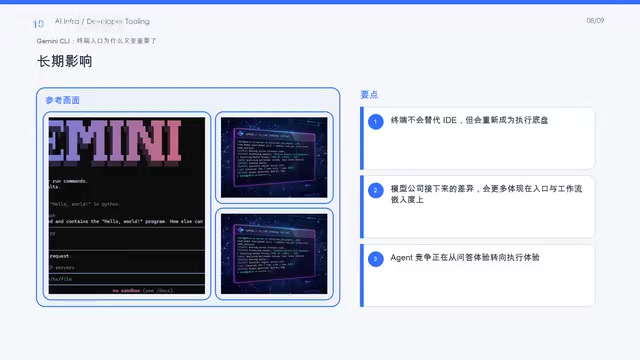
Behind this wave of excitement, model companies are actually re-competing for entry points. And the competitive focus is shifting:
- Previously, the competition was about Q&A experience — who answers more accurately, faster, and more comprehensively;
- Now, the competition is about execution experience — whoever integrates workflows more seamlessly gains more stickiness.
From OpenAI's Codex CLI, to Anthropic's Claude Code, to Google's Gemini CLI — all three major model companies are betting on the terminal simultaneously, and this is no coincidence. OpenAI's Codex CLI was released in early 2025, positioned as a code agent running in the terminal with support for multi-file editing and command execution, using sandbox isolation for security; Anthropic's Claude Code emphasizes deep understanding of large codebases, supporting direct project structure reading and cross-file refactoring. All three products launched in rapid succession and chose open-source or CLI forms rather than closed SaaS products — this itself is a strategy for winning developer trust and habits. The terminal is the last high-frequency work environment for developers that hasn't been deeply penetrated by AI. Whoever occupies it first gets the ticket to enterprise development workflows.
Five Core Dimensions for Teams Evaluating Terminal AI Tools
If your team is seriously evaluating these terminal AI tools, don't just look at benchmark scores. Focus on these five dimensions:
- Failure rollback mechanisms: When an Agent makes an error, can it automatically roll back? Is the rollback strategy configurable?
- Permission boundary control: Which directories can the Agent access? Which commands can it execute? Does it support fine-grained permission management?
- Command audit capability: Is there a complete log of all commands executed by the Agent? Can every operation be traced?
- Workflow integration depth: Can it seamlessly integrate with the team's existing CI/CD, monitoring, and alerting systems?
- Context understanding depth: Is its understanding of project structure, codebase, and configuration files sufficiently accurate?
These dimensions determine whether a terminal Agent can evolve from a "fun toy" into "reliable productivity infrastructure."
Conclusion
Gemini CLI deserves attention not just because of its impressive star count, but because it validates a trend: the terminal is re-emerging as the critical gateway for models to enter real development workflows. In the battle for AI Agent entry points, the value of the execution layer is being rediscovered. Whoever can establish a foothold in the terminal — the place closest to "real actions" — controls the shortest path from conversation to execution. And that path is precisely the critical leap for AI from "can talk" to "can do."
Related articles
Meta Muse Hits 900K Downloads in Six D…
Meta Muse Hits 900K Downloads in Six Days: The AI Agent Era Has Officially Arrived
Meta's AI agent Muse hit 902K downloads in 6 days, topping US App Store and Google Play charts above ChatGPT and Claude. A deep dive into Muse's capabilities and the AI Agent race.
 Industry Insights
IRS Fully Embraces Claude AI, Accelerating Federal Government's AI Adoption
The IRS is recruiting staff with 24/7 Claude AI access, marking Anthropic's breakthrough into the federal government. Explore the strategic implications and tax use cases.
 Industry Insights
The IRS Mobile App Debate: A Trust Crisis in Government Digital Transformation
The IRS's proposed mobile app has sparked heated debate. This article analyzes the core arguments, exploring data security, privacy, and the trust crisis in government digital transformation.