Bento: Break Down GitHub Repos with AI Interactive Maps and Learn Programming by Running Code
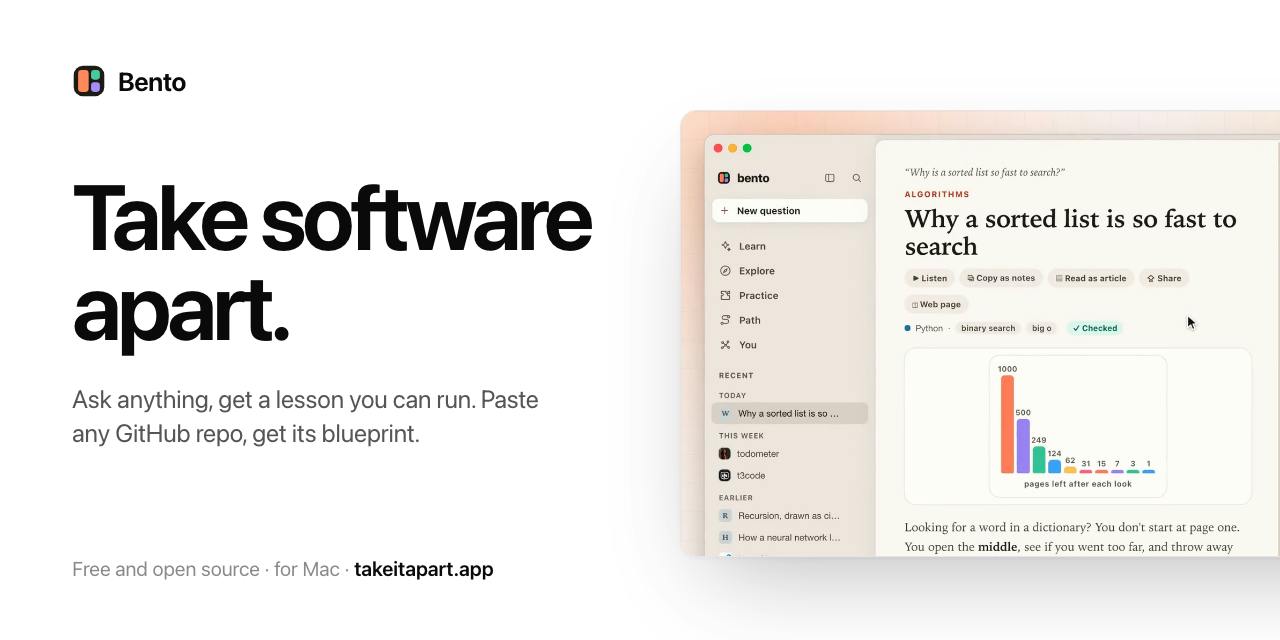
Bento is a free, open-source Mac app that lowers the barrier to reading source code with runnable courses and interactive repository maps.
Bento is a free, open-source Mac app ranked #10 on Product Hunt. It turns learners' questions into runnable coding courses and converts GitHub repositories into structured interactive maps. It reuses users' existing AI subscriptions instead of building its own model service, and offers zero-install in-browser courses and curated repositories. It addresses real pain points in reading source code, though its course content depth and breadth will determine its long-term value.
Why do we need "runnable" code learning tools?
Reading source code has always been an effective way to learn how software works, but the traditional path is full of friction: cloning repositories, setting up environments, understanding project structure—before you even get to the core logic, your patience is already exhausted. Bento, ranked #10 on Product Hunt, tries to solve this problem. It's a free, open-source Mac app whose core selling points are "runnable courses" and "interactive maps of GitHub repositories"—letting you ask questions to get executable coding lessons, or directly break down an existing GitHub repository to understand how it works.
According to its Product Hunt page, Bento was built by developer Lin Zaw and has received 78 votes and 1 comment. It's categorized as open-source, education, developer tools, and GitHub-related. Its differentiation lies in not requiring you to install an additional AI service, but instead reusing the AI service you already subscribe to ("It uses the AI subscription you already have"), and offering ready-made courses and curated repositories you can try directly in the browser without installation.
How exactly do you use Bento?
From question to runnable course
Bento's interaction can start with a specific question. For example, if you want to know "how does the authentication flow in this repository work," it turns the question into a series of runnable steps and explanations, rather than dumping a static code snippet or a lengthy document on you. This "learn by running" model is especially effective for debugging and understanding dynamic behavior—you can change a line of code and immediately see the result.
The key difference between "runnable courses" and traditional tutorials is the execution environment. Running code in the browser typically relies on WebAssembly sandboxes (like Pyodide, WebContainers) or remote containers. The former requires no backend but is limited in language and system calls; the latter is flexible but more costly. To make courses "runnable," a tool must automatically handle dependency installation, runtime versions, and sample data—which is precisely the most time-consuming part of the traditional source-reading path, and the core value this product claims.
Turning GitHub repositories into interactive maps
Another core feature is the "interactive map." Traditional source reading is like fumbling through a file tree in the dark, while Bento tries to generate a structured tour of the repository, annotating relationships between modules and key paths. For open-source projects with hundreds of files, such a map can significantly lower the barrier to entry, letting learners first build a global understanding before diving into details.
The "repository interactive map" is essentially static analysis and dependency extraction on a codebase: parsing import/require statements, function call chains, directory hierarchies, and configuration files to build a module-level directed graph, then overlaying AI-generated semantic annotations. Such techniques have precedents in code visualization, like dependency graph tools and code knowledge graphs. The challenges lie in the accuracy of cross-language parsing and rendering performance for large repositories; the granularity of the map (file-level or function-level) also determines whether it's a "tour map" or a "debugging map."
Zero-install browser experience
Bento offers ready-made courses and curated repositories directly accessible in the browser, meaning potential users can try before deciding whether to download the Mac app. For educational tools, lowering the barrier to first experience is crucial, because abandonment rates for learning tools are often decided in the first few minutes.
Reusing your existing AI subscription: a pragmatic product decision
Bento explicitly states it "uses the AI subscription you already have." This design choice is worth noting: it shifts AI costs to the user's existing subscription while focusing itself on the learning experience and interaction design. For users, the benefit is not having to pay for another AI service; for the product, it lowers operating costs and avoids duplicating investment in model capabilities.
Of course, this also means Bento's experience is limited by the capabilities and quotas of the AI service you subscribe to. If users don't have a suitable subscription, or the subscribed API doesn't support the required capabilities, the experience may suffer. This is a trade-off the product makes between ease of use and flexibility.
Technically, "reusing your existing AI subscription" usually means the app calls the model service you've already paid for (such as OpenAI, Anthropic, or a local model gateway) via a user-provided API key or OAuth authorization, rather than the product vendor purchasing compute centrally and reselling it. This model is increasingly common in open-source tools; the benefit is cost transparency and freedom to switch models, while the cost is that users must manage their own keys, and different services vary significantly in context length, code understanding, and rate limits—directly affecting the quality and coherence of course generation.
The competitive position of open-source and educational tools
Bento choosing to be open-source is uncommon among AI education tools. Open source means the community can review code, contribute course content, and even self-host. Combined with its Mac app form, it targets the segment of developers who are willing to tinker and value data control.
Judging from Product Hunt feedback, 78 votes and 1 comment indicate the product has gained some attention, but discussion is still limited. As an early-stage product, Bento's challenge lies in the quality and coverage of course content—no matter how good the tool framework is, if the runnable courses aren't rich or accurate enough, the learning value will be limited.
Who is Bento for?
Bento is worth trying if you fit the following: you're learning a new framework or open-source project and want to quickly understand its architecture; you prefer learning by running things rather than reading docs; you already have an AI subscription and don't want to pay extra for a learning tool; you use a Mac and prefer native app experiences.
If you need Windows or Linux support, or want a tool with built-in AI capabilities that doesn't depend on an external subscription, Bento may not be for you right now.
Summary
Bento combines "runnable courses" and "repository interactive maps," hitting real pain points in learning by reading source code. Reusing existing AI subscriptions and an open-source strategy are pragmatic differentiators, while the in-browser experience lowers the barrier to trying it out. The product is still early-stage; the depth and breadth of its course content will determine whether it grows from an "interesting little tool" into a commonly used learning entry point for developers.
One-line Summary
Bento is a free, open-source Mac app that lowers the barrier to reading source code with runnable courses and interactive repository maps.
Paragraph Summary
Bento is a free, open-source Mac app that ranked #10 on Product Hunt. Its core features turn learners' questions into runnable coding courses and convert GitHub repositories into structured interactive maps to help build quick global understanding. Its differentiation lies in reusing users' existing AI subscriptions rather than building its own model service, lowering user costs and reducing the product's operating burden; it also offers zero-install ready-made courses and curated repositories in the browser, lowering the barrier to first experience. The article argues it hits real pain points in environment setup and structure understanding when reading source code, but as an early-stage product, the depth and breadth of course content will determine its long-term value, and it currently only supports Mac and depends on external AI subscriptions.
Related articles

Xenon Flash Bug Returns: Radxa Dragon Q8B Affected
The Xenon flash bug resurfaces, this time on the Radxa Dragon Q8B board. This article reviews early Hacker News discussion and analyzes the potential impact and community concerns.

ChatGPT Plus Subscription Guide for Users in China: Official Top-Up Channel Walkthrough and Comparison
A complete guide to subscribing to ChatGPT Plus from China via official top-up platforms: plan selection, account login, copying account info, payment verification, plus a comparison of top-up, proxy, and self-supplied card channels.

The Complete Guide to Subscribing to ChatGPT Plus in China: Hands-On Walkthrough of Third-Party Top-Up Channels and Risk Analysis
How can users in China subscribe to ChatGPT Plus? This article breaks down the complete process of third-party top-up platforms, analyzes account security, renewal sustainability, and risk-control risks to help you decide which subscription option suits you better.