Big Fat Fish QQ Plugin Update: Listen More, Talk Less, and Cross-Machine Collaboration

Big Fat Fish QQ plugin unifies chat perception and cross-machine collaboration, dispatching remote tasks through plugin combinations.
The Big Fat Fish QQ plugin connects to QQ private and group chats via OneBot, unifying text, images, voice, files, chat cards, and merged forwards into one context stream, with support for re-reading history, taking over references, and operating message buttons. Each chat binding can have its own persona and host permissions. At completion uses unique identifiers to avoid same-name confusion, and cross-drawing references are read-only. The multi-device collaboration plugin pairs hosts over encrypted connections, with the remote side controlling directory and task permissions, supporting large-file transfer, background drawing, and direct remote plugin calls. The design is plugin-based and flexible, but configuration and permission understanding carry a real learning curve.
Title
Big Fat Fish QQ Plugin Update: Listen More, Talk Less, and Cross-Machine Collaboration
Meta Description
Big Fat Fish QQ plugin update: connects private and group chats via OneBot, supports independent personas, context enrichment, At completion, and cross-drawing references, plus a new multi-device collaboration plugin for encrypted cross-computer connections, remote drawing, and file transfer.
Article Content
This update to the Big Fat Fish QQ plugin twists together two threads: "chatting" and "collaboration." By connecting to QQ private and group chats through OneBot, it's no longer just a bot that replies—it's an entry point that can bind different DSH drawings, distinguish personas, and dispatch host permissions. In this Bilibili demo video, the author walks through the full chain from group album to cross-computer file transfer.
From Chat Window to Context Enrichment
Private and group chats can each use their own persona, and each binding can separately select a model and host access permissions. The plugin feeds group members' names, group nicknames, titles, and messages referenced by the actor into the context. Text, images, voice, files, chat cards, and merged forwards can all flow into the same message stream, and when needed it can re-read chat history, take over references, and operate supported message buttons on command.
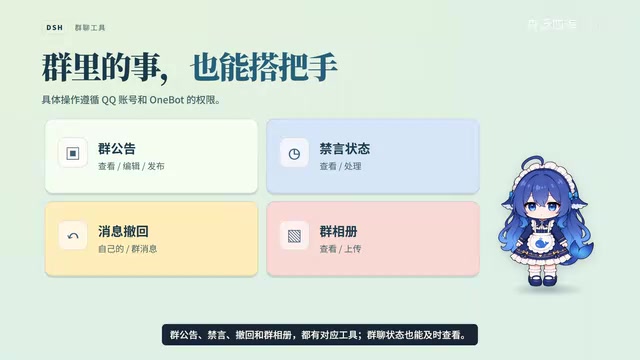
Group announcements, mute, recall, and group albums all have corresponding tools, and group chat status can be checked in real time. In the demo, the group owner first creates an album; Big Fat Fish then calls the drawing tool to generate a photo of itself and uploads it back to the group album.
Listen Fully Before Responding
The plugin receives messages in real time, merges and interprets consecutive interjections, and waits for the other party to finish before giving a consistent response. Even when woken from DSH, it can proactively find the QQ channel and send what it wants to say in separate messages. Within a drawing, it can play voice, work with music tools, and even pick lyric fragments to try composing a score; combined with the video plugin, it can also browse Bilibili storyboards, subtitles, and specified clips.

OneBot is an open messaging protocol specification, originally defining a unified event and API format for QQ bot frameworks (such as go-cqhttp, NapCat, etc.). It abstracts the implementation differences of different bot backends into standard JSON message segments and action interfaces, so upper-layer plugins only need to interface with one protocol to send and receive private chats, group chats, images, files, and other messages, without having to adapt separately for each QQ framework. The Big Fat Fish QQ plugin connects to QQ precisely through this OneBot standard interface, thereby covering both private and group chats and unifying different message types into the same context stream fed into the model.
At Completion and Cross-Drawing References
At completion in input marks the workspace, drawing, and files; once selected, the name is displayed on screen, while the underlying layer locates it by unique identifier. When referencing another drawing, that segment is referenced as read-only content; when referencing a file in the workspace, the original read/write tools remain available as usual.
To send two sets of instructions to different drawings, you can write them in blocks, and the send preview will mark where each block goes; confirm before delivering. When two drawings share the name "Discussion," first scroll through the right-column messages, find the one discussing weekend activities, and then confirm the selection—drawing selection is no longer blind. To start a new conversation, you can create it directly in the selected workspace, choose files, and hand the model and reasoning strength to the caller together.
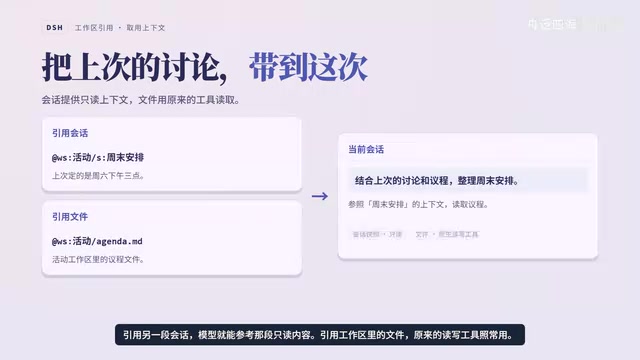
"Drawing" here refers to an independent conversation or task context within DSH, similar to a referable session canvas rather than image drawing. Each drawing has its own independent model selection, message history, and available tools, so different tasks can proceed in parallel. A "workspace" is the corresponding file and directory scope, where read/write tools only take effect within the authorized range. The plugin locates drawings and files by unique identifier (rather than display name) precisely because two drawings can share a name, and selecting by name alone would be ambiguous; the display name serves only as a UI hint, while the underlying binding is the reliable addressing basis. Cross-drawing references are therefore read-only snapshots, preventing a modification in one place from affecting another.
Working Across Computers: Multi-Device Collaboration Plugin
After selecting a paired host, both sides collaborate through an encrypted connection. The remote side decides which directories can be read and which tasks and tools can run. Locally, you reference materials using the At workspace syntax; across machines, you switch to the host prefix, and both workspace names and relative paths can be reused, with large files also transferable directly between the two devices.
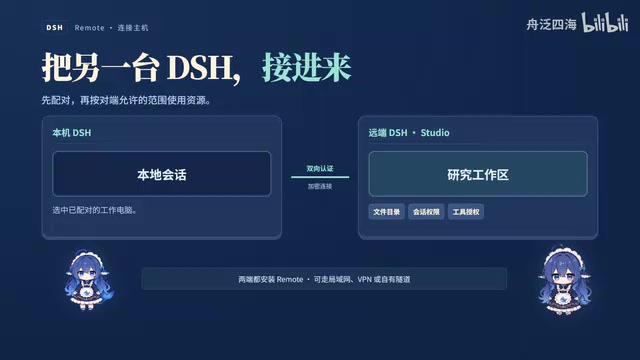
Delegating drawing to a remote drawing and running it in the background lets the local machine view progress, add instructions, or stop it; when further changes are needed, continue the instructions in the same drawing. When the remote side encounters a problem, it brings the question back to the local machine; once answered, it continues in the original drawing, and the final replies return in the original order, each preserving its source. Authorized remote plugins can be called directly—for example, using tools on a work computer to look up literature—with the request executed on the target host without creating a new remote drawing.
In theory, multiple devices can be paired one by one and authorized separately, each acting as either controller or controlled—though in the video the author admits that this multi-host mutual trust scenario has not yet been tested in practice.
A "paired host" here means two devices establish a long-term trusted relationship through one-time pairing, after which they communicate over an encrypted connection without relying on exposing service ports to the public internet. The authorization model is unidirectional and tiered: the remote host decides which directories the local machine can read and which tasks and tools it can execute; the permission boundary is held by the accessed party rather than self-declared by the initiator. When referencing materials locally, use the "At workspace" syntax; across machines, replace it with the host prefix, keeping the path structure unchanged—this lets the same set of prompts move between single-machine and multi-machine setups. When a remote plugin is called, the request actually executes on the target host, and results are labeled by source, making it easy to distinguish local from remote output.
The Usage Logic of Plugin-Based Assembly
The entire design revolves around "install the plugins you need, on demand": the chat side handles perception and response, while the collaboration side handles cross-machine dispatch. The DSH open-source plugins split the two directions into independent modules that users combine by scenario. For users who need an AI assistant to handle both group chat affairs and remote tasks simultaneously, this split is more flexible than a monolithic bot, but it also means no small barrier to understanding configuration costs and permission boundaries.
One-line Summary
The Big Fat Fish QQ plugin twists chat perception and cross-machine collaboration into one, dispatching remote tasks through plugin combinations.
Paragraph Summary
The Big Fat Fish QQ plugin connects to QQ private and group chats via OneBot, unifying text, images, voice, files, chat cards, and merged forwards into a single context stream, and supports re-reading history, taking over references, and operating message buttons. Private and group chats can each use their own persona, with each binding separately selecting a model and host permissions. At completion uses unique identifiers to locate drawings and files, avoiding blind selection among same-named items, and cross-drawing references are read-only. The multi-device collaboration plugin pairs hosts over encrypted connections, with the remote side deciding readable directories and runnable tasks, supporting direct large-file transfer, background drawing, and direct invocation of remote plugins. The overall design revolves around installing plugins on demand—flexible, but with no small cost to understanding configuration and permissions.
Related articles

AI-Assisted React Development in Practice: Optimizing a Video App and Handling Errors
A 14-year veteran developer demonstrates AI-assisted React video app optimization: compressing video from 80MB to 5MB (~94%) via ImageKit, plus reliable error handling and retry mechanisms. Includes planning, code understanding, and verification methods for working with AI.

Incident Response in the Age of AI Attackers: A 6-Month Retrospective and the Four Pillars
AI attackers are making attacks on AI infrastructure more frequent. This article explains MarkTechPost's four-pillar incident response playbook based on a 6-month retrospective, with Fireworks AI and Klue case studies on implementation.

Abnormal Error Rate Spike in Claude Mythos 5.2 and Fable 5.2
Claude Mythos 5.2 and Claude Fable 5.2 show an abnormal spike in request error rates, marked as investigating on the official status page. This article covers the incident overview, practical impact on developers, and recommended responses.