AI-Assisted React Development in Practice: Optimizing a Video App and Handling Errors

AI boosts efficiency, but understanding code, deciding what to change, and judging results still rely on the developer.
Drawing on 14 years of programming experience, the author shares the complete process of collaborating with AI to revamp a React video page: first create a four-step plan with AI covering current state, goals, unchanged parts, and verification steps; then have AI explain existing code logic and confirm understanding; then introduce ImageKit to compress video from ~80MB to ~5MB (~94%) while maintaining 1080p/60fps. For error handling, he emphasizes distinguishing 'playable' from 'waiting for network,' using the `error` event rather than `onWaiting`, and leveraging React `key` changes to reset error states. He summarizes three tips: read key code before changing it, make small changes and verify immediately, and establish AI collaboration norms before the project expands. Core takeaway: AI accelerates work, but understanding logic and judging results remain the developer's job.
Why Hasn't AI Replaced Developers?
With over 14 years of programming experience, the author notes that AI has completely transformed the way he works over the past six months. But the key question is: which decisions still need to be made by yourself. In the video, he uses a real React video page case study to show how to collaborate with AI — not letting AI take full control, but having AI assist in understanding code, planning changes, and verifying results.
This case stems from a side project from years ago: what was originally a simple page requesting just 5 videos eventually ballooned into a complex application with multiple categories and a large number of videos. The author admits that he spent a lot of time on data preparation and video processing back then, and today he would start the project in a completely different way: first clarify the video playback and fallback logic, then move into actual development.
Four-Step Planning: The Starting Point of AI Collaboration
Before touching any code, the author worked with AI to create a four-part plan:
- Current state: A React website with 3 videos, one of which is a playable working video, providing AI with project context.
- Improvement goals: Reduce video file size to lower data transfer; add application-level error handling so users see friendly messages during network issues; provide a retry entry point.
- What stays unchanged: Page layout and video switching behavior. The author emphasizes that AI has clear boundaries here — he doesn't need AI to rewrite the entire website, because "we all know what AI is good at."
- Verification steps: How to test, how to check the code, whether video switching works after changes. The author also asks AI to explain options in simpler language until he truly understands the approach.
This planning gave the author control before AI generated any code. He specifically mentions that if he doesn't understand a solution AI provides, he can ask AI to "explain the options in smaller, simpler pieces" — which is far safer than blindly accepting code.

Understanding Existing Code: Ask Before Changing
Before modifying any code, the author had AI explain the existing logic: which video is selected when clicked? How does React remember the user's choice? He verified his understanding through an analogy: just because you see all the dishes in a restaurant doesn't mean you ordered all of them — the app may have loaded multiple video resources, but only the selected one actually enters the playback state.
"We confirmed the existing logic, and there's no reason to change it for this task."
The value of this step: AI helped him quickly clarify the project structure, while he retained the judgment. He compared the code against browser behavior, confirmed that AI's explanation matched reality, and only then decided on the next step.

Introducing ImageKit: Separating Hosting from Optimization
The video file was nearly 18MB (about 2.5 minutes long), a clear burden for users with poor network conditions or limited data. The author chose to introduce ImageKit — a media processing service that provides an API, supporting storage, transcoding, and optimization. It can connect to storage backends like Amazon S3 or Google Cloud Storage, offers URL-based image transformations (including AI cropping and watermarks), and supports HLS and Dash streaming protocols.
In this case, the author used MP4 format and ImageKit's free plan. In Cursor, he had AI implement the video step: generate video sources using ImageKit's React SDK, and generate thumbnail URLs via buildSrc — requesting the frame at the 5th second of the video at 960 pixels wide. ImageKit generates the thumbnail server-side and handles image uploads.
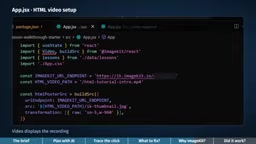
The optimization results were significant: the video dropped from about 80MB to about 5MB, roughly a 94% compression rate, while maintaining 1080p resolution at 60 frames per second. The author emphasizes that image quality decreased slightly but the code logic remained unchanged — that's the key point. He also reminds himself that further verification is needed in full-screen and small-screen scenarios, and clarifies that this is only a single-video test, not a whole-site performance benchmark.
HLS and MP4 are two different approaches to streaming media delivery. MP4 uses "progressive download": the entire file is treated as a static resource, and the browser reads bytes on demand via HTTP Range requests, but it needs to download enough data before playback can start, and it cannot dynamically switch quality based on bandwidth. HLS (HTTP Live Streaming), proposed by Apple, splits video into short segments (typically 2-10 second TS or fMP4 files) accompanied by an m3u8 index manifest, and the player pulls segments one by one according to the manifest. This allows the server to offer multiple bitrates based on network conditions (adaptive bitrate), and users can start from any segment without waiting for the complete file. The trade-off is the extra overhead of segmentation, slightly higher latency, and the need for player or SDK support. The author uses MP4 in this case because it's simple to implement, sufficient for a single-video scenario, and ImageKit's URL parameter optimization is already enough to bring the size down; if multiple quality levels, long videos, or live streaming are needed in the future, HLS would be the more appropriate solution — which is why ImageKit supports both HLS and Dash.
Error Handling: Where AI Is Most Prone to Mistakes
The author specifically tested the case of video loading failure. By intercepting requests to simulate network failure, he observed that the browser's native player gives users very little feedback. So he asked AI to implement: clear error messages, a close button, preserved course context, dismissing the message when switching videos, and no autoplay on retry.
Here he makes a key distinction: "playable" and "waiting for network" are not the same thing. A video that is buffering should not tell the user "everything is fine." The video's error event is the signal that triggers the error state, while the onWaiting state is only used to determine whether it's waiting. AI needs to understand that a change in key triggers React to remount the component, thereby resetting the error state.
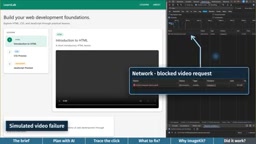
When AI's implementation doesn't match expectations, the author's advice is very specific: tell AI what you did, what you tried, what actually happened, and provide reproducible conditions. This is far more useful than vaguely saying "it doesn't work."
The event model of the HTML5 <video> element is key to understanding this error handling. The browser dispatches a series of events during the media lifecycle: loadstart indicates resource request has begun, loadedmetadata indicates metadata such as duration and dimensions are available, canplay indicates enough data is available to start playback, playing indicates playback has actually begun, waiting indicates a pause due to insufficient buffering, and error indicates loading or decoding failure. Among these, waiting is merely an intermediate state of "temporarily no data" that will automatically resume when the network recovers and should not be treated as a failure; error is the terminal failure, accompanied by a MediaError object (such as MEDIA_ERR_NETWORK or MEDIA_ERR_SRC_NOT_SUPPORTED). Additionally, the error event does not bubble, so it typically needs to be listened to directly on the <video> element, or via React's onError synthetic event. The author's emphasis that "playable" and "waiting for network" are not the same thing essentially requires AI to distinguish between the semantics of waiting and error, avoiding the mistake of turning a buffering indicator into an error popup.
React's key attribute and component remounting is another mechanism that AI easily overlooks. In React, key is used to identify element identity during list rendering; when key changes, React does not reuse the old component instance but unmounts it and mounts a new one. For <video>, this means the DOM node is rebuilt and internal states like error, paused, and currentTime are all reset to zero. The author leverages this by changing the key when switching videos to force an error state reset, so the new video starts with a clean state. If AI doesn't understand the remounting semantics of key, it might manually clean up state with useEffect, or mistakenly think key is only for eliminating console warnings — resulting in the previous video's error message still showing after switching. This is why the author asks AI to first explain clearly "how the error state is cleared when switching videos" before writing any code.
Three Practical Tips for Developers
- Have AI explain key code, read it yourself before changing: The author asks AI to restate the approach in simpler language until he confirms he understands.
- Make small changes and verify immediately: Make one change at a time, then confirm in the browser whether the behavior matches expectations before deciding whether to continue.
- Establish collaboration norms before the project becomes a platform: If the product has expansion plans, discuss the boundaries of AI usage and verification processes with the team in advance.
The author concludes that AI has helped him improve efficiency, but understanding code logic, choosing what to change, and judging whether results are correct — these are still done by him. The tool is ImageKit, the thinking is his own — perhaps this is the balance developers should maintain most in the AI era.
One-line Summary
AI boosts efficiency, but understanding code, deciding what to change, and judging results still rely on the developer.
Paragraph Summary
Drawing on 14 years of programming experience, the author shares the complete process of collaborating with AI to revamp a React video page: first create a four-step plan with AI covering "current state, goals, unchanged parts, and verification steps," then have AI explain the existing code logic and confirm understanding, then introduce ImageKit to compress the video from about 80MB to about 5MB (roughly 94%) while maintaining 1080p/60fps. In the error handling phase, he specifically emphasizes distinguishing "playable" from "waiting for network," using the error event rather than onWaiting to trigger user notifications, and leveraging React key changes to reset error states. He summarizes three tips: read key code before changing it, make small changes and verify immediately, and establish AI collaboration norms before the project expands. The core conclusion: AI handles speed, but understanding logic and judging results are still done by the developer.
Related articles

Gemini 4 Neon Review: Benchmark Scores Rival Carbon, API Pricing and Quota Breakdown
Google Gemini 4 Neon is now live, benchmark scores closely tracking Carbon, API pricing 3/15 at twice Hydrogen's rate. This article compiles Bilibili creator testing: Neon can replace 90% of Carbon scenarios, AntiGravity quota consumption is only one-third of Carbon, plus subscription channel restrictions and 2API ban risks.

Gemini 4 Helium Coming Soon? Signals of Google Loosening Subscription Restrictions
Google team member hints releases will continue; community speculates Gemini 4 Helium (Flash Lite) may be next. Subscription ban controversy gets a response as product lead says "Soon," suggesting restrictions may be lifted. This article covers Gemini developments, OpenAI Coding Agent and risk management, Doubao real-time audio-video API, and compute business dynamics.

Incident Response in the Age of AI Attackers: A 6-Month Retrospective and the Four Pillars
AI attackers are making attacks on AI infrastructure more frequent. This article explains MarkTechPost's four-pillar incident response playbook based on a 6-month retrospective, with Fireworks AI and Klue case studies on implementation.