Big Weather: AI Weather Insights in Your Mac Menu Bar

Big Weather brings scrollable weather curves and AI insights to your Mac menu bar.
Big Weather is a Mac menu bar app by indie developer Tommi Urtti that distills multi-day forecasts into a draggable curve, letting users check weather trends at a glance without opening a standalone app. The free tier includes the multi-day curve and hourly UV index; Premium unlocks AI weather insights and official meteorological warnings. AI Insights is the main differentiator, translating abstract data into actionable natural-language suggestions. Still in its early stages, the app represents the growing trend of embedding AI into high-frequency, lightweight tools — ideal for Mac users who want weather info always within reach.
A Mac App That Reimagines the Menu Bar Weather Experience
A Mac app called Big Weather has appeared on Product Hunt with a straightforward premise — compress weather information into your menu bar so it's always within reach. Built by indie developer Tommi Urtti, it sits at the intersection of Mac, weather, and artificial intelligence, currently ranked #14 on Product Hunt.
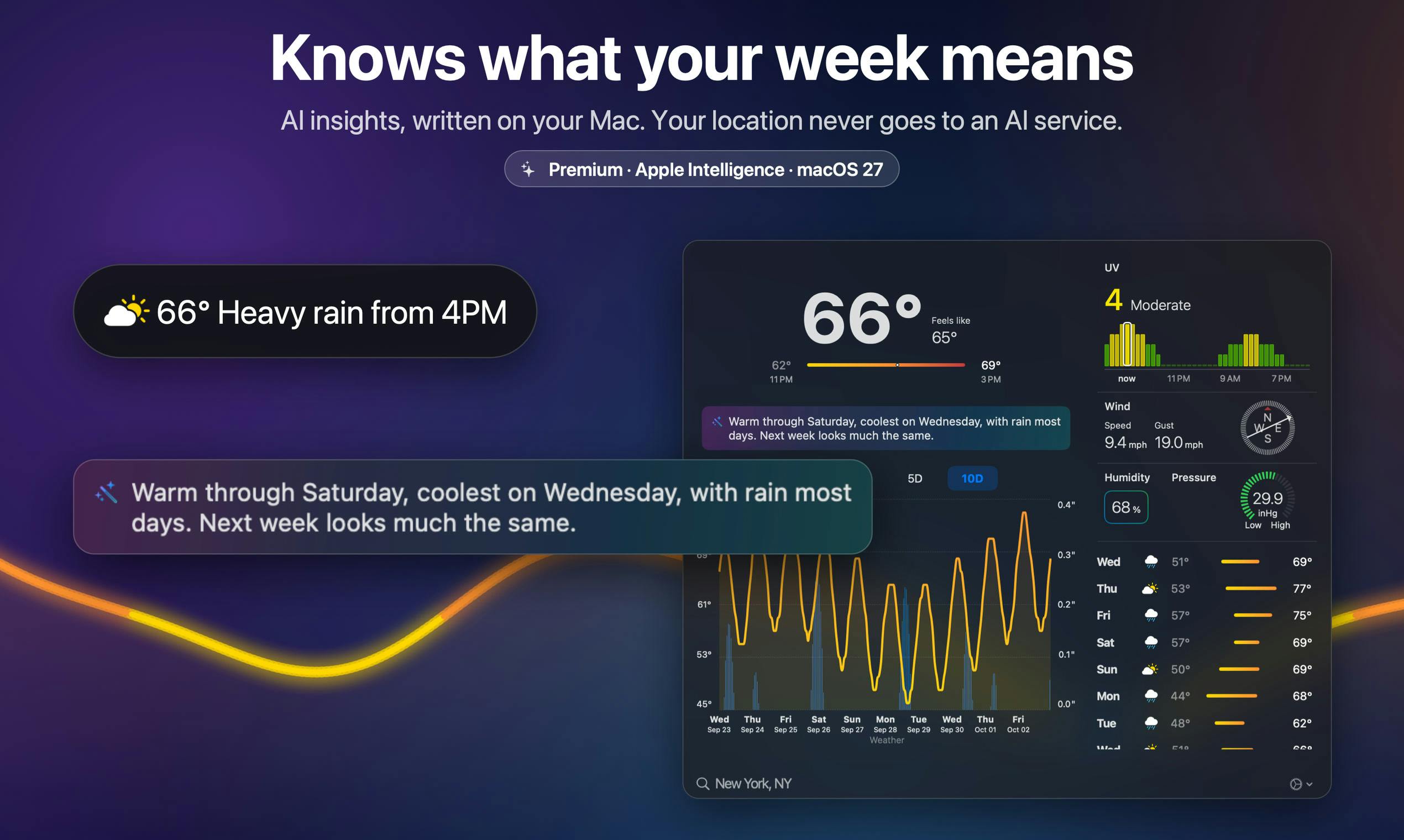
Unlike traditional weather apps that flood an entire screen with information cards, Big Weather takes a lighter, more focused approach: the next several days of weather are distilled into a single draggable curve, letting you scroll through upcoming temperatures and conditions like scrubbing a timeline. For users who spend their days in front of a Mac, this interaction model lowers the barrier to checking the weather — no need to open a standalone app, just glance at the menu bar.
Core Features: Curves, Hourly UV, and AI Insights
Big Weather's free tier already covers everyday needs: a scrollable multi-day weather curve and hourly UV index readings. The hourly UV detail is worth highlighting — most lightweight weather tools only show a single daily UV summary, but breaking it down by hour gives genuinely useful guidance for outdoor activities and sun protection planning.
The real differentiation comes with the Premium tier. Paying users unlock two capabilities:
- AI Weather Insights: Rather than just listing raw data, this feature interprets weather trends and helps users quickly understand "what's coming next."
- Official Weather Warnings: Integrates alerts issued by authoritative meteorological agencies, providing advance notice ahead of extreme weather events.
AI Insights is the product's headline feature and the key differentiator from both macOS's built-in weather widget and other menu bar tools. Embedding LLM-style interpretive capability into a high-frequency, lightweight context is a direction many small tools are currently exploring.
The UV Index is a standardized measure of solar ultraviolet radiation intensity, typically divided into five levels from 0 to 11+ (Low, Moderate, High, Very High, and Extreme). The World Health Organization recommends taking protective measures when the UV Index reaches 3 or above. Because UV intensity fluctuates dramatically throughout the day with the sun's elevation angle — typically peaking in the two hours around solar noon — hourly UV data helps users precisely plan outdoor activity windows. For example, it can help you avoid the high-intensity period between 10 a.m. and 2 p.m., or determine whether a particular afternoon is suitable for extended outdoor exercise. This is far more actionable than a single "today's maximum UV index" figure.
The Value and Limits of AI-Powered Weather Tools
Adding AI to weather apps has become a clear trend. For users, the value of AI insights isn't about getting more raw data — it's about reducing the cognitive load of interpretation. Translating abstract values like barometric pressure, humidity, and cloud cover into actionable natural-language prompts like "bring an umbrella" or "temperatures may drop sharply tonight" is the real goal.
That said, the actual experience of such features depends heavily on the quality of the underlying data source and the accuracy of the AI's interpretation. Weather forecasting is inherently uncertain, and AI reasoning built on top of that uncertainty can, if handled poorly, amplify errors or produce vague, non-committal conclusions. For a product that makes weather warnings a paid feature, the authority and timeliness of the data are especially critical.
In terms of product approach, Big Weather follows the "small and polished" indie development model. Its early traction — 7 upvotes and 1 comment — shows it's still at the starting line and hasn't yet built a mass following. But the menu bar weather niche naturally generates high user retention, and paired with the currently hot AI label, there's room to grow.
Menu bar apps are a lightweight application form on macOS where an icon lives permanently in the menu bar at the top of the screen. Clicking it reveals a dropdown panel without occupying Dock space or appearing in the app switcher. This format is naturally suited to tools with low information density but high viewing frequency — clocks, system monitors, quick translators, and so on. Compared to full-window apps, menu bar apps cost less to develop and maintain, making them friendlier to indie developers. However, the limited panel size demands that information be highly condensed — which is precisely why Big Weather chose a curve as its primary visualization, packing multi-day data into a compact, high-density format.
Who It's For and Whether It's Worth Trying
Big Weather is built for a specific type of user: someone who works on a Mac all day, wants weather information instantly accessible, and doesn't want a complex app eating up screen real estate. The free tier's multi-day curve and hourly UV data are more than enough for everyday use; if you have a clear need for AI-driven interpretation and official weather alerts, upgrading to Premium makes sense.
As a tool maintained by a solo developer, its iteration pace and long-term stability are worth watching. But in terms of design philosophy, it has landed on a clear product logic — lightweight presentation plus AI-powered value-add — and carved out a differentiated answer in a heavily commoditized weather app market.
Related articles

Local Creative Writing Model Showdown: Fine-tuned Qwen3.8 27B Wins, DeepSeek v4.1 Underwhelms
Bilibili creator tests seven local creative writing models: Hemingway and HumanLike Chat based on Qwen3.8 27B perform best, DeepSeek v4.1 is plain, Dongfang Shuo ranks last with confused characters. Includes three test prompts, scores, and usage advice.

Liang Wenfeng's Three Big Bets: Why Did DeepSeek Open-Source Its 82% Gross Margin?
Why did DeepSeek open-source DeepInfer, its 82% gross margin inference framework, and then launch a hundred-billion funding round? An analysis of Liang Wenfeng's three big bets and the open-source strategy.

Restoring 169 Episodes of a Classic TV Show with AI Super-Resolution: A 95-Hour Home PC Diary
A Bilibili creator used an RTX 3070 Ti home desktop and open-source AI super-resolution tools to restore 169 episodes of Growing Pains from DVD quality over 95 hours, costing only 20 yuan in electricity. The diary reveals real pitfalls in deinterlacing, model selection, and fully automated pipelines, plus lessons in AI collaboration.