Bilibili's Viral AI Reverse Engineering Tutorial: Batch Scraping Big Tech Data with Skills+MCP

Configure Skills and MCP via CC Switch to let AI assistants automate JS reverse engineering and control browsers.
The article introduces a configuration method that upgrades AI coding assistants from "chatbots" to "automated reverse engineering assistants." The core idea is to use the highly-starred CC Switch tool on GitHub to install preset Skills packs and connect MCPs like Chrome DevTools, enabling the AI to call external tools to control a real browser and perform environment patching, breakpoint setting, and hook injection. It details installing CC Switch, adding providers, one-click Skills installation from GitHub, and pasting JSON to configure MCP, with a special reminder that MCPs only appear after clicking "Import" in the panel. In the live demo, the AI successfully opens an e-commerce page but triggers anti-scraping mechanisms, showing that fingerprint countermeasures remain difficult and batch scraping big tech data requires per-platform research.
On Bilibili, a tutorial on "AI reverse engineering in practice" has attracted widespread attention. It doesn't teach simple scraping scripts—instead, it shows how to configure Skills and MCP (Model Context Protocol) so that AI coding assistants can break through ethical and capability limits to automate JS reverse engineering, environment patching, and even batch scraping of data from major platforms like QQ Music, NetEase Cloud Music, Boss Zhipin, Pinduoduo, and Xiaohongshu. Behind it is a complete AI Agent workflow configuration method that every developer interested in AI-assisted coding should know about.
Why Is Your AI Assistant "Misbehaving"?
Many developers have run into similar problems when using AI to assist with JS reverse engineering: the AI either refuses to execute due to ethical constraints, fails to fully reproduce the case, or can't achieve full automation. For example, if you want the AI to help patch the environment, you need browser DevTools features to locate key positions, analyze the JS code, automatically set breakpoints for debugging, and inject hooks—operations that are hard for an AI to complete independently through conversation alone.
The creator points out in the video that the root cause is failing to configure the right Skills and MCP for the AI. Skills are essentially preset "skill packs" for the AI, telling it how to perform specific tasks; MCP is a protocol that lets the AI call external tools (such as browser DevTools) to manipulate the real environment. Only when the two are combined can the AI transform from a "chatbot" into an "automated reverse engineering assistant."
JS reverse engineering and environment patching: JS reverse engineering means reconstructing encrypted parameters, signature algorithms, or API call logic by reading and debugging obfuscated, minified JavaScript on a target website when source code is unavailable. Common scenarios include cracking login password encryption and reconstructing request signatures. Environment patching refers to running browser-side JS in non-browser environments like Node.js by supplying host objects such as window, document, navigator, and localStorage so the code doesn't throw errors due to a missing environment. Environment patching often requires browser DevTools to locate key variables, set breakpoints, and inject hooks to observe runtime state—exactly why conversational AI struggles to do it alone and needs MCP to control a real browser.
MCP (Model Context Protocol): An open protocol proposed by Anthropic to standardize how LLM applications connect to external tools and data sources. Think of it as the "USB interface of the AI world": an MCP Server exposes a set of tools (such as browser control, file read/write, database queries), and AI clients discover and invoke these tools through the protocol. Compared with writing a separate plugin for each tool, MCP lets the same configuration be reused across different AI coding assistants—which is why the Chrome DevTools MCP mentioned in this article can be integrated by simply pasting a JSON snippet.
Step 1: Install CC Switch (formerly GCC Switch)
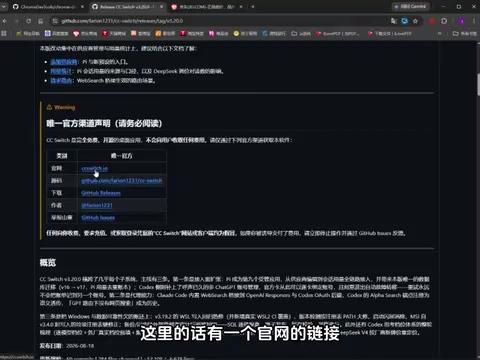
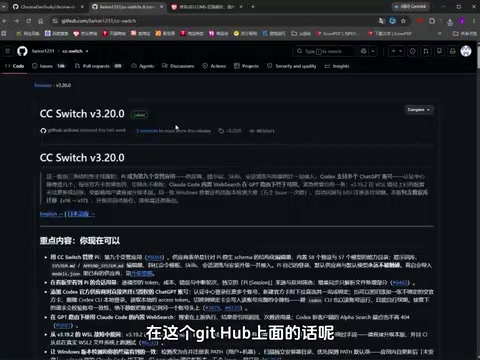
Before configuring the environment, you need to install a tool called CC Switch. The creator likens it to a "file manager" designed specifically for AI coding tool developers. The tool has already garnered 129K stars on GitHub—extremely popular.
Installation is simple: visit the official documentation page, click the prominent yellow download button, and choose the macOS, Windows, or Linux version for your system. The creator demonstrates the Windows download—click it and the download completes in the top-right corner.
After installation, add a new provider in CC Switch by filling in the API Key and request URL. The official documentation provides detailed configuration instructions—just follow along to complete the test.
API Key and Base URL: When using third-party models or relay services, you need to fill in the API Key provided by the service as identity credentials, along with a request URL pointing to an endpoint compatible with the OpenAI/Anthropic format. CC Switch's "provider" configuration essentially manages multiple sets of Keys and Base URLs for easy switching between models. Incorrect entries or incompatible endpoints are common reasons calls fail after configuration.
Step 2: Configure Skills and MCP
Installing Skills is refreshingly "brutal": in CC Switch, simply click "Install from GitHub" and the tool automatically pulls and configures all Skills. The creator notes that a success prompt appears if installation succeeds; if not, clicking the button will still complete the entire configuration automatically.
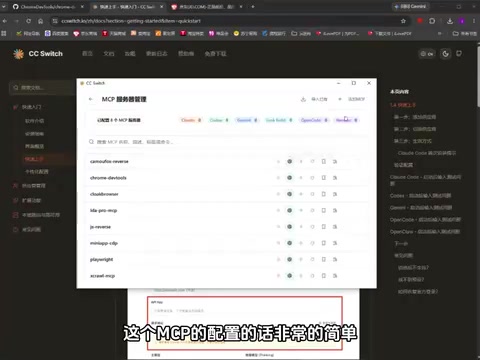
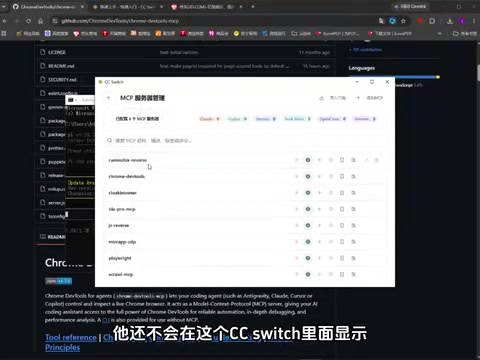
Configuring MCP is equally simple. Click "Add MCP," find the target MCP (e.g., Chrome DevTools), copy its JSON configuration and paste it into the input box, modify the title, and click Add. The creator demonstrates the Chrome DevTools MCP configuration process live.
Let the AI Connect MCP Itself
Beyond manual configuration, you can also talk directly to the AI. In the terminal, tell the AI "help me connect to such-and-such MCP" with the link attached, and the AI will complete the integration automatically. But the creator specifically warns: after integration, you must click the "Import" button in the CC Switch panel, otherwise the MCP won't appear. Many learners get stuck here thinking the configuration failed, when they simply missed the import step.
In Practice: Controlling the Browser with MCP
After configuration, the creator demonstrates with the DeepSeekAd V4 Pro model. He asks the AI to open an e-commerce page (JD.com) via Chrome DevTools MCP, and the AI executes the operation automatically, successfully opening the page. The entire process requires no manual intervention, showcasing MCP's ability to automate browser control.
But the demo also exposes problems: the target website detected the automated behavior, triggered anti-scraping mechanisms, and the page was closed immediately. The creator explains that this is because the site identified the browser fingerprint, which can later be addressed through methods like "modding the browser." This also shows that real-world reverse engineering battles are far more complex than configuring an environment.
Browser fingerprinting and anti-scraping mechanisms: Websites often determine whether a visitor is an automated program using multi-dimensional information such as navigator.webdriver, User-Agent, Canvas/WebGL rendering characteristics, font lists, timezone and language, and TLS handshake fingerprints. Tools like Puppeteer and Playwright leave traces such as webdriver=true by default, making them easy for risk control systems to identify. So-called "browser modding" means modifying Chromium source code or using patch tools to erase these features, combined with proxy IPs and behavior simulation to reduce the probability of detection. Fingerprint countermeasures are a dynamic game, and platform rules update frequently—which is the fundamental reason batch scraping can never be a one-and-done solution.
The Possibilities and Boundaries of Batch Scraping Big Tech Data
The video title mentions platforms like QQ Music, NetEase Cloud Music, Boss Zhipin, mini-programs, Pinduoduo, and Xiaohongshu, but the actual demo stops at opening a page. The creator candidly admits that anti-scraping mechanisms are an unavoidable challenge, and risk control strength varies greatly across platforms. For developers, this Skills+MCP configuration approach can indeed improve the efficiency of AI-assisted reverse engineering, but batch scraping still requires studying anti-scraping strategies for each platform individually.
It should be emphasized that the technology itself is neutral, but its use must comply with laws, regulations, and platform rules. The value of AI reverse engineering lies in legitimate scenarios such as security research and automated testing—not malicious data scraping.
Conclusion: A Key Step in the AI Agent Workflow
The core value of this tutorial isn't the "batch scraping" gimmick, but the demonstration of how to arm an AI coding assistant into a true automation tool through Skills and MCP. From installing CC Switch, configuring Skills, and adding MCP, to solving the detail issue of "not showing after import," the creator provides a reproducible path. For engineers looking to boost AI-assisted development efficiency, this configuration approach is worth trying out.
Related articles

Nothing CMF Buds 2A Drops to $17.89 on Black Friday: A New Low for ANC Earbuds
Nothing CMF Buds 2A wireless earbuds Black Friday deal: just $17.89 on Amazon, about $11 off retail and a record low. ANC earbuds at an entry-level price.

When AI Creation Gets Accused of "Spitting": Hacker News Heats Up Over the Glaude Controversy
A Hacker News post, "Spitting in the Face of Glaude," sparks debate on AI creation transparency and attribution ethics. This analysis examines the blurred creator identity behind the controversy and offers practical advice for AI content production.

Akai Embraces Custom Firmware: MPC Sample 1.4 Lets Users AI-Program Their Sampler
Akai embraces the modding community with MPC Sample 1.4 firmware, supporting vibe-coded custom firmware and effects. We analyze the impact of this open strategy on music hardware and AI-assisted programming.