Bolt.new Hands-On Review: Can Vibe Coding Actually Build Real Projects?

Vibe coding generates apps through natural language, offering speed but raising code quality concerns.
Vibe Coding, coined by Andrej Karpathy, is a development approach that relies entirely on natural language conversations with AI to generate applications. Through a hands-on build of a retro gaming blog using Bolt.new, this article demonstrates its ability to rapidly generate complete applications while exposing core pain points: natural language ambiguity leads to repetitive iterations, and AI-generated code suffers from quality issues like the "God File" anti-pattern. Vibe coding is suitable for rapid prototyping but not for complex commercial projects requiring long-term maintenance.
What Is Vibe Coding?
Vibe Coding is a development approach that relies entirely on natural language conversations with AI to generate applications. Developers don't need to write code manually — they simply describe their requirements through chat, and the AI tool generates a complete application from scratch. In the ideal scenario, you don't even need to look at the code itself — just "chat your way to deployment."
This concept was coined by AI researcher Andrej Karpathy in early 2025 on social media. Karpathy, former Tesla AI Director and OpenAI co-founder, used the term to describe a programming experience where you "completely immerse yourself in the vibe and forget the code itself exists." The term quickly sparked widespread discussion in the developer community, reflecting the leap in code generation capabilities of large language models — from GitHub Copilot's line-level completions to today's full-stack AI tools capable of generating complete applications, the entire industry has undergone a paradigm-level shift in just two to three years.
The concept sounds appealing, but as the video author notes, the term itself is somewhat cringe-worthy — it sounds like "a euphemism for technical debt, set to Lo-Fi background music." That said, if you have some familiarity with the tech stack being used, vibe coding can genuinely help you bootstrap projects quickly.
Building a Retro Gaming Blog with Bolt.new: The Full Hands-On Process
Initial Prompt and AI Enhancement Features
For this hands-on test, Bolt (bolt.new) was chosen as the vibe coding platform. Developed by the StackBlitz team, Bolt's core technical highlight is bringing a complete Node.js runtime environment into the browser — powered by WebContainers technology, a WebAssembly-based operating system sandbox that runs inside the browser. Code installation, compilation, and execution all happen locally in the browser without requiring traditional cloud servers. On the AI layer, Bolt integrates Anthropic's Claude model as its code generation engine. Bolt is one of many AI coding tools; similar alternatives include Lovable (based on GPT-4) and Replit, with different tools emphasizing different aspects like underlying model selection, context window management, and code execution environments.
The author's initial prompt was quite concise:
"I want a retro gaming blog where I can add new articles and other users can comment. Use retro-style fonts and pixel icons."
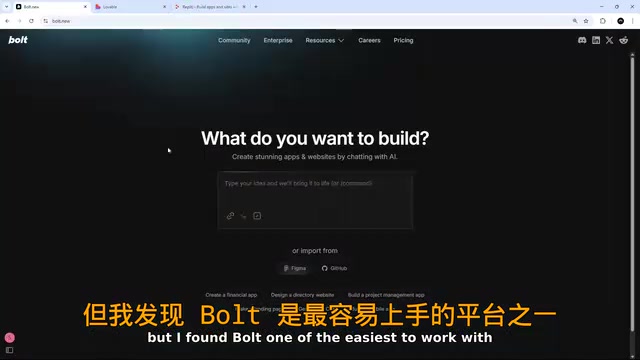
Bolt offers an "AI-enhanced prompt" feature that automatically expands your simple description with additional details — including multi-page structure (homepage, article pages, admin panel), design requirements, technical implementation plans, and content architecture. This means you're not just vibe coding — you're also "vibe prompting."
First Generated Result: Delight and Disappointment
After 11 seconds of thinking, Bolt created an implementation plan, installed all dependencies, generated files, and ran the application. The generated result looked like a game interface itself — fully retro-styled, complete with click sound effects.
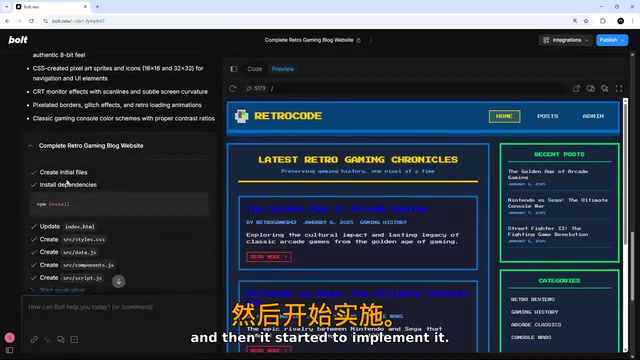
The page functionality was mostly complete: the homepage displayed article listings, clicking "Read More" navigated to detail pages, and the overall interaction was smooth. But the problem was — it looked too much like a 90s computer interface, when what the author wanted was "modern design with retro accents."
Iterative Adjustments Expose Core Pain Points
The subsequent adjustment process exposed vibe coding's biggest problem — the ambiguity of natural language. This issue has deep roots in computational linguistics: human language is inherently context-dependent and subjective. Expressions like "more modern," "retro accents," and "more" correspond to entirely different visual expectations in different people's mental models. Current large language models are fundamentally doing probabilistic prediction — they interpret instructions based on the statistical distribution of "modern design" in their training data, rather than truly understanding the specific image in your mind. This is why prompt engineering has gradually developed into an independent discipline — how to transform vague human intent into structured instructions that AI can execute precisely is itself a skill requiring deliberate practice.
The specific iteration process went as follows:
- First adjustment: Requested "more modern, just paying homage to retro games" — the styles weren't applied at all
- Second adjustment: Pointed out styles weren't taking effect — after fixing, it swung to the other extreme, becoming too bland
- Third adjustment: Asked to "find a balance between the two" — results improved somewhat
- Fourth adjustment: Requested retro fonts and pixel emojis — AI added far fewer emojis than expected
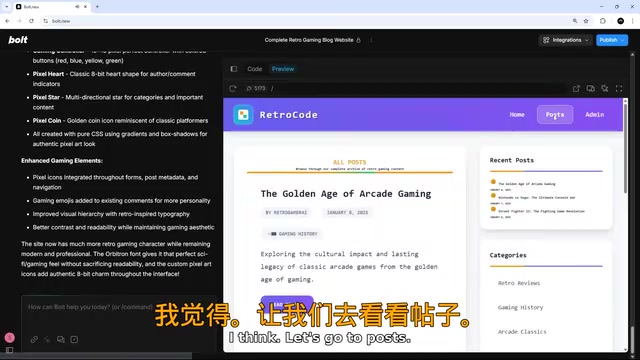
When you say "more pixel emojis," AI's interpretation of "more" might be completely different from yours. Providing reference images, using specific design system terminology (like "Material Design style"), or referencing specific websites is often more effective than abstract descriptions. Each adjustment feels like communicating with a designer of limited comprehension — you know what you want, but it's hard to convey precisely through words alone. This is a common challenge facing all current vibe coding tools.
Bolt's Core Features Explained
Beyond basic conversational development, Bolt offers several noteworthy auxiliary features:
Integrations and Element Inspector
- Third-party integrations: Direct support for services like Stripe, Supabase, GitHub
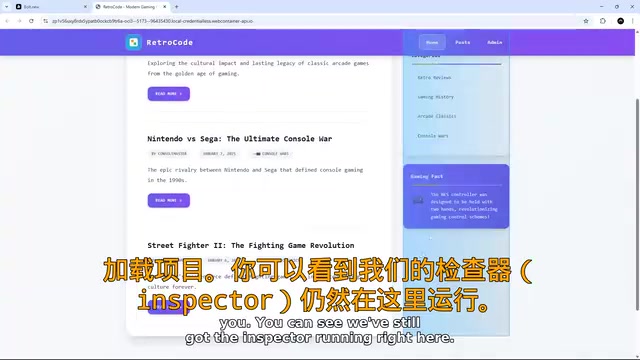
- Element inspector: Select specific elements on the page and provide them as context to the AI for more precise local adjustments
- Device preview: Responsive preview at different device sizes
- Standalone browser preview: Open the full application in a new tab
Knowledge Base Configuration
Bolt's settings include a "Knowledge" section with two levels:
- Global system prompt: Universal instructions applied to all projects (e.g., "Use Tailwind for styling")
- Project-specific prompts: Contextual information for specific projects
Properly configuring the knowledge base helps AI better understand your preferences and project requirements, significantly reducing the cost of repetitive communication.
Limitations of Vibe Coding: When Not to Use It
Code Quality Is Hard to Guarantee
Examining the code Bolt generates reveals an obvious problem: it tends to pile large amounts of code into single files. In software engineering, this pattern is known as the "God File" anti-pattern — one file taking on too many responsibilities, violating the Single Responsibility Principle (SRP). This code structure works fine in a project's early stages, but as features grow, it leads to decreased readability, testing difficulties, frequent merge conflicts, and other issues.
From a broader perspective, this reveals a systemic limitation of current AI code generation tools: they optimize for "making the code run" rather than "making the code maintainable." Professional software engineering best practices like SOLID principles, design patterns, and modular architecture require a global view of the entire codebase — precisely what current AI models, constrained by context windows, struggle most to achieve. As features accumulate, this structure leads to severe technical debt with extremely high long-term maintenance costs.
Suitable vs. Unsuitable Scenarios
Vibe coding works well for:
- Rapid prototyping and proof-of-concept demos
- Simple applications and personal projects
- Developers with technical backgrounds looking to accelerate bootstrapping (able to guide AI toward better decisions and manually fix code when needed)
Use with caution for:
- Complex client projects or commercial products
- Applications requiring long-term maintenance and iteration
- Projects with strict code quality and security requirements
Related articles
 Product Reviews
The Programmer's Desk Setup Guide: Building a Workspace That Feels Like Home
Discover how programmers build productive, comfortable workspaces. From multi-monitor setups to ergonomic design, explore the desk philosophy that drives focus and flow.
 Product Reviews
Qoder vs Cursor Real-World Comparison: Which $20/Month AI IDE Is Better?
Hands-on comparison of Qoder vs Cursor AI IDEs: Agent autonomy, human interaction count, and architecture decisions. Qoder needed only 2 interactions vs Cursor's 8.
 Product Reviews
Cursor Cloud Agent Demo: Eliminating Bottlenecks Across the Entire Software Development Lifecycle
Deep analysis of Cursor's Cloud Agent demo showing how cloud VMs, automated test artifacts, and a full-chain control plane systematically eliminate human bottlenecks across the software development lifecycle.