BookmarkAI: The AI-Powered Code Bookmark Tool That Eliminates Context Loss

BookmarkAI is an AI-driven code bookmark plugin that preserves and resurfaces code context across VS Code, Cursor, and Windsurf.
BookmarkAI (Bookmarkit) tackles the growing challenge of context loss in AI-assisted development by combining AI semantic analysis with bookmark management. It auto-generates grouped bookmarks, traces feature call chains, analyzes uncommitted changes, and binds context to Git branches — helping developers navigate and maintain fast-growing codebases without losing their place.
Why You Need a "Code Bookmark" Tool
AI coding assistants have dramatically accelerated the pace of writing code — but they've introduced a new problem: codebases are growing faster than ever, and tracking context is becoming increasingly difficult. When you use Cursor or Copilot to generate a complex piece of logic, coming back to maintain it a few days later often means spending significant time re-tracing entry points, main flows, and key nodes.
There's a structural tension at play here. AI coding assistants like GitHub Copilot and Cursor can generate dozens or even hundreds of lines of code in seconds, but the rate of code production far outpaces a developer's ability to understand and internalize it. Cognitive science's "working memory" theory tells us that the human brain can only process a limited number of information chunks simultaneously (typically 7±2). Once a codebase exceeds that threshold, developers need external tools to extend their memory — and that's precisely where "code context management" tools deliver their value.
BookmarkAI (the plugin is called Bookmarkit) was built to solve exactly this pain point. It's not a simple code bookmarking tool — it deeply integrates AI analysis capabilities with bookmark management to help developers continuously preserve and reuse code context across fast-moving projects. The plugin currently supports three major editors: VS Code, Cursor, and Windsurf.
Installation and Setup
Installing in VS Code
Open VS Code, click the Extensions icon in the left activity bar, and search for Bookmark AI. Find the plugin and click Install. Once installed, go to the plugin settings, select Install Skill, and configure it based on the AI coding assistant you use — the plugin supports Claude, Cursor, Codex, and other major assistants. After making your selection, click "Initialize Plugin" to enter the main interface.
Installing in Cursor and Windsurf
Open Cursor's extension marketplace, search for Bookmarkit, and install it. Once installed, find the plugin icon in the dropdown menu — the workflow is identical to VS Code. The same applies to Windsurf: search, install, and click the plugin icon to get started.
Technical background: Both Cursor and Windsurf are built on the VS Code core, making them natively compatible with the vast majority of VS Code extensions. They share the same plugin API (VS Code Extension API), which is the technical foundation that allows BookmarkAI to support all three editors simultaneously — developers don't need to separately adapt core logic for each editor, significantly reducing cross-editor maintenance overhead.
Core Features in Depth
AI-Driven Repository Analysis and Bookmark Generation
BookmarkAI's most powerful capability is using AI to automatically analyze an entire codebase and mark key nodes as bookmarks.
It's worth noting that code bookmarks aren't a new concept — they've existed since the days of traditional IDEs like Eclipse and IntelliJ IDEA. The limitation of traditional bookmarks is that they're just "line number pointers" with no semantic information, and they don't stay in sync with code changes — once a bookmarked line is moved or deleted, the bookmark breaks. BookmarkAI's innovation is introducing AI semantic understanding: bookmarks are no longer isolated line numbers, but semantic nodes carrying functional descriptions that understand "what this code means in business terms."
Switch to the Staged Tab and press F4 to trigger AI analysis. The AI automatically identifies entry modules and main flows, annotating key lines as candidate bookmarks. Once analysis is complete, the system outputs results and waits for your confirmation before continuing to trace the chain and complete automatic validation.
Generated candidate bookmarks automatically appear in the Staged Tab, already grouped by functional module. Double-clicking any bookmark jumps directly to the corresponding line of code, dramatically reducing the cost of code navigation.
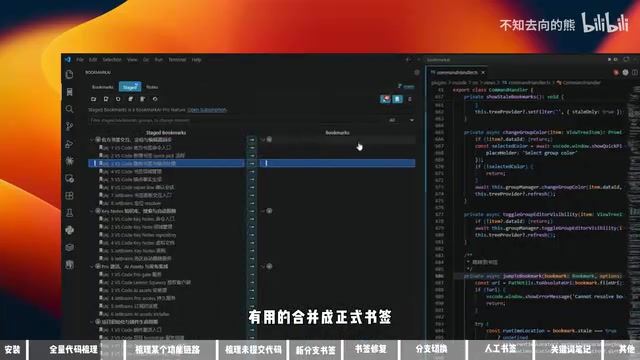
Once you've confirmed which bookmarks are valuable, you can select individual bookmarks or entire groups to merge. Merged bookmarks move into the official Bookmarks Tab. While browsing code, bookmark annotations appear directly alongside the code, forming persistent context labels.
Workflow Tracing: Connecting Functional Entry Points
Beyond single-point bookmarks, BookmarkAI also offers a Workflow Scale feature that chains together the complete call path of a feature into a "workflow bookmark."
The underlying logic here combines static code analysis with AI semantic understanding. Traditional static analysis tools (such as AST parsers) can build call graphs and identify complete call paths from entry functions to leaf functions — but they often struggle with dynamic dispatch, callbacks, event-driven patterns, and similar paradigms. AI fills this gap: by understanding code semantics, it can recognize that "this code belongs to the same functional chain in business terms," even when the code structures aren't directly connected.
Switch to the Staged Tab and use your AI coding assistant to invoke the Bookmark AI Workflow Scale skill. Enter a description of the feature you want to trace, and the AI will chain together entry points, decision nodes, and endpoints in sequence, generating an initial workflow trace for you to confirm and refine.
Once complete, the workflow bookmark automatically appears in the Staged Tab. After confirmation and a Merge operation, you can click any workflow bookmark to instantly locate a feature's code entry point — completely eliminating the frustration of "I know this feature is in the codebase somewhere, but I just can't find it."
Uncommitted Change Analysis
For local code changes that haven't been committed yet, BookmarkAI provides the Bookmark iChange feature, which runs AI analysis on uncommitted code in your current workspace, outputs a change summary, and generates corresponding temporary workflow bookmarks.
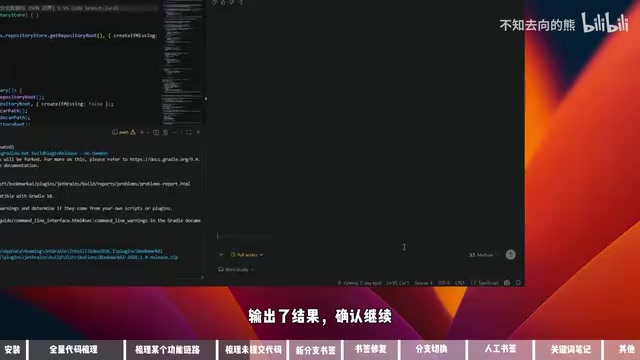
Once analysis is complete, you can review results in the Staged Tab, merge temporary workflow bookmarks into official ones, and create a new branch with synchronized bookmarks — ensuring context is never lost when switching branches.
Branch Awareness: Bookmarks That Follow Branch Changes
This is one of BookmarkAI's most practical design choices — bookmarks and workflow bookmarks are bound to Git branches.
Git's branching model is foundational infrastructure for modern software development, but it inherently only manages versions of code files, not developers' "cognitive state." In practice, developers frequently face "context fragmentation" when switching branches: the understanding of a particular piece of code built up on a feature branch evaporates the moment you switch to a hotfix branch. BookmarkAI's design of binding workflow bookmarks to branches is essentially layering "cognitive state version management" on top of Git's version control — so that a developer's accumulated understanding can be saved, merged, and switched alongside branches, just like code.
When you create a new branch, the plugin's branch state syncs accordingly, and the new branch starts with no workflow bookmarks. You can choose to merge bookmarks from another branch (such as the main branch), so the new branch also displays the main branch's code navigation annotations.
The plugin also handles bookmark merging in branch divergence scenarios: if a workflow bookmark's corresponding code doesn't exist in the target branch, the system will flag it as "not recommended for merging," preventing invalid bookmarks from being created.
Bookmark Repair: Handling Code Changes
Code changes over time, and BookmarkAI has a mechanism for that too. When a bookmarked line of code is deleted, the plugin displays a "Location Lost" indicator. Clicking that bookmark triggers a re-anchoring interaction that guides you to bind the bookmark to a new code location, keeping bookmarks continuously valid.
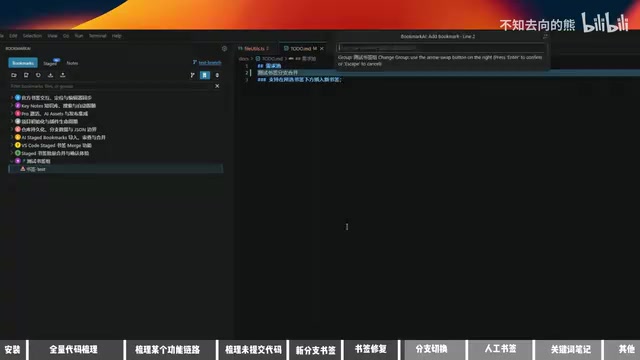
Manual Bookmark Creation and Group Management
Beyond AI-generated bookmarks, BookmarkAI also supports manual bookmark creation: double-click to the left of any code line to anchor it and create a bookmark, then enter a name and confirm. New bookmarks automatically appear after the anchored position, and you can assign them to a group — the bookmark will be appended to the end of that group, making it easy to manage bookmarks by module.
Notes: Contextual Memos Alongside Your Code
Switch to the Notes Tab and enable "Auto Follow" mode. When you select any code snippet, the notes panel on the left will automatically highlight the corresponding entry. You can write plain text notes or Markdown-formatted notes here — once saved, content is automatically rendered into tables and other formats.
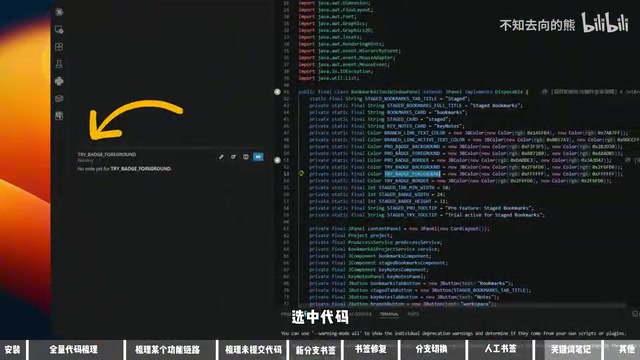
The "notes follow code selection" interaction reflects a philosophy of managing Contextual Knowledge. Traditional code comments can also record information alongside code, but they have two key limitations: comments are part of the code file, so they enter version control and are visible to all team members; and comment formatting is constrained, making it difficult to carry structured information. BookmarkAI's notes system decouples "personal understanding" from "the code itself." Markdown support means developers can embed tables, flowchart descriptions, external links, and other rich content in their notes — forming a true "knowledge base alongside the code."
The core value of the follow feature is this: no matter where in the codebase you select the same code snippet, the corresponding note automatically surfaces — creating a two-way binding between notes and code. Disabling follow mode lets you pin a specific note in view, unaffected by what code is currently selected.
Use Cases and Recommendations
BookmarkAI is especially well-suited for the following scenarios:
- Onboarding to an unfamiliar codebase: Use AI analysis to quickly build a code map without spending hours reading line by line
- Multi-person collaborative projects: Use workflow bookmarks to document key feature entry points, reducing communication overhead across the team
- Long-term maintenance projects: Persistently annotate important logic nodes to avoid the embarrassment of "not understanding your own code three months later"
- AI-assisted development: After AI rapidly generates code, use bookmarks to lock down key nodes and preserve traceable context
One thing worth noting: the plugin currently relies on AI coding assistants (Cursor, Claude, etc.) to execute analysis skills, so you'll need to configure the corresponding AI assistant beforehand to use the AI auto-analysis features. Manual bookmarks and notes have no such dependency.
Summary
BookmarkAI's core value isn't in "bookmarks" per se — it's in integrating AI analysis, code navigation, branch management, and a notes system into a complete code context management workflow. As AI programming tools continue to accelerate code production, effectively managing and understanding a rapidly growing codebase is becoming the new bottleneck for developer productivity. At its core, this is an imbalance between "human cognitive bandwidth" and "machine production speed." BookmarkAI offers a compelling approach: rather than asking developers to remember more, it lets the tool help developers recall the right context at the right moment.
Related articles

AI Comic Drama with WorkBuddy from Scratch: A Step-by-Step Skill Pack Installation Guide
Learn how to create AI comic dramas with WorkBuddy from scratch. This guide covers installation, Skill pack import and invocation, plus a script generation demo with manual revision tips to get you through the first step from script to storyboard.

WorkBuddy Agent Runs the Entire GEO Database Mining Pipeline with a Single Prompt
WorkBuddy agent automates GEO database mining: from data search and curation to batch correction, differential analysis, co-expression networks, feature gene screening, and immune infiltration—a single prompt generates a complete bioinformatics report, greatly lowering the barrier to bioinformatics analysis.

PC Memory Wasted? Hacker News Debates Centralized Data Centers
Hacker News users argue that personal computer memory is wasted and should be centralized in data centers, sparking debate on centralized vs. distributed computing resource allocation. This article analyzes the logic behind the claim, the costs of centralization, and new tensions in memory resource allocation in the AI era.