Boox Tappy Bluetooth Remote Review: Two Buttons Unlock Multi-Scenario Control

Boox releases Tappy, a multi-function Bluetooth remote that goes beyond traditional page turning.
Boox has launched Tappy, a two-button Bluetooth remote designed for e-ink devices. It not only solves pain points like E Ink screen touch delay and difficult operation in special environments, but also supports multi-scenario functions including page turning, scrolling, music, and podcast control. As a standard Bluetooth HID device, Tappy works with any app thanks to Boox's open Android ecosystem, offering richer functionality and broader applicability compared to the Kobo Remote.
What Is Boox Tappy? A Bluetooth Remote That Goes Beyond Page Turning
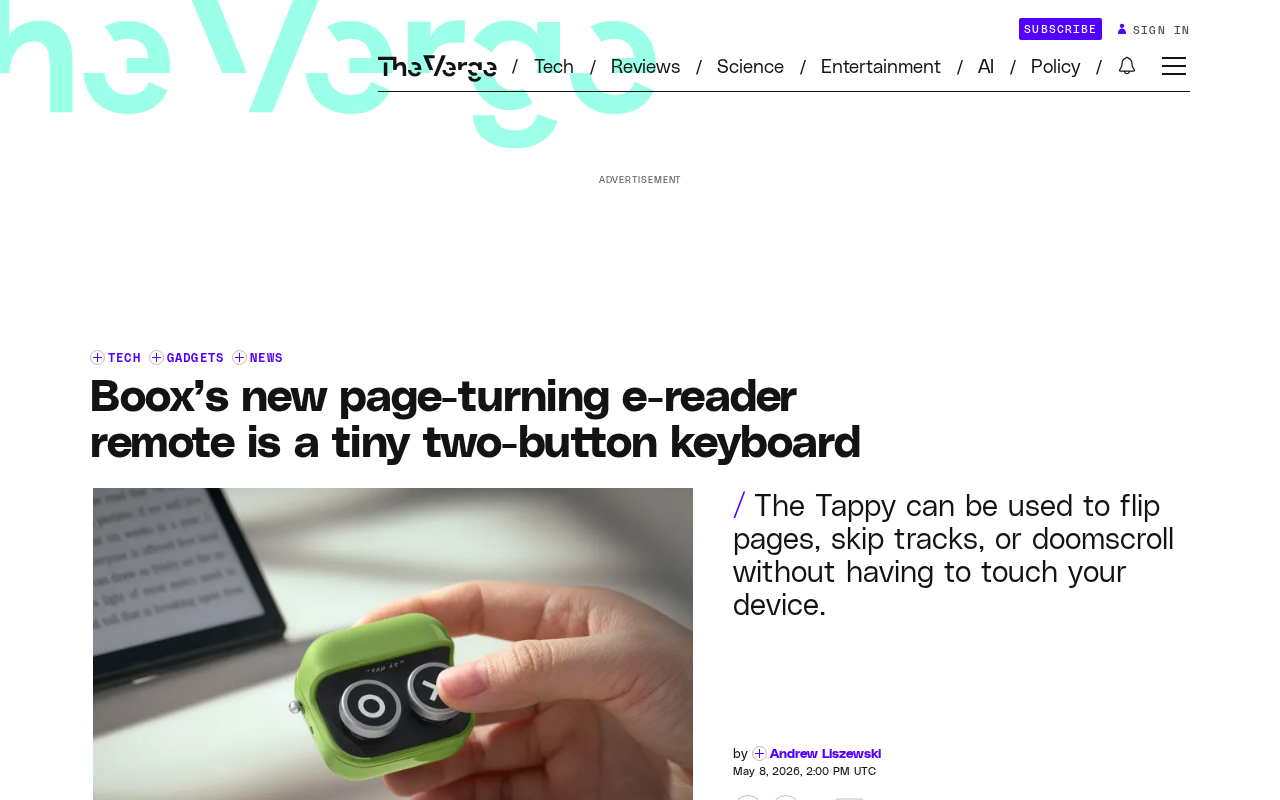
Boox recently released a small Bluetooth remote called Tappy — a micro keyboard device with just two buttons, designed specifically for its e-ink readers and tablets. Similar to the Kobo Remote but with richer functionality, Tappy not only handles basic page-turning but also supports shortcut controls across multiple scenarios.
Tappy's Core Function: An Upgraded Reading and Page-Turning Experience
Solving E-Ink Touchscreen Pain Points
As an e-reader accessory, Tappy's core mission is page turning. For users who read in bed, on the couch, or during commutes, being able to turn pages without touching the screen is an extremely attractive feature. The two physical buttons correspond to forward and backward page turns — intuitive and efficient.
This design addresses a common pain point for e-ink device users: frequently touching the screen not only breaks reading immersion but can be quite inconvenient in certain holding positions. Understanding this pain point requires knowledge of e-ink screen technology limitations: E Ink screens form images by using electric fields to flip charged black and white particles within microcapsules. Each refresh takes hundreds of milliseconds — far slower than the millisecond-level response of LCD screens. This refresh delay creates noticeable lag in visual feedback for touch operations, leaving users uncertain whether their tap was registered, which often leads to repeated touches. Furthermore, most mainstream e-ink devices use a capacitive touch layer overlaid on the E Ink panel, and capacitive sensitivity drops significantly in cold environments, with reduced recognition rates when wearing gloves or when fingers are dry. Physical buttons bypass the touch layer entirely, sending commands directly via Bluetooth, fundamentally avoiding all the issues mentioned above — this is precisely the technical reason why page-turner accessories maintain persistent market demand among e-reader users. The advantages of physical buttons become even more apparent in scenarios like wearing gloves in winter or having wet fingers.
Multi-Scenario Function Mapping: More Than Just a Page Turner
Tappy's real highlight is that it's not a single-function page turner. According to Boox's official description, the device also supports:
- Vertical content scrolling: Scrolling up and down in browsers or social media apps
- Music control: Switching to the previous/next track
- Podcast/audiobook control: Jumping between chapters or segments
This means Tappy is essentially a universal Bluetooth HID device. HID (Human Interface Device) is a device protocol defined in USB and Bluetooth standards, originally designed for human-computer interaction devices like keyboards, mice, and gamepads. When a device connects in Bluetooth HID mode, the operating system recognizes it as a standard input device without requiring additional drivers. Tappy's two buttons are essentially sending standard HID KeyCodes — for example, Page Up/Page Down for page turning, Media Next/Previous for music control, and arrow keys for scrolling. Because of this protocol's universality, the same physical buttons can trigger different behaviors in different application contexts: a reading app captures page-turn keys, a music player captures media keys, and a browser responds to scroll commands. This is why Tappy can work across application scenarios without needing individual adaptation for each piece of software, greatly enhancing its practical value and daily usage frequency.
Boox Tappy vs. Kobo Remote: Which Is Worth Buying?
The Evolution of the Page-Turner Accessory Market
Dedicated page-turner accessories are not a new category — their history traces back to the consumer evolution of PowerPoint presentation remotes. Early Bluetooth page turners primarily targeted the presenter market, later migrating toward reading scenarios as e-book readers became widespread. The launch of the Kobo Remote marked the first time a mainstream reader manufacturer incorporated a page turner into its official accessory lineup, validating the commercial viability of this niche market. Before that, many users relied on generic Bluetooth remote shutters (originally designed for phone selfies) to achieve page turning — these devices were cheap but single-function with poor build quality. The emergence of Boox Tappy represents the evolutionary direction of this category: upgrading from a single-function page-turning tool to a multi-scenario universal remote while maintaining an ultra-compact form factor.
Differences in Feature Coverage
Previously, Kobo's page-turning remote attracted considerable attention in the e-reader accessory market. Boox's launch of Tappy is clearly a response to this niche demand. But unlike the Kobo Remote, which primarily serves the page-turning function, Tappy attempts to cover a broader range of use cases through its multi-function design.
Boox's Natural Advantage with the Android Ecosystem
Interestingly, Boox devices run Android — a strategy that stands in stark contrast to the closed ecosystem approaches of mainstream reader manufacturers like Kindle and Kobo. Kindle runs a deeply customized Linux system, Kobo uses proprietary firmware, and both strictly limit third-party app installation. Boox's parent company, ONYX International, insists on shipping full Android (with many current devices running Android 11/12), allowing users to install apps directly from Google Play or sideload any APK. This open architecture creates a dual benefit: on one hand, users can run WeChat, the Kindle App, web browsers, and any other application on an e-ink screen; on the other hand, the accessory ecosystem also benefits — Tappy, as a standard Bluetooth HID device, works with all applications on the system without requiring proprietary Boox drivers. This means the Boox + Tappy combination effectively constitutes a low-power, eye-friendly, lightweight Android tablet solution.
For users who simultaneously use multiple reading apps like WeChat Read, the Kindle App, and Pocket, a universal Bluetooth remote offers better value than an accessory tied to a specific ecosystem.
The Design Philosophy of Two Buttons: Minimalism Is Efficiency
A design with only two buttons may seem spartan, but it actually reflects a restrained product philosophy. Too many buttons increase the learning curve and the probability of misoperation, while two buttons perfectly cover the most fundamental binary operation logic of "forward/backward." Whether it's turning pages, scrolling, or skipping songs, the essence is always moving forward or backward in a linear sequence.
This minimalist design also means the device can be made extremely compact — easy to hold in one hand or even clip between fingers — truly achieving an "imperceptible" interaction experience.
Related articles
 Product Reviews
The Programmer's Desk Setup Guide: Building a Workspace That Feels Like Home
Discover how programmers build productive, comfortable workspaces. From multi-monitor setups to ergonomic design, explore the desk philosophy that drives focus and flow.
 Product Reviews
Qoder vs Cursor Real-World Comparison: Which $20/Month AI IDE Is Better?
Hands-on comparison of Qoder vs Cursor AI IDEs: Agent autonomy, human interaction count, and architecture decisions. Qoder needed only 2 interactions vs Cursor's 8.
 Product Reviews
Cursor Cloud Agent Demo: Eliminating Bottlenecks Across the Entire Software Development Lifecycle
Deep analysis of Cursor's Cloud Agent demo showing how cloud VMs, automated test artifacts, and a full-chain control plane systematically eliminate human bottlenecks across the software development lifecycle.