BrAIn Browser: A Lightweight AI-Powered Browser with a Built-in MCP Server

BrAIn is a desktop browser with a built-in MCP server for transparent, controllable AI Agent automation.
BrAIn is a desktop browser built for AI Agents, distinguished by its built-in MCP (Model Context Protocol) server that exposes browser capabilities — clicks, input, page reading — as standardized tools with a single line of config. Unlike headless browser approaches, all Agent actions happen in a visible window. Users can pause at any time, block high-risk operations, and rewind to any historical page snapshot. Completed tasks can be solidified into reusable flows, with full call logs and hidden secrets. BrAIn also retains full everyday browser functionality including native tabs, a command palette, and a password vault.
When the Browser Becomes an AI Agent's Control Panel
AI can write code, reply to emails, and plan trips — but can it use a browser the way a human does? BrAIn (Brain) answers that question by turning the browser itself into a tool that AI can directly control.
This is a genuine desktop browser, and what sets it apart is that it has an MCP (Model Context Protocol) server built right in. With a single line of configuration, your AI Agent gains access to dozens of browser operation tools — clicking, typing, reading page content — all happening in real time inside a window you can actually see.
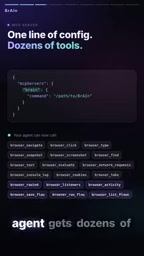
This design breaks the black-box feel of traditional automation approaches. When driving web pages through scripts or headless browsers, the process is typically invisible and hard to debug. BrAIn puts every action the Agent takes on screen, letting you supervise the entire process.
MCP (Model Context Protocol) is an open protocol introduced by Anthropic in late 2024, designed to standardize how AI models communicate with external tools and data sources. Before MCP, every AI application had to write custom integration code for each tool it used — costly to maintain and nearly impossible to reuse. MCP's core idea is to define a unified "server-client" interface: tool providers (such as browsers, databases, and file systems) expose their capabilities as MCP servers, while AI Agents act as clients and invoke them through the protocol, without either side needing to understand the other's internal implementation. By embedding an MCP server directly into the browser process, BrAIn means that native browser capabilities — clicks, input, DOM reading — can be called as standardized tools by any MCP-compatible AI Agent, eliminating the need to deploy a separate proxy service.
Control and Safety: Pause Anytime, Block Risky Actions
The biggest concern with letting AI operate a browser is losing control. BrAIn addresses this with a clear design philosophy: you can pause the Agent at any time with a keyboard shortcut, and any risky operation is intercepted and counted.
This keeps a human in the loop at all times. When the Agent attempts a sensitive action, the system doesn't let it proceed automatically — it blocks the action, logs it, and returns the decision to the user.
Another noteworthy feature is Rewind, which the team calls "time travel for web pages." You can roll back to any previous state of a page, or search across all snapshots for a price that changed at some point. This feature is off by default, data stays in memory only, and it never records content from private tabs — a restrained balance between utility and privacy.

Human-in-the-loop is a design principle in AI automation systems that preserves human intervention and approval at critical decision points, rather than letting the system operate entirely on its own. This concept is especially important in AI Agent scenarios: when an Agent executes multi-step tasks, an error at any intermediate step can cascade and amplify, leading to consequences that are hard to roll back — such as submitting an incorrect form or sending an unintended request. By forcing a pause before sensitive operations and waiting for user confirmation, the system shifts the balance between "automation efficiency" and "human oversight" toward the safer side. In browser automation, common high-risk actions include submitting payment forms, deleting account data, and authorizing third-party permissions — the types of operations most likely to cause irreversible harm.
Helping Agents "Read" Pages: Built-in Developer Tools
AI agents often hit walls when operating web pages because they can't understand the page's interaction logic — why a button triggers a particular behavior is often a mystery.
BrAIn's built-in developer tools aim to solve this: they can surface every event listener and map it precisely to the exact line of code behind it. This finally lets the Agent understand what a button actually does, rather than guessing or trying blindly.
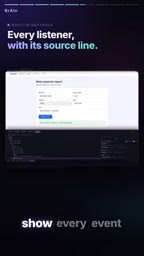
For Agents that need to complete tasks inside complex web applications, this kind of transparency into interaction mechanics is crucial. It transforms a web page from "visual pixels" into "understandable logical structure."
From One-Off Tasks to Reusable Tools
BrAIn has a clever workflow mechanism. After an Agent completes a task, it proactively proposes a flow. Once you review and approve it, that flow is locked in as a genuinely reusable tool.
This creates a kind of progressive capability accumulation: every time the Agent completes a new task, there's an opportunity to distill that experience into a standardized operation that can be called directly next time. Throughout the entire process, every invocation is logged, and keys and sensitive information remain hidden at all times.

Auditable call logs combined with secret isolation form the basic trust foundation needed to let an Agent operate a browser in a production environment.
This "execute then solidify" workflow mechanism is known in the automation field as "Programming by Demonstration" — an intelligent variant of macro recording. Traditional RPA (Robotic Process Automation) tools typically require users to manually record operation steps in advance, whereas BrAIn reverses the order: the AI Agent completes the task first, and then a parameterizable flow template is extracted from the actual execution path. The flows that get crystallized this way are essentially validated operation sequences, because they come from real, successful executions rather than being designed from scratch. As usage grows, the library of flows a user accumulates amounts to a personal automation toolkit tailored to their most-used websites and tasks — with compounding reuse value over time.
It's Still a Great Everyday Browser
Despite being positioned as an AI-drivable tool, BrAIn doesn't sacrifice the basic experience of being a browser. It offers native tabs, a command palette, a password vault, private tabs, and even practical features like scrolling screenshots.
In other words, you don't have to give up your everyday browsing habits to get AI capabilities — it works both as an Agent's control platform and as a fully functional browser for regular web use.
Quick Take
BrAIn represents a clear direction for the tooling of AI Agents: rather than letting Agents wrestle with web pages in an invisible background process, give them a transparent, controllable, and auditable real browser environment. The built-in MCP server integration lowers the barrier to entry, while the pause mechanism, risk interception, call logging, and secret hiding directly address the core security concerns of both enterprise and individual users.
It's worth noting that the information above comes from the product's official materials. Real-world stability, tool invocation success rates, and compatibility with complex websites remain to be validated through actual use.
Related articles

ChatGPT Space Launches: Team Collaboration and New Pages Features Explained
ChatGPT Space is OpenAI's new team collaboration feature with Pages, real-time collaboration, and Slack/Google Drive sync. We break down its privacy design, multi-platform integration, and the full workflow from conversation to document.

Migrating Apache Spark UDFs to GPU Acceleration with AI Agents
NVIDIA developer blog explains how AI Agents rewrite Apache Spark UDFs for GPU acceleration, covering migration criteria, agent rewriting and verification workflows, plus pitfalls like result consistency and CPU-GPU transfer overhead.

Zed Editor v0.40.4-rc2 Released: Usage Credits Now Available Without Upgrading
Zed editor releases v0.40.4-rc2, allowing users to use usage credits for AI features without upgrading to a paid plan, lowering the trial barrier.