Brink: Turn Your MacBook Trackpad Edges into a Quick Control Center
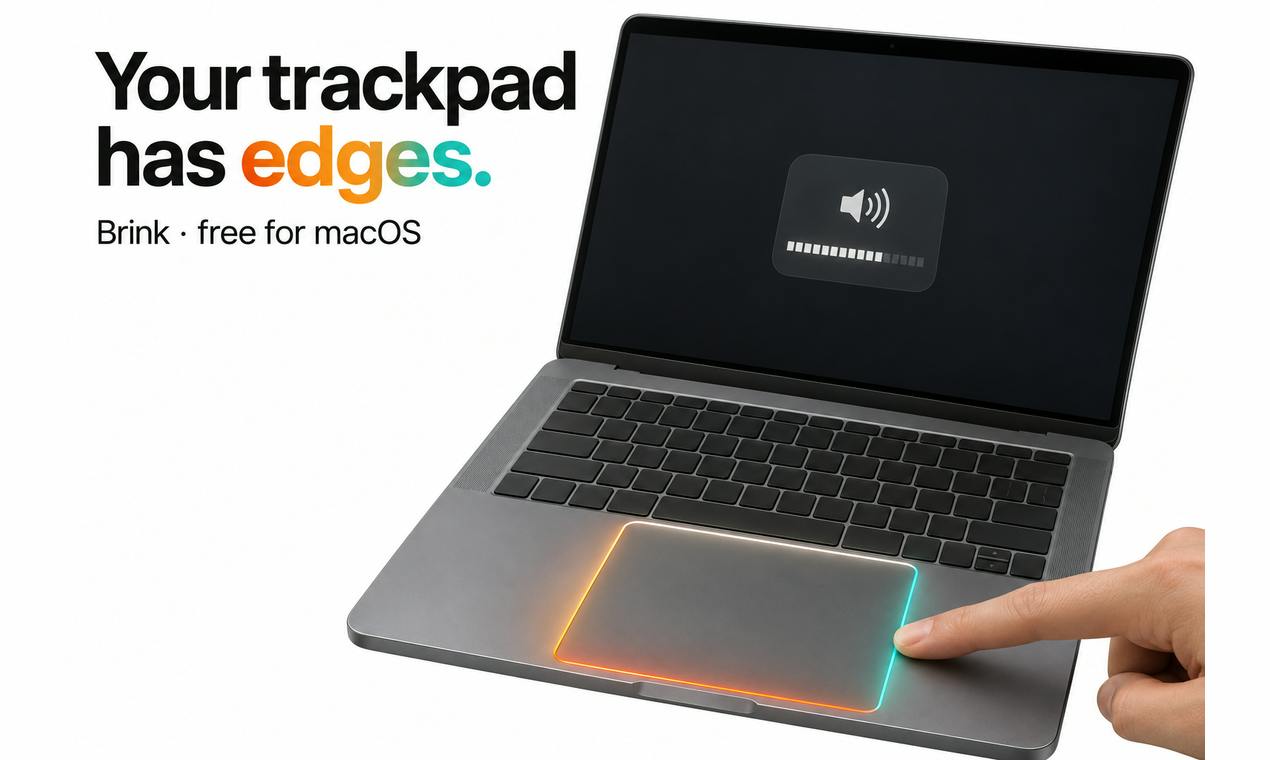
Brink is a free, open-source macOS menu bar tool that controls volume, brightness, and more with trackpad edge swipes.
Brink is a free macOS menu bar app that uses swipes along the four edges of the MacBook trackpad to replace some physical keys and menu bar clicks: up/down on the right for volume, left for brightness, top for keyboard backlight, left/right on the bottom to switch tracks, and double-tap a corner to mute. Actions come with a native HUD and haptic feedback for a near system-level feel. It's lightweight, doesn't take up the Dock, and is open source on GitHub. The article also notes challenges like accidental touches, conflicts with system gestures, a learning curve, and lack of customization—best for trackpad-heavy users, with limited benefit for external mouse users.
The MacBook trackpad has always been the core area for gesture control, but its edges are often overlooked. A free macOS menu bar app called Brink is trying to turn those edges into entry points for common controls like volume, brightness, and keyboard backlight.
Edge Gestures: Making the Most of Your Trackpad
Brink's core idea is straightforward: use swipes along the four sides of the trackpad to replace some physical keys and menu bar clicks. According to the product description, swipe up and down on the right edge to adjust volume, on the left edge to adjust screen brightness, on the top edge to control keyboard backlight, and swipe left and right on the bottom edge to switch tracks (skip). In addition, double-tapping a trackpad corner quickly mutes audio.
These actions come with a native HUD (heads-up display) and haptic feedback—a subtle vibration as you swipe, simulating the detents of a physical knob. For users who frequently need to quickly adjust volume or brightness while focused on work, these gestures that keep your hands on the trackpad reduce the need to shift your gaze and hands.
HUD (heads-up display) is a floating interface in macOS used to briefly show system state changes, such as the translucent indicator bar that appears in the center of the screen when adjusting volume or brightness. It doesn't interrupt your current workflow and disappears automatically after a few seconds. A native HUD means Brink uses system-level UI components rather than custom third-party pop-ups, so the visual style, animation curves, and response speed stay consistent with macOS, and users won't feel jarred.
Haptic feedback relies on the Taptic Engine built into the MacBook trackpad. Unlike ordinary phone vibration motors, the Taptic Engine can precisely control the frequency and amplitude of vibrations, simulating a "click" or "detent" feel. Apple uses this technology extensively in Force Touch and Magic Mouse, letting users perceive operation confirmation without physical button displacement. Brink leverages this hardware capability to provide a subtle vibration as you swipe to adjust, simulating the detents of a physical knob.
A Lightweight Menu Bar Tool, Free and Open Source
Brink exists as a menu bar app and doesn't take up Dock space, fitting the lightweight trend of macOS utility software. Product information shows it's completely free and open source on GitHub—a plus for users who care about privacy and customizability.
Judging by Product Hunt data, Brink received 81 upvotes and 2 comments, ranking 18th for the day. That's not a standout result in the highly competitive productivity tools category, but it does show that some Mac users are interested in this kind of edge-gesture approach.
Menu bar apps are a common form of tool on macOS: the program resides on the right side of the menu bar at the top of the screen, and clicking the icon pops up a panel or menu. The main window usually doesn't appear, and no icon shows in the Dock. These apps suit lightweight tools that stay in the background and are summoned on demand, such as system monitors, clipboard managers, and quick launchers. Because they don't take up Dock or window space, menu bar apps are less intrusive to your workflow—but too many of them can clutter the menu bar icons, and users often need tools like Bartender to organize them.
Open source in this context means Brink's source code is publicly available on GitHub, and anyone can view, audit, modify, and distribute it. For privacy-conscious users, open source lets them confirm the app doesn't collect or upload data; for developers, they can compile it themselves or submit improvements. However, open source doesn't equal a security audit—users still need some judgment or to rely on community oversight.
The Pros and Cons of Trackpad Gestures
Turning trackpad edges into control zones isn't a brand-new concept; similar tools have tried similar approaches before. Brink's advantage lies in its integration of native HUD and haptic feedback, making the operation feedback feel closer to a system-level experience. However, these tools also face some inherent challenges:
- Risk of accidental touches: Edge swipes may conflict with the system's three-finger drag and Notification Center pull-out gestures, requiring users to adapt.
- Learning curve: Four edges correspond to different functions, which you need to memorize at first—less intuitive than physical keys.
- Use cases: For users with an external mouse, trackpad gestures will be used far less often.
Brink's developer Ali MS hasn't yet mentioned solutions to gesture conflicts or customization options in the description. If custom edge-function mapping becomes available later, its practicality would improve further.
Three-finger drag is a macOS accessibility setting; once enabled, users can drag windows, select text, or move files on the trackpad with three fingers without pressing hard. It overlaps with edge-swipe gestures on the trackpad area: when a finger starts swiping from the edge, the system may recognize it as part of a drag operation rather than an independent edge gesture. Notification Center pull-out is the gesture of swiping left from the right edge of the trackpad to summon Notification Center, which overlaps in area with Brink's up-and-down swipe on the right edge to adjust volume, but in a different direction. The actual degree of conflict depends on the system's priority for determining gesture direction. Such conflicts usually require the app to intercept gestures and declare priorities through private APIs or accessibility permissions, and the specific implementation affects compatibility and stability.
Who Is Brink For?
If you often work on a MacBook and are used to doing most things with the trackpad, Brink can help you reduce trips to keyboard shortcuts or the menu bar. Especially for high-frequency actions like adjusting volume and brightness, edge swipes are more seamless than hunting for F keys or clicking the menu bar.
But if you mainly use an external monitor and mouse, or have extremely high demands for trackpad gesture precision, these tools may just be something to try out. Considering it's free and open source, the cost of trying is low—interested users can get it directly from GitHub.
Brink represents a niche direction in macOS productivity tools: tapping into the hidden interaction potential of existing hardware. It may not suit everyone, but for users who want to keep their hands on the trackpad, it's a small tool worth watching.
One-line Summary
Brink is a free, open-source macOS menu bar tool that uses trackpad edge swipes to control volume, brightness, and more.
Paragraph Summary
Brink is a free macOS menu bar app whose core idea is to use swipes along the four edges of the MacBook trackpad to replace some physical keys and menu bar clicks: swipe up and down on the right edge for volume, on the left for brightness, on the top for keyboard backlight, swipe left and right on the bottom to switch tracks, and double-tap a corner to mute. Actions come with a native HUD and haptic feedback for a near system-level experience. The app is lightweight, doesn't take up the Dock, and is open source on GitHub. The article also notes challenges such as accidental touches, conflicts with system gestures, a learning curve, and lack of customization options—suitable for users used to trackpad operation, with limited benefit for external mouse users.
Related articles

Yung Pueblo on Self-Awareness: A 365-Day Guide to Inner Transformation
Yung Pueblo shares his new book Journey's 365-day self-awareness structure on Talks at Google, discussing meditation, intuition, co-leadership in relationships, and gratitude practices.

FBI and USDA Hit by Cyberattacks: Critical Infrastructure Security Alarms Sound Again
FBI and USDA reportedly hit by cyberattacks; the FBI was breached for the second time in recent months, this time targeting the National Crime Information Center (NCIC). This article analyzes the incident details, NCIC's strategic value, and common security challenges facing government agencies.

How Do UK Grid Battery Storage Systems Make Money?
How UK grid battery storage makes money: stacking frequency response, capacity market, and wholesale arbitrage revenue, plus operational trade-offs and market risks.