Browser FX: A Review of the Real-Time Audio Effects Chrome Extension

Chrome extension that turns your browser into a real-time audio effects processor with MIDI support.
Browser FX is a Chrome extension that captures audio from any browser tab and applies real-time professional effects processing. It features a studio-style knob interface, audio-reactive Cymatic pattern visualization, and MIDI hardware controller support. Built on Chrome's tabCapture API and Web Audio API, it brings DAW-like audio manipulation capabilities directly into the browser for content creators, musicians, and audio enthusiasts.
When Browser Audio Meets Professional Effects Processing
In everyday browser use, audio is typically passive—we can only hear whatever sound a webpage outputs, with no ability to adjust it. Whether a podcast has poor audio quality, video vocals sound muffled, or you want to add some spatial depth to background music, regular users are essentially powerless. Browser FX, which recently launched on Product Hunt, is trying to change that.
As a Chrome audio processing extension, Browser FX's core philosophy is: take audio from any browser tab and reshape it through a real-time, professional-grade effects processing system. Built by developer Bruce Blay, it garnered 96 upvotes and 11 comments after launch, reaching #14 on the daily leaderboard across categories including Chrome Extensions, Music, Tech, and Audio.
Core Features: Studio-Grade Transformation of Real-Time Audio
Capturing Audio from Any Tab
Browser FX's most fundamental and critical capability is capturing the audio stream from any tab. Whether you're listening to Spotify's web player, watching YouTube videos, or attending a web conference, it can intercept that audio as input for processing. This "capture and process" approach breaks free from the limitations of any single website or player, making it a universal browser audio routing and enhancement tool.
From a technical implementation perspective, Chrome introduced the chrome.tabCapture API in 2013, allowing extensions to capture audio and video streams from specified tabs. This API is built on WebRTC's MediaStream interface, enabling developers to access the raw audio data stream output by a tab and then construct processing node chains through the Web Audio API. The Web Audio API itself is part of the W3C standard, providing a rich set of audio processing nodes including GainNode, BiquadFilterNode (biquad filter node), ConvolverNode (convolution node, commonly used for reverb simulation), and more—supporting developers in building complex Audio Graphs within the browser. Browser FX leverages this technology stack to achieve professional-grade audio effects processing without ever leaving the browser environment.
Studio-Style Knob Control Interface
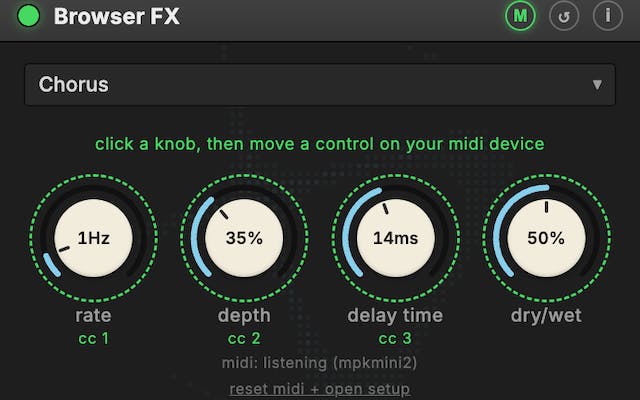
The product's most visually striking selling point is its studio-style knob interface. The developer employs a dark interface design with knob controls that simulate real audio hardware, allowing users to adjust audio parameters in real time as if operating physical effects units. This skeuomorphic interaction design not only lowers the psychological barrier to professional audio processing but also makes the operation more immersive.
For users accustomed to DAWs (Digital Audio Workstations) or hardware mixing consoles, this interface language feels very familiar; for regular users, intuitive knobs are easier to grasp than cold numerical sliders. DAWs are the core software for professional audio production, with representative products including Ableton Live, Logic Pro, and FL Studio. These applications typically employ skeuomorphic design language, digitally recreating real mixing console faders, knobs, and VU meters to help audio engineers transitioning from the analog era maintain their operational intuition. Notably, skeuomorphic design has a much higher retention rate in the audio domain compared to general UI design—even after iOS 7's flat design swept across the industry, virtually all major audio plugins (such as Waves, Universal Audio, and FabFilter) retained knob and dial interfaces. This is because the continuous adjustment of audio parameters is naturally suited to the knob metaphor, with the mapping between rotation angle and parameter change being extremely intuitive.
Highlight Features: Sound Visualization & MIDI Hardware Control
Audio-Reactive Cymatic Visualization
Browser FX includes a built-in audio-reactive Cymatic visualizer. Chladni Patterns, named after 18th-century German physicist Ernst Chladni, are symmetrical geometric patterns formed on physical media through vibration frequencies, historically used to demonstrate the physical form of sound. In the classic experiment, fine sand is sprinkled on a metal plate, and when the plate edge is bowed with a violin bow to induce vibration, sand particles gather on the nodal lines (positions where amplitude is zero), forming symmetrical geometric patterns. Different frequencies produce different patterns, with higher frequencies yielding more complex and intricate designs. This phenomenon intuitively demonstrates the physical principles of standing waves and vibration modes.
When this concept is digitized and bound to real-time audio, the patterns on screen dynamically change with the rhythm, frequency, and intensity of the music. Modern digital implementations use FFT (Fast Fourier Transform) to decompose audio signals into spectral data, then map frequency, amplitude, and other parameters to graphical parameters, generating similar symmetrical geometric animations in real time.
This design is more than visual decoration—it transforms "invisible sound" into "visible patterns," adding an intuitive feedback dimension to both music listening and audio debugging. For content creators and music enthusiasts, it's a clever design that balances functionality with visual appeal.
MIDI Controller Hardware Support
Browser FX also supports physical control via MIDI controllers. Users can connect their own MIDI keyboards, knob stations, or fader controllers to adjust browser audio effects using real physical hardware.
MIDI (Musical Instrument Digital Interface) is an industry-standard communication protocol established in 1983 for transmitting control information (such as note on/off, velocity, controller knob positions, etc.) between electronic instruments, computers, and audio devices. MIDI transmits not audio signals themselves, but digital instructions describing musical actions, with extremely small data volumes and very low latency. In 2015, the W3C officially released the Web MIDI API standard, with Chrome being the first browser to implement support, allowing web applications to communicate directly with MIDI hardware devices connected to the computer. This means users can use MIDI controllers from brands like Akai, Novation, and Korg directly with browser applications without installing additional drivers or bridging software. Browser FX achieves direct hardware controller integration based on the Web MIDI API.
This feature elevates the product's positioning from "fun tool" to "semi-professional workflow" territory. For musicians, DJs, streamers, or audio enthusiasts, being able to operate browser audio with familiar hardware controllers significantly enhances both practicality and operational efficiency.
Product Positioning & Typical Use Cases
Looking at its feature set, Browser FX clearly aspires to be more than a simple volume booster plugin. It packages "real-time effects processing + visual feedback + hardware control" into a single browser extension, creating a lightweight audio processing environment for Chrome.
Typical use cases include:
- Content creation & live streaming: Streamers can apply effects to microphone or playback audio in real time, adjusting sound live with MIDI controllers
- Enhanced music listening experience: Add equalization, reverb, and other effects to web-based music for improved overall sound
- Audio debugging & learning: Use the Cymatic visualizer to intuitively understand audio spectrum and dynamic characteristics
- Personalized audio customization: Adjust specific frequency bands to suit individual listening preferences
Potential Limitations & Considerations
As a browser extension, Browser FX faces some inherent constraints. First, audio capture and real-time processing consume browser performance, and stability during extended use or when processing high-sample-rate audio is worth monitoring.
From a technical standpoint, real-time audio processing demands extremely low latency—typically requiring sampling, processing, and output to complete within 10 milliseconds, otherwise users will perceive noticeable audio lag. In the browser environment, Web Audio API processing latency is constrained by multiple factors: JavaScript's garbage collection mechanism can cause occasional stutters, the operating system's audio buffer size affects base latency, and CPU scheduling pressure increases when multiple tabs are running simultaneously. Chrome's AudioWorklet interface (introduced in 2018, replacing the deprecated ScriptProcessorNode) allows developers to run custom DSP (Digital Signal Processing) code in a dedicated audio rendering thread, significantly reducing processing latency and main-thread blocking risks. Even so, audio processing performance in the browser environment still lags behind native applications, especially in scenarios with complex stacked effect chains.
Second, a Chrome extension's access to tab audio involves privacy and security boundaries, requiring users to weigh their authorization decisions carefully.
Additionally, based on currently available public information, the product hasn't yet disclosed in detail which specific effect types are supported (such as parameter ranges for reverb, compression, and EQ), nor the latency performance of audio processing—these are precisely the core metrics professional users care most about. The 96-vote result shows it has identified a real pain point, but to evolve from an "interesting experiment" to a "professional tool," continued refinement in processing quality, stability, and ecosystem compatibility will be necessary.
Summary: New Possibilities for Browser Audio
Browser FX demonstrates a direction worth watching: bringing capabilities that traditionally belong to the professional audio domain into everyday browser experiences in a lightweight, intuitive way. The combination of real-time effects processing, skeuomorphic knob interface, Cymatic visualization, and MIDI hardware support makes it stand out among similar Chrome audio extensions.
For users seeking personalized audio experiences—especially content creators and music enthusiasts—this extension is worth trying. It may not yet be perfect, but it genuinely offers a new realm of imagination for "browser audio processing," a field that has been long overlooked.
Related articles

Laptops: The Last Bastion of Plaintext Secrets
Developer laptops are the last security blind spot for plaintext secrets. This article analyzes risks in .env files, shell history, and tool configs, offering practical solutions like OS keystores, dynamic injection, and short-lived credentials.

Go Microservices in Practice: Detailed Architecture for E-Commerce, AI Agent, and IM System Integration
Deep dive into integrating e-commerce, AI Agent, and IM systems under Go microservices architecture, covering unified auth, gRPC, componentized Agent engines, and group chat bots.

X Platform's Recommendation Algorithm Caught Filtering Brazilian Election Content, Reigniting Algorithm Transparency Debate
X (formerly Twitter) was found filtering Brazilian election content in its For You feed, sparking debate over algorithm transparency and free speech.