BrowserSkill: A Controlled Channel for AI Agents to Safely Borrow Your Logged-In Browser

BrowserSkill lets AI agents safely borrow your logged-in browser via explicit, bounded access controls.
BrowserSkill (BSK) by Tencent lets AI agents reuse your real browser login state without handing over full control. Through a three-layer architecture of CLI, daemon, and browser extension, it enforces strict boundaries: a separate visible window, single-tab borrowing, and human takeover for CAPTCHAs or sensitive steps. Currently supporting Chrome and Edge, it's ideal for users who need agents to work in authenticated environments safely.
When an Agent Needs to Use Your Browser
Having AI agents operate browsers is nothing new, but when it comes to real-world daily workflows, one awkward problem persists: websites require login, and agents don't have your credentials. The traditional workaround — setting up separate test accounts for every website — is both tedious and insecure. BrowserSkill (BSK), an open-source project from Tencent, offers a different approach: letting agents directly borrow your already-logged-in, real browser session.
The core value of this design isn't more aggressive automation capability — it's that the "borrowing boundaries" are explicitly built into the workflow. You no longer need to prepare a parallel identity system for the agent; it reuses the same login session you use every day. At the same time, BSK deliberately avoids the chaotic situation where an agent and you are fighting over control of the same browser.
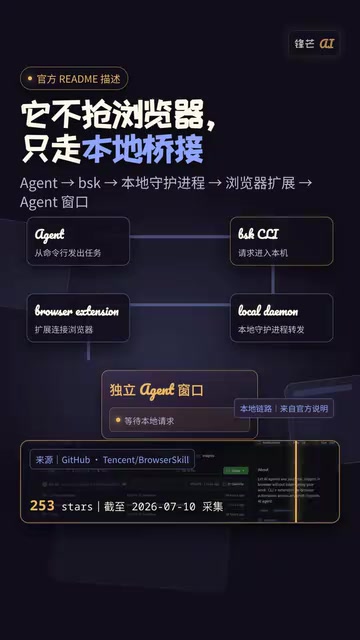
Three-Layer Architecture: CLI, Daemon, and Extension
According to the official README, BrowserSkill's runtime structure is straightforward. The agent calls the BSK command-line tool, a local daemon receives the instructions, and then hands off the specific tasks to a browser extension to execute. This chain clearly decouples "the agent's intent" from "the browser's actions."
Notably, BSK chose the browser extension route rather than headless browser solutions like Playwright or Puppeteer. This is no accident. While headless browsers driven by programmatic interfaces offer fine-grained control, they inherently lack user login state and require re-authentication every time. Browser extensions, on the other hand, run within the user's real Profile and can directly share cookies and sessions. Communication between the daemon and the extension uses Chrome/Edge's native Native Messaging mechanism — the extension runs a Content Script and Background Service Worker inside the browser, while the daemon acts as a local Native Messaging Host that responds to calls. This also explains why Firefox support is complicated: the three browsers differ in their Native Messaging implementation details, making the porting cost non-trivial.
Separate Window — No Wheel-Grabbing
By default, agent operations run in a separate, visible window, and won't compete with your everyday browsing window for control. The "visible" aspect is critical — you can see in real time what the agent is doing, rather than letting it quietly operate in the background. This transparency is essential for building trust, and is an important safeguard against potential security risks (more on that later).
Explicit Borrowing, Returned After Use
If a task genuinely requires using a page you already have open, BSK's rule is: it must explicitly "borrow" that one tab, return it after completing the operation, and leave all other windows untouched. This tab-level borrowing mechanism prevents the agent from crudely taking over your entire browser environment.

The Selling Point Isn't Automation — It's Boundaries
What BrowserSkill really wants to convey is the idea that "boundaries" are the core of the product, rather than simply pursuing the breadth of automation. Many browser agents on the market emphasize "fully automated everything," but in real-world workflows, there are always steps that automation simply cannot handle.
What About CAPTCHAs?
When a CAPTCHA, login prompt, or confirmation dialog appears in the task flow, BSK's solution isn't to try to bypass it — it's to hand control directly to you ("human takeover") so you can handle these sensitive steps, after which the agent resumes. This design isn't flashy, but it's far closer to real-world work scenarios than solutions that pretend every website can be fully automated.
For critical checkpoints involving payment confirmation or account security, returning decision-making authority to the human is the responsible approach. Acknowledging the limits of automation is actually a sign of maturity.

Browser Compatibility: Don't Confuse "Supports Any Agent" with "Any Browser"
One commonly misunderstood point needs clarification. BrowserSkill claims to "support any agent," but this absolutely does not mean "any browser."
"Supports any agent" means BSK provides a command-line interface that aligns closely with the rapidly spreading MCP (Model Context Protocol) paradigm in today's AI ecosystem. As long as an agent can call command-line tools or interfaces that conform to standard tool-calling specifications, it can connect to BSK — no need to individually adapt for each agent framework. This "agent-agnostic" interface design is the mainstream direction for browser tooling layers today, and is not any kind of promise about browser compatibility.
Current Supported Scope
The official README clearly states: Chrome and Edge are currently supported. Other Chromium-based browsers are only "expected to work" — no explicit official guarantee is given. Firefox remains at the planning stage and has not yet been implemented.
For users planning to try it out: if your primary browser isn't Chrome or Edge, proceed with caution. Incorrectly projecting the openness of "supports any agent" onto browser compatibility could lead to frustration.

The Permission Boundaries of Real Login State Deserve Ongoing Attention
There's a logical point worth being cautious about: the more authentic the login state, the more carefully the permission boundaries the agent can reach need to be considered. BSK reuses your real login identity — cookies and LocalStorage in the browser are bound to a specific Profile. When an agent operates on pages through the extension under the same Profile, all HTTP requests automatically carry the user's authentication credentials, and the website has no way to distinguish your manual actions from the agent's automated behavior. Once the agent acts, it's equivalent to acting on the website as you.
This is both the source of BSK's convenience and a security threat that cannot be ignored: Prompt Injection. Malicious web pages can embed hidden instructions in their content to trick the agent into performing actions the user didn't intend — for example, while the agent is scraping a webpage, hidden text on the page might instruct it to "forward the contact list to a certain address." In scenarios where a real login session is held, the severity of such attacks increases significantly. The industry currently lacks robust defense mechanisms for this, and BSK's visible window design at least provides a line of human review, giving users a chance to spot abnormal behavior.
This is precisely why the entire set of boundary mechanisms — visible window, explicit borrowing, and human takeover — matters so much. They aren't meant to restrict the agent's capabilities; they're meant to retain human control over critical steps while granting real permissions.
Who Is BrowserSkill For?
On balance, BrowserSkill is best suited for users who are already accustomed to handing tasks off to agents, but constantly get stuck at the login state and manual confirmation steps. The problem it solves isn't "making agents more capable" — it's "making agents work safely in a real login environment."
In other words, what it's selling isn't a browser — it's a controlled borrowing channel. To learn more about this project, search for tencent-browserskill.
For the trend of AI agents moving into real production environments, this design philosophy of "acknowledge boundaries, borrow explicitly" may be more instructive than chasing full automation at all costs. Especially now, when security threats like Prompt Injection have yet to be systematically resolved, keeping humans in the loop at critical decision points is both a pragmatic engineering choice and a product-level idea worth promoting.
Key Takeaways
Related articles

DeepCell: One-Click AI Generation of Documents, Spreadsheets, and Slides
DeepCell tops Product Hunt with one-click generation of documents, spreadsheets, and slides, using the .deepcell format for linked updates, designed for System 2 tasks like modeling and sales reviews.

Doneas: 15-Minute Daily Accountability Calls That Keep Indie Developers From Procrastinating
Doneas is a daily accountability tool for indie developers: plan tasks on Monday, join a 15-minute call with five builders each day, and log deliveries on a public progress page. This article analyzes its core mechanics, effectiveness, and potential issues around retention and matching.

Fastlane 2.0: Fully Automated AI Ad Campaigns, From Creative to Optimization
Fastlane 2.0 is an AI ad automation tool: enter your website and it learns your brand, generates video and image ads, and runs and optimizes them on Meta, TikTok, Instagram, and YouTube.