Buffer 3.0 Review: The macOS Clipboard Manager That Can Search Text Inside Screenshots

Buffer 3.0 is a local-first, MIT open-source macOS clipboard manager that can OCR-search text in screenshots.
Buffer 3.0 is a free, open-source clipboard manager for macOS under the MIT license, built around a "no registration, no cloud" local history approach with all data staying on-device and summoned by default with ⇧⌘V. Its standout feature is using on-device Vision OCR to read text inside screenshots, making images keyword-searchable and turning the clipboard's "image black hole" into a searchable text source. Version 3.0 adds an interactive image canvas, unlimited history levels, and clipboard noise suppression, plus tags, bookmarks, multi-select paste, and inline editing for lightweight snippet management. It's macOS-only with no cross-device sync, and OCR accuracy isn't officially published, so test it with your own screenshot types.
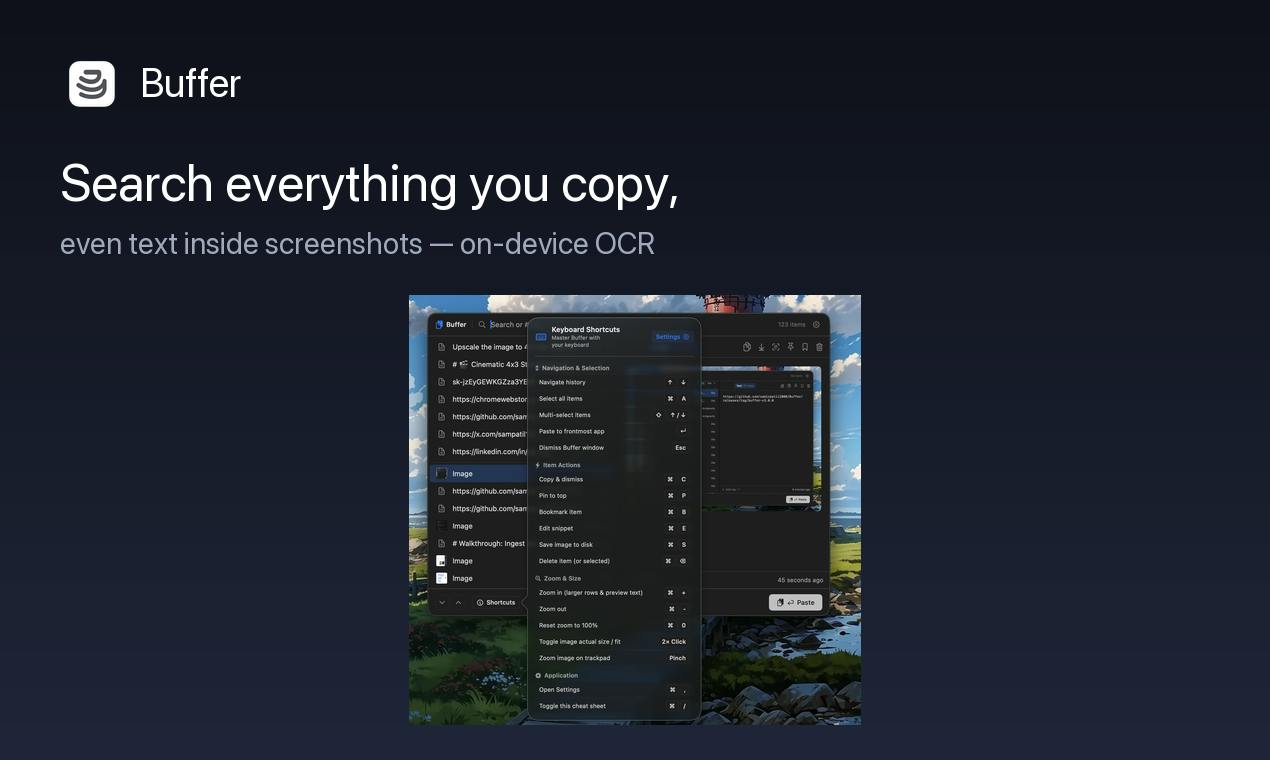
The clipboard is the most easily out-of-control corner of macOS. The order numbers, code snippets, images, and links you've copied are, in the vast majority of cases, pushed out by new content after a single paste. Buffer 3.0 earned 72 votes on Product Hunt, placing 20th for the day, and tries to solve this problem with the idea of a "locally searchable history" — and its selling point goes beyond just storing text: it can even search for text inside screenshots.
No Registration, No Cloud: A Local macOS Clipboard History
Buffer's positioning is clear: a free, open-source clipboard manager for macOS (MIT license). Everything you copy — text, links, images — is stored in a searchable local history, summoned by default with ⇧⌘V.
There are two key trade-offs in that description. First, "local": there's no account system, no cloud sync, and all data stays on your Mac — a hard requirement for anyone handling sensitive information (keys, client data, internal documents). Second, "free and open source": the MIT license means the code is auditable and modifiable, which matters especially for a tool like a clipboard manager that needs high privileges and can read everything you type.
The product is released by developer Samir Patil. Compared to many similar tools that sync the clipboard to the cloud and charge monthly, Buffer takes the exact opposite approach: no server, no server breach.
MIT is one of the most permissive common open-source licenses; it only requires retaining the copyright and license notices and places almost no restrictions on usage — you can freely use, modify, and redistribute it, even in closed-source commercial products. For a tool like a clipboard manager, the practical significance of this license is that the code can be audited by anyone to confirm whether it truly only processes data locally; if users have special needs (say, changing the hotkey logic or adjusting the storage path), they can build their own derivative versions. Compared to "free but closed-source" alternatives, open source here serves as a verifiable trust mechanism rather than a mere marketing label.
Core Capability: Using On-Device OCR to Search Text Inside Screenshots
The most noteworthy thing about Buffer is how it handles screenshots.
Typically, clipboard tools just store images as binary objects, and when searching you can only rely on thumbnails to jog your memory. Buffer uses on-device Vision OCR to read the text inside screenshots — meaning if you screenshot an image containing a quote, error log, or chat history, you can later search for words within it to bring it back.
The qualifier "on-device" is crucial — OCR is done locally, and screenshots are never sent to a recognition service. For teams that frequently communicate via screenshots, this turns the "image" black hole of the clipboard into a searchable text source.
It's worth noting that OCR's actual recall rate is affected by screenshot clarity, font, and background, and the official accuracy figures aren't published — so it's still best to test with your own commonly used screenshot types.
Vision is a computer vision framework Apple has provided with the system since macOS 10.15. Its text recognition (OCR) capability supports multiple languages, handwriting, and complex layouts, and runs entirely on-device without requiring network requests. This means apps that call it can convert images into searchable text without configuring any server or uploading images. For developers, using the built-in framework also reduces app size and avoids the privacy and cost issues of third-party recognition services. More and more local-first tools are adopting this path precisely because it satisfies both "searchable" and "non-exfiltrating" requirements at once.
What's New in v3.0: Image Canvas, Unlimited History, and Noise Suppression
Compared to earlier versions, Buffer 3.0 adds three capabilities:
- Interactive image canvas: further process saved images rather than just pasting them as-is.
- History levels up to unlimited: the old problem with clipboard tools is that the longer the history, the harder it is to find things; Buffer solves this with scalable history capacity combined with search.
- Clipboard noise suppression: automatically filters out meaningless copies (such as temporary values written by password managers or a string of digits that flashes by briefly), reducing junk entries in the history.
Of these three, noise suppression is the most easily underestimated. The real enemy of clipboard history is often not capacity but signal-to-noise ratio — if every copy is remembered, search actually becomes useless.
Clipboard noise typically comes from three kinds of copy behavior: temporary strings written by password managers when generating or filling passwords, format fragments quietly written by the system or apps in the background, and short-lived content from accidental user touches. These entries have no reuse value themselves, yet they crowd the history list and dilute search accuracy. Noise suppression is essentially a set of filtering and deduplication rules, with common approaches including skipping by source app, identifying by content characteristics (such as high-entropy random strings), and merging duplicates within a short time window. The more aggressive the rules, the higher the chance of harming useful content, so such features often need to let users adjust whitelists or turn them off.
Organizing and Reusing: Tags, Bookmarks, Multi-Select Paste, and Inline Editing
Saving is only the first step. Buffer does several things for "getting it back and using it out":
Snippets can be given tags and bookmarks, turning one-off copies into reusable material; multi-select paste lets you pick multiple snippets at once for batch use; any saved snippet can be edited inline, then pasted, saving the back-and-forth of "paste elsewhere, edit, copy again."
This combination means Buffer isn't only for instant copy-paste — it also works well as a lightweight snippet library, for things like frequently used email templates, commands, and address information.
Who It's For, and the Boundaries to Watch
Buffer's target audience is fairly clear: users who work on macOS long-term, copy frequently, and are sensitive about data exfiltration — such as developers, writers, and roles that handle large amounts of spreadsheets or customer service records.
There are a few things worth thinking through before you start. First, it's currently macOS-exclusive, so Windows or Linux users can't use it. Second, no cloud sync means no history across multiple devices — you'll need to consider backups yourself when switching machines or reinstalling. Third, this tool relies heavily on accessibility and clipboard permissions, and the permission model and privacy boundaries are worth confirming item by item during initial setup.
A result of 72 votes and 2 comments places it among niche tools with limited exposure on Product Hunt, but that doesn't directly reflect product quality — open-source, local-first tools often spread by word of mouth rather than launch-day traffic. For Mac users currently troubled by the lack of clipboard history, Buffer 3.0 is worth adding to the trial list.
One-line Summary
Buffer 3.0 is a local-first, MIT open-source macOS clipboard manager that can OCR-search text in screenshots.
Paragraph Summary
Buffer 3.0 is a free, open-source clipboard manager for macOS under the MIT license, built around a "no registration, no cloud" local history approach, with all data staying on the machine and summoned by default with ⇧⌘V. Its biggest differentiator is using on-device Vision OCR to read text inside screenshots, making image content searchable by keyword and turning the clipboard's "image black hole" into a searchable text source. Version 3.0 adds an interactive image canvas, history levels up to unlimited, and clipboard noise suppression, and supports tags, bookmarks, multi-select paste, and inline editing, so it can be used as a lightweight snippet library. It supports macOS only, has no cross-device sync, and its OCR accuracy isn't officially published, so you'll need to test it with your own screenshot types.
Related articles

Chain of Thought Isn't Just for AI: How Humans Can Use CoT to Improve Thinking Quality
Chain of Thought isn't just a prompt trick for large models. Starting from a Hacker News discussion, this article analyzes why CoT works for human thinking too, breaks down actionable ways to transfer it, and highlights the key differences between human CoT and machine CoT.
Cloudflare Teams Up with OpenAI: Closi…
Cloudflare Teams Up with OpenAI: Closing the Loop from Vulnerability Discovery to Defense with AI
Cloudflare uses OpenAI Daybreak to investigate security vulnerabilities and generate reviewable remediation plans, while developers use Codex to boost coding efficiency and quality.

Orca Multi-Agent Orchestration in Practice: A Guide to Parallel Collaboration with Claude and Codex
Orca is Stable AI's free open-source agent workbench supporting 34 agents like Claude Code and Codex in parallel. Learn its Git worktree isolation, multi-model orchestration, and mobile management.