Build 4 AI Agents with Grokbot to Automate Your Daily Life

Grokbot uses a persistent cloud VM and multi-agent collaboration to keep AI assistants online 24/7 handling your daily tasks.
Grokbot is a cloud-based AI agent platform launched after the Cursor and xAI merger, with a persistent cloud virtual machine as its core feature — eliminating the need to keep local devices running. It uses a "bots + channels" team architecture with natural-language cron scheduling, accessible for $20/month via Cursor Pro. The article walks through four practical agents: a chief-of-staff agent, an email cleanup agent, a household shopping agent, and a daily learning curator. Payment security is a highlight — the author recommends Stripe CLI over entering credit card details in the VM, with mandatory manual confirmation steps. The key takeaway: this system's value lies in outsourcing tedious tasks to an always-on AI team, and the real challenge has shifted from technical skill to role design and cost control.
What Is Grokbot: A Cloud-Based AI Assistant That Never Shuts Down
Grokbot is one of the first products launched after the Cursor and xAI team merger, and it's considered Cursor's fastest-growing product. Its core concept is similar to chatbots like Cowork, OpenClawAd, and Hermes — but with a much lower barrier to entry. It works out of the box and gives you a cloud-based virtual machine right away.
That virtual machine is the key to understanding Grokbot's value. Many similar tools in the past required you to keep your own computer running to execute agents locally — the moment your laptop shut down or crashed, the task stopped. Grokbot hosts this virtual machine in the cloud and keeps it online indefinitely. All agents can access it, read and write files on it, and keep running even after you close your laptop. The author believes this model is almost destined to become the industry standard, because it genuinely solves the "device must stay on" problem.
The price barrier is also dropping. These capabilities were initially only available on plans costing around $300/month. Now, a $20/month Cursor Pro subscription gives you access to both Grokbot and Cursor. Combined with the Grok 4.6 and Grok Heavy models, the overall usefulness of the toolchain has improved significantly.
Core Concept: Building Your Agent Team with "Bots + Channels"
The system is organized much like a team collaboration workspace. You can create individual "Bots" or "Channels" — a channel works like a department. For example, a marketing channel could house multiple bots responsible for growth, SEO, and PPC, all communicating and collaborating with each other within the same channel.
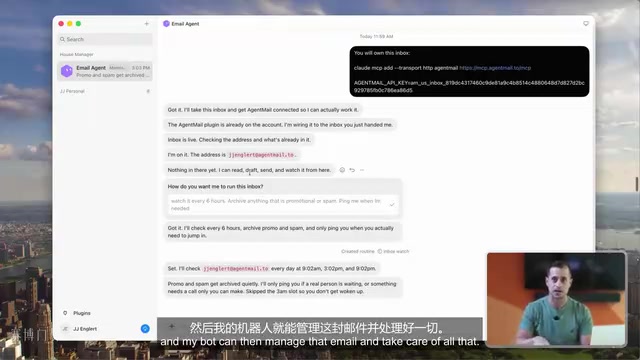
Each bot needs a clearly defined background and role at creation time: who it is, what its responsibilities are, and what rules it must follow. Even more interesting is the "Routines" mechanism (i.e., scheduled/cron tasks) — you simply tell the bot in plain language "do something every X hours," and it will automatically do so, regardless of whether your computer is on.
However, the author specifically warns about token costs: the more frequently scheduled tasks run and the longer conversation threads grow, the more credits and tokens get consumed. The best practice is to avoid setting high-frequency routines on very long threads. Instead, have bots write daily summaries to a dedicated channel, and have other bots check only that summary channel rather than reading through every individual conversation — this saves significantly on costs.
The technical mechanism behind "Routines" is essentially cron scheduling — a timed task standard originating from Unix systems. Traditional cron requires you to manually write time expressions like 0 8 * * * (every day at 8 AM), whereas Grokbot lets you describe your scheduling intent in natural language, with the system converting it to the corresponding trigger logic in the background. This abstraction lowers the barrier for non-technical users, but it also means users sacrifice some precision over actual trigger frequency. Another important concept is token consumption: every inference pass by a large language model processes a full context window. The longer the thread and the more conversation history it contains, the more tokens each call consumes — and costs grow linearly or even exponentially. This is exactly why the article recommends a "summary channel" instead of "full retrieval" — compressing input length is the most direct way to control costs.
Four Agents in Practice: From a Chief of Staff to Shopping to Learning
The video demonstrates building four collaborating personal agents that form an "agent fleet."
Personal Assistant Agent (Chief of Staff Role)
The first is a personal assistant named "Paris," positioned as the lead agent responsible for interfacing directly with the owner while supervising other bots. It's configured to check all conversations once per hour, stay up to date on the latest developments, and proactively push other bots to deliver results. The author further restricts it to only check agents within a "butler group," preventing it from accessing personal private conversations.
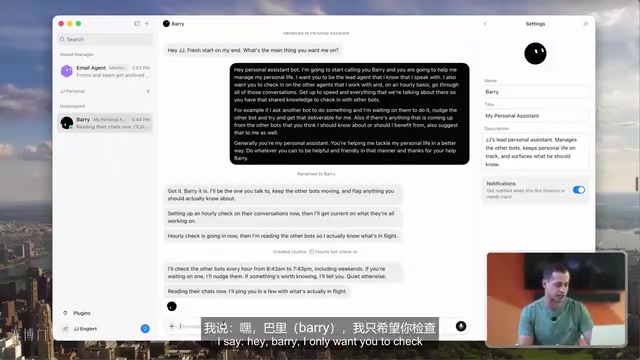
Worth noting is the "teach skills" feature: bots can observe your screen operations, memorize the workflow, and generate a skill from it — similar to the "skills" concept in the Claude Code ecosystem.
Email Agent
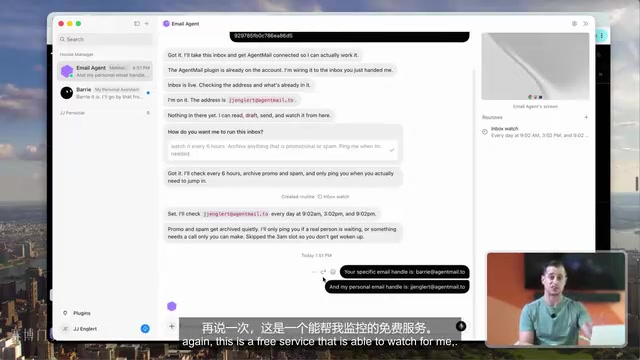
The second agent is paired with Agent Mail — a free email service built specifically for AI agents. The author assigned a dedicated email address to the bot and uses this address when signing up for new services, letting spam flow there to be managed by the agent, keeping the real inbox clean. It's configured to check emails every 6 hours, automatically archive promotions and spam, and proactively alert the owner when an email requires personal attention.
Shopping Agent (Butler)
The third is a "butler" responsible for household purchases. The author gave it family context (a family of four with two kids) and set purchasing priorities: general items go to Amazon first, household goods go through Target, and groceries are ordered via Instacart.
This involves a critical security decision: how to let the agent complete payments. One option is logging into accounts and entering credit card information directly in the virtual machine — but the author explicitly warns that the platform is still in beta, has not been fully validated for enterprise-level security, and there is a risk of credential exposure if the virtual machine is compromised. His preferred approach is using the Stripe CLI — getting the Stripe CLI link from GitHub and passing it to the bot, binding the credit card via command line so transactions don't need to pass through the virtual machine itself, which is significantly more secure. He also emphasizes making "must get owner confirmation before every payment" a hard rule.
Stripe CLI is the official command-line tool provided by the Stripe payment platform, originally designed for developers to test Webhooks and APIs locally. In this use case, it shifts the path for handling payment credentials from "filling in via browser/GUI" to "command-line interface," preventing credit card numbers from being exposed in plaintext in the virtual machine's browser cache, cookies, or screenshots. Cloud virtual machines have a relatively broad attack surface — including prompt injection (malicious web pages tricking agents into performing unintended actions) and session hijacking — so "credentials never touch the virtual machine" is an effective defense-in-depth principle. Regardless of which AI agent platform you use for financial automation, until the platform completes enterprise-level security auditing, setting "manual confirmation" as a mandatory checkpoint before payment is the most robust practice available today.
Learning Agent
The fourth is a "learning manager" that runs every morning at 8 AM. Thanks to the deep integration between Grok and X (Twitter) — both part of the same company — it can connect to an X account to monitor topics of interest, while also checking Hacker News and browsing Reddit's subreddits on AI agents and bots. Every day it curates 4 to 5 learning resources with summaries and detail links, enabling personalized just-in-time learning.
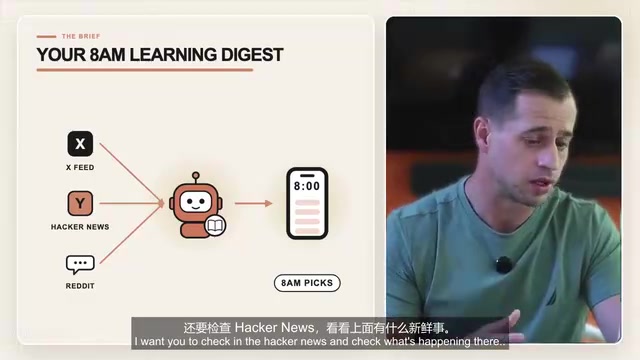
The deep integration between Grok and X (formerly Twitter) stems from both belonging to the ecosystem under Elon Musk's xAI and X Corp. In practice, this means Grok can tap into X's real-time data stream without third-party API access restrictions. By contrast, other mainstream large language models (such as GPT-4 and Claude) typically need to go through X's paid API subscription — which is fairly expensive — or resort to indirect methods like web scraping, both of which are worse in terms of timeliness and reliability. Hacker News is a tech community operated by Y Combinator, known for its technical depth and high signal-to-noise ratio, and is one of the primary channels engineers and startup founders use to stay on top of cutting-edge developments. Combining X's real-time stream, Hacker News aggregation, and Reddit vertical communities creates an information matrix covering three layers: "immediate news — in-depth discussion — community practice."
Advanced Configuration and Usage Tips
Beyond built-in capabilities, Grokbot also has a plugin store that agents can call directly. The author highlights one notable advantage: while other platforms typically only allow binding a single Gmail account, Grokbot can connect multiple Gmail accounts. You can also integrate the 1Password CLI tool, letting agents manage your password vault. Some people have even given their agents a phone number so it can make calls to make reservations or answer the phone.
Once an agent has an "agent credit card, agent email address, and a shipping address," it has essentially everything it needs to handle day-to-day tasks and can truly be let loose.
The author's overall assessment is: for engineering and development work, he still prefers Cursor, Claude Code, or Codex — but for knowledge work and personal task management, this cloud agent system performs exceptionally well. Its greatest value isn't technical showmanship, but rather outsourcing the tedious tasks you don't want to do yourself to a team of AI agents that are always online and working in coordination.
Summary
The inspiring takeaway from this setup is that it demonstrates a practical form of personal-level AI automation: rather than chasing a single all-powerful assistant, it uses a chief-of-staff agent to coordinate and multiple specialized agents to divide the work, with a cloud-hosted virtual machine ensuring continuity. For everyday users, the real barrier has shifted from "technical ability" to "how to thoughtfully design roles, control costs, and secure payment flows."
Related articles

@ai-sdk/vue 3.0.306 Patch Release Syncs with [email protected] Update
@ai-sdk/vue 3.0.306 released, synced with [email protected]. A routine patch release for the Vercel AI SDK ecosystem with no public API changes; the Vue adapter layer stays version-aligned with the core package.

Gemini 4 Argon API Launches: The Era of Million-Token Output Begins
Google launches Gemini 4 Argon with sparse MoE architecture, up to 1M output tokens, and a 68.90% Vals Index score, available across API, AI Studio, and the Gemini app.

DukaanAI: Turning Product Photos into Inventory Lists with Open-Source AI
DukaanAI is an AI inventory tool for small retailers that turns product photos into inventory entries using the open-source Gemma 3 model, with local inference, editable fields, and CSV export.