Build a Bilibili AI Workflow Step by Step: Terminal + MCP Lets LLMs Auto-Read Subtitles and Scrape Danmaku
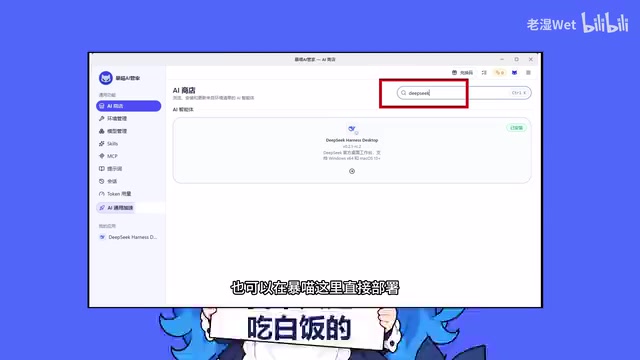
A Bilibili creator demonstrates using Billy Agent to wrap Bilibili's capabilities as AI-callable tools for subtitle and danmaku scraping and update posting.
The article introduces a workflow that lets AI operate Bilibili directly: install Billy Agent via pip, run Billy Skills Install, then scan a QR code to authorize a Bilibili account, after which the AI can parse BV links, scrape subtitles and danmaku, read favorites, and even like, tip coins, and post updates. The approach aligns with the MCP protocol, wrapping platform capabilities as standardized tools the model can call. The author notes that the tool obtains account-level read/write permissions, so publishing actions should keep human review; domestic mirrors occasionally return 403, and switching to the official source solves it. Content quality still depends on persona and prompts—the first generated self-introduction needed manual adjustment. This kind of solution suits experimental attempts, with stability affected by mirrors and platform APIs.
Recently, a Bilibili creator shared a workflow that lets AI operate Bilibili directly—from installing a terminal tool to scanning a QR code for authorization, and on to automatically parsing video subtitles, scraping danmaku, and posting updates. The whole thing is demonstrated step by step. The core idea is clear: wrap Bilibili's capabilities as tools the AI can call, so the model can get work done right in the terminal.
What This Workflow Actually Does
According to the creator's demo, the process has three steps: first install a package called Billy Agent in the terminal, then use the Billy Skills Install command to load skills into the AI, and finally run Billy Auth Login to scan a QR code and log in to a Bilibili account. Once set up, the AI can read video subtitles, export danmaku, view favorites and the Watch Later list, and even perform actions like liking, tipping coins, and posting text updates.
In the creator's testing, after login the tool directly displayed view-count data for the account's recent videos, showing that it had obtained account-level read/write permissions. It can then parse BV links, scrape video subtitles, and export danmaku—turning "understanding a video" into a single tool call: hand the BV number to the AI, and subtitles, top comments, and an AI summary all come back at once.
This approach aligns with the philosophy of MCP (Model Context Protocol): provide the model with standardized tool interfaces so it can call them autonomously during a conversation. The "MCP tools" mentioned in the creator's title refer to this kind of approach—wrapping platform capabilities as callable skills.
MCP (Model Context Protocol) is a standardized protocol proposed and open-sourced by Anthropic. Its core idea is to abstract external tools, data sources, and APIs into model-discoverable "tool descriptions," so that during a conversation the model decides on its own which tool to call and what parameters to pass, rather than having the application code hard-code the call logic. MCP typically uses a client-server architecture: the AI application acts as the client and connects through standard interfaces to individual MCP Servers, which handle communication with a specific platform (such as Bilibili, a database, or a file system). The value of this is decoupling—switching to a different model or a different platform capability only requires swapping the corresponding Server, without rewriting the entire orchestration logic. Billy Agent in this article is exactly the middle layer connecting the model to Bilibili's capabilities, turning platform operations into functions the model can call.
Installation and Authorization: Three Steps
The first step is installing the package. Open the terminal and install Billy Agent with a single pip command. After installation, type Billy --version; if you see a version number, it worked. The second step is loading skills into the AI: run Billy Skills Install Yes. The third step is authorization: after running Billy Auth Login, the terminal displays a QR code—pull out your phone and scan it with the Bilibili app to complete login.
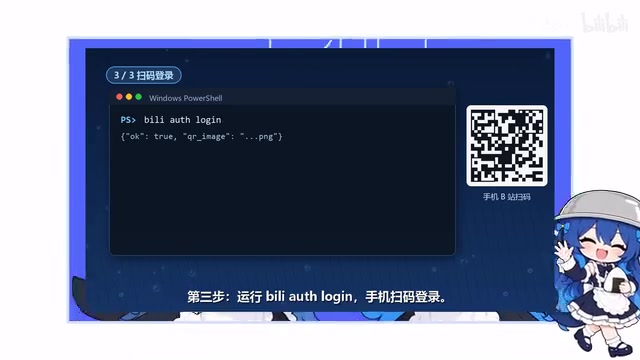
In the video, the creator specifically flagged one pitfall: domestic mirrors sometimes glitch and return a 403, and switching to the official source fixes it—tested and confirmed. This kind of network issue is common for developers in China when installing packages: when you hit an error, try switching sources first, and that usually rules out most problems.
Once authorization is complete, the tool's capabilities are connected to the model. In the demo, the creator had it directly list view counts for recent videos, and the data came back correctly, showing that read permissions were in effect.
The pip mentioned here is Python's package manager, and "domestic mirrors" refers to PyPI mirror sites in China (such as the Tsinghua mirror, Alibaba Cloud mirror, etc.). Because the official PyPI source is located overseas, developers in China often encounter slow speeds or timeouts when installing directly; mirrors cache packages on domestic servers to speed up downloads. However, mirrors may have synchronization delays or temporary failures, in which case requests may return errors such as 403. In such cases, you can temporarily specify the official source with the -i parameter, or modify the pip configuration file to switch permanently. Understanding the relationship between mirrors and the official source helps you quickly determine whether an error is a network issue or a problem with the package itself.
Getting the AI to Work: From Self-Introduction to Final Cut
Once connected, you can make requests to the AI directly. The creator asked it to write a Bilibili self-introduction and a narration script for this episode, with the requirement that it be reviewed before publishing—this "human review" step is crucial: when account publishing actions are involved, keeping a human confirmation step prevents the model from making mistakes.
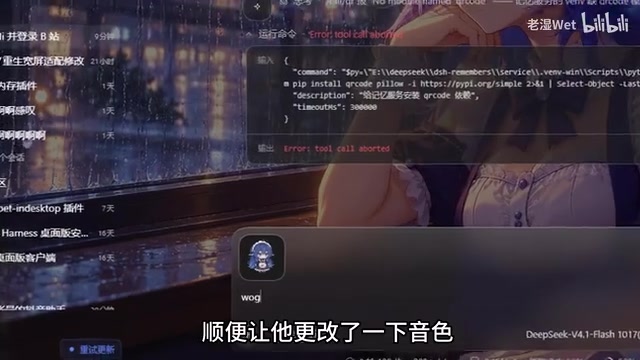
The first generated result wasn't great: the AI's self-introduction was "a whale girl living in the DeepSeekAd data ocean," which was clearly not what the creator wanted. So the creator gave it a specific persona and adjusted the voice, and only then got the final cut. This process illustrates a reality: tools solve the "can it be done" problem, but content quality still depends on prompts and persona settings—the model won't automatically understand what style you want.

In the final cut, the AI, in the voice of "Big Fat Fish," walks through the entire installation process, including the three steps of pip installing Billy Agent, Billy Skills Install, and Billy Auth Login QR-code scanning, and it also repeats the reminder about switching from the mirror to the official source when hitting a 403.
A Few Details Worth Noting
Be aware of the permission scope. This tool obtains account-level read/write permissions—it can post updates, like, and tip coins. In the demo, the creator told the AI, "only publish after I review it," and that habit is worth keeping. Putting publishing actions behind human confirmation is a basic safety line when using tools like this.
You can take advantage of free credits. The creator mentioned that you can enter a redemption code in the top-right corner of Baomiao AI to claim model time and free credits, used to have the model help download plugins; if you haven't deployed Harness yet, you can also deploy it directly in Baomiao. For people who want to try things out at low cost, this is a way to lower the barrier.
Tools handle execution; content still relies on people. The adjustment process from whale girl to the final cut is the most informative part of the whole video. AI can automatically read subtitles, scrape danmaku, and post updates, but it doesn't know what persona style you want. How well the prompt is written directly determines whether the output is usable.
The "account-level read/write permissions" these tools obtain are essentially Cookie or Token credentials acquired through QR-code login. The difference from OAuth authorization on Bilibili's open platform is that the latter clearly defines permission scopes, whereas QR-code login often inherits the account's full range of operations on the web. This means the tool can not only read public data but also perform write operations such as liking, tipping coins, and posting updates as you; if credentials leak or are misused, the impact falls directly on your real account. So in addition to human review of publishing actions, you should also pay attention to where credentials are stored, whether they can be revoked at any time, and avoid staying logged in for long periods in untrusted environments.
What's the Value of This Kind of Workflow
Wrapping Bilibili's capabilities as AI-callable tools actually opens up quite a few scenarios: batch-parsing video subtitles for content research, exporting danmaku to analyze audience sentiment, reading favorites for knowledge management, and even having the AI generate draft updates from templates. For content creators, this workflow hands repetitive platform operations to the model, and people only need to make judgments at key points.
A bit of cold water, though: the stability of such tools depends on mirrors and platform APIs, and errors and glitches are the norm. The creator's demo was smooth, but in actual use, 403s, expired logins, and API changes are not surprising. Treat it as an experimental solution that requires tinkering, not an out-of-the-box product, and your expectations will be more reasonable.
For those who want to try it, I suggest first going through the video's steps in a clean environment, setting up the authorization and review steps properly, and then considering integrating it into your daily creative workflow.
One-line Summary
A Bilibili creator demonstrates using Billy Agent to wrap Bilibili's capabilities as AI-callable tools for subtitle and danmaku scraping and update posting.
Paragraph Summary
The article introduces a workflow that lets AI operate Bilibili directly: install Billy Agent via pip, run Billy Skills Install to load skills, then scan a QR code to authorize a Bilibili account. The AI can then parse BV links, scrape subtitles and danmaku, read favorites, and even like, tip coins, and post updates. The approach aligns with the MCP protocol, wrapping platform capabilities as standardized tools the model can call. The author reminds readers that the tool obtains account-level read/write permissions, so publishing actions should keep human review; domestic mirrors occasionally return 403, and switching to the official source solves it. Content quality still depends on persona and prompts—the first generated self-introduction needed manual adjustment. This kind of solution is suitable for experimental attempts, and its stability is affected by mirrors and platform APIs.
Related articles
 Tech Frontiers
Edge AI on Microcontrollers: When Is It Actually Worth Deploying?
Drawing on Reddit discussions and Arm case studies, this article analyzes the real-world use cases for edge AI on microcontrollers: when each device needs independent inference, when a gateway or cloud is more reasonable, and the costs and boundaries of specialized hardware.
 Tech Frontiers
Pushing the Limits of Extreme Sudoku on a 16GB GPU: Insights from Depth and Flow Matching
A researcher trained a 16.54M-parameter model on a 16GB GPU to solve extreme Sudoku, finding effective depth breaks the 60% plateau and flow matching with improved sampling pushes accuracy past 99% with ~50× lower layer-evaluation budget.
 Tech Frontiers
AI Agent Approval Workflows: Why Human Confirmations Always Get Mindlessly Clicked
Why do AI agent approval workflows always get mindlessly clicked? A Reddit discussion shows that separating rules from keys, low-frequency high-risk approvals, and GitHub Environments-style gates are the keys to effective approvals.