Build a Custom Fitness App in 20 Minutes with AI — Ditch the Spreadsheet Patchwork

One prompt, 20 minutes: AI turns messy small-business back-office chaos into a working custom app prototype.
Using an online personal trainer management system as a case study, this article walks through a complete AI-assisted development workflow: Claude Code generates a functional prototype with dashboard, client management, exercise library, and payments in ~20 minutes from a single prompt; Mobbin MCP enables UI redesign against 620K+ real product screens without leaving the dev environment; features like CSV import are added conversationally; and the agent provides a GitHub + Cloudflare + Supabase + Stripe deployment roadmap. The author also cautions that data persistence, security, and long-term maintenance still require human expertise.
From Spreadsheet Chaos to Custom Software
Almost every small business runs its back-office on a mess of spreadsheets, Notion pages, Google Drive folders, invoicing tools, and miscellaneous software subscriptions — all duct-taped together to make a single workflow function. In the past, businesses had no choice but to bend their operations around their tools. Now, thanks to AI coding assistants, we can flip that relationship: build software that fits the way a business actually works.
YouTuber Kyle Skelly uses the example of an "online personal trainer" to demonstrate how a single prompt and roughly 20 minutes can produce a fully integrated management system. He emphasizes that the specific industry doesn't really matter — this workflow applies to virtually any business drowning in back-office chaos. For business owners it's a way to cut costs and boost efficiency; for designers and developers it's a replicable service offering.
Step 1: Turn a Messy Brain-Dump into a High-Quality Prompt
Development doesn't start with writing code — it starts with a conversation. Kyle's habit is to open ChatGPT or Claude and just talk through everything he wants to build: an all-in-one platform for managing an online personal training business, a dashboard showing monthly revenue, a library of unlisted YouTube workout videos, the ability to assign videos to specific clients, and so on.
This verbal brainstorm is "pretty messy" — full of jargon and tangents. The key is letting the AI transform those scattered thoughts into two things: a structured prompt and a detailed step-by-step action plan. If you already have a client spec document, you can feed that in directly. The essence of this step is "translating" vague business requirements into machine-executable specifications.

A Working Prototype in 20 Minutes
With the prompt in hand, there are several ways to proceed: you could stay in ChatGPT and use Codex, or switch to cloud-based Claude Code. Kyle chose the latter — on the $100/month plan — though he explicitly notes the $20/month plan can handle this just fine, with occasional waits for the 5-hour usage quota to reset.
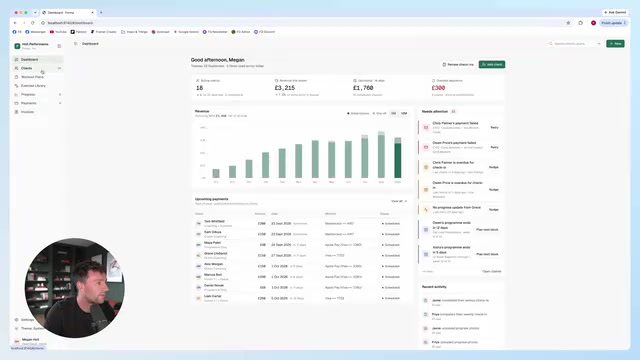
In practice, he pastes in the prompt and asks the model to first generate a pure HTML prototype, making it easy to quickly tweak flows and design with placeholder data, using high model settings. After about 20 minutes, a single prompt produced a complete dashboard, a client roster (with goals and training plans), an exercise library, workout program scheduling, client progress tracking, and a revenue and payments overview page.
This prototype essentially covers everything spreadsheets, Notion, and invoice trackers would otherwise handle — and it only consumed 8% of the 5-hour usage quota, leaving plenty of room for refinement.
Rapidly Redesigning the UI with Mobbin MCP
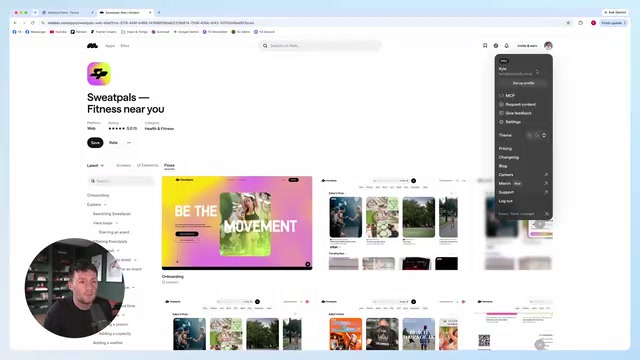
The prototype is feature-complete, but the interface often still needs polish. Kyle introduces the episode's sponsor, Mobbin: a library of over 620,000 screens and 120,000 user flows from the world's top companies.
Via MCP (Model Context Protocol), you can open a custom connector inside Claude, Codex, or similar tools, type mobbin, and connect directly to the agent. This lets the agent query Mobbin's design library without ever leaving the development environment. Kyle demonstrates searching for dashboard designs that are "clean, minimal, and elegantly colored," surfacing examples from xAI, Fireflies, Copilot, and others. He then instructs the model to "apply the Copilot style to our app" — and the UI is immediately redesigned, complete with dark mode support.
This "design inspiration search + AI application" workflow compresses what used to require multiple back-and-forth rounds with a designer into a single conversation.
MCP (Model Context Protocol) is an open protocol introduced by Anthropic in late 2024, designed to standardize how AI models connect to external data sources and tools. Think of it as a "USB port for AI": once a service provider implements an MCP server, any MCP-compatible AI client (such as Claude Desktop or Cursor) can call that service through a unified protocol — no need to build separate plugins or API integrations for each tool. Mobbin's MCP integration is a perfect example: it lets Claude search Mobbin's design case library directly while generating or modifying code, turning "design reference lookup" — a step that previously required manually hopping between tools — into something the agent can handle autonomously. As more and more SaaS tools roll out MCP support, "calling external specialist databases from within a conversation" will become a standard capability in AI-assisted development workflows.
Iterating Like a Collaborator: Importing CSV and Real Data
The value of a real business application isn't how pretty the prototype looks — it's how well it runs in practice. Kyle shows how easy modifications are: to add an "Import CSV" button to the client page, you just tell the agent in plain language. Once added, dragging in a CSV file automatically maps the columns; after a quick review, existing clients can be bulk-imported into the portal.
He also shares his favorite trick: when working on his own apps, he drags a CSV straight into Claude or Codex and says "add these users, and ask me if you're unsure about anything." He predicts this style of "using agents to interact with software" will only become more common — and all humans need is an interface that ties these capabilities together.

From Local Prototype to Production Deployment
At this point the app only runs locally. Getting it truly online takes a few more steps. Kyle's approach is to ask the agent for a deployment roadmap: put the code on GitHub, deploy on Cloudflare, use Supabase for the database and authentication, and integrate Stripe for payments. Cloud-based tools will essentially walk you through each of these connections step by step.
He also mentions a hybrid option: keep it locally hosted and package it as a macOS app to run directly on your computer — that's exactly what he does for his own internal revenue-tracking software, which even has a "World of Warcraft–style XP bar." He does caution, though: if you go that route, make sure the AI confirms that data you enter won't be wiped during rebuilds or temporary storage resets. Backing up all input data is essential. This is one of the most easily overlooked — and most fatal — pitfalls in AI-generated apps.
The deployment stack mentioned — GitHub + Cloudflare + Supabase + Stripe — represents a popular "modern full-stack" hosting setup. GitHub handles version control and collaboration; Cloudflare Pages/Workers provides edge-network deployment with a free tier that covers small business traffic needs; Supabase is an open-source Backend-as-a-Service (BaaS) built on PostgreSQL, with built-in authentication, database, storage, and real-time features — eliminating the complexity of building your own backend; and Stripe is the industry's most widely used online payment infrastructure, supporting subscriptions, one-time charges, and more, with a complete Webhook system. The key advantage of this stack is that every component has thorough documentation and SDKs that AI tools can reference, greatly reducing the chance of errors when agents assist with deployment. For first-timers pushing an AI-generated app to production: note that Supabase's Row Level Security (RLS) policies must be configured manually — skipping this step can lead to unauthorized data access vulnerabilities.
The Value and Limits of This Workflow
This walkthrough lays out a clear paradigm: verbalize requirements → AI generates prompt and plan → working prototype in 20 minutes → Mobbin design search for UI redesign → conversational iteration to add features → agent-assisted deployment. What it lowers isn't just the barrier to writing code — it's the overall cost of building software tailored to a specific business.
But it's worth being clear-eyed about the limits: Kyle himself admits that features like client progress tracking may be "too complex for most personal trainers"; data persistence risks, post-launch security and compliance, and long-term maintenance all still require professional judgment. AI makes "a working prototype in 20 minutes" a reality — but the road from prototype to reliable production system still needs human experience to pave. For business owners and designers alike, the real opportunity is using this workflow to rapidly validate ideas, then gradually refining them into a product worth charging for.
Related articles

@ai-sdk/vue 3.0.306 Patch Release Syncs with [email protected] Update
@ai-sdk/vue 3.0.306 released, synced with [email protected]. A routine patch release for the Vercel AI SDK ecosystem with no public API changes; the Vue adapter layer stays version-aligned with the core package.

Gemini 4 Argon API Launches: The Era of Million-Token Output Begins
Google launches Gemini 4 Argon with sparse MoE architecture, up to 1M output tokens, and a 68.90% Vals Index score, available across API, AI Studio, and the Gemini app.

DukaanAI: Turning Product Photos into Inventory Lists with Open-Source AI
DukaanAI is an AI inventory tool for small retailers that turns product photos into inventory entries using the open-source Gemma 3 model, with local inference, editable fields, and CSV export.