Build a Flask Visual Database Query System in 20 Minutes with Trae

Build a Flask visual database query system in 20 minutes using Trae, ByteDance's free AI coding tool.
This article demonstrates how to use Trae, ByteDance's free AI-native IDE, to rapidly build EasyQuery — a Flask-based visual database query system. It covers the project structure, PyMySQL database connection, frontend-backend interaction, and multi-condition querying, all driven by a simple three-point prompt in under 20 minutes.
Intro: AI Tools Are Reshaping the Development Workflow
Building a complete Web project used to require developers to juggle frontend, backend, Python, and framework knowledge all at once. Today, with AI-powered coding tools, a project that once took days can be up and running in just minutes.
This article is based on a live coding session from Bilibili, walking you through how to use Trae — a free AI coding tool from ByteDance — to quickly build a visual database query system called EasyQuery on top of the Flask framework. The project is relatively small in scope, but it's an indispensable utility for anyone working with databases in real-world development.
About Trae: Trae is a ByteDance AI-native IDE released in 2024. It has a built-in LLM-powered Agent that can autonomously break down tasks, generate code, run terminal commands, and debug errors — forming a complete "Plan → Code → Verify" loop. Unlike completion-focused tools like GitHub Copilot, Trae's Agent mode works more like an "automated dev assistant." It understands natural language requirements and generates runnable, fully structured projects, dramatically lowering the barrier to full-stack development.
What Is EasyQuery
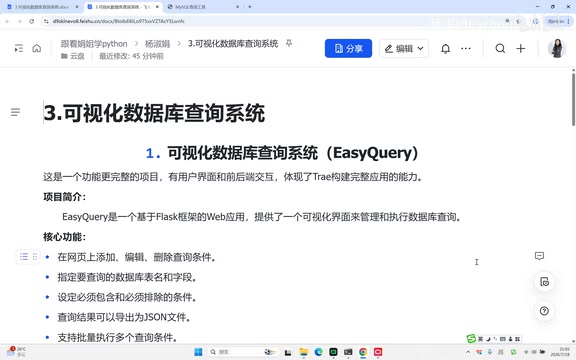
EasyQuery (short for "easy querying") is a Flask-based web application with a visual interface for managing and executing database queries. Users don't need to write SQL manually — they simply add, edit, and delete query conditions on the page, specify the table name and fields, and run multi-condition queries. Results can also be exported to a file.
Core Features
- Visually add / edit / delete query conditions
- Specify the target database table and fields
- Support multi-condition queries (AND, LIKE, etc.)
- Export query results to a file
Tech Stack
| Component | Technology |
|---|---|
| Language | Python |
| Web Framework | Flask |
| Database Driver | PyMySQL |
| Database | MySQL |
| CORS Handling | Flask-CORS |
Common Python web frameworks include Django and Flask. Django follows a "batteries included" philosophy — it ships with an ORM, admin panel, and authentication system, making it well-suited for rapidly building large, feature-rich applications. Flask, born in 2010, is designed around the "micro-framework" philosophy: it provides only the minimal components needed for web development (routing, request/response handling, and a template engine), with everything else added via extensions as needed. This lightweight approach makes Flask a great fit for microservices, API services, and learning projects. This project uses Flask, which is ideal for small-to-medium frontend/backend separated applications.
About PyMySQL: PyMySQL is a pure-Python MySQL client library that requires no C extensions, making it easy to install. It implements the Python DB-API 2.0 specification, offering standard interfaces like connect() for establishing connections, cursor() for creating cursors, and execute() for running SQL. Compared to MySQLdb (which requires compiling C extensions) and MySQL Connector/Python (Oracle's official library), PyMySQL offers better cross-platform compatibility and ease of installation, making it the go-to choice for connecting to MySQL in Flask/Django projects.
Driving Trae with a Simple Prompt
The key to the project is writing a clear prompt for Trae. This example uses a concise "three-point" prompt:
- Create the project structure: Use Flask to build a web framework, separated into a frontend page and backend API
- Implement backend logic: Write an API endpoint that accepts a table name, fields, and query conditions, connects to MySQL, and runs the query
- Build the frontend interface: Create an HTML page with a form for adding query conditions and an area to display query results
Paste these three points into Trae's chat box and send. The Agent will automatically break them down into five actionable tasks:
- Create the project directory structure and
requirements.txt - Create the Flask backend app and database connection configuration
- Implement the API endpoint for database queries
- Create the frontend page
- Test and run
These five steps also map to a complete project development workflow — a helpful guide for beginners learning how a project progresses from start to finish.
Project Structure Breakdown
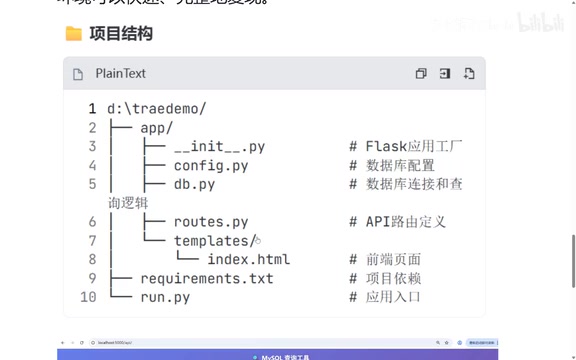
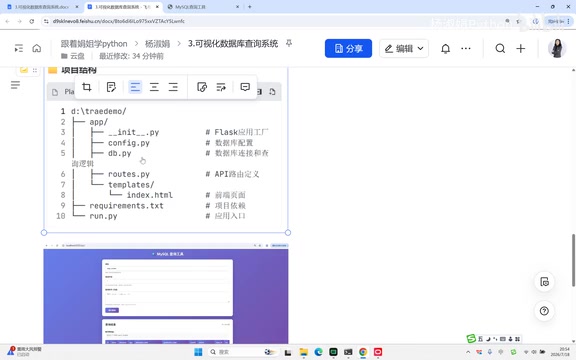
Trae generates a clean project structure under the trae_demo folder:
trae_demo/
├── app/
│   ├── __init__.py      # Package init, contains the create_app factory function
│   ├── config.py        # Database configuration
│   ├── db.py            # Database connection and query logic
│   └── routes.py        # API route definitions
├── templates/           # Directory for HTML templates
├── requirements.txt     # Project dependency list
└── run.py               # Application entry point
What Is requirements.txt For?
Whether you're working on a Django or Flask project, you'll always see this file. It records all third-party libraries and their exact versions that the project depends on, allowing the environment to be quickly and fully reproduced. This project only needs three libraries:
flask
pymysql
flask-cors
requirements.txt is typically auto-generated with pip freeze > requirements.txt. It's used alongside Python virtual environments (venv/conda), which create an isolated runtime environment for each project to prevent dependency version conflicts across projects. In real team collaboration, new members can restore all dependencies with a single pip install -r requirements.txt after cloning the repo, ensuring consistent behavior across environments. For more complex dependency management, next-generation tools like Poetry and PDM are gradually replacing the traditional pip + requirements.txt combo.
run.py: The Application Entry Point
Even if you're not familiar with Flask, the project structure makes it clear that run.py is the entry point:
from app import create_app

app = create_app()

if __name__ == '__main__':
    app.run()
from app import create_app imports the factory function create_app from the app package and calls it to create the Flask application object. The create_app factory function is Flask's recommended pattern for initializing an application: compared to creating an app object directly at the module level, a factory function allows different configurations to be passed in for different environments (development/testing/production), avoids circular import issues, and makes it easy to create isolated app instances for unit testing. The factory function is defined in app/__init__.py, where CORS handling is also registered.
CORS (Cross-Origin Resource Sharing) is a browser security mechanism that by default blocks frontend pages from sending requests to a backend on a different domain or port. The Flask-CORS extension adds headers like Access-Control-Allow-Origin to responses, telling the browser to allow cross-origin requests from specific origins — in a frontend/backend separated project, the frontend and backend are often not on the same domain, making this configuration essential.
Database Configuration: Change One File to Query Any Database
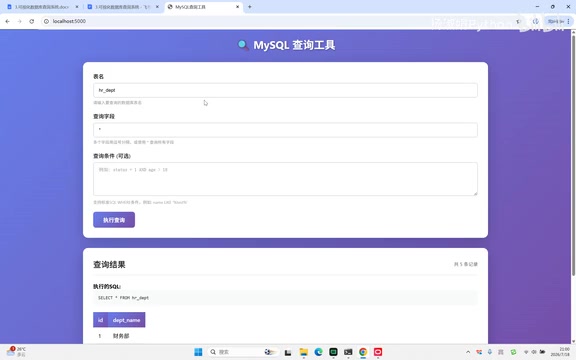
Once the project is running, opening http://127.0.0.1 in your browser will load the index.html frontend page, which has a form where you can enter a table name, query fields, and query conditions.
Which database does it connect to? That's defined in config.py:
class Config:
    MYSQL_HOST = 'localhost'
    MYSQL_PORT = 3306
    MYSQL_USER = 'root'
    MYSQL_PASSWORD = 'root'
    MYSQL_DATABASE = '学籍'
The example defaults to a database named "学籍" (student records). Enter the table name student, set fields to "all", leave conditions blank, and click Execute — you'll get all records from that table.
Multi-Condition Query Demo
The tool supports flexible multi-condition combinations, for example:
AGE > 20 AND AGE < 23: Filters records where age is between 20 and 23- Add
宿舍 LIKE 北京: Further filters to records where the dorm field contains "北京"
By stacking AND and LIKE conditions, you can precisely target the data you need.
The most practical feature: If you want to query a different database (like hr, test, blog, etc.), just change the database name in config.py, refresh the page, and you can query any table in any database — a truly out-of-the-box universal query tool.
Frontend-Backend Interaction Flow
Frontend/backend separation is the dominant architectural paradigm in modern web development: the frontend focuses on the user interface and interaction logic, calling the backend's REST API via HTTP requests to fetch data; the backend focuses on business logic, database operations, and returning data in JSON format. This decoupled approach brings many advantages — frontend and backend can be deployed and scaled independently, the same API can serve multiple clients (web/mobile/mini programs), and team collaboration is more clearly divided.
EasyQuery's data flow is a textbook example of this pattern, with three stages:
- Frontend (index.html): Handles UI rendering. When you click "Execute Query", the JavaScript
executeQueryfunction collects the table name, query fields, and conditions, then sends a POST request with headers and a request body to the/api/queryendpoint - Backend (routes.py): Receives the request, connects to MySQL, runs the query, and returns the results in JSON format
- Frontend rendering: On receiving the
response.json, renders the query results into the HTML page
This is the classic frontend/backend separation pattern: the frontend handles display, while the Flask backend provides data through routes.
Why This Small Project Deserves Attention
Don't let the size fool you — this visual query system is almost indispensable in real-world development. For any project, database operations are usually among the very first things you need to handle. A visual query tool is obviously far more efficient and intuitive than typing SQL commands into a terminal.
What's even more noteworthy is the efficiency gain: the entire project, from writing the prompt to having a working app, took about 20 minutes. In the pre-AI era, building this independently would have required mastering frontend development, Python, the Flask framework, and database knowledge all at once — a significantly larger undertaking.
AI Coding Tool Recommendations
Here's a quick positioning guide for several popular AI coding tools:
- Trae: Developed by ByteDance, completely free, with a built-in Agent mode that can independently complete full projects. Great for beginners and well-suited for small-to-medium projects
- Claude Code: Anthropic's command-line AI coding tool, known for powerful code comprehension and long-context handling. Best for large-scale projects
- Codex: OpenAI's code generation model, ideal for high-concurrency scenarios — using it for small scripts would be overkill
Additionally, recommending beginners to start with PyCharm directly has become less common, as the AI plugin capabilities in tools like Trae and VS Code are already powerful enough, significantly lowering the barrier to writing code.
Closing Thoughts: AI Can't Walk Your Growth Path for You
AI tools have certainly made coding easier, but as this example emphasizes: AI tools can write code for you, but they can't replace your own growth journey. To truly break into the AI industry, foundational skills like data structures and algorithms remain core competencies you must master.
The right approach for developers is to use AI tools to boost efficiency and accelerate delivery, while continuously strengthening your fundamentals — going deep in one direction rather than letting the convenience of tools go to your head. That way, AI becomes a genuine multiplier for your abilities, not a replacement for them.
Key Takeaways
Related articles

Coinbase Engineer: How to Determine Whether an AI Agent Can Operate Unattended
Coinbase engineer Evan Kormos shares an engineering method for judging whether an AI agent can run unattended: model processes with DAG/DCG, replace output comparison with statistical evaluation, and hand over control in three phases—supervision, sampling, and exception handling.

WorkBuddy Beginner's Guide: How AI Agents Automate Office Tasks
WorkBuddy tutorial: learn how this desktop AI agent workbench automates files, organizes data, and generates documents, compared with LLMs and Codex, plus a beginner path and cost analysis.

Doubao Work in Practice: Three Modes That Let AI Actually Get Work Done
Doubao Work practical tutorial: from chat mode to Work Mode Lite and Pro, explaining the logic for choosing among three modes with real office task demonstrations. Even complete beginners can learn to use an AI agent to handle local files, organize materials, and generate documents.