WorkBuddy Beginner's Guide: How AI Agents Automate Office Tasks

WorkBuddy is a desktop AI Agent that directly controls a computer to execute tasks, with low barriers and domestic office compatibility.
Based on a Bilibili creator's tutorial, the article introduces WorkBuddy, a desktop AI agent workbench positioned as a domestic alternative to Codex. It explains how Agents go beyond chat models by executing tasks within authorized boundaries, demonstrates automatic document formatting and PPT generation, and highlights low deployment barriers, connectors for tools like WeCom, and controllable costs. It also compares Codex, offers a four-step learning path with a 28-point course, and reminds users that authorization boundaries still need human oversight.
From Q&A to Control: AI Agents Are Changing How We Work
Over the past few years, most of our use of AI has stayed in the "ask a question, get an answer" stage. For example, if you hand a large model a badly formatted document, it can tell you that "the body text formatting should be unified," but you still have to do the actual work yourself. In the tutorial, the Bilibili creator demonstrates this awkward reality: AI gives suggestions, but the work is still done by humans.
What sets AI Agents like WorkBuddyAd apart is that they push tasks through to results within the scope you confirm and authorize. It's more like a digital employee taking your instructions—it can control your computer, call tools, and directly get things done. The creator positions WorkBuddy as "a domestic alternative to Codex"—a desktop-level AI agent workbench.
What WorkBuddy Can Do: From File Processing to PPT Generation
In the video demo, the creator sends a single instruction to WorkBuddy, and it automatically finds the document on the desktop and completes the formatting. In the screenshot, you can see that both the title and body text have been reorganized, and the user simply waits throughout the process.

This case is small, but it highlights the dividing line between AI Agents and traditional large models: traditional large models excel at Q&A, analysis, and suggestions, while Agents can actually execute. The creator also shows a PPT completed with AI assistance, including animation effects—the requirements come from a human, and execution is handed to the agent.
Such tools are not unique to WorkBuddy. Codex and other agents capable of calling tools to execute workflows belong to the same category. The criterion is simple: can it directly take action for you?
AI Agent differs from ordinary chat large models in its "ability to act." Traditional large models only output text, whereas an Agent wraps an execution framework around the model: it can break down tasks, call tools (read/write files, operate browsers, run scripts), observe execution results, and self-correct, forming a "think—act—observe" loop. This paradigm is commonly called ReAct (Reasoning + Acting). Therefore, an Agent's success depends not only on the model's intelligence but also on whether the tool interfaces are stable and the permission boundaries are clear. This also explains why Agent products often require a desktop client—only with OS-level file and window permissions can they truly "act on your behalf."
Why Start with WorkBuddy: Three Practical Reasons
Low deployment barrier
Open a browser, search for the product name, download, and install it on your computer—the process is intuitive. For office workers without a technical background, this is the most worry-free starting point.
Well adapted to domestic office scenarios
Through the "Connector" feature, WorkBuddy can connect to common office software such as WeCom. The creator explains that a connector essentially authorizes AI to use a certain software or service—after authorization, it can help reply to messages and also organize chat records into documents. This lets AI not only "know how to do it" but also participate in the process within the scope you allow.
Connector is a standardized channel for an Agent to access external services, usually implemented based on authorization protocols such as OAuth. Its role is to encapsulate the capabilities of third-party applications into "tools" that the Agent can call, such as reading WeCom conversations, writing documents, and querying calendars. The key is that permissions are explicitly granted and revocable: the Agent can only read and operate within the authorized scope and cannot access unauthorized data beyond its permissions. In enterprise scenarios, you also need to consider whether data leaves the country, whether logs are retained, and how sensitive information is de-identified—these often affect whether it can be deployed within an organization more than the features themselves.
More controllable costs
You get credits upon registration, and you can claim a certain quota every day, which is basically enough for light users to cover daily experience and basic tasks. In contrast, some overseas products require subscription payments, and their value only shows with heavy usage.
The efficiency of installing plugins and Skills is also a plus. A Skill can be understood as a pre-trained professional tool or work capability. The platform has a built-in Chinese Skill marketplace, where common capabilities can be installed with one click. There is also an "Expert" module, like digital employees for different roles. When a team needs to set up a workflow, it can directly find the corresponding expert and invoke it with one click.
Skill can be understood as a packaged "capability bundle": a combination of a preset prompt, several tool-calling workflows, and supporting resources, which users can reuse without writing workflows from scratch. The difference between it and a plugin (Plugin) is that plugins tend to extend tool interfaces, while Skills tend to encapsulate task methodologies. The significance of the platform providing a Chinese Skill marketplace is to lower the cold-start cost—productizing the experience of "how to make an Agent complete a certain type of task," so that non-technical users can also achieve results close to expert tuning.
Trade-offs with Codex-like Tools
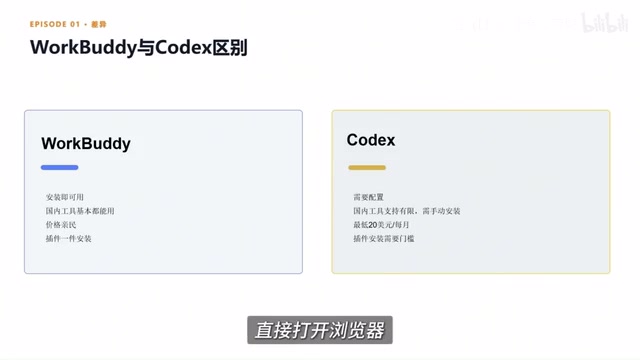
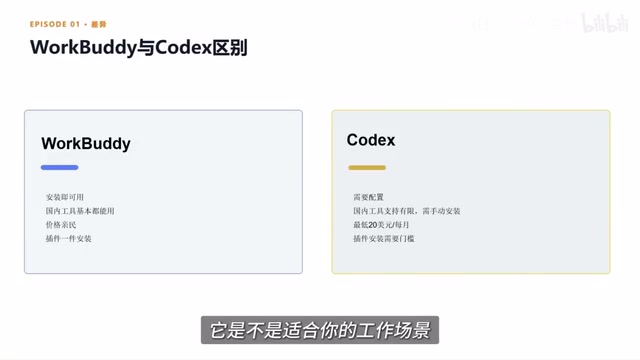
The creator did not avoid the comparison: tools like Codex offer greater freedom, but they require understanding code, configuring environments, and calling workflows, so the technical baseline is higher. For most beginner users, choosing an AI Agent that is easier to deploy, compatible with domestic office scenarios, and cost-controllable is a more practical starting point.
The learning path given in the video has four steps: learn the basic operations, complete one case, build a portfolio, and then post links on platforms to take orders. Many people get stuck at the first step. What they lack is not tools, but someone to explain the steps, the methods, and where they might stumble. The creator says it took nearly three months to compile a practical course covering 28 knowledge points across introduction, cases, advanced topics, and industry applications, with the related setup process and Skill resource pack provided as documents.
A Pragmatic Judgment
WorkBuddy is not a panacea. It suits office workers who want to obtain a "digital employee" at a relatively low cost, especially for repetitive tasks such as file processing, data organization, and document generation. But authorization boundaries and task confirmation still need human oversight—no matter how capable an Agent is, it works within the scope of your authorization. Treat it as an assistant that can execute instructions, not as a role that makes decisions for you, and your expectations will be more reasonable.
One-line Summary
WorkBuddy is a desktop-level AI Agent that can directly control a computer to execute tasks, focusing on low barriers and domestic office compatibility.
Paragraph Summary
The article uses a Bilibili creator's tutorial as a thread to introduce WorkBuddy, a desktop-level AI agent workbench. The author points out that traditional large models can only give suggestions and the work is still done by humans, while Agents can control computers and call tools within the authorized scope to push tasks through to results. WorkBuddy is positioned as a domestic alternative to Codex and demonstrates automatic document formatting and PPT generation. Its advantages are threefold: low deployment barrier, adaptation to domestic office software such as WeCom through connectors, and credits upon registration with a daily claimable quota. The article also compares trade-offs: Codex offers greater freedom but requires a technical foundation, while WorkBuddy is more suitable for beginners. Finally, it gives a four-step learning path and a practical course with 28 knowledge points, and reminds readers that authorization boundaries still require human oversight.
Related articles

Mistral Large 4 Open-Sources a Trillion Parameters, Microsoft Offers Voluntary Severance to 60,000 Employees
Mistral Large 4 open-sources a trillion-parameter multimodal model with a coding agent score of 48; SanDisk earnings show AI inference reshaping NAND demand; Google Gemini adds in-app file editing, OpenAI raises Codex quotas, and Microsoft offers voluntary severance to 60,000 employees.
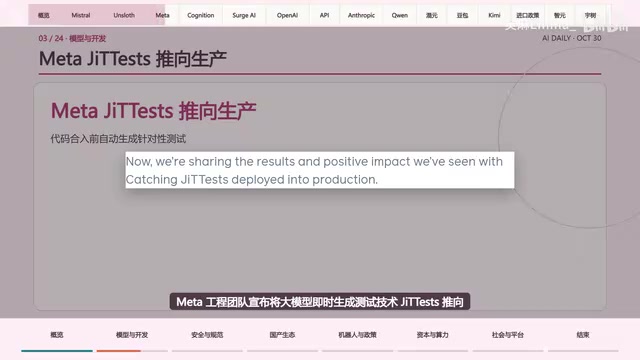
Mistral Large 4 Opens Its Weights: AI Morning Brief Roundup of Models and Ecosystem Trends
Mistral Large 4 opens its weights, a 1-trillion-parameter MoE architecture that can run locally on MacStudio; Meta's test-generation technology enters production; top tax benchmark pass rate only 10.8%; Canadian government takes a stake in Cohere; Doubao Work opens third-party model calls. This AI Morning Brief rounds up model, ecosystem, capital, and policy developments.

Mistral Large 4 Goes Open Source: A 1T-Parameter European Qwen Challenging DeepSeek
Mistral Large 4 is now open source: 1T total parameters, 52B activated, focused on coding and cybersecurity, with ~610G NVFP4 weights. We analyze its comparison with DeepSeek V4 Flash, API pricing, demo realism, and local deployment value.