Build a Free YouTube Shorts Auto-Upload Workflow with n8n

An n8n-based YouTube Shorts daily-update automation workflow that enables unattended publishing from topic selection to upload.
This article introduces an n8n-based YouTube Shorts automated publishing solution. The workflow starts with a scheduled trigger, reads topics and scripts from Google Sheets, generates voiceovers with Azure Speech, composes videos via a third-party rendering site, auto-uploads to YouTube, and writes status back. It also covers workflow architecture, execution flow, status tracking, and the boundaries of the free solution.
In today's fiercely competitive short-video landscape, maintaining a consistent publishing cadence is one of the key factors behind channel growth. But for independent creators or small teams, manually completing the daily cycle of topic selection, voiceover, rendering, and uploading is astonishingly time-consuming. The Tech Talks with Manju channel recently demonstrated an n8n-based automation solution that strings the daily YouTube Shorts publishing process into an unattended workflow.
The core idea behind this solution isn't complicated: use a scheduled trigger to start the flow, read the day's topic and script from Google Sheets, call Azure Speech services to generate the voiceover, hand the assets to an external rendering service to produce the video, and finally auto-upload to the YouTube channel while writing the status back. The entire process requires no manual intervention.
Workflow Architecture and Core Nodes
The whole automation flow consists of several key stages. Every day at 9 AM, n8n's scheduled trigger activates the workflow, which then reads the topic information to be processed that day from a configured Google Sheet. This spreadsheet acts as the "brain" of the workflow—the topic content, narration script, and basic video parameters are all stored here.
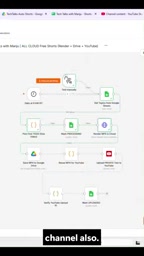
For the speech synthesis stage, Azure's speech service was chosen. The creator specifically mentioned that to achieve the desired Indian male voiceover, an Azure Voice configuration was selected. Azure Speech offers a certain amount of free usage, which is basically sufficient for the volume of one Short per day. Of course, the author also emphasizes that this is just one option—there are other TTS services on the market that can substitute.
The video rendering stage adopts an outsourcing strategy, sending assets to a third-party rendering website to complete video composition. This approach avoids the complexity of maintaining your own rendering server, at the cost of depending on an external service's stability and response speed.
n8n is an open-source workflow automation tool that uses node-based visual orchestration, supporting the construction of automation flows by dragging and connecting different functional nodes. Unlike SaaS products such as Zapier and Make, n8n can be self-hosted, keeping data entirely in the user's hands, and the community edition is free to use. It comes with hundreds of built-in service integration nodes (such as Google Sheets, YouTube, and HTTP Request), and also supports custom code nodes to call any API. For independent creators, n8n's biggest advantage is that it can quickly build prototypes while avoiding subscription costs that scale linearly with task volume. This solution leverages n8n's scheduled trigger node and HTTP Request node to chain multiple external services into a single automated pipeline.
TTS (Text-to-Speech) is the technology that automatically converts written text into natural speech. Current mainstream TTS services include Azure Speech, Google Cloud TTS, Amazon Polly, and ElevenLabs, among others. The core dimensions for judging TTS quality include: speech naturalness (whether it sounds mechanical), emotional expressiveness, multi-language and multi-accent support, and whether SSML tags are supported to control speed, pauses, and emphasis. Azure Speech's advantage lies in offering a rich set of preset voices covering multiple languages and regional accents, and supporting neural network voice models whose output quality approaches that of real human recordings. For narration-driven content formats like YouTube Shorts, choosing an accent and voice that matches the target audience often improves the viewing experience more than pursuing absolute audio quality.
Execution Flow and Status Tracking
After the n8n workflow executes, the system completes rendering and uploading operations in sequence according to the preset node order. As can be seen from the demo, after rendering is complete, the video file first goes to Google Drive as intermediate storage, then triggers the YouTube upload node.
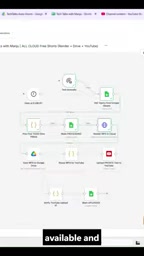
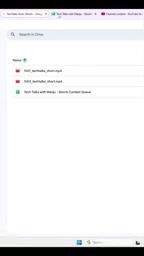
One highlight of this flow is the status write-back mechanism. After the video upload completes, the workflow automatically updates the status of the corresponding row in Google Sheets, marking that task as completed. If it fails midway, the status is marked as failed, making it easy for the creator to troubleshoot. The spreadsheet clearly distinguishes three states: "in progress," "succeeded," and "failed."
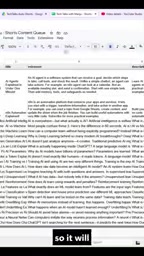
This design gives the entire automation system observability. The creator doesn't need to stare at n8n's execution logs—just periodically checking the spreadsheet is enough to keep track of the daily publishing situation. For teams that need to manage multiple videos in batches, this spreadsheet-centric management approach is especially practical.
Using Google Sheets as the workflow's status management center is essentially a lightweight implementation of a task queue. Each row represents a task to be processed, and the status column serves as the task's lifecycle marker. This design pattern is known in the automation field as a "spreadsheet-driven workflow," and its advantages are: non-technical people can intuitively view and edit task information without understanding n8n's internal logic; and spreadsheets naturally support multi-person collaboration and permission control. In more complex scenarios, fields such as priority, scheduled publish time, and error notes can be added to the spreadsheet, giving the workflow more fine-grained scheduling capabilities. Compared to maintaining a standalone database or task management system, the spreadsheet approach offers extremely high value for small teams.
Boundaries and Limitations of the Free Solution
Although the entire solution is designed to use free resources as much as possible, there are still some limitations to note in actual operation. First, while Azure Speech's free quota is sufficient for low-frequency use, when the channel scales up and requires batch voiceover generation, the cost of overage usage needs to be planned in advance.
Second, the YouTube API itself has quota limits on upload behavior. The number of videos uploaded per day and the upload frequency are both constrained by the API quota system. The creator mentions that these limits will be discussed in detail in the full version of the video, which hints at specific constraints that may be encountered in actual use.
The reliability of the outsourced rendering service is also a factor to consider. The service quality and response time of third-party rendering websites are not entirely controllable. If the rendering service experiences a failure, the entire workflow will get stuck at the rendering node, affecting subsequent upload steps.
Another easily overlooked issue is control over content quality. A fully automated process means that topic selection, scriptwriting, voiceover, and video generation all depend on preset rules, lacking human review. While pursuing efficiency, this can also bring the risk of unstable content quality. Creators still need to periodically check the final results generated in the spreadsheet.
YouTube Data API v3 has clear quota limits on video uploads. Google allocates a default quota of 10,000 units per day to each API project, and a single video upload operation consumes about 1,600 units. This means that under the default quota, at most about 6 videos can be uploaded per day. If creators need a higher upload frequency, they must submit a quota increase request to Google and explain the purpose. In addition, upload operations are also subject to channel-level restrictions—for example, new or unverified channels may face stricter upload frequency constraints. For the volume of one Short per day, the default quota is basically sufficient, but if you plan to expand to multi-channel operations or batch publishing, planning your API quota strategy in advance is necessary.
Scalability and Alternatives
The modular design of this architecture leaves room for subsequent optimization. The speech synthesis node can be replaced with other TTS services, the rendering stage can connect to a local rendering cluster or switch to another cloud rendering solution, and the trigger can also be adjusted to fire multiple times per week or at specific times as needed.
For creators who want to try a similar solution, one practical suggestion is to start with a minimum viable version: first build the core chain of "trigger + spreadsheet reading + TTS," verify whether the voiceover quality is satisfactory, and then gradually integrate the rendering and uploading stages. This avoids investing too much time upfront only to discover that some stage doesn't meet your needs.
The value of short-video automation isn't in completely replacing human creation, but in stripping repetitive operations out of daily work. When topic selection and scripts are still controlled by humans, this n8n workflow plays the role of an efficient executor, allowing creators to focus their energy on the stages that truly require creativity.
One-line Summary
An n8n-based YouTube Shorts daily-update automation workflow that enables unattended publishing from topic selection to upload.
Paragraph Summary
This article introduces an n8n-based YouTube Shorts automated publishing solution demonstrated by the Tech Talks with Manju channel. The workflow starts with a scheduled trigger, reads the topic and script from Google Sheets, calls Azure Speech to generate the voiceover, composes the video through a third-party rendering site, uploads it automatically to YouTube via Google Drive as an intermediary, and writes the status back to the spreadsheet. The article breaks down the workflow architecture, execution flow, and status tracking mechanism in detail, while pointing out the boundaries and limitations of the free solution in terms of Azure quota, YouTube API limits, and outsourced rendering reliability. The author suggests creators start with a minimum viable version and gradually integrate each stage, emphasizing that the value of automation lies in stripping away repetitive operations rather than replacing human creation.
Related articles

Felix Rieseberg Personal Homepage
Felix Rieseberg's personal homepage sparks attention on Hacker News. This article covers the Slack engineer's technical background, the rise and fall of nativefier, and the value of a developer homepage as a tech calling card.

@ai-sdk/vue 3.0.306 Patch Release Syncs with [email protected] Update
@ai-sdk/vue 3.0.306 released, synced with [email protected]. A routine patch release for the Vercel AI SDK ecosystem with no public API changes; the Vue adapter layer stays version-aligned with the core package.

Gemini 4 Argon API Launches: The Era of Million-Token Output Begins
Google launches Gemini 4 Argon with sparse MoE architecture, up to 1M output tokens, and a 68.90% Vals Index score, available across API, AI Studio, and the Gemini app.