Build a Fully Local AI Agent in Python in 10 Minutes
Build a fully offline, tool-calling AI agent locally using Ollama + Pydantic AI in ~50 lines of Python.
This tutorial walks through a minimal approach to building a local AI agent: Ollama handles downloading and running open-source models like Qwen3 (served via localhost:11434), while Pydantic AI manages agent orchestration and tool calling. The workflow has four steps — connect to the local model, define Python tool functions (e.g., get time, save notes), assemble them into an Agent object, and write a history-aware main loop. The result is a working agent that calls local tools, maintains conversation context, and runs entirely offline in just a few dozen lines of code.
With cloud-based LLM API costs rising and privacy concerns growing, running AI agents entirely on your own machine is becoming an increasingly attractive option. This tutorial, based on a hands-on demo, shows how to use two tools — Ollama and Pydantic AI — to build a fully offline, tool-calling AI agent in under ten minutes with just a few dozen lines of Python.
Why Go Local?
The core advantages of running an AI agent locally come down to three things: cost, privacy, and speed. With tools like Ollama, you don't pay per API call, and all your data stays on your device — nothing gets sent to third-party servers. The most striking thing in the demo is the response speed: when the model runs entirely locally, tool calls return almost instantly.
The trade-off is hardware requirements. The capability ceiling of a local model is directly tied to how much VRAM or RAM you have available. The author uses an RTX 4090 (24GB VRAM) as a reference point: Windows users with discrete GPUs should pay attention to VRAM, while Mac or unified-memory device users should look at total RAM (modern Macs typically range from 16GB to 128GB). The guiding principle for model selection is simple — pick the best model that fits in your available memory.
Downloading and Running a Local Model with Ollama
Ollama is the foundation of the whole setup. It's essentially a free tool that lets you download and run various open-source models locally. Installation is straightforward: download and install it from the official website, then open a terminal and run ollama — if you get output, you're good to go.
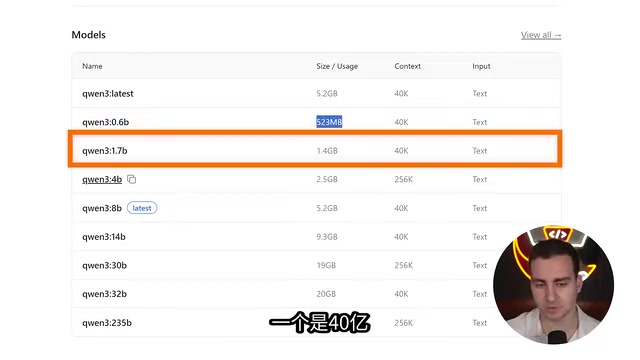
For model selection, the author recommends starting with smaller variants of the Qwen series — such as 0.6B, 1.7B, or 4B — which can run on almost any reasonably modern hardware. His personal default recommendation is Qwen3 at 4B parameters, which strikes a good balance between speed and capability. Larger parameter counts mean better performance but slower responses; if things feel too slow during testing, just drop down to a smaller model.
To download a model, run ollama pull <model-name>. Once installed, use ollama list to see all available models. To quickly test whether a model runs smoothly, run ollama run <model-name> — once loaded, you can chat with it directly in the terminal.
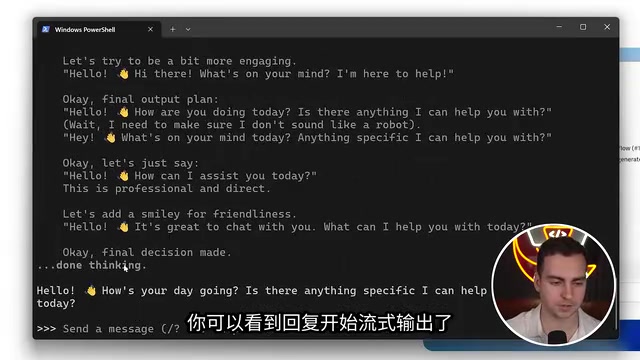
In the demo, the author types a simple greeting and the model quickly starts streaming a response, including a visible "thinking" reasoning trace. The goal of this step is simply to verify that the model responds at an acceptable speed — as long as it doesn't make you wait too long, you're ready to move on to writing code.
Ollama starts a local inference server that exposes an OpenAI-compatible HTTP API, listening on localhost:11434 by default. This means any client library that supports the OpenAI format can seamlessly switch to a local model just by pointing the base URL to your local address — no other code changes needed. Internally, Ollama uses llama.cpp as its inference engine and automatically detects and leverages hardware acceleration such as NVIDIA CUDA or Apple Metal (the GPU acceleration framework for Apple Silicon). Models are stored in .gguf format and support quantized variants at different precisions — such as Q4 and Q8. Quantization represents model weights using fewer bits, dramatically reducing memory usage at the cost of a tiny drop in accuracy. For example, a 7B-parameter model at full precision requires roughly 14GB of VRAM, but after 4-bit quantization that drops to about 4GB — which is why consumer-grade GPUs can run large models at all.
Writing the Agent with Pydantic AI
The code side relies on the Pydantic AI library, installable via pip or uv. Building the agent breaks down into four steps: connect to the model, define tools, assemble the agent, and write the main loop.
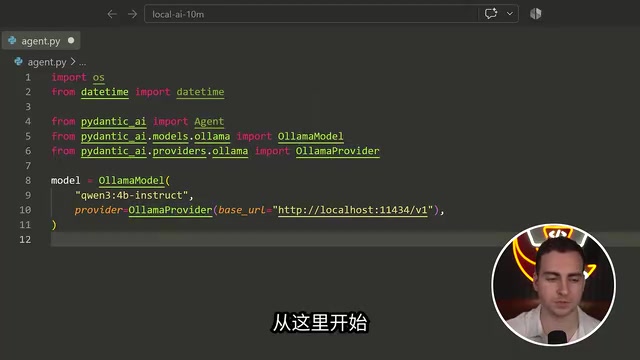
Step 1: Connect to Ollama. Use the Ollama model class and Ollama provider from Pydantic AI, specify the model name you want to load, and connect to the local address localhost:11434. This port works because Ollama has already started an inference server on your machine that accepts direct requests.
Step 2: Define tools. Tools are simply Python functions that the model can call. The demo defines a few example functions: get the current time, evaluate an expression, save a note, and read notes. The last two give the agent the ability to create and read files on the local filesystem. Pydantic AI automatically infers the parameter types of these functions so the model knows how to call them correctly.
Pydantic AI is an agent framework developed by the Pydantic team (a key contributor to the FastAPI ecosystem). Its design philosophy is to bring LLM tool calls and structured outputs under the discipline of Python's type system. Compared to heavier frameworks like LangChain, Pydantic AI is more lightweight with a cleaner API — its core abstractions are just Agent, Tool, and RunContext. Its key feature is using Python type annotations to automatically generate JSON Schemas for tools: when the model calls a tool, it fills in parameters according to the schema, and the framework validates and executes the corresponding function. This means developers don't need to manually describe each parameter's format — as long as the function signature is clear, the framework handles the entire job of "telling the model how to use this tool." It supports multiple backends including OpenAI, Anthropic, Gemini, and Ollama, and switching between them only requires changing the provider, making it ideal for setups that mix local and cloud models.
Assembling and Running the Agent
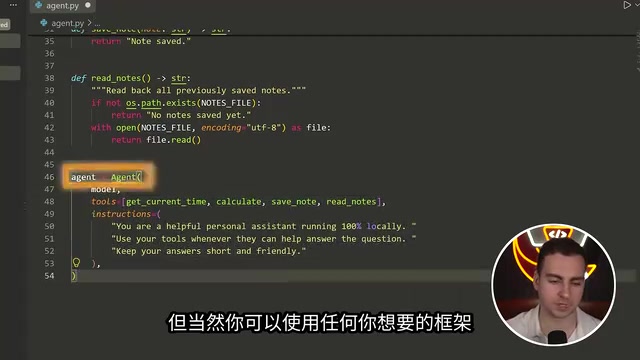
With the model and tools in place, the agent itself is simply the combination of three things: a system prompt, a list of tools, and the model. In Pydantic AI, you just pass the model, tool function names, and system prompt into an Agent object to complete the assembly.
The final step is writing the main loop. The author defines a main function with a while loop that continuously reads user input while maintaining a full conversation history. When the user types quit or exit, the loop ends; otherwise, the user's input along with the message history is sent to the agent, the history is updated, and the response is printed.
The results validate the whole approach: once the terminal shows "local agent is ready", the author tests three types of tasks — a casual greeting, asking the agent to save a note with the text "hello world team", reading back the current notes, and asking for the current date and time. The agent correctly calls the appropriate tools and returns results quickly, all running locally at a satisfying speed.
Value and Limitations
The significance of this example isn't in the complexity of what it builds, but in how low it sets the bar for a "local AI agent." Ollama handles model execution; Pydantic AI handles agent orchestration and tool calling. Together, these two mature tools let developers put together a working agent — one that can call tools and maintain context — in just a few dozen lines of code.
The limitations are equally clear: small local models still can't match cloud flagship models on complex reasoning and long-context tasks, and the reliability of tool calls tends to degrade as model capability decreases. For developers who prioritize privacy, need offline operation, or simply want to quickly learn the fundamentals of agent architecture, this setup is an ideal starting point. From here, you can expand by adding more tool functions or switching to a larger model for improved capability.
Related articles

OpenAI Breaks ETH? P=NP Could Upend the Cryptography World
OpenAI reportedly disproved ETH with a sub-exponential algorithm, sparking P=NP speculation. What it means for RSA, blockchain, and protein folding.
When an Anti-Fingerprinting Script Is …
When an Anti-Fingerprinting Script Is Flagged as a Bioweapon: The Detection Dilemma of Security Tools
An anti-fingerprinting script was flagged as a bioweapon by security scanning, sparking Hacker News debate. This analysis covers the causes of keyword-matching false positives, how developers respond, and the long-term imbalance between automation and precision in security tools.
41,000 DHS Employee Records Leaked, Including Undercover ICE Agents
Data breach exposes 41,000 DHS employees, including undercover ICE agents. Analysis of sensitive data risks, law enforcement security gaps, and protection measures like access control and auditing.