Build a Local Expense Tracker with n8n + Qwen: Snap a Receipt, Log It Instantly

Snap a receipt, send it to Telegram — Qwen + Ollama recognize it locally and log it automatically.
Introduced by the Byte Automate AI channel, this automated expense tracking solution chains Telegram, n8n, Qwen/Ollama, and a spreadsheet into a fully local pipeline. Users simply snap a receipt and send it to a Telegram bot; the system handles image recognition, data extraction, amount validation, and spreadsheet entry automatically. The core highlight is privacy: the Qwen model runs entirely on-device via Ollama, so photos and financial data never touch any cloud service. A built-in validation mechanism catches mismatches between itemized totals and receipt totals, prompting the user to retake the photo instead of logging bad data. The author honestly notes that faded thermal paper can trip up the model, and recommends verifying amounts and keeping original receipts. The full workflow file and tutorial are publicly available in the channel's pinned post.
Every end of the month, your desk is covered in crumpled receipts — faded ink, illegible numbers, and the tedious chore of entering them one by one, only to lose a few along the way. What if logging an expense required nothing more than snapping a photo?
The YouTube channel Byte Automate AI shared an automated workflow that does exactly this: take a photo of your receipt, send it to a Telegram bot, and let the system handle recognition, validation, and data entry automatically. Better yet, the entire pipeline runs locally — no data ever leaves your machine.
From a Single Photo to a Spreadsheet Row
The user experience is remarkably lightweight. Whether you're at a checkout counter, in a cab, or anywhere else, just snap a photo of your receipt and send it to the Telegram bot like any ordinary message — no manual input, no sorting required. You carry on with your day while the workflow runs silently in the background.
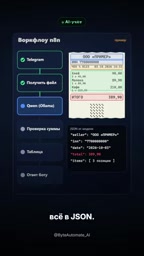
Once the photo enters n8n — the automation orchestration platform — the Qwen model processes it locally via Ollama, running entirely on your own computer. The model reads the receipt and extracts the merchant name and tax ID, date, total amount, and itemized details. n8n then assembles this information into structured JSON data.

The entire pipeline chains together OCR recognition, information extraction, and data assembly. From the user's perspective, there are only two moments: "take a photo" and "receive a reply." All the technical complexity in between is completely hidden.
A quick primer on the tools involved: n8n is an open-source workflow automation platform — similar to Zapier or Make (formerly Integromat) — but with support for self-hosted, private deployment. It connects different services through visual nodes, where each node represents an action such as "receive a Telegram message," "call a local AI model," or "write to Google Sheets." Users build complex automations by dragging and connecting nodes, with no need to write code from scratch. Ollama is a tool that lets you run large language models on your local machine; it wraps model downloading, loading, and API calls into simple commands, making it possible to run models on an ordinary laptop that would otherwise require cloud-based GPU power. Qwen (Tongyi Qianwen) is Alibaba's series of multimodal large language models; its vision-capable version can understand image content and is used here to read receipt images and extract structured information. Together, these three tools form a complete private pipeline that is both locally orchestrated and locally inferred.
Built-in Validation to Reduce Errors
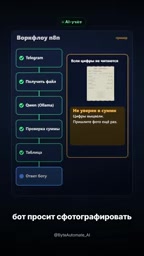
Accuracy is the lifeline of any expense-tracking tool. This workflow adds a validation step before writing anything to the spreadsheet: the system calculates the sum of all itemized amounts and compares it against the total shown on the receipt.
If the two figures match, n8n adds a new row to the spreadsheet and the bot replies with a confirmation, displaying what it recognized so you can do a quick sanity check. If the result seems unreliable or the totals don't match, the bot proactively asks you to retake the photo — rather than silently writing bad data into your ledger.
This "recognize → validate → feedback" loop is far more robust than relying on a model to get it right on the first try. It acknowledges that models can fail and uses rule-based validation as a safety net — and that's precisely what separates a production-ready automation from a polished demo.
Running Locally: Privacy Is the Biggest Selling Point
The most compelling aspect of this solution is how it handles data privacy. Because the Qwen model runs locally on your machine via Ollama, receipt photos are never uploaded to any cloud service. The entire workflow requires no paid subscription and sends no data to third-party services.
For receipts that contain spending records, merchant information, and even tax IDs, local processing means sensitive financial data stays in your hands at all times. In an era where most tools default to sending data to the cloud, this "data never leaves the machine" architecture is genuinely appealing to privacy-conscious users.
The author is also upfront about the limitations: the model isn't foolproof, and it can struggle with faded thermal paper in particular. He therefore advises always double-checking the amounts and not discarding the original paper receipts. This honest, grounded acknowledgment of the system's boundaries actually makes the solution more credible.
Why thermal paper is tricky: Thermal paper — the most common material used for supermarket and restaurant receipts — uses a heat-sensitive coating on the paper surface to produce text without ink. This same property is its biggest weakness: prolonged exposure to sunlight, heat, or friction causes the coating to fade rapidly, and text can become nearly illegible within weeks. For AI vision models, low-contrast faded text, partial obstruction from fold creases, and non-standard layouts all significantly reduce recognition accuracy. This is exactly why the author specifically emphasizes keeping the original paper receipts and manually verifying amounts — when image quality can't be guaranteed, the validation mechanism and human review are the last line of defense against erroneous entries.
How to Get the Full Workflow
According to the Byte Automate AI channel, the ready-to-use n8n workflow file and step-by-step tutorial are available in the channel's pinned post, accessible to anyone who follows the channel.

From a technical standpoint, this solution stitches together Telegram (input channel), n8n (workflow orchestration), Qwen + Ollama (local vision recognition), and a spreadsheet (data storage) into a practical pipeline. The barrier to entry is reasonable, making it well-suited for individual users with some experience in automation. For anyone looking to ditch manual expense logging without sacrificing data privacy, this offers a solid local-first approach worth exploring.
One note of caution: this article is based on a single source (the YouTube channel Byte Automate AI). Actual recognition accuracy and setup complexity will vary based on your own experience building and using the system.
Related articles

How Big Can Stars Really Get? The Physical Limits of the Largest Stars
Red supergiants are the largest stars by volume, with radii up to 2,000 times the Sun, engulfing the inner solar system. But there is no precise upper limit on stellar size—models predict up to 15,000 solar radii. The most massive blue stars are far smaller than red supergiants—biggest and heaviest are two different things.

Apple HomeView Smart Display Full Feature Breakdown: Wall-Mount or Desktop, $299
Apple launches HomeView, a $299 smart display with wall-mount and desktop options, 12MP camera for facial recognition, smart home control, music playback, and recipe step-by-step cooking. Full breakdown of watch faces, apps, privacy, and cooking integration.

Where Did the Promised New Studio Go? Craft Computing Answers After Five Years
Craft Computing's host responds to viewer questions: the new studio promised five years ago was shelved as construction costs soared from $30,000 to $75,000, and was replaced by a 168-square-foot garage conversion.